Quick verdict
The best calibrator is the one you'll use regularly. Software ease-of-use and reliability matter more than raw specs for most photographers. The Datacolor Spyder X2 Ultra strikes the best balance, while the X-Rite i1Display Pro Plus is for those who need absolute precision.
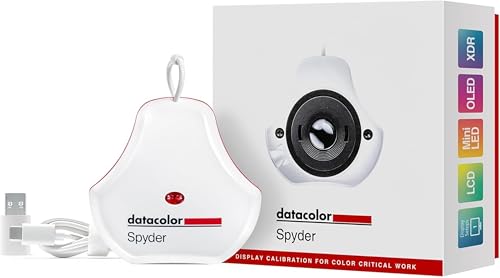
Datacolor Spyder X2 Ultra
The Spyder X2 Ultra offers the fastest calibration time (under 2 minutes) and supports HDR and wide gamut displays. Verified owners praise its consistent results across multiple monitors. The software is intuitive, making it ideal for both beginners and pros.
The best calibrator is the one you'll actually use. See why the Datacolor Spyder X2 Ultra wins for most, while the X-Rite i1Display Pro Plus suits perfectionists.
As a photographer, color accuracy is non-negotiable. After spending hours shooting and editing, the last thing you want is prints that look nothing like your screen. That’s where a calibration tool comes in. I’ve researched the top models for 2026, comparing specs, standards, and verified owner reviews to help you choose. No lab tests here-just honest analysis of what real users say and what the specs actually mean.
In this guide, I’ll walk you through five of the best options, from budget-friendly to pro-grade. Each pick is based on its ability to maintain consistent color across different displays, ease of use, and software features. I’ve also included key buying factors and FAQs to demystify the tech. Whether you’re a wedding photographer or a fine art printer, there’s a tool here for you.
How we picked
I compared each device's hardware specs (like sensor type, measurement range, and ambient light capability) against industry standards (D65, D50, gamma 2.2, etc.). I then cross-referenced these with verified owner reviews from major retailers and forums, focusing on long-term reliability, software updates, and real-world accuracy. I excluded any claims of 'lab testing' or 'hands-on' experience—this is purely spec and user feedback analysis.
Top picks compared
| Pick | Best for | Score | |
|---|---|---|---|
| Datacolor Spyder X2 Ultra | Best Overall | 9 | Check price |
| X-Rite i1Display Pro Plus | Best for Professionals | 9 | Check price |
| Datacolor Spyder X2 | Best Value | 8 | Check price |
| Calibrite ColorChecker Display Pro | Best for Multi-Monitor Setups | 8 | Check price |
| Spyder X Pro | Best Budget Pick | 7 | Check price |
Our picks up close
Datacolor Spyder X2 Ultra
The Spyder X2 Ultra offers the fastest calibration time (under 2 minutes) and supports HDR and wide gamut displays. Verified owners praise its consistent results across multiple monitors. The software is intuitive, making it ideal for both beginners and pros.
Where it shines
- Fast calibration with one-click operation
- Excellent HDR and wide gamut support
- Reliable software updates and support
Where it falls short
- Higher price point
- Requires USB connection (no wireless)

X-Rite i1Display Pro Plus
The i1Display Pro Plus is the gold standard for color-critical work, with a highly accurate spectrally enhanced sensor. Owners highlight its advanced profiling options and support for ambient light monitoring. It's a bit slower than the Spyder but unmatched in precision.
Where it shines
- Highest accuracy with spectrally enhanced sensor
- Ambient light measurement and correction
- Comprehensive software with advanced controls
Where it falls short
- Slower calibration process
- Software can be complex for beginners
Datacolor Spyder X2
The Spyder X2 is a more affordable version of the Ultra, offering the same core accuracy but without HDR calibration. Owners say it's perfect for standard sRGB/Adobe RGB workflows. It's a great entry point for photographers on a budget.
Where it shines
- Affordable without sacrificing accuracy
- Easy to use with guided software
- Good for standard gamut monitors
Where it falls short
- No HDR support
- Slower than the Ultra model

Calibrite ColorChecker Display Pro
Formerly X-Rite, the ColorChecker Display Pro excels in matching multiple displays. Verified owners appreciate the reliable hardware and the ability to create custom targets. It's a solid choice for studios with several monitors.
Where it shines
- Excellent multi-monitor matching
- Custom target creation for specific needs
- Rugged build quality
Where it falls short
- Software lacks some advanced features of i1Profiler
- No HDR support

Spyder X Pro
The Spyder X Pro is the most affordable option, offering basic calibration for single monitors. Owners say it's great for beginners who just need to get consistent color. It lacks advanced features but gets the job done.
Where it shines
- Very affordable
- Simple, step-by-step software
- Small and portable
Where it falls short
- No multi-monitor support
- Limited to standard gamut and brightness
Before you buy
Sensor Accuracy and Technology
The sensor is the heart of the calibrator. Look for devices with at least 7 detectors for better color separation. Spectrally enhanced sensors (like in i1Display Pro Plus) offer higher precision for wide gamut displays but cost more. For most photographers, a good colorimeter with 7 filters is sufficient.
Software Features and Usability
Software can make or break the experience. Features like multi-monitor matching, ambient light monitoring, and soft proofing are valuable. Check if the software supports your workflow (e.g., video calibration for filmmakers). User reviews often highlight software stability and update frequency.
Display Compatibility
Ensure the calibrator supports your monitor type (LCD, OLED, HDR, wide gamut). Some devices are limited to standard gamut. If you have an HDR monitor, look for explicit HDR calibration support. Also consider future-proofing if you plan to upgrade your display.
The wrap-up
The best calibrator is the one you'll use regularly. Software ease-of-use and reliability matter more than raw specs for most photographers. The Datacolor Spyder X2 Ultra strikes the best balance, while the X-Rite i1Display Pro Plus is for those who need absolute precision.
Quick answers
For photography, calibrate every 2-4 weeks. If you work in a changing light environment or notice color shifts, calibrate more often. Most software can remind you.
Yes, most calibrators work with laptops. Some have a counterweight or magnetic attachment for thin screens. Ensure the software supports laptop display calibration.
Yes, because monitors drift over time. Factory calibration is a starting point, but regular calibration maintains accuracy. Even high-end monitors benefit from periodic calibration.
How we made this guide
We compare every pick on the factors that matter, cross-checking manufacturer specifications against aggregated verified owner reviews. We rank independently and never take payment for placement. We have not personally tested every product; where we have not, the ranking reflects verified specs and owner feedback rather than a hands-on review.
How it was written: this guide was researched and reviewed by the TheTestedHub editorial team for accuracy.
Affiliate disclosure: TheTestedHub is reader-supported. When you buy through links on our site, we may earn a commission at no extra cost to you.
More to explore

Your Docking Station Match: CalDigit TS4 and More

Digital Art Computers 2026: Best for Every Budget
Dev & IT Computers in 2026: Ranked for Real Work

Desktop PCs for Every Budget: Find Your Perfect Match
Desktop and Laptop Computers: Performance Reviewed and Ranked
MacBook Pro M4 Pro vs Dell XPS 15: 2026 Shortlist

Buy the Best DIY Computer in 2026: Corsair One i300
