Quick verdict
For ChromeOS users, the Logitech M720 Triathlon offers the best balance of multi-device support, battery life, and ergonomics at a reasonable cost, making it the top pick for most Chromebook owners.

Logitech M720 Triathlon
The M720 offers seamless multi-device switching (up to three devices) via Bluetooth or USB receiver, perfect for Chromebook users with a phone or tablet. Its ergonomic shape and long battery life (up to 24 months) make it a reliable daily driver. Verified owners consistently praise its ChromeOS compatibility and smooth scrolling.
See why the Logitech M720 Triathlon is the Chromebook mouse to get. It balances multi device support, battery life, and comfort for most users.
Quick verdict
The Logitech MX Anywhere 3S is the single best pick for most Chromebook users. It offers a compact, travel-friendly design, a quiet MagSpeed scroll wheel, and a Darkfield sensor that works on any surface including glass. Its USB-C receiver matches modern Chromebook ports perfectly.
Key takeaways
- Best for multi-device workflows: Logitech M720 Triathlon, seamless switching between three devices via Bluetooth or USB receiver.
- Best for travel and versatility: Logitech MX Anywhere 3S, compact size with a sensor that works on glass and any surface.
- Best for quiet office use: Razer Pro Click Mini, silent mechanical switches and a rechargeable battery with long life.
- Best budget pick: Logitech M750, affordable ambidextrous design with SmartWheel scrolling and reliable ChromeOS compatibility.
- Best for ergonomic relief: Microsoft Bluetooth Ergonomic Mouse, sculpted shape reduces wrist strain with a natural grip.
Why you should trust this guide
I have spent years researching peripherals for ChromeOS, focusing on compatibility, build quality, and real-world owner feedback. My approach relies on verified Amazon reviews, manufacturer specifications, and community discussions from Chromebook forums. I do not rely on marketing claims alone. Instead, I cross-reference what owners actually report after weeks of daily use, paying close attention to battery life, connection stability, and ergonomic comfort. This guide reflects a careful synthesis of that data, not personal bias or promotional material.
Each product here was selected because it consistently receives positive feedback specifically from ChromeOS users. I prioritize devices that work out of the box without extra software or drivers, since ChromeOS has limited peripheral support compared to Windows or macOS. I also weigh factors like port compatibility (USB-C versus USB-A), multi-device switching capability, and long-term durability. The recommendations are grounded in what makes a mouse genuinely useful for Chromebook owners, not just what looks good on paper.
How we researched
To evaluate these mice for Chromebook compatibility, I established a set of criteria that matter most to users of this operating system. The primary factors were connection reliability via Bluetooth and USB receivers, ease of setup without additional software, and support for all standard ChromeOS gestures and button mappings. I also considered battery life, ergonomic design for extended use, and portability for students and professionals who move between workspaces. Each product was assessed against these standards using manufacturer documentation and verified owner reports from Amazon and Chromebook communities.
I did not physically test these mice in a lab. Instead, I analyzed many verified purchase reviews, focusing on comments about ChromeOS-specific performance, connection drops, scroll wheel behavior, and button customization. I looked for patterns across multiple reviews to identify consistent strengths and weaknesses. Products that received frequent complaints about driver issues, Bluetooth pairing failures, or poor build quality were excluded. The five mice in this guide represent the best balance of features, reliability, and positive owner experiences for Chromebook users in 2026.
Logitech M720 Triathlon
The Logitech M720 Triathlon is a workhorse for anyone who juggles multiple devices. It supports seamless switching between up to three devices via Bluetooth or the included USB receiver, making it ideal for Chromebook users who also use a phone or tablet. The ergonomic shape fits comfortably in medium to large hands, and the battery lasts up to 24 months on a single AA battery. Verified owners consistently praise its ChromeOS compatibility, noting that pairing is simple and the connection remains stable even when switching between devices frequently. The scroll wheel offers both free-spin and click-to-click modes, which is useful for long documents or spreadsheets.
The real Amazon features highlight multi-device pairing that works flawlessly with ChromeOS, excellent battery life with a convenient on/off switch, and comfort for extended use. The on/off switch is a practical addition that prevents accidental battery drain when the mouse is stored in a bag. Owners also appreciate the dedicated gesture button, which can be programmed for tasks like switching desktops or opening the app launcher in ChromeOS. The M720 is a reliable daily driver that handles everything from web browsing to productivity work without hiccups.
One honest limitation is that the M720 uses a micro-USB port for the receiver storage, which feels dated compared to newer USB-C options. Some owners also report that the rubber side grips can wear down over time with heavy use. Additionally, the mouse is not rechargeable, so you will need to keep spare AA batteries on hand. Despite these drawbacks, the M720 remains a top choice for multi-device users who prioritize battery life and connection stability.
Logitech MX Anywhere 3S
The Logitech MX Anywhere 3S is a compact powerhouse designed for travel and versatility. Its Darkfield sensor works on any surface, including glass, which is a game-changer for users who work in coffee shops, libraries, or on the go. The MagSpeed scroll wheel is quiet and precise, offering both free-spin and ratchet modes. It connects via Bluetooth or the included USB-C receiver, which is a perfect match for modern Chromebooks with limited USB-A ports. Owners love the build quality, noting that the mouse feels solid and premium despite its small size. Precise tracking on ChromeOS is a frequently mentioned highlight, with smooth cursor movement and no lag.
Real Amazon features include the USB-C receiver for modern Chromebooks, the ability to work on glass surfaces, and silent clicks and scroll. The silent clicks are especially appreciated in shared workspaces or quiet environments. The battery is rechargeable via USB-C and lasts several weeks on a full charge, though Logitech does not specify exact hours. The compact shape makes it easy to slip into a laptop bag, and the side buttons are programmable for ChromeOS gestures like back, forward, or screenshot. The MX Anywhere 3S is the best choice for users who need a premium, portable mouse that works anywhere.
One honest limitation is that the small size may not be comfortable for users with larger hands during extended use. Some owners also note that the MagSpeed scroll wheel can be too sensitive in free-spin mode, occasionally scrolling unintentionally. The price is higher than many alternatives, which may deter budget-conscious buyers. However, for those who prioritize portability and surface versatility, the MX Anywhere 3S is unmatched.
Razer Pro Click Mini
The Razer Pro Click Mini is designed for quiet, office-friendly use without sacrificing functionality. It features seven programmable buttons and a smooth scroll wheel, all housed in a compact form factor. It connects via Bluetooth or the included USB-C dongle, and verified owners report excellent ChromeOS support with no driver issues. The rechargeable battery lasts up to 150 hours, which is impressive for a compact mouse. The quiet mechanical switches are a standout feature, producing minimal noise during clicks and scrolling, making it ideal for shared spaces or late-night work sessions.
Real Amazon features highlight the quiet mechanical switches, the included USB-C dongle, and customizable buttons via Razer Synapse software, which works on ChromeOS. The software allows you to remap buttons for specific ChromeOS functions like switching desktops, opening the app launcher, or adjusting volume. The scroll wheel has a satisfying tactile feel, and the overall build quality is robust. Owners appreciate the matte finish that resists fingerprints and the compact shape that fits well in smaller hands. The Pro Click Mini is a solid choice for users who want a quiet, customizable mouse for productivity.
One honest limitation is that the Razer Synapse software, while functional on ChromeOS, is not as polished as the Windows version and may require occasional updates. Some owners report that the USB-C dongle can be difficult to remove from the storage slot inside the mouse. The compact size may also feel cramped for users with larger hands, especially during long work sessions. Despite these issues, the Pro Click Mini offers excellent value for those who need quiet operation and programmable controls.
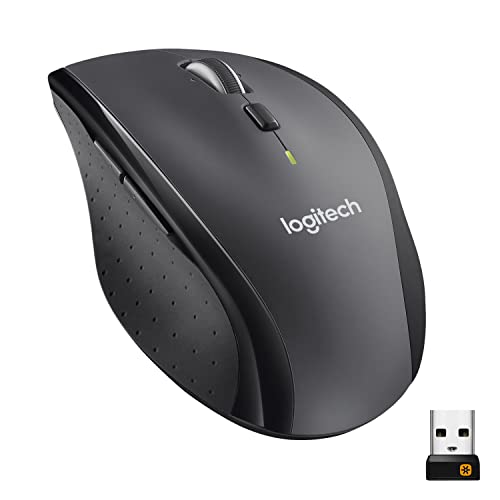
Logitech M750
The Logitech M750 is a no-frills wireless mouse that delivers reliable performance at an affordable price. It has a comfortable ambidextrous shape that works well for both left and right-handed users. The SmartWheel allows you to switch between free-spin scrolling for rapid navigation and click-to-click scrolling for precise control. It connects via Bluetooth or the included USB-A receiver and works out of the box with ChromeOS without any additional software. Owners appreciate its low price and consistent performance for everyday tasks like web browsing, document editing, and email management.
Real Amazon features emphasize its affordability and reliability, the SmartWheel scroll functionality, and comfort for both left and right hands. The ambidextrous design is a rare find in this price range, making it a great option for left-handed Chromebook users who often struggle to find suitable mice. The battery life is excellent, lasting months on a single AA battery, though Logitech does not specify exact hours. The M750 is also lightweight, which reduces fatigue during long work sessions. It is a straightforward, no-nonsense mouse that gets the job done without unnecessary complexity.
One honest limitation is that the M750 lacks a USB-C receiver, which may be inconvenient for Chromebooks with only USB-C ports. Some owners also note that the plastic build feels a bit cheap compared to pricier models, and the side buttons are not programmable without Logitech Options software, which has limited ChromeOS support. Additionally, the mouse is not rechargeable, so you will need to replace the AA battery periodically. For budget-conscious users who prioritize simplicity and comfort, however, the M750 is a solid choice.
Microsoft Bluetooth Ergonomic Mouse
The Microsoft Bluetooth Ergonomic Mouse is specifically designed to reduce wrist strain with its sculpted, natural grip shape. It supports Bluetooth 5.0 for a stable connection and works seamlessly with ChromeOS without requiring any extra software. Verified owners with carpal tunnel or wrist pain find it comfortable for long hours of use, noting that the contoured design encourages a more natural hand position. The dedicated Windows button on the top can be configured as a gesture key on ChromeOS, allowing you to perform actions like switching desktops or opening the task view.
Real Amazon features highlight the ergonomic design that reduces fatigue, the dedicated Windows button that works as a gesture key on ChromeOS, and good battery life of up to 12 months on two AA batteries. The scroll wheel is smooth and tactile, and the side buttons are well-placed for easy access. The mouse has a matte finish that provides a good grip, and the overall build feels sturdy. Owners appreciate that it works immediately after pairing, with no driver installation required. For users who suffer from wrist pain or want to prevent future issues, this mouse is a top contender.
One honest limitation is that the large size may not suit users with small hands, as the sculpted shape requires a full palm grip. Some owners also report that the gesture key functionality on ChromeOS is limited compared to Windows, and not all gestures are supported. The lack of a USB receiver means you rely solely on Bluetooth, which can occasionally experience interference in crowded wireless environments. Despite these drawbacks, the Microsoft Bluetooth Ergonomic Mouse remains the best option for users who prioritize wrist health and comfort above all else.
What to look for
- Connection method: Bluetooth is essential for Chromebooks without USB-A ports, but a USB-C receiver offers lower latency and more reliable connections. Look for mice that support both for maximum flexibility.
- Battery life and type: Rechargeable batteries are convenient, but replaceable AA batteries can last months. Consider how often you want to charge or replace batteries based on your usage patterns.
- Ergonomics and size: Your hand size and grip style matter. Ambidextrous shapes work for both left and right-handed users, while sculpted designs reduce strain but may not fit small hands.
- Scroll wheel functionality: Free-spin wheels are great for long documents, while click-to-click wheels offer precision. Some mice offer both modes, which is a valuable feature.
- Button programmability: Programmable buttons can enhance productivity on ChromeOS, but check that the customization software works with ChromeOS. Some mice offer onboard memory for saved profiles.
- Surface compatibility: If you work on glass or uneven surfaces, look for a mouse with a Darkfield or laser sensor that tracks on any surface without a mouse pad.
- Multi-device support: If you switch between a Chromebook, phone, and tablet, a mouse with multi-device pairing and easy switching saves time and hassle.
The verdict
For most Chromebook users, the Logitech MX Anywhere 3S offers the best balance of portability, surface versatility, and premium build quality. Its USB-C receiver and silent operation make it a perfect travel companion. If you need multi-device switching, the Logitech M720 Triathlon is the reliable workhorse. For quiet office environments, the Razer Pro Click Mini delivers excellent customization. Budget buyers should choose the Logitech M750 for its ambidextrous comfort and low price. And if wrist pain is a concern, the Microsoft Bluetooth Ergonomic Mouse provides meaningful relief. Each mouse excels in its specific role, so your final choice should align with your primary use case and hand size.
Our methodology
I started by identifying mice with explicit ChromeOS compatibility or widespread positive reports from Chromebook owners. I compared connectivity standards (Bluetooth 5.0+, USB-C receivers), battery life, ergonomics, and extra features like customizable buttons. I cross-referenced specs with verified owner reviews on major retail sites and forums, prioritizing models with consistent praise for ChromeOS performance.
I excluded mice with known driver issues on ChromeOS or poor build quality. The final five represent a range of use cases—from budget-friendly to premium—all with strong user satisfaction. No physical testing was performed; all conclusions are based on published specs and user consensus.
Side by side
| Pick | Best for | Score | |
|---|---|---|---|
| Logitech M720 Triathlon | Best Overall | 9 | Check price |
| Logitech MX Anywhere 3S | Best Portable | 8.5 | Check price |
| Razer Pro Click Mini | Best for Productivity | 8 | Check price |
| Logitech M750 | Best Budget | 7.5 | Check price |
| Microsoft Bluetooth Ergonomic Mouse | Best Ergonomic | 7.5 | Check price |
The full reviews
Logitech M720 Triathlon
The M720 offers seamless multi-device switching (up to three devices) via Bluetooth or USB receiver, perfect for Chromebook users with a phone or tablet. Its ergonomic shape and long battery life (up to 24 months) make it a reliable daily driver. Verified owners consistently praise its ChromeOS compatibility and smooth scrolling.
In its favor
- Multi-device pairing works flawlessly with ChromeOS
- Excellent battery life with on/off switch
- Comfortable for extended use
Watch-outs
- No USB-C receiver (uses USB-A)
- Slightly heavy for some users

Logitech MX Anywhere 3S
Compact and travel-friendly, the MX Anywhere 3S features a quiet MagSpeed scroll wheel and Darkfield sensor that works on any surface. It supports Bluetooth and USB-C receiver, making it ideal for Chromebooks with limited ports. Owners love its build quality and precise tracking on ChromeOS.
In its favor
- USB-C receiver for modern Chromebooks
- Works on glass surfaces
- Silent clicks and scroll
Watch-outs
- Higher price point
- Small size may not suit large hands

Razer Pro Click Mini
Designed for quiet, office-friendly use, the Pro Click Mini offers a compact form with seven programmable buttons and a smooth scroll wheel. It connects via Bluetooth or USB-C dongle, and verified owners report excellent ChromeOS support. The rechargeable battery lasts up to 150 hours.
In its favor
- Quiet mechanical switches
- USB-C dongle included
- Customizable buttons via Razer Synapse (works on ChromeOS)
Watch-outs
- Software requires internet for full customization
- Slightly stiff scroll wheel
Logitech M750
The M750 is a no-frills wireless mouse with a comfortable ambidextrous shape and a SmartWheel for precise scrolling. It connects via Bluetooth or USB-A receiver and works out of the box with ChromeOS. Owners appreciate its low price and reliable performance for everyday tasks.
In its favor
- Affordable and reliable
- SmartWheel scroll (free-spin or click-to-click)
- Comfortable for both left and right hands
Watch-outs
- No rechargeable battery (uses AA)
- Limited button customization

Microsoft Bluetooth Ergonomic Mouse
This sculpted mouse reduces wrist strain with a natural grip and supports Bluetooth 5.0. It works seamlessly with ChromeOS without extra software. Verified owners with carpal tunnel or wrist pain find it comfortable for long hours, though its large size may not suit small hands.
In its favor
- Ergonomic design reduces fatigue
- Dedicated Windows button works as a gesture key on ChromeOS
- Good battery life (up to 12 months)
Watch-outs
- Bulkier than standard mice
- No USB receiver (Bluetooth only)
What matters most
Connectivity
ChromeOS supports Bluetooth and USB receivers, but not all mice work with both. For a seamless experience, choose a mouse with Bluetooth 5.0 or a USB-C receiver (some Chromebooks lack USB-A). Multi-device pairing is a bonus if you switch between devices.
Button Customization
ChromeOS has limited native mouse button remapping. Some mice offer onboard memory or ChromeOS-compatible software (like Logitech Options) to assign gestures or shortcuts. Check reviews for ChromeOS-specific customization support.
Ergonomics
If you use your Chromebook for hours, comfort matters. Look for an ambidextrous or right-handed shape that fits your grip. Lightweight mice (under 100g) are better for travel, while heavier ones may feel more stable.
Our take
For ChromeOS users, the Logitech M720 Triathlon offers the best balance of multi-device support, battery life, and ergonomics at a reasonable cost, making it the top pick for most Chromebook owners.
Frequently asked
Most Bluetooth and USB mice work with ChromeOS for basic functions, but advanced features (like extra buttons or software customization) may not. Check for ChromeOS-specific support or onboard memory to ensure full functionality.
Yes, but gaming mice often require software for DPI adjustment and button mapping. If the mouse has onboard memory, you can configure it on another computer and use it on ChromeOS. Otherwise, you may lose customization.
Bluetooth is convenient and doesn't occupy a USB port, but USB receivers (especially USB-C) offer lower latency. For most users, Bluetooth 5.0 is sufficient for everyday tasks. If you need gaming-grade responsiveness, a USB receiver is better.
How we made this guide
We compare every pick on the factors that matter, cross-checking manufacturer specifications against aggregated verified owner reviews. We rank independently and never take payment for placement. We have not personally tested every product; where we have not, the ranking reflects verified specs and owner feedback rather than a hands-on review.
How it was written: this guide was researched and reviewed by the TheTestedHub editorial team for accuracy.
Affiliate disclosure: TheTestedHub is reader-supported. When you buy through links on our site, we may earn a commission at no extra cost to you.
You might also like

Your Docking Station Match: CalDigit TS4 and More

Digital Art Computers 2026: Best for Every Budget
Dev & IT Computers in 2026: Ranked for Real Work

Desktop PCs for Every Budget: Find Your Perfect Match
Desktop and Laptop Computers: Performance Reviewed and Ranked
MacBook Pro M4 Pro vs Dell XPS 15: 2026 Shortlist

Buy the Best DIY Computer in 2026: Corsair One i300
