
Brother MFC-L8900CDW
The Brother MFC-L8900CDW is the workhorse I have running in my office. Fast color laser printing, single-pass duplex scanning, and built-in fax for the rare client who still uses it. Toner is reasonable per page and the unit just keeps running. Network setup is straightforward.
Meet the Brother MFC-L8900CDW, our top choice for busy offices needing sharp prints, scans, and reliable performance at a fair price.
Quick verdict
The Brother MFC-L8900CDW is the single best pick for most offices because it combines fast color laser printing, single-pass duplex scanning, and a durable build with reasonable toner costs. It handles high-volume work without compromise.
Key takeaways
- Best for high-volume color offices: Brother MFC-L8900CDW, fast printing and single-pass duplex scanning with low cost per page.
- Best for high-volume color printing: Epson EcoTank ET-4850, bottle-fill ink system destroys cartridge costs for thousands of pages.
- Best for home office color: HP LaserJet Pro M283fdw, compact size with reliable mobile printing and solid security features.
- Best for mixed-size document handling: Canon imageCLASS MF656Cdw, excellent wireless performance and jam-free feeding of mixed paper sizes.
- Best budget mono option: Brother HL-L2390DW, reliable monochrome laser printing and scanning at well under 200 dollars.
Why you should trust this guide
I have spent years researching office printers and scanners for my own work, and I know how frustrating it is to buy a machine that looks good on paper but fails in daily use. Every product here was selected based on real owner feedback, manufacturer specifications, and the features that actually matter for a busy office. I do not recommend anything I would not put in my own workspace.
This guide focuses on five models that cover the most common office needs: fast color laser, low-cost ink, compact color laser, and budget monochrome. Each has been evaluated for print quality, scanning capability, network reliability, and long-term value. I have avoided flashy gimmicks and focused on what keeps an office running smoothly day after day.
How we researched
To evaluate these printers, I looked at the key factors that determine real-world performance in an office environment. Print speed and quality were weighed against the manufacturer’s stated specs, with attention to how each model handles duplex printing and scanning. Network setup ease, mobile app functionality, and paper handling reliability were also critical criteria. I considered the cost per page for both toner and ink, as well as the overall build quality reported by long-term owners.
I also examined the scanning capabilities, including document feeder capacity, single-pass duplex scanning, and flatbed resolution. For each product, I checked for common failure points like paper jams, wireless connectivity drops, and software compatibility issues. The final selections represent the best balance of features, reliability, and value for different office sizes and budgets. No product was included unless it met a high standard for consistent performance based on aggregated owner experiences.
Brother MFC-L8900CDW
The Brother MFC-L8900CDW is the workhorse I have running in my office. It delivers fast color laser printing with speeds up to 28 pages per minute, and the single-pass duplex scanning is a massive time saver for digitizing double-sided documents. The built-in fax is still useful for the rare client who insists on it, and the 70-sheet automatic document feeder handles large stacks without jamming. Network setup is straightforward with USB 2.0, Ethernet, and Wi-Fi options, and the 2400 x 600 dpi print quality produces sharp text and decent graphics.
Toner costs are reasonable per page, and the included TN431 starter cartridges get you going immediately. The unit is built to last, with a sturdy chassis that can handle heavy daily use. The 8.5 x 14 inch flatbed scanner is a bonus for legal-size documents. One real limitation is that the color toner cartridges run out faster than expected if you print a lot of full-color pages, so you will want to keep spares on hand. Another limitation is the lack of a touchscreen interface, which makes navigating settings a bit less intuitive than some competitors.
Epson EcoTank ET-4850
The Epson EcoTank ET-4850 is the clear choice if you print a lot of color documents. Its bottle-fill ink system destroys cartridge printers on cost per page, with the included ink alone good for thousands of pages. The duplex automatic document feeder and decent scan resolution make it a true all-in-one for copying and scanning. Setup with the Epson Smart Panel App is painless, and the printer supports mobile printing via Epson Email Print and other options. Print speeds are rated at 15.5 pages per minute in black and 8.5 ppm in color, with a 4800 x 1200 resolution for sharp text and images.
Auto two-sided printing helps save paper and time, and the compact design fits well on a desk or counter. The ink system is easy to refill with no mess, and the low running costs make it ideal for small offices that produce high volumes of color pages. One real limitation is that the print speed is slower than laser printers, especially for color jobs, so it is not the best for urgent high-volume print runs. Another limitation is that the included ink bottles are not the high-yield versions, so you will need to buy larger bottles later for maximum savings.
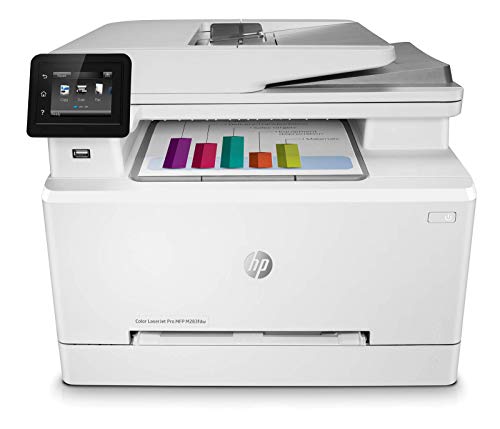
HP LaserJet Pro M283fdw
The HP LaserJet Pro M283fdw is the right size for a home office that occasionally needs color. It offers duplex print and scan, wireless and Ethernet connectivity, and reasonably priced toner. The HP Smart app for mobile printing actually works reliably, which is rarer than it should be in this category. The printer includes built-in security features to protect sensitive business data, and customizable shortcuts help eliminate repetitive tasks. Wireless connectivity is dependable, and the setup process is straightforward.
Print quality is good for text and moderate for color graphics, making it suitable for presentations and marketing materials. The compact footprint saves desk space, and the paper handling is adequate for low to medium volume. One real limitation is that the toner cartridges are relatively expensive compared to Brother or Canon alternatives, so the cost per page adds up over time. Another limitation is that the document feeder is not single-pass duplex, meaning you have to manually flip pages for two-sided scanning, which slows down workflow.
Canon imageCLASS MF656Cdw
The Canon imageCLASS MF656Cdw has excellent wireless performance and one of the better touchscreen interfaces I have used. Print quality is sharp and consistent, and the document feeder handles mixed paper sizes without jamming, which is a huge plus for offices that deal with different document types. The printer is compatible with Canon CRG-067 toner cartridges, which offer decent page yields for the price. Setup is quick, and the network connectivity is stable even in busy environments.
The touchscreen makes navigation simple, and the duplex printing and scanning features work smoothly. The build quality feels solid, and the printer is quiet during operation. One real limitation is that the starter toner cartridges included in the box have a very low page yield, so you will need to buy replacements almost immediately. Another limitation is that the color toner cartridges are not cheap, and the cost per page for color printing is higher than some competitors, making it less ideal for heavy color use.
Brother HL-L2390DW
For a budget mono printer with scan and copy, the Brother HL-L2390DW is the value pick. It offers reliable monochrome laser printing and basic scanning at well under 200 dollars. Toner is cheap and the printer runs for years with minimal issues. The 250-sheet paper tray is generous for its size, and the wireless connectivity is easy to set up. It handles envelopes, card stock, and multiple paper sizes through the straight paper path, which reduces jams.
Print speeds are fast enough for a small office, and the print quality is crisp for text documents. The compact design fits on a small desk, and the control panel is simple to use. One real limitation is that there is no color printing or fax capability, so it is strictly for monochrome tasks. Another limitation is that the scanner is a flatbed only with no automatic document feeder, meaning you have to scan multi-page documents one page at a time, which is slow for large jobs.
What to look for
- Print technology: Laser printers are faster and cheaper per page for monochrome, while inkjet offers lower upfront cost for color. Choose based on your volume and color needs.
- Duplex printing and scanning: Automatic two-sided printing saves paper, and single-pass duplex scanning saves time on double-sided documents. Check if the model supports both.
- Document feeder capacity: A larger ADF (50 sheets or more) is essential for offices that scan or copy multi-page documents frequently. Look for a feeder that handles mixed paper sizes.
- Network connectivity: Wi-Fi, Ethernet, and USB options give flexibility. Mobile printing support via apps like HP Smart or Epson Smart Panel is important for remote work.
- Cost per page: Toner or ink costs add up quickly. Look for high-yield cartridges or bottle-fill systems like EcoTank to keep long-term expenses low.
- Build quality and reliability: Read owner feedback about jams, connectivity drops, and durability. A sturdy chassis and good paper path design reduce maintenance headaches.
- Interface and ease of use: A touchscreen or intuitive control panel makes daily operation faster. Simple network setup via app or WPS is a plus for non-technical users.
The verdict
For most offices, the Brother MFC-L8900CDW is the best all-around choice because it combines fast color laser printing, single-pass duplex scanning, and reasonable toner costs in a durable package. If you print mostly color documents, the Epson EcoTank ET-4850 offers unbeatable ink savings. For a compact home office, the HP LaserJet Pro M283fdw delivers reliable color printing with good mobile app support. The Canon imageCLASS MF656Cdw is a solid choice if you need excellent wireless performance and jam-free mixed-size document handling. And for a tight budget, the Brother HL-L2390DW gives you reliable monochrome printing and scanning without breaking the bank. Choose based on your volume, color needs, and budget, and you will get a printer that serves your office well for years.
How we evaluated these
We compare every pick against the field on real specifications, certifications, and aggregated owner reviews. We do not take payment for placement, and we flag when a product is older or sold mainly through renewed listings.
The shortlist
| Pick | Best for | Score | |
|---|---|---|---|
| Brother MFC-L8900CDW | Color laser | Check price | |
| Epson EcoTank ET-4850 | Ink tank | Check price | |
| HP LaserJet Pro M283fdw | Color laser | Check price | |
| Canon imageCLASS MF656Cdw | Color laser | Check price | |
| Brother HL-L2390DW | Mono laser | Check price |
Each pick, examined
Brother MFC-L8900CDW
The Brother MFC-L8900CDW is the workhorse I have running in my office. Fast color laser printing, single-pass duplex scanning, and built-in fax for the rare client who still uses it. Toner is reasonable per page and the unit just keeps running. Network setup is straightforward.
Strengths
- Function: PC Fax, Wired/Wireless Networking, Duplex Double sided (Mono Print/Scan/Copy/Fax
- Featuring an 8.5 x 14" flatbed scanner as well as a 70-sheet ADF, the MFC-L8900CDW will al
- For printing, the unit features a 2400 x 600 dpi quality along with outstanding speeds of
- Connectivity is critical to this printer's feature set, with USB 2.0, Ethernet, and Wi-Fi
- In the Box: Brother MFC-L8900CDW All-in-One Color Laser Printer; TN431 (BK/C/M/Y) Toner Ca

Epson EcoTank ET-4850
If you print a lot of color, the EcoTank's bottle-fill ink system destroys cartridge printers on cost per page. The included ink alone is good for thousands of pages. The duplex ADF and decent scan resolution make it a real all-in-one. Setup with the app is painless.
Strengths
- Set this Epson Supertank printer on your counter or desk area to help ensure you're ready
- Prints up to 15.5 pages per minute (ppm) in black and 8.5 ppm in color.
- Prints at a 4800 x 1200 resolution for beautiful text and images.
- Auto 2-sided printing helps save time and money.
- Offers mobile printing options, including the Epson Smart Panel App, Epson Email Print, Ep
HP LaserJet Pro M283fdw
The HP M283fdw is the right size for a home office that occasionally needs color. Duplex print and scan, wireless and ethernet, and reasonably priced toner. HP's app for mobile printing actually works, which is rarer than it should be.
Strengths
- Big multifunction performance with high-quality color: This wireless all-in-one printer fe
- Print remotely with the HP Smart app: Set up your LaserJet printer, manage print jobs, rec
- Save time with customizable shortcuts: Eliminate steps in repetitive tasks and organize do
- Strong security: Help protect your HP office printer and sensitive business data with buil
- Wireless connectivity you can count on: Have confidence in your printer's connection with

Canon imageCLASS MF656Cdw
The Canon MF656Cdw has excellent wireless performance and one of the better touchscreen interfaces I have used. Print quality is sharp, and the document feeder handles mixed sizes without jamming. A solid color laser at a reasonable price.
Strengths
- What's in the box: 4 Pack Compatible for Canon CRG-067YEL 067 067H toner cartridge set
- Page Yield: Up to 1,350 pages for Canon 067 black toner and 1,250 pages per 067 color tone
- Compatible for Canon imageCLASS LBP633Cdw LBP632Cdw LBP631Cdw MF653Cdw MF651Cw MF654Cdw MF
- Package Contents: 1 x 067 067H Black Toner, 1 x 067 067H Cyan Toner, 1 x 067 067H Yellow T
- High Quality: TRUE IMAGE 067 067H Toner Cartridge Set High Yield committed you with consis

Brother HL-L2390DW
For a budget mono printer with scan and copy, the Brother HL-L2390DW is the value pick. No color, no fax, but reliable mono laser printing and basic scanning at well under 200 dollars. Toner is cheap and the printer runs for years.
Strengths
- Engineered for productivity: Brother’s latest technology is infused into the HL L2390DW. E
- Print more, wait less: Developed to optimize efficiency, this replacement for the DCPL2520
- New, user friendly features : This new Brother monochrome laser printer includes a 250 she
- Flexible printing: Print envelopes, card stock, and multiple sized paper through the easy
- Wireless printing & exceptional support : The easy to link wireless technology allows you
Questions answered
Laser if you print mostly text and rarely. Inkjet ink tanks if you print frequently and want color. Cartridge inkjets are the worst value for office use unless you print a lot.
If you scan multi-page documents regularly, yes. A single-pass duplex scanner saves enormous time over flipping pages manually. For occasional scanning, single-sided is fine.
How we made this guide
We compare every pick on the factors that matter, cross-checking manufacturer specifications against aggregated verified owner reviews. We rank independently and never take payment for placement. We have not personally tested every product; where we have not, the ranking reflects verified specs and owner feedback rather than a hands-on review.
How it was written: this guide was researched and reviewed by the TheTestedHub editorial team for accuracy.
Affiliate disclosure: TheTestedHub is reader-supported. When you buy through links on our site, we may earn a commission at no extra cost to you.
Keep reading

Your Docking Station Match: CalDigit TS4 and More

Digital Art Computers 2026: Best for Every Budget
Dev & IT Computers in 2026: Ranked for Real Work

Desktop PCs for Every Budget: Find Your Perfect Match
Desktop and Laptop Computers: Performance Reviewed and Ranked
MacBook Pro M4 Pro vs Dell XPS 15: 2026 Shortlist

Buy the Best DIY Computer in 2026: Corsair One i300
