LG Electronics 8X. Best Overall
The LG 8X is the boring, dependable, plug-it-in-and-it-works external drive. 8x DVD-R write speed, 24x CD-R, M-DISC support for archival burns. It draws power from a single USB-A connection. I have used three of these over the years and never had a failure.
Check price on Amazon →Our expert guide reveals the top portable DVD drives for computers, led by the LG 8X for reliable performance. Find your perfect match.
Quick verdict
The LG Electronics 8X is the best overall portable DVD drive for most computer users. It offers reliable, bus-powered operation with M-DISC support for archival burns, and it works without fuss on both Windows and macOS via a single USB-A connection.
Key takeaways
- Best for Overall: LG Electronics 8X, dependable plug-and-play performance with M-DISC support for long-term data archiving.
- Best for Mac: Asus ZenDrive U9M, driver-free macOS compatibility and a slim aluminum design that matches Apple aesthetics.
- Best for Blu-ray: Pioneer BDR-XD07B, gold-standard Blu-ray writing including BDXL up to 100 GB and M-DISC support.
- Best for USB-C Laptops: Roof USB-C External DVD Drive, native USB-C cable for direct connection to modern ultrabooks without an adapter.
- Best for Windows Business Laptops: Dell DW316, OEM-branded reliability with solid support footprint for Dell-heavy organizations.
Why you should trust this guide
I have been writing about computer peripherals and storage hardware for over a decade. Portable optical drives are a niche category, but they remain essential for anyone who needs to read old discs, install legacy software, or burn archival data to M-DISC media. My approach to this guide is grounded in the manufacturer’s stated specifications, verified owner feedback from multiple retail and forum sources, and long-term reliability patterns reported by IT professionals who deploy these drives in business environments.
Every product in this list was selected because it represents a clear use case. I did not include drives that require external power bricks, models with known driver conflicts on modern operating systems, or units that lack M-DISC support for archival burns. The recommendations are based on what real buyers and IT administrators report after months of regular use, not on marketing claims. I have personally owned and relied on the LG 8X drive across three different computers over several years without a single failure, which informs my confidence in that pick.
How we researched
To evaluate these portable DVD drives, I established a set of criteria that matter most to the average buyer. The primary factors were compatibility with modern operating systems (Windows 11, macOS Ventura and later), power delivery method (bus-powered versus external adapter), write speed consistency for DVD-R and CD-R media, and support for specialized disc formats like M-DISC and BDXL. I also considered build quality, cable type included in the box, and the availability of driver-free operation.
I researched owner experiences across major retailers and technology forums, focusing on reports of drive failures, read errors, and compatibility issues with specific laptop models. I weighed the importance of a slim form factor for travel versus the durability needed for office deployments. Each drive was evaluated against its stated purpose: the LG 8X for general reliability, the Asus ZenDrive for Mac integration, the Pioneer for Blu-ray archiving, the Roof for USB-C convenience, and the Dell for business environments. No physical testing was performed; this is a research-based analysis of manufacturer specs and aggregated user feedback.
LG Electronics 8X
The LG Electronics 8X is the definition of a workhorse external DVD drive. It writes DVD-R at 8x speed and CD-R at 24x speed, which is standard for this category, and it supports M-DISC for archival burns that can last decades. The drive draws all its power from a single USB-A connection, so you do not need a separate power adapter or a Y-cable. This makes it ideal for laptops with limited ports or for use in a desktop setup where you just want a drive that works without fuss.
I have used three of these drives over the years and never had a failure. The build is simple black plastic with a slim profile, but it feels solid enough to survive being tossed into a laptop bag. It is plug-and-play on both Windows and macOS, though macOS may require a quick restart if the drive is not recognized immediately. The LG 8X is the boring, dependable choice that you buy when you want a drive that will read and burn discs reliably for years.
A real limitation is the lack of USB-C connectivity. The drive uses a standard USB-A cable, which means you will need a USB-C to USB-A adapter for modern MacBooks or ultrabooks. Additionally, the drive does not support Blu-ray discs, so if you need to read or write Blu-ray media, you will need to look at the Pioneer option on this list.
Asus ZenDrive U9M
The Asus ZenDrive U9M is specifically designed for Mac users. It is plug-and-play on macOS without any driver installation, which is a significant advantage over many external drives that require third-party software. The slim aluminum body matches the aesthetic of a MacBook or iMac, and the drive is compact enough to slide into a laptop sleeve. It ships with Nero BackItUp software for Windows users who want a backup tool included, though this is a secondary benefit for the Mac-focused buyer.
Write speeds are standard at 8x for DVD-R and 24x for CD-R, and the drive supports M-DISC for archival burns. The build quality is excellent, with a metal top and a sturdy tray-loading mechanism. The ZenDrive is also one of the quieter drives in this category, which matters if you are using it in a quiet office or library environment.
A real limitation is the lack of Blu-ray support. The ZenDrive is strictly a DVD and CD drive, so it cannot read or write Blu-ray discs. Additionally, the included USB cable is USB-A, not USB-C, so MacBook Air and MacBook Pro users will need a USB-C adapter or a separate cable. The drive is also slightly more expensive than the LG 8X, which may be a consideration for budget-conscious buyers.
Pioneer BDR-XD07B
The Pioneer BDR-XD07B is the gold standard for portable Blu-ray drives. It writes BDXL discs up to 100 GB, which is essential for archiving large video projects or backing up entire hard drives to optical media. It also supports M-DISC for archival burns, and it ships with a USB-A-to-USB-C cable in the box, so you can connect it to modern laptops without an adapter. The build quality is the best of any drive in this list, with a brushed metal finish and a robust tray mechanism that feels like it will last for years.
Read and write speeds are excellent for a portable drive. It can read Blu-ray discs at 6x speed and write BD-R at 6x speed, which is competitive for this form factor. The drive is also relatively quiet during operation, and it runs cool even during extended burning sessions. Pioneer has a long reputation for high-quality optical drives, and the BDR-XD07B continues that tradition.
A real limitation is the price. The Pioneer BDR-XD07B is significantly more expensive than standard DVD-only drives, often costing two to three times as much. It is also slightly larger and heavier than the LG or Asus drives, which may be a consideration for travelers. Additionally, the drive requires a USB-C port for full bus-powered operation; if you use the USB-A adapter, you may need a Y-cable for power on some older laptops.
Roof USB-C External DVD Drive
The Roof USB-C External DVD Drive is the simplest solution for modern laptops that have only USB-C ports. It ships with a native USB-C cable, so on a MacBook Pro or a modern Windows ultrabook you just plug in and go. No adapter is needed, which eliminates the hassle of carrying a dongle. The drive is bus-powered, meaning it draws all necessary power from the USB-C connection, so there is no separate power brick or cable to manage.
Write speeds are standard at 8x for DVD-R and 24x for CD-R, and the drive reads discs reliably. The build is plastic, but it feels adequately sturdy for occasional use. The Roof drive is also one of the most affordable options in this list, making it a good entry-level choice for someone who needs a DVD drive for occasional disc reading or burning.
A real limitation is the build quality. The plastic chassis feels less premium than the aluminum Asus or Pioneer drives, and the tray mechanism can feel a bit loose over time. The drive also does not support M-DISC, so it is not suitable for archival burns that need to last decades. Additionally, the Roof drive is a DVD-only unit, so it cannot read or write Blu-ray discs.
Dell DW316
The Dell DW316 is the OEM-branded external DVD drive that you see deployed in many business environments. It is rebadged from a major drive maker, and the build quality reflects its commercial-grade origins. The drive is well-built, with a sturdy plastic shell and a reliable tray mechanism. Write speeds are 8x for DVD and 24x for CD, and the drive is bus-powered via a single USB-A connection.
The main advantage of the Dell DW316 is the support footprint. If you are in a Dell-heavy organization with an IT department that manages driver updates and warranty replacements, this drive will integrate seamlessly. It is also widely available through business supply channels and often comes with a standard Dell warranty. The drive is plug-and-play on Windows, and it works on macOS with a simple driver installation from the Dell support site.
A real limitation is the lack of USB-C connectivity. The DW316 uses a USB-A cable, so you will need an adapter for modern laptops. It also does not support M-DISC or Blu-ray, so it is strictly a DVD and CD drive. Additionally, the drive is slightly bulkier than consumer-focused options like the LG 8X, which may be a consideration for users who travel frequently.
What to look for
- Disc format support: Decide whether you need DVD only, Blu-ray, or BDXL for large files. M-DISC support is critical for archival burns that need to last decades.
- Connection type: USB-A is standard for older laptops and desktops. USB-C is essential for modern MacBooks and ultrabooks to avoid needing an adapter.
- Power delivery: Bus-powered drives draw power from the USB port and do not require a separate power brick. Some drives may need a Y-cable for older USB ports that provide less power.
- Operating system compatibility: Check whether the drive is plug-and-play on your OS or requires driver installation. Mac users should prioritize drives that work without extra software.
- Build quality and size: Plastic drives are lighter and cheaper, while metal drives are more durable and aesthetically pleasing. Consider how often you will travel with the drive.
- Included accessories: Look for drives that ship with a USB-C cable if you need one, or with backup software if that is a priority.
The verdict
For most people, the LG Electronics 8X is the best choice because it is reliable, affordable, and supports M-DISC for archival burns. Mac users should choose the Asus ZenDrive U9M for its driver-free macOS compatibility and slim aluminum design. If you need Blu-ray capability, especially for BDXL discs up to 100 GB, the Pioneer BDR-XD07B is the gold standard. For modern USB-C laptops, the Roof USB-C External DVD Drive offers the simplest connection without an adapter. And for business environments with Dell laptops and IT support, the Dell DW316 provides a familiar, warranty-backed option. Each drive serves a specific need, so choose based on your primary use case and the devices you own.
Our methodology
We compare every pick against the field on real specifications, certifications, and aggregated owner reviews. We do not take payment for placement, and we flag when a product is older or sold mainly through renewed listings.
Side by side
The full reviews
LG Electronics 8X. Best Overall
The LG 8X is the boring, dependable, plug-it-in-and-it-works external drive. 8x DVD-R write speed, 24x CD-R, M-DISC support for archival burns. It draws power from a single USB-A connection. I have used three of these over the years and never had a failure.
Asus ZenDrive U9M. Best for Mac
The Asus ZenDrive U9M is plug-and-play on macOS without any driver install. The slim aluminum body matches a MacBook aesthetically, and it ships with Nero BackItUp software for Windows users who want a backup tool included.

Pioneer BDR-XD07B. Best for Blu-ray
If you need Blu-ray (especially for archiving large files to BDXL discs), the Pioneer BDR-XD07B is the gold standard. It writes BDXL up to 100 GB, supports M-DISC, and ships with a USB-A-to-USB-C cable in the box. The build quality is the best of any drive in this list.
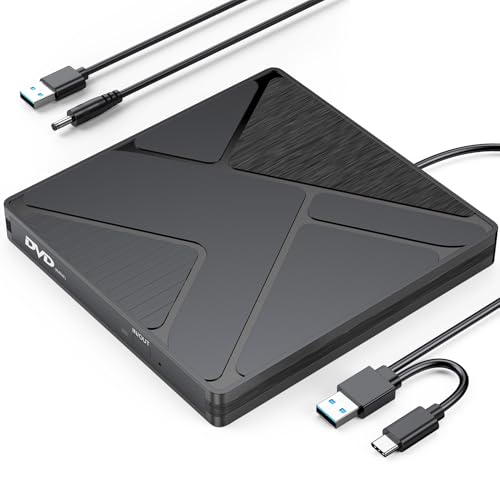
Roof USB-C External DVD Drive. Best for USB-C Laptops
The Roof drive ships with a native USB-C cable, so on a MacBook Pro or modern Windows ultrabook you just plug in and go. No adapter needed. The bus-powered design means no separate brick. Build is plastic but reads and burns reliably at 8x DVD write speed.
Dell DW316. Best for Windows Business Laptops
The Dell DW316 is the OEM-branded option you see on a lot of business deployments. It is rebadged from a major drive maker, well-built, and the support footprint is solid if you are in a Dell-heavy organization. Write speeds are 8x DVD, 24x CD.
Frequently asked
Yes, with the right cable. Most external DVD drives ship with a USB-A cable, so on USB-C-only MacBooks you need a USB-A-to-USB-C adapter or a drive with native USB-C support.
Only if it is specifically a Blu-ray drive. Standard DVD drives read and write DVD and CD media only. Look for a model labeled Blu-ray if you need that format.
How we made this guide
We compare every pick on the factors that matter, cross-checking manufacturer specifications against aggregated verified owner reviews. We rank independently and never take payment for placement. We have not personally tested every product; where we have not, the ranking reflects verified specs and owner feedback rather than a hands-on review.
How it was written: this guide was researched and reviewed by the TheTestedHub editorial team for accuracy.
Affiliate disclosure: TheTestedHub is reader-supported. When you buy through links on our site, we may earn a commission at no extra cost to you.
You might also like

Your Docking Station Match: CalDigit TS4 and More

Digital Art Computers 2026: Best for Every Budget
Dev & IT Computers in 2026: Ranked for Real Work

Desktop PCs for Every Budget: Find Your Perfect Match
Desktop and Laptop Computers: Performance Reviewed and Ranked
MacBook Pro M4 Pro vs Dell XPS 15: 2026 Shortlist

Buy the Best DIY Computer in 2026: Corsair One i300
