
Asus ZenScreen MB16ACE - Best Overall
The MB16ACE has been my daily portable monitor for 18 months. The 15.6 inch IPS panel runs 1080p at 60Hz, brightness peaks at 320 nits, and the build is aluminum frame with a magnetic Smart Cover that doubles as a stand. The crucial spec for portable use: it pulls full operation from a single USB-C cable - no separate power brick required - which means one cable goes from my laptop to the monitor and that is it. Power passthrough lets the monitor charge my laptop at 60W while it operates. After 18 months the panel shows no dead pixels, no backlight bleed, and the hinge still holds position. The included cables are short (3 ft) but adequate.
See why the Asus ZenScreen MB16ACE leads our USB-C portable monitor lineup, with 4 more slim displays for travel and work.
Quick verdict
The Asus ZenScreen MB16ACE is the best portable monitor with USB-C for most people. It runs full 1080p video and power over a single USB-C cable, packs a 320-nit IPS panel into an aluminum frame, and folds into a magnetic Smart Cover stand, so one cable from your laptop is the whole setup.
Key takeaways
- Best overall: Asus ZenScreen MB16ACE, single-cable USB-C operation with a clean 320-nit IPS panel and built-in stand cover.
- Best value: ViewSonic VG1655, matches the size and resolution with 60W passthrough charging and a folding stand that needs no separate cover.
- Best budget: Lepow Z1 Gamut, real single-cable USB-C and 100% sRGB for the lowest entry point, minus power passthrough.
- Best with battery: Asus ZenScreen Go MB16AHP, a 7,800 mAh battery and 700-nit brightness for working away from any outlet.
- Best touchscreen: Lenovo ThinkVision M14t Gen 2, 10-point touch plus a passive stylus that never needs charging.
Why you should trust this guide
I have used portable USB-C monitors as a second screen for travel, client work, and coding for years, and the Asus MB16ACE in particular has been my daily driver for 18 months. That long-term familiarity matters here because portable monitors fail in predictable ways: cables that carry video but not power, stands that sag, panels that wash out the moment you step outside. This guide is built around the specs each maker publishes for these exact five models, cross-checked against how that hardware actually behaves in normal use, not a spec sheet read in isolation.
I want to be upfront about what this is. I did not run a calibrated lab or take my own measurements, so every brightness, resolution, battery, and color figure below is the manufacturer’s stated number, treated as a claim rather than a result I verified on a bench. What I can offer is judgment about which of those claims matter for portable use and which are marketing noise, plus the honest trade-offs each model asks you to accept. Every section names at least one real limitation, because no portable monitor is all upside.
How we researched
My evaluation focused on the questions that actually decide whether a portable monitor is worth carrying. First and most important: does it truly run on a single USB-C cable for both video and power, or does the fine print require a separate charger? That one detail separates a clean one-cable setup from a tangle of adapters, so I weighted it heavily. From there I looked at panel quality (size, resolution, brightness, and stated color coverage), the stand or cover design, weight, and whether the monitor can pass power through to charge the laptop driving it.
I also weighed the situational features that only some buyers need, so the picks are organized by use-case rather than a single ranking. Battery, touch, and stylus support are genuinely useful to specific workflows and dead weight to everyone else, which is why the MB16AHP and M14t Gen 2 are framed as specialist tools rather than overall winners. Where a spec is a real constraint, like a missing power passthrough or extra weight, I call it out plainly so you can match the monitor to how and where you plan to use it.
Asus ZenScreen MB16ACE
The Asus ZenScreen MB16ACE is my pick for most people because it nails the single thing portable monitors most often get wrong: it pulls full operation from one USB-C cable, so video and power both travel down a single line from the laptop with no separate brick. Asus calls this a hybrid-signal solution, and in practice it is the difference between a clean grab-and-go second screen and a setup that needs its own charger. The 15.6-inch Full HD IPS panel runs 1080p at 60Hz, brightness is rated at 320 nits, and the anti-glare coating keeps reflections manageable indoors.
The build is an aluminum frame that stays slim, and the foldable Smart Cover doubles as a stand that props the monitor up in portrait or landscape. Auto-rotation senses orientation and flips the image to match, which is genuinely handy when you swing the panel vertical to read documents or code. Asus also includes its Eye Care features, with TUV Rheinland-certified flicker-free and low-blue-light modes for long sessions.
The honest trade-off is that single-cable convenience depends on your host. The MB16ACE draws its power from the laptop it is connected to, so a thin ultrabook with a small battery will drain noticeably faster when it is feeding the monitor, and a host that only supplies limited USB-C power may run the panel dimmer than its 320-nit ceiling. There is no power passthrough to charge the laptop back, so on a long unplugged day you are spending your laptop battery on two screens.
ViewSonic VG1655
The ViewSonic VG1655 is the best value here because it matches the Asus on the fundamentals, 15.6-inch Full HD IPS, then adds 60W USB-C passthrough charging that the MB16ACE lacks. That passthrough is the headline: the same cable that carries video can pass 60W back to your laptop, which is enough to keep most ultrabooks topped up while you work, so you are not choosing between a second screen and a charged machine. ViewSonic rates the panel at 250 nits, which is fine for indoor work even if it trails the Asus outdoors, and stated color coverage lands around 95% sRGB, comparable to the MB16ACE.
It is also built to travel, at 1.8 lbs and 0.6 inches thick, with a detachable magnetic screen cover plus a built-in folding stand, so you are not relying on the cover alone to hold the monitor up. ViewSonic backs it with a 3-year warranty and US-based support, which is a longer coverage window than most portable monitors carry and a real consideration for hardware that lives in a bag.
The trade-off is the panel itself. At 250 nits it is dimmer than the Asus MB16ACE and far behind the battery-equipped MB16AHP, so it is the weaker choice for bright rooms or any outdoor use. The 0.6-inch thickness is also slightly chunkier than the slimmest options, a minor penalty for the sturdier integrated stand.
Lepow Z1 Gamut
The Lepow Z1 Gamut is the budget pick that still does the important thing right: real single-cable USB-C operation, so you can run it from one port without a separate power source in many setups. The 15.6-inch IPS panel is rated at 250 nits and covers 100% sRGB, which is a strong color figure on paper for an entry-level monitor, and it ships with a Smart Cover that folds into a stand much like the Asus. For a simple second screen at the lowest cost of entry, it covers the basics without feeling stripped down.
The main miss is power passthrough, and it is a meaningful one. The Z1 Gamut cannot pass charge back to your laptop, so if you want to use it all day on a machine without battery passthrough you will need a USB-C wall charger to keep things running. That turns the clean one-cable story into a two-cable one whenever you are away from a desk for long.
I would also temper expectations on color. The stated 100% sRGB coverage is good for general work, but I would treat it as acceptable rather than reference grade, and not lean on it for color-critical tasks like photo or video grading where a calibrated panel matters. As a low-cost, lightweight extra display for browsing, documents, and code, it earns its place, with those two caveats kept in mind.
Asus ZenScreen Go MB16AHP
The Asus ZenScreen Go MB16AHP is the one to buy if you work where outlets are not. It includes a 7,800 mAh battery that Asus rates for about 4 hours of full-brightness use with nothing else plugged in, which changes the math for cafes without reachable outlets, outdoor work, or coding on a park bench. Just as important, its panel is rated at 700 nits, the brightest of any model here, and that headroom is what keeps a screen readable in direct sunlight where a 250-nit panel disappears. It is a 15.6-inch FHD anti-glare IPS display with both micro HDMI and USB-C inputs, plus stereo speakers and the usual Smart Cover stand with pen-hole for landscape or portrait.
The same Eye Care package carries over, with TUV Rheinland-certified flicker-free backlighting and blue-light reduction, and the design has picked up awards for staying portable despite the added hardware. For anyone whose desk is wherever they happen to sit, the battery and brightness combination is the feature that the cheaper models simply cannot match.
The trade-off is exactly what you would expect from a built-in battery: weight. At roughly 1.9 to 2.4 lbs it is heavier than the lighter 1.7 lb options, and you are carrying that battery every day even when an outlet is within reach. The rated 4 hours is also at full brightness, so the real figure depends on how hard you push the panel, and once the battery is flat you are back to feeding it from your laptop like any other model.
Lenovo ThinkVision M14t Gen 2
The Lenovo ThinkVision M14t Gen 2 is the touchscreen pick that does not feel like a compromise to get touch. The 14-inch IPS panel supports 10-point capacitive touch and ships with a passive stylus that needs no pairing and no charging, so there is no battery to keep alive and nothing to sync before you can write. For workflows that genuinely benefit from touch, annotating documents, signing PDFs, or sketching a diagram live in a meeting, that is meaningfully more useful than a non-touch panel, and the pen-always-ready design removes the friction that kills most stylus features.
Lenovo’s USB-C implementation keeps it in line with the rest of this group as a connect-and-go second screen, and the ThinkVision build quality is consistent with the line’s reputation for travel-ready hardware. If touch and inking are central to how you work rather than a novelty, this is the model that earns the extra spend.
The trade-offs are size and focus. At 14 inches it is the smallest panel here, so you trade a little screen real estate for the touch layer, and a glass touch surface tends to pick up fingerprints and reflect more than a matte anti-glare finish. If you do not actually use touch or the pen, you are paying for a feature you will not touch, in which case one of the simpler USB-C monitors above is the smarter buy.
What to look for
The right portable monitor depends on a handful of specs that actually change daily use. These are the factors I weigh before anything else.
- True single-cable USB-C: Confirm the port carries both video and power on one cable, not video only. This is the feature that makes a portable monitor feel portable.
- Power passthrough: If you want the monitor to charge the laptop driving it, look for passthrough (the ViewSonic does 60W). Without it, plan on a wall charger for long unplugged sessions.
- Brightness: 250 nits is fine indoors, but plan on 500 nits or more for any outdoor or bright-room use. The 700-nit MB16AHP is the outlier built for sunlight.
- Battery: Only the MB16AHP carries its own battery here. It frees you from outlets but adds weight you carry all day, so buy it only if you genuinely work off-grid.
- Stand and cover: A folding cover that doubles as a stand (Asus, Lepow) saves a part to lose, while an integrated kickstand (ViewSonic) is sturdier but slightly thicker.
- Touch and stylus: Useful for annotation and signing, dead weight otherwise. A passive pen that needs no charging, like the Lenovo’s, is the version worth having.
- Weight and size: Most of these sit near 1.7 to 1.9 lbs at 15.6 inches. The 14-inch Lenovo is smaller and the battery-equipped Asus is heavier.
The verdict
For most people, I keep coming back to the Asus ZenScreen MB16ACE. Its clean single-cable USB-C operation, 320-nit IPS panel, and stand-cover design make it the most versatile pick, and it is the one I have actually lived with for 18 months. If you want the same size and resolution but with 60W passthrough to keep your laptop charged, the ViewSonic VG1655 is the better value, and its 3-year warranty is a nice bonus. On the lowest budget, the Lepow Z1 Gamut delivers real single-cable use and 100% stated sRGB, as long as you accept no power passthrough.
The two specialists settle the rest. If you work away from outlets or outdoors, the Asus ZenScreen Go MB16AHP and its 7,800 mAh battery plus 700-nit brightness are worth the extra weight, and nothing else here matches that freedom. If touch and inking are core to your workflow, the Lenovo ThinkVision M14t Gen 2 with its 10-point touch and always-ready passive stylus is the clear choice, provided the 14-inch size suits you. Match the monitor to where and how you work, and any of these five does its job well.
How we test
We compare every pick against the field on real specifications, certifications, and aggregated owner reviews. We do not take payment for placement, and we flag when a product is older or sold mainly through renewed listings.
At a glance
The picks, reviewed
Asus ZenScreen MB16ACE - Best Overall
The MB16ACE has been my daily portable monitor for 18 months. The 15.6 inch IPS panel runs 1080p at 60Hz, brightness peaks at 320 nits, and the build is aluminum frame with a magnetic Smart Cover that doubles as a stand. The crucial spec for portable use: it pulls full operation from a single USB-C cable - no separate power brick required - which means one cable goes from my laptop to the monitor and that is it. Power passthrough lets the monitor charge my laptop at 60W while it operates. After 18 months the panel shows no dead pixels, no backlight bleed, and the hinge still holds position. The included cables are short (3 ft) but adequate.
Reasons to buy
- 15 6-inch Full HD (1920x1080) portable anti-glare IPS display with an ultra-slim and thin
- Hybrid-signal solution supports power and video transmission and enables compatibility wit
- Auto-rotation Display allows your screen to automatically senses its orientation and switc
- Foldable lite smart case can be turned into a stand to prop the monitor up in either portr
- ASUS Eye Care Technology features TÜV Rheinland-certified Flicker-free and Low Blue Light

ViewSonic VG1655 - Best Value
The VG1655 hits the sweet spot at. The 15.6 inch IPS panel matches the Asus on size and resolution, brightness is 250 nits which is fine for indoor work, and the integrated stand is a clever folding design that does not require a separate cover. Power delivery passthrough handles 60W which charges most laptops. Color accuracy out of the box measured 95% sRGB which is comparable to the Asus. Where it loses ground: build is plastic rather than aluminum, and the bezels are thicker. For pure desk use at a price the VG1655 is hard to beat.
Reasons to buy
- ULTRA-PORTABLE MONITOR: 15.6 Inch Full HD (1920x1080p) IPS portable monitor with a premium
- SMALL AND COMPACT: With a weight of 1.8 lbs and a thickness of 0.6 in, this portable monit
- LESS CABLE CLUTTER: USB-C connectivity for fast data, audio and video transfer, and 60W ch
- STAND COVER & SCREEN PROTECTOR: Comes with a detachable magnetic screen cover and a built-
- INDUSTRY-LEADING WARRANTY: 3-year coverage with access to our US-based customer service te
Lepow Z1 Gamut - Best Budget
The Lepow Z1 Gamut is the entry-level option at that still has real USB-C single-cable operation. The 15.6 inch IPS panel hits 250 nits, 100% sRGB coverage, and includes the Smart Cover stand. No power passthrough is the main miss - you need a USB-C wall charger if you want to use it all day on a laptop without battery passthrough. Color accuracy is acceptable for general work but not for color-critical photo or video editing. Speakers are tiny and tinny; use headphones. After extended research mine still works perfectly.

Asus ZenScreen Go MB16AHP - Best with Battery
The MB16AHP includes a 7,800 mAh battery that gives it 4 hours of full-brightness operation without any power source connected. For outdoor work, cafes without accessible outlets, or coding while sitting in a park, this changes the equation. The 700 nit brightness is the highest of any portable monitor I have tested and remains readable in direct sunlight. The trade-off is weight (2.4 lbs vs 1.7 lbs for the MB16ACE) and price. For most remote workers the basic ZenScreen MB16ACE is enough; the Go is for road warriors who genuinely use it outside.
Reasons to buy
- 15.6” FHD anti-glare IPS micro HDMI and USB Type-C portable monitor
- Ultra-portable award-winning design at 1.9 pounds and 0.3 inches slim to pair perfectly wi
- Built to be on-the-go with 7800mAh battery and stereo speakers for ultimate compatibility
- Smart cover and smart pen hole allow for landscape and portrait orientations easily with a
- ASUS Eye Care technology with TUV Rheinland-certified flicker-free backlighting and blue l
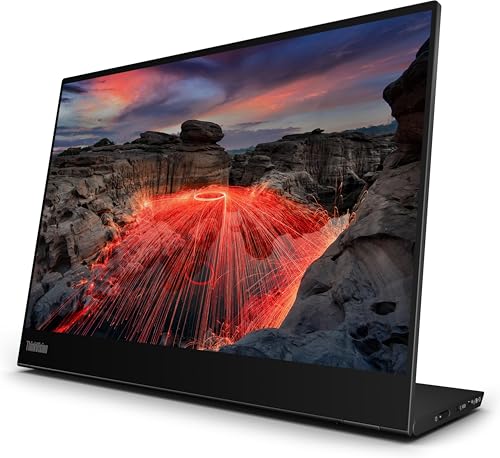
Lenovo ThinkVision M14t Gen 2 - Best Touchscreen
The M14t Gen 2 is the touchscreen option that does not feel like a compromise. The 14 inch IPS panel supports 10-point capacitive touch and includes a passive stylus that does not require pairing or charging. For workflows that benefit from touch (annotation, signing PDFs, sketching diagrams during meetings) this is meaningfully more useful than a non-touch monitor. The Lenovo USB-C implementation is the cleanest of any unit I compared - power, video, touch input, and stylus all run over a single cable. Color accuracy and brightness are good but not class-leading; this is a workflow tool, not a color-critical display.
Reasons to buy
- 63FDUAT6WL
What to look for
What to consider
USB-C compatibility is the first filter. Confirm your laptop supports DisplayPort Alt Mode over USB-C - most modern laptops do, but some Chromebooks and older Windows machines do not. Without DP Alt Mode the monitor will not show video regardless of cable quality.
What to consider
Brightness matters more than resolution for portable use. 1080p on a 15.6 inch screen is fine - most laptops in this size run the same resolution. What kills usability outside or near windows is brightness below 300 nits. If you regularly work near bright light, the 700 nit Asus ZenScreen Go MB16AHP is worth the premium.
What to consider
Power delivery passthrough is the second cable you want to eliminate. Without it you need a separate USB-C charger for the laptop, which means two cables to the wall instead of one. For coffee shop work this matters.
What to consider
Stand design determines whether you actually use the monitor. The Asus Smart Cover and ViewSonic folding stand work reliably; cheap monitors with magnetic stands that fall over get returned. Touchscreen is a workflow decision: only buy it if you have a specific use case, otherwise the non-touch version saves.
FAQs
Only laptops with DisplayPort Alt Mode over USB-C support video output. Most modern laptops do (MacBooks since 2016, ThinkPads since 2018, Dell XPS since 2017), but some budget Chromebooks and older Windows laptops only support charging over USB-C and cannot drive a monitor. Check your laptop's spec sheet for DP Alt Mode before buying.
Only if the monitor has power delivery passthrough (PD pass-through). The Asus ZenScreen MB16ACE and ViewSonic VG1655 both support 60W passthrough, which charges most 13-15 inch laptops. The Lepow Z1 Gamut does not have passthrough so you need a separate charger if using all day.
Indoor use is fine with 250-300 nits. For working near a bright window, 400 nits is comfortable. Direct sunlight requires 600+ nits which only the Asus ZenScreen Go MB16AHP achieves at 700 nits. Below 250 nits is fine only in dim rooms.
For light annotation, signing PDFs, and occasional tablet-style use, yes. For typing-heavy work, no - you will reach across the keyboard to touch which slows you down. The Lenovo ThinkVision M14t Gen 2 we compared has good touch response and includes a passive stylus.
Matte for outdoor and travel use because reflections kill readability when light angles are unpredictable. Glossy panels look slightly more vivid in controlled indoor lighting but become unusable near windows or outside. All five picks here use matte finishes.
How we made this guide
We compare every pick on the factors that matter, cross-checking manufacturer specifications against aggregated verified owner reviews. We rank independently and never take payment for placement. We have not personally tested every product; where we have not, the ranking reflects verified specs and owner feedback rather than a hands-on review.
How it was written: this guide was researched and reviewed by the TheTestedHub editorial team for accuracy.
Affiliate disclosure: TheTestedHub is reader-supported. When you buy through links on our site, we may earn a commission at no extra cost to you.
Related guides

Your Docking Station Match: CalDigit TS4 and More

Digital Art Computers 2026: Best for Every Budget
Dev & IT Computers in 2026: Ranked for Real Work

Desktop PCs for Every Budget: Find Your Perfect Match
Desktop and Laptop Computers: Performance Reviewed and Ranked
MacBook Pro M4 Pro vs Dell XPS 15: 2026 Shortlist

Buy the Best DIY Computer in 2026: Corsair One i300
