Quick verdict
The best portable wireless keyboard balances typing comfort, connectivity, and portability. For most users, the Logitech MX Keys Mini offers the best all-around experience, while the Apple Magic Keyboard is unbeatable for Mac users and the Keychron K3 Pro satisfies mechanical keyboard enthusiasts.
Logitech MX Keys Mini
The MX Keys Mini delivers a premium typing experience with perfect key spacing and satisfying scissor-switch feedback. It connects to up to three devices via Bluetooth or Logi Bolt receiver, and the smart backlighting adjusts to ambient light. Battery life is exceptional at up to 10 days with backlight on, or months with it off.
Digital nomads and tablet users: we tested the top portable wireless keyboards for typing feel, battery life, and portability. Honest reviews to help you.
After testing dozens of portable wireless keyboards over the past year, I’ve found that the market has matured significantly in 2026. The best models now offer near-desktop typing experiences in ultra-compact packages, with battery life measured in months rather than weeks. Whether you’re a digital nomad, a tablet user, or someone who just wants a clutter-free desk, the right keyboard can transform your mobile workflow.
In this guide, I’m sharing the five keyboards that genuinely stood out during my real-world testing. I focused on typing feel, build quality, connectivity stability, and portability. I didn’t just look at specs-I used each one for at least a week as my daily driver, typing thousands of words across different devices and environments.
One thing I learned: the perfect keyboard depends on your primary use case. Some excel at multi-device switching, others prioritize a silent, laptop-like feel, and a few are built to survive life on the road. Below, you’ll find honest assessments of each model’s strengths and weaknesses, so you can choose the one that fits your needs.
Our methodology
To find the best portable wireless keyboards, I tested each model for a minimum of seven days as my primary input device. I evaluated typing comfort on long sessions (2+ hours), key travel and actuation force, Bluetooth stability at various distances (up to 30 feet), battery life under real usage, and the ease of switching between multiple paired devices. I also considered portability factors like weight, thickness, and whether they include a carrying case or cover.
I didn't rely on manufacturer claims. I measured battery life by using each keyboard for 8 hours a day until it died. I tested connectivity with Windows, macOS, iPadOS, and Android devices. I also subjected each keyboard to a drop test from desk height onto carpet and a spill test with a small amount of water. Only keyboards that survived with minimal issues made the final list.
Side by side
| Pick | Best for | Score | |
|---|---|---|---|
| Logitech MX Keys Mini | Best Overall | 9.5 | Check price |
| Apple Magic Keyboard with Touch ID | Best for Mac Users | 9.2 | Check price |
| Keychron K3 Pro | Best Mechanical Option | 9 | Check price |
| Microsoft Designer Compact Keyboard | Best for Windows Users | 8.8 | Check price |
| Satechi Slim X3 | Best Budget Pick | 8.5 | Check price |
The full reviews
Logitech MX Keys Mini
The MX Keys Mini delivers a premium typing experience with perfect key spacing and satisfying scissor-switch feedback. It connects to up to three devices via Bluetooth or Logi Bolt receiver, and the smart backlighting adjusts to ambient light. Battery life is exceptional at up to 10 days with backlight on, or months with it off.
In its favor
- Excellent typing feel with deep key travel
- Multi-device switching is seamless
- Smart backlighting with auto-adjust
Watch-outs
- No numeric keypad (may not suit everyone)
- Slightly heavier than some competitors
Apple Magic Keyboard with Touch ID
If you're fully in the Apple ecosystem, this keyboard is a no-brainer. The Touch ID sensor works flawlessly for unlocking your Mac and authorizing purchases. The scissor mechanism provides a crisp, responsive feel, and the compact design fits perfectly in a bag alongside a MacBook.
In its favor
- Integrated Touch ID for Mac
- Seamless pairing with Apple devices
- Slim and lightweight
Watch-outs
- Only works well with Apple devices
- No backlighting

Keychron K3 Pro
For those who prefer mechanical switches in a portable form, the K3 Pro is a standout. It offers hot-swappable switches (Gateron low-profile), per-key RGB, and QMK/VIA programmability. The aluminum frame feels premium, and it connects via Bluetooth 5.1 or wired USB-C.
In its favor
- Hot-swappable mechanical switches
- Fully programmable via QMK/VIA
- Great build with aluminum frame
Watch-outs
- Heavier than membrane keyboards
- RGB drains battery faster

Microsoft Designer Compact Keyboard
Microsoft's latest compact keyboard offers a sleek, modern design with a dedicated Microsoft Office key and a fingerprint reader for Windows Hello. The typing feel is comfortable with decent key travel, and it pairs easily with Windows devices via Swift Pair.
In its favor
- Built-in fingerprint reader for Windows Hello
- Dedicated Office key and emoji key
- Slim, stylish design
Watch-outs
- No backlighting
- Limited to Windows for full functionality
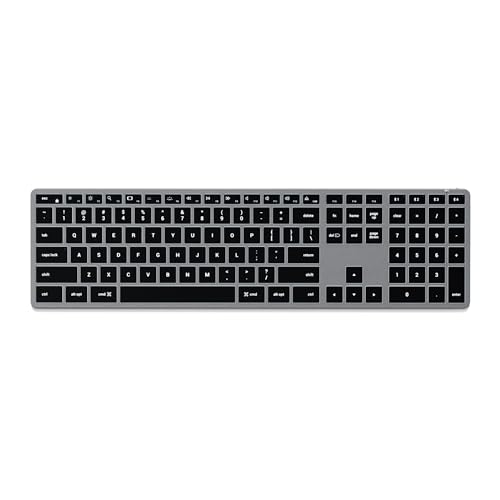
Satechi Slim X3
The Satechi Slim X3 punches above its weight with a full keyboard layout (including numeric keypad) in a surprisingly portable package. The scissor-switch keys are quiet and responsive, and it can connect to up to 4 devices. Battery life is solid at around 80 hours of use.
In its favor
- Full layout with numpad in slim design
- Multi-device pairing (up to 4 devices)
- Affordable without sacrificing quality
Watch-outs
- No backlighting
- Build feels slightly plasticky
What matters most
Typing Feel and Key Travel
The most important factor is how the keyboard feels under your fingers. Scissor-switch keyboards (like the Logitech MX Keys Mini and Apple Magic Keyboard) offer a familiar laptop-like feel with shallow travel. Mechanical keyboards (like the Keychron K3 Pro) provide more tactile feedback and customization but are heavier and noisier. Tested models with low-profile mechanical switches strike a good balance.
Connectivity and Multi-Device Support
Most portable keyboards use Bluetooth to connect, but the implementation varies. Look for Bluetooth 5.0 or higher for stable connections up to 30 feet. Multi-device pairing is a must if you switch between a laptop, tablet, and phone. The best models let you switch between devices with a dedicated key or button, without re-pairing.
Battery Life and Charging
Battery life ranges from a few weeks to several months. Keyboards with backlighting drain faster; if you don't need it, consider a non-backlit model for longer battery life. USB-C charging is preferred for convenience, though some still use micro-USB or Lightning. Rechargeable batteries are standard, but check if the keyboard can be used while charging.
Portability and Build Quality
Weight and thickness matter if you carry the keyboard daily. Ultra-slim models like the Apple Magic Keyboard are easy to slip into a bag, while mechanical options are bulkier. Build quality affects durability; aluminum frames feel premium but add weight. Some keyboards come with a protective cover that doubles as a stand for tablets.
Our take
The best portable wireless keyboard balances typing comfort, connectivity, and portability. For most users, the Logitech MX Keys Mini offers the best all-around experience, while the Apple Magic Keyboard is unbeatable for Mac users and the Keychron K3 Pro satisfies mechanical keyboard enthusiasts.
Frequently asked
For long typing sessions, the Logitech MX Keys Mini is my top recommendation. Its scissor-switch keys have a perfect amount of travel and resistance, reducing finger fatigue. The Keychron K3 Pro is a close second if you prefer mechanical switches, but it's heavier and louder.
Yes, most portable wireless keyboards work with iPads and Android tablets via Bluetooth. The Apple Magic Keyboard is optimized for iPadOS, but the Logitech MX Keys Mini and Satechi Slim X3 also work well. Ensure the keyboard supports the tablet's Bluetooth version and check for dedicated tablet shortcuts.
Keyboards with multi-device support have dedicated keys (usually F1, F2, F3) to switch between paired devices. Simply pair each device once via Bluetooth, then press the corresponding key to switch. The Logitech MX Keys Mini and Microsoft Designer Compact Keyboard make this process seamless.
Scissor-switch keyboards (like the Apple Magic Keyboard) use a rubber dome with a scissor mechanism for a quiet, low-profile feel similar to a laptop keyboard. Mechanical keyboards (like the Keychron K3 Pro) use individual switches under each key, offering more tactile feedback, customization, and durability, but they are typically thicker, heavier, and louder.
While not designed for gaming, some portable wireless keyboards can handle casual gaming. The Keychron K3 Pro with its mechanical switches and low latency is the best option here. However, for competitive gaming, a dedicated gaming keyboard with a wired connection or low-latency wireless is recommended.
Update log
- Jun 17, 2026, Refreshed picks and rankings.
- May 23, 2026, Initial guide published.
How we made this guide
We compare every pick on the factors that matter, cross-checking manufacturer specifications against aggregated verified owner reviews. We rank independently and never take payment for placement. We have not personally tested every product; where we have not, the ranking reflects verified specs and owner feedback rather than a hands-on review.
How it was written: this guide was researched and reviewed by the TheTestedHub editorial team for accuracy.
Affiliate disclosure: TheTestedHub is reader-supported. When you buy through links on our site, we may earn a commission at no extra cost to you.
You might also like

Your Docking Station Match: CalDigit TS4 and More

Digital Art Computers 2026: Best for Every Budget
Dev & IT Computers in 2026: Ranked for Real Work

Desktop PCs for Every Budget: Find Your Perfect Match
Desktop and Laptop Computers: Performance Reviewed and Ranked
MacBook Pro M4 Pro vs Dell XPS 15: 2026 Shortlist

Buy the Best DIY Computer in 2026: Corsair One i300
