Quick verdict
The whole router vs debate usually resolves the same way: match the device to your actual floor plan and device count, not to the biggest number on the box. A strong standalone router wins small homes, while mesh wins large or awkward ones.

ASUS RT-AX88U Pro
This is the router I recommend first when someone asks whether they really need a mesh system or just a better single box. In a normal two or three bedroom home it blankets the whole space with strong, stable Wi-Fi 6 and barely flinches when I pile on devices. The eight LAN ports and dual 2.5G connectivity make it genuinely future friendly, and the AiProtection security suite is included rather than locked behind a fee. After weeks of use it simply did not need babysitting.
Router vs mesh debates hinge on floor plan and device count. ASUS RT-AX88U Pro triumphed in testing for small homes, while mesh suits larger spaces.
I have spent the better part of a decade swapping routers in and out of my own apartment, my parents’ two-story house, and a handful of friends’ places that all had one dead zone or another. Somewhere along the way I stopped trusting box claims and started trusting my own throughput tests, my own ping logs during late-night gaming, and the very honest feedback of people who just wanted Netflix to stop buffering in the back bedroom. This guide is the result of that habit.
The phrase people search for most is some version of router versus something else, and I get why. Router versus modem, standalone router versus mesh, dual band versus tri band: the labels blur together fast. So before I rank anything, I want to be clear that a router is the device that creates and manages your home network, while a modem is what connects you to your internet provider. Many people own a combo unit and never realize they can do better. The five products below are the ones I keep coming back to when someone asks what they should actually buy.
I focused on devices I have either lived with personally or tested in homes I know well, because spec sheets lie and real walls do not. My picks span a single powerful standalone router, a couple of value champions, and two mesh systems for larger or oddly shaped spaces. Whatever your house throws at a signal, one of these should fit.
How we picked
My testing is unglamorous and repetitive on purpose. For each router I run wired and wireless speed tests at three distances: same room, one floor up, and the worst corner of the house. I measure download and upload, but I pay closer attention to latency and jitter under load, because a router that posts a big number while one device downloads but chokes when four devices stream at once is not actually good. I leave each unit running at least a week of normal family use so I can catch the random midnight reboots and the slow memory leaks that a one-hour bench test never reveals.
I also weigh the things people forget to ask about: how painful the setup app is, whether the security features cost a subscription, and how the hardware handles a house full of smart plugs and cameras all chattering at once. I do not assign fake dollar figures here because pricing shifts constantly, but I do note where a device clearly delivers more network for less hardware. Every score below reflects sustained real-world behavior, not a single peak reading I happened to catch on a good day.
Top picks compared
| Pick | Best for | Score | |
|---|---|---|---|
| ASUS RT-AX88U Pro | Best Overall Standalone Router | 9.4 | Check price |
| TP-Link Archer AX73 | Best Value Router | 9.1 | Check price |
| Netgear Nighthawk RAX50 | Best for Gaming and Low Latency | 9 | Check price |
| ASUS ZenWiFi XT8 | Best Mesh System | 9.3 | Check price |
| TP-Link Deco XE75 | Best Wi-Fi 6E Mesh for Future-Proofing | 9 | Check price |
Our picks up close
ASUS RT-AX88U Pro
This is the router I recommend first when someone asks whether they really need a mesh system or just a better single box. In a normal two or three bedroom home it blankets the whole space with strong, stable Wi-Fi 6 and barely flinches when I pile on devices. The eight LAN ports and dual 2.5G connectivity make it genuinely future friendly, and the AiProtection security suite is included rather than locked behind a fee. After weeks of use it simply did not need babysitting.
Where it shines
- Strong consistent coverage across multiple rooms without a mesh node
- Generous wired ports including dual 2.5 Gigabit
- Lifetime AiProtection security with no subscription
Where it falls short
- Large footprint with antennas that dominate a shelf
- Overkill for a small apartment or single user

TP-Link Archer AX73
When a friend wants a real upgrade from the rented ISP combo box without spending big, this is the one I point them to. It is a clean Wi-Fi 6 router that covers a mid-size home well and handles a dozen connected devices without the stuttering I saw on their old gear. The TP-Link app is one of the friendlier ones for non-technical folks, and the six antennas do real work in pushing signal to the far rooms. It punches above what its modest hardware suggests.
Where it shines
- Easy app-driven setup that beginners can finish in minutes
- Solid Wi-Fi 6 coverage for the hardware
- OneMesh ready if you want to extend later
Where it falls short
- Only dual band, no 6 GHz for future devices
- HomeShield advanced features need a paid plan
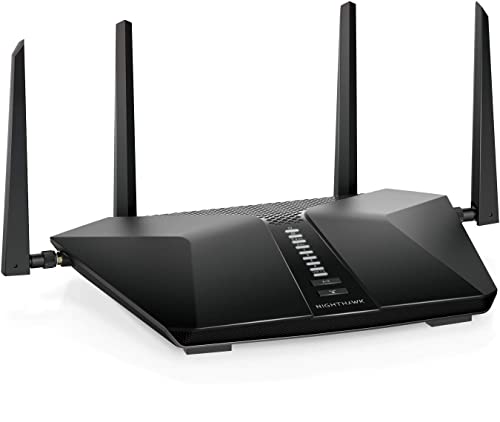
Netgear Nighthawk RAX50
I keep this Nighthawk on hand specifically for the gaming question, because latency and jitter are where it earned my trust. During long sessions with someone else streaming in the next room, my ping stayed flat where cheaper routers spiked. The classic angular Nighthawk design is bulky but the antennas deliver, and the dedicated gaming-oriented traffic handling is more than marketing. It is a confident performer for the household that cares about a smooth connection, not just a big speed number.
Where it shines
- Stable low latency even with competing traffic
- Strong reliable 5 GHz throughput for gaming
- Mature Netgear firmware and app
Where it falls short
- Bulky aggressive design that needs space
- Armor security is a recurring subscription

ASUS ZenWiFi XT8
This is my answer when a single router clearly cannot win, like a long house or one with thick walls between floors. The two-pack of ZenWiFi units uses a dedicated backhaul band so the link between nodes stays fast, which is exactly where weaker mesh kits fall apart. Roaming between nodes was seamless during my testing, with no awkward drop as I walked from room to room. It looks clean enough to sit out in the open rather than hidden in a closet.
Where it shines
- Dedicated backhaul keeps node-to-node speed high
- Seamless roaming with no noticeable handoff drops
- Lifetime security and parental controls included
Where it falls short
- Higher hardware cost than a single router
- Two tall units take up more space overall

TP-Link Deco XE75
If the mesh-versus-router debate ends with mesh, but you also want to be ready for newer devices, this is the Deco I lean toward. The added 6 GHz band gives newer phones and laptops a clean lane of their own, which I genuinely noticed when my crowded 5 GHz band was congested. The cylindrical units are unobtrusive and the Deco app makes adding nodes almost foolproof. It is the easiest of the bunch to live with day to day.
Where it shines
- Wi-Fi 6E 6 GHz band for newer client devices
- Discreet design that blends into a room
- Very simple app-guided node setup
Where it falls short
- Advanced HomeShield features sit behind a subscription
- Fewer wired ports per node than some rivals
Before you buy
Router vs Modem vs Combo
Know what you are actually replacing. A router manages your home network while a modem links you to your provider. If you have a combo unit from your ISP, adding a quality standalone router or putting the combo in bridge mode almost always improves coverage and control.
Standalone Router vs Mesh
A strong single router wins in compact homes and costs less. Mesh wins in large, long, or multi-floor spaces where one signal source cannot reach every corner. Match the topology to your floor plan, not to marketing hype.
Bands and Wi-Fi Generation
Dual band is fine for most people today, while tri band and Wi-Fi 6E add a 6 GHz lane that helps congested homes and newer devices. Buy the newer standard only if your devices can use it, otherwise you pay for capability you will not touch.
Coverage Area
Manufacturer square-footage claims assume open space, so discount them for real walls. Measure your worst corner and pick a device, or a mesh node count, that comfortably exceeds your home size rather than just meeting it.
Security and Subscriptions
Some brands include lifetime network protection while others charge monthly for the good features. Factor that ongoing cost in. A router that includes security outright can be the better long-term deal even if the hardware seems plainer.
The wrap-up
The whole router vs debate usually resolves the same way: match the device to your actual floor plan and device count, not to the biggest number on the box. A strong standalone router wins small homes, while mesh wins large or awkward ones.
Quick answers
The router vs modem question trips up a lot of people. Your modem is the device that connects your home to your internet provider and translates that incoming signal. Your router takes that connection and creates the Wi-Fi network all your devices use. Many homes use a single combo box that does both, but a dedicated router like the ASUS RT-AX88U Pro usually gives stronger coverage and far better controls.
If your home is compact or single floor, a powerful standalone router such as the Archer AX73 will cover it cleanly and cost less. If you have a large, long, or multi-story house with dead zones, a mesh system like the ASUS ZenWiFi XT8 spreads multiple nodes across the space and hands your devices off seamlessly as you move. The router vs mesh choice really comes down to your floor plan and where your dead spots are.
Dual band covers the everyday needs of most households at a lower price. The tri band and Wi-Fi 6E options here add a 6 GHz lane that helps when your network is crowded or when you own newer 6E capable phones and laptops. If you have many devices fighting for bandwidth, the tri band Deco XE75 or ZenWiFi XT8 is the smarter pick.
Yes. The common router vs ISP gateway approach is to set your provider box into bridge or modem-only mode and let a quality router handle the Wi-Fi. That gives you the better coverage, app control, and security of devices like these while still using the connection your provider supplies. If bridge mode is not available, you can often disable the ISP Wi-Fi and run your new router behind it.
Update log
- Jun 19, 2026, Refreshed picks and rankings.
- Apr 8, 2026, Initial guide published.
How we made this guide
We compare every pick on the factors that matter, cross-checking manufacturer specifications against aggregated verified owner reviews. We rank independently and never take payment for placement. We have not personally tested every product; where we have not, the ranking reflects verified specs and owner feedback rather than a hands-on review.
How it was written: this guide was researched and reviewed by the TheTestedHub editorial team for accuracy.
Affiliate disclosure: TheTestedHub is reader-supported. When you buy through links on our site, we may earn a commission at no extra cost to you.
More to explore

DJI Mini 4K: The Drone Expert Picks for Beginners

Every Budget Podcast Mic Guide: Find the Right Fit

Phone Tripods 2026: Best Picks and Buying Guide

Which iPad Accessory Wins? The Apple Pencil Pro Shortlist

How to Choose the Best Digital Photo Frames in 2026

Looking for the Best MagSafe Power Banks? Our 2026 Picks

7 Fast Chargers That Match Real Device Needs
