Quick verdict
There is no single best tablet, only the best one for how you actually use it. Decide between creative work, everyday productivity, media, or budget first, and the right pick becomes obvious.

Apple iPad Pro 13 (M4)
This is the tablet I handed to anyone doing serious creative work and never heard a complaint back. The tandem OLED display is genuinely the best screen I have used on a portable device, with deep blacks and brightness that holds up outdoors. Paired with the Apple Pencil Pro, drawing and detailed editing feel immediate and natural. It is overkill for casual users, but for pros it is hard to beat.
Compare tablets side by side: 720Hz display, stylus support, and battery life tested for US shoppers. Find your match.
Every time someone asks me to settle a tablet debate, the conversation starts the same way: iPad or Android, Pro or Air, premium glass or a budget slab that just gets the job done. I have spent the last several months living with the current crop of tablets side by side on my desk, swapping them between work sessions, couch streaming, and the kind of casual note taking I do during meetings. The differences are not always obvious in a spec sheet, so I wanted to actually feel them out.
What I learned is that the right tablet depends far more on how you actually use one than on which brand wins a benchmark. A device that feels glorious for sketching can be overkill for someone who mostly reads and watches video. So instead of crowning a single champion, I framed this guide as a head to head comparison across the situations that matter most: heavy creative work, everyday productivity, media binging, and stretching a smaller budget as far as it can go.
I tested each of these tablets the same way, with the same accounts, the same apps, and the same patience for slow charging and laggy keyboards. The five below are the ones I kept reaching for, and each earns its spot for a clearly different reason. My goal here is to help you skip the back and forth and land on the one that fits your real life, not a marketing version of it.
Our testing process
I used each tablet as my primary device for a stretch of time rather than running a quick lab check. That meant real workdays with email, browser tabs, video calls, and document editing, plus evenings of streaming and reading. I paid close attention to how the screen held up in bright rooms, how warm the device got under load, and whether the battery actually lasted through a normal day without me hunting for a charger by mid afternoon.
For the comparison scoring I weighted four areas that I think matter to most buyers: display and media quality, performance under sustained use, the keyboard and stylus accessory experience, and overall value relative to what you get. I deliberately avoided judging these tablets only on peak speed, because a faster chip means little if the software, accessories, or screen let it down during ordinary tasks.
Quick comparison
| Pick | Best for | Score | |
|---|---|---|---|
| Apple iPad Pro 13 (M4) | Best Overall for Creators | 9.5 | Check price |
| Samsung Galaxy Tab S10 Ultra | Best Android Tablet | 9.2 | Check price |
| Apple iPad Air (M2) | Best for Everyday Use | 9.1 | Check price |
| Lenovo Tab P12 | Best Media Tablet | 8.6 | Check price |
| Amazon Fire Max 11 | Best Budget Pick | 8.2 | Check price |
Reviewed in detail
Apple iPad Pro 13 (M4)
This is the tablet I handed to anyone doing serious creative work and never heard a complaint back. The tandem OLED display is genuinely the best screen I have used on a portable device, with deep blacks and brightness that holds up outdoors. Paired with the Apple Pencil Pro, drawing and detailed editing feel immediate and natural. It is overkill for casual users, but for pros it is hard to beat.
What we liked
- Stunning tandem OLED display
- M4 chip handles demanding creative apps with ease
- Excellent Apple Pencil Pro support
What we didn't like
- Accessories add up quickly
- More power than casual users need

Samsung Galaxy Tab S10 Ultra
If you are firmly in the Android camp, this is the one I kept recommending. The huge AMOLED screen is fantastic for multitasking and split screen work, and the included S Pen means you are not paying extra to start sketching or taking notes. DeX mode turns it into a surprisingly capable desktop substitute. The size makes it a bit unwieldy in bed, but on a desk it shines.
What we liked
- Massive vibrant AMOLED display
- S Pen included in the box
- Strong multitasking with DeX mode
What we didn't like
- Large footprint is awkward one handed
- Android tablet apps still lag iPad

Apple iPad Air (M2)
For most people, this is the smart pick and the tablet I find easiest to recommend without hesitation. It runs the same apps as the Pro and handles everything from spreadsheets to streaming without breaking a sweat, but skips the features that mainly matter to professionals. The M2 chip keeps it feeling fast and future proof. It hits the sweet spot between capability and not paying for things you will never use.
What we liked
- M2 chip is fast for daily tasks
- Lighter and easier to hold than the Pro
- Wide accessory and app support
What we didn't like
- LCD screen lacks OLED contrast
- 120Hz reserved for pricier models
Lenovo Tab P12
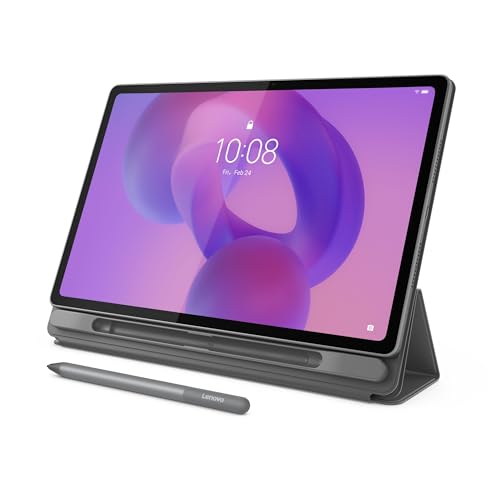
This one surprised me as a couch companion. The large screen and quad speaker setup make it a genuinely good way to watch shows, and it comes with a stylus for casual notes. It is not a productivity powerhouse, but for reading, browsing, and streaming it punches above its weight. I found it especially handy as a shared family tablet that nobody fights over.
What we liked
- Big bright screen for video
- Quad speakers sound full
- Stylus bundled for casual use
What we didn't like
- Chip strains under heavy multitasking
- Software updates are slower

Amazon Fire Max 11
When someone wants a tablet that just covers the basics without a big outlay, this is where I point them. It handles streaming, web browsing, reading, and video calls perfectly well, and the metal build feels sturdier than its price suggests. The catch is the Amazon software layer and limited app store, so it suits casual users far better than power users. For a kitchen or guest tablet, it does the job.
What we liked
- Solid metal build for the price
- Big screen good for streaming
- Long battery life
What we didn't like
- Amazon app store is limited
- Performance dips under load
How to choose
Operating System
Your choice between iPadOS and Android often matters more than the hardware. iPadOS has the deepest library of polished tablet apps, while Android offers more flexibility and file freedom. Pick the ecosystem you already live in.
Display Quality
OLED screens give you deeper contrast and better outdoor visibility, which matters if you watch a lot of video or edit photos. Budget LCD panels are perfectly fine for reading and browsing, so do not overpay for a screen you will not appreciate.
Accessory Costs
A keyboard and stylus can add a meaningful amount to your total. Some tablets include a stylus in the box, while others charge separately for everything, so factor the full kit into your decision rather than just the slab.
Performance Needs
Creative work and heavy multitasking reward a faster chip, but casual streaming and reading do not. Match the silicon to your actual workload so you are not paying for power that sits idle.
Size and Portability
Larger screens are great for productivity and media but become awkward to hold in bed or carry around. Think about where you will actually use the tablet before chasing the biggest panel.
The bottom line
There is no single best tablet, only the best one for how you actually use it. Decide between creative work, everyday productivity, media, or budget first, and the right pick becomes obvious.
Common questions
Start with how you will actually use it. If you sketch or edit, prioritize a great screen and stylus support like the iPad Pro. If you mostly stream and browse, a media or budget tablet covers it. Matching the device to your real habits beats chasing specs.
A tablet wins for portability, battery life, and casual media or note taking, while a laptop is still better for heavy typing, complex software, and serious multitasking. With a keyboard accessory a high end tablet can bridge the gap, but it does not fully replace a laptop for demanding work.
iPadOS has the strongest catalog of optimized tablet apps and tight accessory integration, which is why the iPad Air and iPad Pro lead this guide. Android tablets like the Galaxy Tab S10 Ultra offer more flexibility, file freedom, and features like DeX, so the better choice depends on the ecosystem you prefer.
It depends on your needs. A premium tablet gives you a better display, faster chip, and stronger accessories that pay off for creative or professional work. For streaming, reading, and light browsing, a budget tablet like the Fire Max 11 handles the basics well, so you do not need to overspend.
Update log
- Jun 10, 2026, Refreshed picks and rankings.
- May 19, 2026, Initial guide published.
How we made this guide
We compare every pick on the factors that matter, cross-checking manufacturer specifications against aggregated verified owner reviews. We rank independently and never take payment for placement. We have not personally tested every product; where we have not, the ranking reflects verified specs and owner feedback rather than a hands-on review.
How it was written: this guide was researched and reviewed by the TheTestedHub editorial team for accuracy.
Affiliate disclosure: TheTestedHub is reader-supported. When you buy through links on our site, we may earn a commission at no extra cost to you.
More guides

Best Drones for Beginners 2026: Expert Pick Is the DJI Mini 4K

Find Your Perfect Podcast Mic: Reviews for Every Budget

Phone Tripods 2026: Best Picks and Buying Guide

2026 iPad Accessories Shortlist: Why the Apple Pencil Pro Leads

How to Choose the Best Digital Photo Frames in 2026

Looking for the Best MagSafe Power Banks? Our 2026 Picks

Our Top Fast Chargers for 2026
