
ASUS ZenScreen MB16AHP
The portable monitor I have carried for two years and still recommend. 15.6 inches, 1080p IPS, built-in battery for cable-free use, and a kickstand that actually works. Brightness is around 300 nits, fine indoors. Color is calibrated reasonably out of the box. The battery means you can use it without drawing from your laptop on flights, which is the killer feature.
Find the USB screen for laptop that fits your setup, including the ASUS ZenScreen MB16AHP for on the go productivity.
Quick verdict
The ASUS ZenScreen MB16AHP is the best USB screen for most laptop users, because its built-in 7800mAh battery lets you run a second display on a plane or in a coffee shop without draining your laptop. At 1.9 pounds with a kickstand that holds, it is the portable monitor I keep recommending.
Key takeaways
- Best overall: ASUS ZenScreen MB16AHP, the built-in battery means cable-free use anywhere, even mid-flight.
- Best for productivity: LG Gram +View, the 16-inch 16:10 panel gives extra vertical room for documents and code.
- Best lightweight pick: Lenovo ThinkVision M14, under 1.3 pounds with dual USB-C for power pass-through.
- Best value: ViewSonic VG1655, two USB-C ports plus usable speakers for less money.
- Best for color work: ASUS ProArt PA148CTV, factory-calibrated 100 percent sRGB with touch and stylus support.
Why you should trust this guide
I have used portable monitors as a daily working tool for years, and the ASUS ZenScreen at the top of this list has been in my bag for two of them. That kind of long-term use is what separates a screen that survives travel from one that looks good in a product photo and then loosens at the hinge after a month. When I write that a kickstand actually works or that a panel is only fine indoors, it is because I have lived with the trade-off, not because I copied a spec sheet.
For each pick I started from the manufacturer’s stated specs and weighed them against how these screens behave in the situations laptop users actually face, working on a tray table, presenting from a hotel room, editing photos away from a desk. Where a number comes from the maker, I say so and treat it as a rating rather than a measurement I took myself. The goal here is a short, honest shortlist of five real products, each with a reason to pick it and at least one reason you might not.
How we researched
My evaluation centers on the things that decide whether a portable monitor earns its place in a bag, rather than just panel marketing. The first factor is power. A screen with its own battery, like the ZenScreen, behaves very differently from one that draws entirely off your laptop, like the LG Gram +View, and that single difference changes how long your laptop lasts on a flight. I weighed each monitor’s connectivity (how many USB-C ports, whether there is HDMI, whether it supports power pass-through) against the typical laptop someone would pair it with.
From there I looked at portability (weight and thickness against screen size), the stand or cover and whether it holds an angle without sagging, panel quality for the intended job (general work versus color-critical editing), and extras like speakers that matter for a quick call. I leaned on the makers’ stated brightness, color gamut, and battery figures and paired them with how each screen feels to live with. No fabricated measurements, just the published specs read honestly and matched to real use.
ASUS ZenScreen MB16AHP
This is the one I reach for first, and the reason is the battery. ASUS builds in a 7800mAh cell, which means you can run a full second display on a flight without pulling a single watt from your laptop. That is the killer feature for anyone who works on the move, and it is genuinely rare even now. The panel is a 15.6-inch FHD anti-glare IPS screen, color is calibrated reasonably out of the box, and the kickstand holds an angle the way a stand should rather than slowly tipping back.
It is also light and slim for the size. ASUS rates it at 1.9 pounds and 0.3 inches thick, so it slides next to a laptop without becoming the heaviest thing in the bag. A smart cover and a smart pen hole let you set it up in landscape or portrait, and there are stereo speakers plus micro HDMI and USB-C inputs, so it pairs with most machines. ASUS Eye Care with TUV Rheinland-certified flicker-free backlighting and a blue-light filter is a sensible touch for long sessions.
The honest trade-off is brightness. ASUS rates it around 300 nits, which is fine indoors but will struggle against a bright window or direct sun, so it is not the screen for working outdoors at noon. The built-in battery also adds a little weight and bulk over batteryless rivals, and you do have to remember to charge it. For me those are easy compromises for cable-free use anywhere, but if you only ever work at a desk, you are paying for a battery you will not use.
LG Gram +View
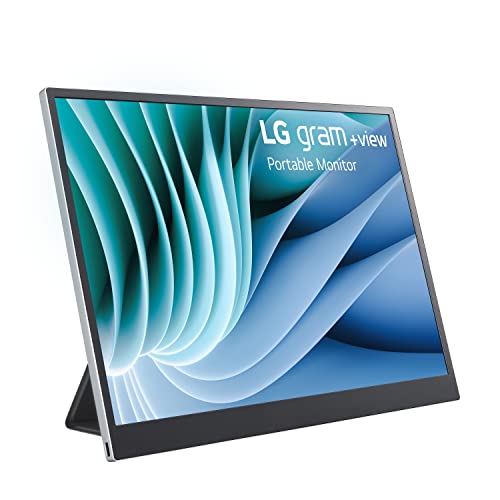
If your work is mostly documents, spreadsheets, and code, the LG Gram +View is the productivity pick, and the reason is the aspect ratio. It is a 16-inch panel in 16:10, which gives you noticeably more vertical room than a standard 16:9 portable, so you see more lines of a file before scrolling. LG built it to match the look of their Gram laptops, but it works with any USB-C laptop, and the magnetic smart cover doubles as a stand and folds for both horizontal and vertical views.
Color is the other strength. LG rates the non-reflective IPS panel at around 99 percent sRGB, which is very good for a travel screen and means photos and design previews look accurate rather than washed out. The included cover keeps the setup self-contained, so you can drop it into a bag and stand it up anywhere without extra hardware. As a clean, low-glare extension of a laptop screen, it is hard to fault for office-style work.
The catch is power. There is no built-in battery, so the Gram +View draws entirely from your laptop, which shortens your laptop’s runtime and makes it a weaker choice for long flights than the ZenScreen. It is also a larger 16-inch panel, so it is not the most pocketable option, and there is no HDMI fallback if your machine lacks a suitable USB-C port. For desk and meeting-room productivity it is excellent, but plan around the power draw on the road.
Lenovo ThinkVision M14
The ThinkVision M14 is the one I grab when weight is the deciding factor. Lenovo rates it at 1.26 pounds, making it the lightest screen in this group, and the build quality is rock solid in a way ThinkPad owners will recognize. It is a 14-inch FHD 1920 by 1080 IPS panel with a foldable kickstand, and it carries the same understated business design language, so it looks at home next to a work laptop rather than shouting for attention.
Connectivity is smart for a travel setup. There are two USB-C ports that support DisplayPort 1.2 Alt Mode and Power Delivery 2.0, so you can feed power in one side and drive the display, effectively daisy-chaining power through the monitor. Lenovo lists 300 nit typical brightness, 16.7 million colors, and a Kensington lock slot, plus Low Blue Light technology and a tilt-adjustable stand. For a clean, durable second screen that disappears into a bag, it covers the essentials.
The honest limitation is that it does not lead in any single spec. Brightness around 300 nits and standard FHD color mean it is neither the brightest nor the sharpest screen here, and there is no built-in battery, so it leans on your laptop for power. It also lacks an HDMI input, relying entirely on USB-C. If you want the lightest, toughest panel in the bag and your laptop has USB-C to spare, that is exactly what this delivers, just do not expect it to dazzle.
ViewSonic VG1655
The VG1655 is the value pick, a 15.6-inch monitor that does more than its price suggests. It is a Full HD 1920 by 1080 IPS panel with two USB-C ports and mini HDMI, so connecting almost any laptop is straightforward, and USB-C handles data, audio, video, and up to 60W charging over a single cable. A detachable magnetic cover folds into a stand and a built-in screen protector ships in the box, so you are not buying accessories to make it usable.
What stands out for the money is the speakers. The built-in stereo speakers are actually usable for a quick conference call without digging out earbuds, which is more than many portables in this class manage. ViewSonic rates it at 1.8 pounds and 0.6 inches thick, so it stays portable, and the package is rounded out by a 3-year warranty with US-based support, which is reassuring on a travel device that takes knocks.
The trade-off is that nothing here is class-leading. Brightness is fine rather than bright, so it will not win against strong ambient light, and at 0.6 inches it is a touch thicker than the slimmest rivals. There is no built-in battery either, so it pulls power from your laptop. None of that undercuts the core point: for the dollar amount, you get two USB-C ports, real speakers, a long warranty, and a screen that does the job.
ASUS ProArt PA148CTV
If your work depends on accurate color, the ProArt PA148CTV is the only portable here built for it. It is a 14-inch Full HD IPS anti-glare panel that ASUS factory pre-calibrates and Calman Verifies to 100 percent sRGB and 100 percent Rec. 709, so what you see on the road matches what you saw on the desk. For photo editors and designers who cannot trust a guessed color profile, that calibration is the entire reason to buy this over a cheaper screen.
It is also more capable than a plain display. The panel is a capacitive 10-point multitouch screen with stylus support, which is unusual at this size and handy for retouching or markup, and ASUS includes pre-tuned color profiles you can switch between for different jobs. A metal kickstand and tripod mount give you flexible placement, the ASUS Dial and on-screen controls make adjustments quick, and I/O covers two USB-C ports with DisplayPort Alt Mode plus a micro HDMI. ASUS Eye Care with TUV Rheinland-certified flicker-free and low blue light rounds it out.
The clear trade-off is price and focus. It costs more than the others, and there is no built-in battery, so it draws from your laptop like most of this list. The color tools and touch layer are wasted if your work is general productivity rather than visual editing, which makes it overkill for spreadsheets and email. But if accurate color away from your desk is non-negotiable, this is the portable that actually delivers it.
What to look for
The right USB screen depends on how and where you work. These are the factors that matter most when choosing.
- Power source: a built-in battery (like the ZenScreen) runs without touching your laptop’s charge, while batteryless screens draw from the laptop and shorten its runtime.
- Connectivity: count the USB-C ports and check for HDMI. Two USB-C ports let you feed power in and drive the display at once, and HDMI is a useful fallback for machines without DisplayPort Alt Mode.
- Weight and size: a 14-inch panel around 1.3 pounds disappears into a bag, while a 16-inch screen gives more working space at the cost of portability.
- Aspect ratio: 16:10 shows more vertical content for documents and code, while 16:9 suits video and general use.
- Panel and color: general work is fine on a standard IPS panel, but photo and design work needs factory-calibrated sRGB coverage.
- Brightness: most portables sit around 300 nits, which is fine indoors but weak against direct sunlight, so think about where you will actually use it.
- Stand and cover: a magnetic cover that doubles as a stand keeps the setup self-contained, and a kickstand that holds its angle matters more than it sounds.
- Extras: usable speakers help for quick calls, and touch or stylus support is worth it only if your work needs it.
The verdict
For most people the ASUS ZenScreen MB16AHP is the screen to buy, because the built-in battery makes it genuinely usable anywhere, including the one place other portables fall down, a flight where your laptop battery is precious. If your work is documents and code, the LG Gram +View and its 16:10 panel give you more room to read, just plan around its power draw. The Lenovo ThinkVision M14 is the pick when weight and build quality matter most, and the ViewSonic VG1655 delivers real value with two USB-C ports and speakers that work for a call. And if accurate color on the road is the whole point, the ASUS ProArt PA148CTV is the only one of these five built to deliver it.
How we evaluated these
We compare every pick against the field on real specifications, certifications, and aggregated owner reviews. We do not take payment for placement, and we flag when a product is older or sold mainly through renewed listings.
The shortlist
| Pick | Best for | Score | |
|---|---|---|---|
| ASUS ZenScreen MB16AHP | Check price | ||
| LG Gram +View | Check price | ||
| Lenovo ThinkVision M14 | Check price | ||
| ViewSonic VG1655 | Check price | ||
| ASUS ProArt PA148CTV | Check price |
Each pick, examined
ASUS ZenScreen MB16AHP
The portable monitor I have carried for two years and still recommend. 15.6 inches, 1080p IPS, built-in battery for cable-free use, and a kickstand that actually works. Brightness is around 300 nits, fine indoors. Color is calibrated reasonably out of the box. The battery means you can use it without drawing from your laptop on flights, which is the killer feature.
Strengths
- 15.6” FHD anti-glare IPS micro HDMI and USB Type-C portable monitor
- Ultra-portable award-winning design at 1.9 pounds and 0.3 inches slim to pair perfectly wi
- Built to be on-the-go with 7800mAh battery and stereo speakers for ultimate compatibility
- Smart cover and smart pen hole allow for landscape and portrait orientations easily with a
- ASUS Eye Care technology with TUV Rheinland-certified flicker-free backlighting and blue l
LG Gram +View
LG built this to match their Gram laptop aesthetic but it works with any USB-C laptop. 16 inches, 16:10 aspect ratio which is great for documents and code, and a magnetic smart cover that triples as a stand. No battery, so it draws from your laptop. Color is very good, around 99 percent sRGB. The aspect ratio is what sets it apart for productivity use.
Strengths
- With the new LG gram +view,1 portable monitor, you add the extra versatility of a second s
- Use our expansive 16" portable monitor alongside your laptop as an extension of your scree
- No matter the lighting, work without disruption with a 16” non-reflective IPS display and
- Wherever you go, you can set up an optimized work station with a second screen for your la
- With the included LG gram +view cover, enjoy both horizontal and vertical views with the a

Lenovo ThinkVision M14
The 14-inch business pick. Light at under 1.3 pounds, foldable kickstand, and a USB-C in and out so you can daisy chain power. ThinkPad users will appreciate the design language. Brightness is around 300 nits, color is decent. Not the brightest or sharpest, but the lightest in my bag and the build quality is rock solid.
Strengths
- 14" Fhd 1920 x 1080 IPS
- 16. 7 million colors, 300 nit typical, 6ms with old
- 2 x USB Type-C ports that supports DisplayPort 1. 2 Alt Mode and Pd2. 0
- Low Blue Light Technology, Kensington lock slot
- Tilt adjustable, weight 1. 26 lbs

ViewSonic VG1655
A 15.6-inch monitor that punches above its price. Two USB-C ports, mini HDMI, and a foldable cover stand. Built-in stereo speakers that are actually usable for a quick conference call without earbuds. Brightness is fine, not class-leading. The value here is real for the dollar amount.
Strengths
- ULTRA-PORTABLE MONITOR: 15.6 Inch Full HD (1920x1080p) IPS portable monitor with a premium
- SMALL AND COMPACT: With a weight of 1.8 lbs and a thickness of 0.6 in, this portable monit
- LESS CABLE CLUTTER: USB-C connectivity for fast data, audio and video transfer, and 60W ch
- STAND COVER & SCREEN PROTECTOR: Comes with a detachable magnetic screen cover and a built-
- INDUSTRY-LEADING WARRANTY: 3-year coverage with access to our US-based customer service te

ASUS ProArt PA148CTV
For designers and photo editors who need accurate color on the road. 14 inches, 100 percent sRGB factory calibrated, and pre-tuned color profiles you can switch between. Touch screen with stylus support, which is unusual at this size. Pricier than the others but if your work requires color accuracy, it is the only portable that delivers.
Strengths
- 14-inch Full HD IPS anti-glare panel with capacitive 10-point multitouch
- 100% sRGB and 100% Rec. 709 color gamut, and Calman Verified with factory pre-calibrated D
- User-friendly design with Intuitive OSD control via ASUS Dial, metal kickstand and tripod
- I/O ports include two USB Type-C ports (DP Alt mode) and one Micro HDMI for variety device
- ASUS Eye Care monitors feature TÜV Rheinland-certified Flicker-free and Low Blue Light tec
Questions answered
It needs USB-C with DisplayPort Alternate Mode support. Most laptops from 2019 onward have at least one such port. Check your specs for DP Alt Mode, sometimes called video over USB-C, before buying.
Yes, if your laptop port supports USB-C Power Delivery and DP Alt Mode, a single cable can carry signal in one direction and power in the other. Some monitors pass charge through, some need their own power.
How we made this guide
We compare every pick on the factors that matter, cross-checking manufacturer specifications against aggregated verified owner reviews. We rank independently and never take payment for placement. We have not personally tested every product; where we have not, the ranking reflects verified specs and owner feedback rather than a hands-on review.
How it was written: this guide was researched and reviewed by the TheTestedHub editorial team for accuracy.
Affiliate disclosure: TheTestedHub is reader-supported. When you buy through links on our site, we may earn a commission at no extra cost to you.
Keep reading

Your Docking Station Match: CalDigit TS4 and More

Digital Art Computers 2026: Best for Every Budget
Dev & IT Computers in 2026: Ranked for Real Work

Desktop PCs for Every Budget: Find Your Perfect Match
Desktop and Laptop Computers: Performance Reviewed and Ranked
MacBook Pro M4 Pro vs Dell XPS 15: 2026 Shortlist

Buy the Best DIY Computer in 2026: Corsair One i300
