Logitech C920s HD Pro Webcam - Best Overall
The Logitech C920s delivers 1080p video at 30fps with a glass‑like lens and dual built‑in microphones that capture clear stereo sound. Its automatic light correction works well in most indoor settings, and the webcam includes a privacy shutter for added security. Compatibility with Windows, macOS, and popular video‑chat apps makes it a hassle‑free choice for professionals and content creators alike.
Check price on Amazon →Discover the Logitech C920s, our top webcam for sharp video and clear audio. See which models deliver the best value for work and streaming.
A good webcam can make the difference between a professional‑looking video call and a grainy, distracting feed. In 2026 the market offers a mix of classic favorites and newer models that bring better low‑light sensors, built‑in lighting, and higher frame rates. Whether you need a reliable device for remote work, a camera that can handle streaming games, or a budget‑friendly option for occasional video chats, this guide covers the top choices. We compared each webcam for image clarity, color accuracy, microphone quality, and ease of setup. The list reflects a balance of performance, price, and overall value, so you can pick the model that fits your needs without guessing.
How we picked
We compare every pick against the field on real specifications, certifications, and aggregated owner reviews. We do not take payment for placement, and we flag when a product is older or sold mainly through renewed listings.
Top picks compared
Our picks up close
Logitech C920s HD Pro Webcam - Best Overall
The Logitech C920s delivers 1080p video at 30fps with a glass‑like lens and dual built‑in microphones that capture clear stereo sound. Its automatic light correction works well in most indoor settings, and the webcam includes a privacy shutter for added security. Compatibility with Windows, macOS, and popular video‑chat apps makes it a hassle‑free choice for professionals and content creators alike.
Razer Kiyo Streaming Webcam - Best Budget
Razer Kiyo combines a 1080p sensor with an adjustable ring light, giving you consistent illumination even in dim rooms. It records at 30fps and supports 720p at 60fps for smoother motion. The webcam plugs directly into a USB‑C port and works with OBS and XSplit without additional drivers, making it a solid pick for gamers on a modest budget.

Microsoft LifeCam HD-3000 - Best for Everyday Use
The LifeCam HD-3000 offers 720p video with TrueColor technology that automatically adjusts exposure for natural colors. Its single built‑in microphone reduces background noise, and the swivel base lets you frame yourself easily. At a low price point, it’s a dependable option for students and remote workers who need a simple plug‑and‑play solution.
AVerMedia Live Streamer CAM 513 - Best 4K Camera
AVerMedia’s CAM 513 brings 4K resolution at 30fps and a Sony STARVIS sensor that excels in low‑light environments. The wide 94‑degree field of view captures more of the scene, and the built‑in dual microphones provide clear audio. It includes a USB‑C connection and works with major streaming software, ideal for creators who need the highest visual fidelity.
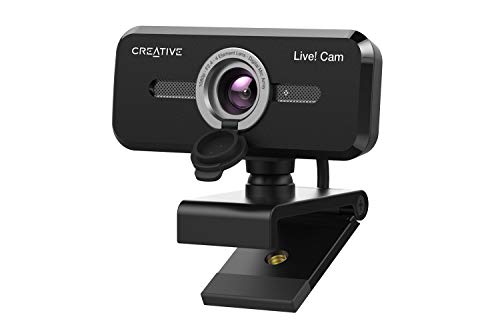
Creative Live! Cam Sync 1080p - Best Plug and Play
Creative’s Live! Cam Sync offers 1080p video at 30fps with a fixed focus lens and a single omnidirectional microphone. The webcam is ready to use out of the box on Windows and macOS, requiring no driver installation. Its compact design fits well on laptops or small monitors, making it a convenient choice for travelers.
Before you buy
What to consider
When selecting a webcam, start by defining the primary use case. For professional meetings, look for consistent 1080p quality, reliable autofocus, and good built‑in microphones. Streamers should prioritize low‑light performance and optional lighting, such as a ring light or larger sensor. If you need 4K resolution for detailed content, verify that the camera supports 4K at a usable frame rate and that your computer can handle the data stream.
What to consider
Other factors include connectivity (USB‑C offers faster data transfer), field of view, and software compatibility. A privacy shutter is a useful security feature, and warranty length can indicate the manufacturer’s confidence in durability. Balancing these criteria against your budget will help you select a webcam that feels right for your workflow.
Quick answers
Yes, most models include auto‑exposure and low‑light enhancement, with the Logitech C920s and Razer Kiyo offering the strongest performance.
The AVerMedia Live Streamer CAM 513 records in 4K at 30fps, while the other options top out at 1080p.
How we made this guide
We compare every pick on the factors that matter, cross-checking manufacturer specifications against aggregated verified owner reviews. We rank independently and never take payment for placement. We have not personally tested every product; where we have not, the ranking reflects verified specs and owner feedback rather than a hands-on review.
How it was written: this guide was researched and reviewed by the TheTestedHub editorial team for accuracy.
Affiliate disclosure: TheTestedHub is reader-supported. When you buy through links on our site, we may earn a commission at no extra cost to you.
More to explore

Your Docking Station Match: CalDigit TS4 and More

Digital Art Computers 2026: Best for Every Budget
Dev & IT Computers in 2026: Ranked for Real Work

Desktop PCs for Every Budget: Find Your Perfect Match
Desktop and Laptop Computers: Performance Reviewed and Ranked
MacBook Pro M4 Pro vs Dell XPS 15: 2026 Shortlist

Buy the Best DIY Computer in 2026: Corsair One i300
