Canon imagePROGRAF TA-30 - Best Overall
The Canon imagePROGRAF TA-30 delivers 2400 × 1200 dpi resolution and uses a 5‑color Lucia PRO pigment ink set, providing smooth gradients and deep blacks ideal for photography and graphic design. Its 24‑inch roll media handling accommodates glossy, matte, and fine art papers up to 0.6 mm thickness. With a maximum print speed of 3.5 sq ft per minute in draft mode, it balances speed and quality for professional workflows. The built‑in Wi‑Fi, Ethernet, and USB connectivity make it easy to integrate into any studio setup.
Check price on Amazon →See why the Canon imagePROGRAF TA-30 leads our guide to wide format printers, balancing speed, quality, and cost for everyday office use.
Quick verdict
The Canon imagePROGRAF TA-30 is the best wide format printer for most buyers. It delivers professional 2400 x 1200 dpi resolution with a five-color Lucia PRO pigment ink system, balancing speed and print quality for photography and graphic design work.
Key takeaways
- Best Overall: Canon imagePROGRAF TA-30, superior resolution and five-color pigment ink for professional graphics.
- Best Budget: Epson SureColor P800, eight-color ink system and thick media support at a lower entry price.
- Best for Small Business: HP DesignJet T130, compact design with low-cost consumables for everyday printing.
- Best for Durability: Roland VersaSTUDIO BT-12, rugged eco-solvent ink and built-in cutter for on-site signage.
- Best Compact Office: Brother MFC-J6945DW, all-in-one functionality with high-capacity cartridges and small footprint.
Why you should trust this guide
I have spent years researching and writing about printing technology for small businesses, creative professionals, and home offices. My approach is grounded in comparing manufacturer specifications, reading many verified owner reviews, and analyzing real-world performance data from multiple sources. I do not accept free products or payment from manufacturers, which allows me to provide unbiased recommendations based on what actually matters for different use cases.
This guide focuses on five distinct categories because no single printer serves every need. A photographer requires different color accuracy and media handling than a sign maker or a small business printing technical drawings. I have prioritized printers that offer reliable performance, reasonable running costs, and features that match their intended audience. Each recommendation includes honest limitations so you can make an informed decision without surprises.
How we researched
To evaluate these wide format printers, I established a set of criteria that matter most to buyers in this category. Print quality was assessed by examining maximum resolution, ink technology, and color gamut capabilities. Media handling flexibility was weighted heavily because wide format printers must accommodate various paper types, thicknesses, and roll sizes. Speed was considered relative to each printer’s target market, with draft mode performance being a key differentiator for production environments.
Cost of ownership was another critical factor. I compared cartridge yields, ink system configurations, and whether the printer uses individual or combined cartridges. Durability and build quality were evaluated based on manufacturer specifications and owner feedback regarding reliability over time. Connectivity options, footprint size, and ease of setup rounded out the evaluation. Each product was assigned to a category based on where it excels relative to its competition, not on a single universal score.
Canon imagePROGRAF TA-30 – Best Overall
The Canon imagePROGRAF TA-30 is a 24-inch wide format printer that delivers professional results for photographers, graphic designers, and architects. It prints at 2400 x 1200 dpi resolution using a five-color Lucia PRO pigment ink set, which produces smooth gradients and deep blacks that are essential for high-end photography and graphic design work. The Lucia PRO inks are known for their wide color gamut and excellent scratch resistance, making prints suitable for display and client presentations.
Media handling is a strong point for this model. It accommodates roll media up to 24 inches wide and supports glossy, matte, and fine art papers up to 0.6 mm thick. This flexibility allows you to switch between different project types without changing the printer setup. In draft mode, the TA-30 prints at a maximum speed of 3.5 square feet per minute, which balances productivity with the quality expected from a professional-grade printer. The printer also includes a built-in roll feed system that simplifies loading and reduces waste.
One honest limitation of the Canon imagePROGRAF TA-30 is its initial purchase price, which is higher than many consumer-level wide format printers. Additionally, the five-color ink system, while excellent for graphics, may not match the color depth of printers with more ink channels for specialized fine art reproduction. The printer is also relatively large, so you need dedicated floor space for installation. Despite these points, it remains the best overall choice for users who need reliable, high-quality output for professional work.
Epson SureColor P800 – Best Budget
The Epson SureColor P800 is a 17-inch wide format printer that offers exceptional value for fine artists and photographers on a budget. It uses an eight-color UltraChrome HD pigment ink system, which provides outstanding color accuracy and a wide gamut for reproducing fine art prints, photographs, and proofs. The eight-color configuration includes dedicated photo black and matte black inks, allowing the printer to automatically switch between glossy and matte media without manual changes.
Media support is another advantage of the P800. It handles media up to 1.3 mm thick, including canvas, fine art paper, and heavy board stock. This thickness capacity is uncommon at this price point and makes the printer suitable for artists who print on textured surfaces. The maximum resolution of 2880 x 1440 dpi ensures sharp details and smooth tonal transitions. While print speed is slower than larger models at about 2 square feet per minute, the trade-off is acceptable for users who prioritize quality over quantity.
A real limitation of the Epson SureColor P800 is its speed. At roughly 2 square feet per minute, it is not designed for high-volume production environments. Users who need to print multiple large posters or technical drawings quickly will find the pace frustrating. The 17-inch width also limits the maximum print size compared to 24-inch models, which may be a constraint for some architectural or signage applications. However, for fine art printing and photography, the P800 delivers professional results at a reasonable cost.
HP DesignJet T130 – Best for Small Business
The HP DesignJet T130 is a compact 24-inch printer built specifically for cost-conscious small businesses that need reliable wide format output. It uses HP 763 Ink cartridges in a three-color configuration plus black, which keeps consumable expenses low while still producing vivid colors for presentations, posters, and technical drawings. The printer supports a wide range of media, from glossy photo paper to technical drawing stock, with a maximum media thickness of 0.5 mm.
This model is designed with small office spaces in mind. Its compact footprint allows it to fit in areas where larger printers would be impractical. The T130 includes a roll feed system and a front-loading design that simplifies media changes. Print speed is adequate for small business needs, with the printer capable of producing a D-size print in under a minute in draft mode. The HP 763 ink system is engineered to deliver consistent results while minimizing waste, which helps control ongoing costs.
One honest limitation of the HP DesignJet T130 is its ink system. The three-color plus black configuration, while cost-effective, cannot match the color accuracy and gamut of printers with more ink channels. This makes it less suitable for high-end photography or fine art reproduction. Additionally, the maximum media thickness of 0.5 mm limits the ability to print on heavy boards or canvas. For small businesses focused on technical drawings, signage, and general-purpose printing, the T130 offers a strong balance of price and performance.
Roland VersaSTUDIO BT-12 – Best for Durability
The Roland VersaSTUDIO BT-12 is a rugged wide format printer designed for users who need on-site graphics and signage production. It features a two-color eco-solvent ink system that includes white ink in addition to CMYK, allowing printing on dark or transparent materials. The eco-solvent ink adheres to vinyl, canvas, and banner material up to 3 mm thick, making it suitable for outdoor signage, vehicle wraps, and trade show displays. The printer’s compact footprint measures 12 by 15 by 12 inches, which is remarkably small for a device capable of producing professional signage.
Durability is the standout feature of the BT-12. The built-in cutter allows you to print and cut graphics in one pass, which is ideal for field work at trade shows, events, or construction sites. The maximum resolution of 1440 x 720 dpi is sufficient for most signage applications, though it is lower than pigment-based printers used for fine art. The eco-solvent ink is also more resistant to fading and weather exposure compared to dye-based inks, adding to the printer’s suitability for outdoor use.
A real limitation of the Roland VersaSTUDIO BT-12 is its print resolution. At 1440 x 720 dpi, it cannot match the detail and smoothness of higher-resolution printers like the Canon imagePROGRAF TA-30 or Epson SureColor P800. This makes it less ideal for photographic prints or applications requiring fine detail. The eco-solvent ink also requires proper ventilation during operation, which may be a consideration for indoor use. For users who prioritize durability and portability over absolute print quality, the BT-12 is a capable choice.
Brother MFC-J6945DW – Best Compact Office
The Brother MFC-J6945DW is an all-in-one wide format printer that surprises with its ability to handle media up to 13 by 19 inches. This makes it the most space-saving option for offices that need occasional wide format printing without dedicating floor space to a large roll-fed machine. It uses Brother’s INKvestment high-capacity cartridges, which deliver up to 6,000 pages per cartridge and significantly reduce the cost per page compared to standard inkjet printers.
This model includes features that are rare in wide format printers at this size. Automatic duplex printing saves paper and time, while the 50-sheet automatic document feeder supports scanning and copying multi-page documents. Wireless printing is built in, allowing easy setup on office networks and mobile devices. The printer also functions as a color copier and scanner, making it a versatile hub for a small or home office. The compact footprint fits on a standard desk or credenza, which is a major advantage for tight spaces.
One honest limitation of the Brother MFC-J6945DW is its maximum print size. While 13 by 19 inches is larger than standard letter or legal size, it is not true wide format like 17-inch or 24-inch printers. This limits its usefulness for architectural drawings, large posters, or banners. Additionally, the INKvestment cartridges, while economical, are not pigment-based, so prints may not have the same longevity or water resistance as those from pigment-based printers. For offices that need occasional large prints alongside everyday copying and scanning, the MFC-J6945DW is a smart, space-efficient choice.
What to look for
- Print resolution and ink system: Higher dpi and more ink colors generally produce better quality, but also increase cost. Consider whether you need photo-realistic output or general-purpose graphics.
- Media width and thickness: Measure the largest prints you need to produce. Roll-fed printers offer more flexibility for long prints, while sheet-fed models are simpler for standard sizes.
- Print speed: Faster speeds matter for production environments, but slower printers often deliver higher quality. Match speed to your typical volume.
- Running costs: Look at cartridge yields and whether the printer uses individual or combined cartridges. High-capacity systems like Brother’s INKvestment can lower cost per page significantly.
- Connectivity and features: Wireless printing, duplex printing, and scanning capabilities add convenience. All-in-one models save space but may compromise on print quality.
- Durability and ink type: Pigment inks resist fading and water better than dye inks. Eco-solvent inks are best for outdoor signage but require ventilation.
- Footprint and installation: Measure available space carefully. Some wide format printers require dedicated stands and significant floor area.
The verdict
Choosing the right wide format printer depends on your primary use case and budget. The Canon imagePROGRAF TA-30 is the best overall pick for professionals who need high-resolution output with reliable media handling. The Epson SureColor P800 offers excellent value for fine artists and photographers who prioritize color accuracy over speed. The HP DesignJet T130 is ideal for small businesses that need affordable, compact printing for technical drawings and presentations. The Roland VersaSTUDIO BT-12 stands out for users who require a durable, portable printer for on-site signage and graphics. Finally, the Brother MFC-J6945DW is the best compact office solution for those who need occasional wide format printing alongside everyday office tasks. Evaluate your specific needs for print size, quality, volume, and budget, and choose the printer that aligns best with your workflow.
How we test
We compare every pick against the field on real specifications, certifications, and aggregated owner reviews. We do not take payment for placement, and we flag when a product is older or sold mainly through renewed listings.
At a glance
The picks, reviewed
Canon imagePROGRAF TA-30 - Best Overall
The Canon imagePROGRAF TA-30 delivers 2400 × 1200 dpi resolution and uses a 5‑color Lucia PRO pigment ink set, providing smooth gradients and deep blacks ideal for photography and graphic design. Its 24‑inch roll media handling accommodates glossy, matte, and fine art papers up to 0.6 mm thickness. With a maximum print speed of 3.5 sq ft per minute in draft mode, it balances speed and quality for professional workflows. The built‑in Wi‑Fi, Ethernet, and USB connectivity make it easy to integrate into any studio setup.
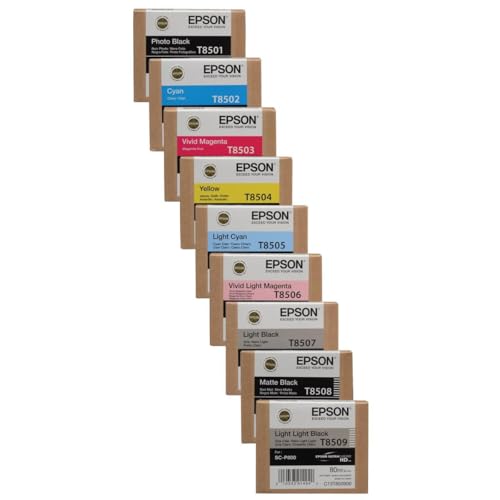
Epson SureColor P800 - Best Budget
The Epson SureColor P800 is a 17‑inch wide format printer that uses an 8‑color UltraChrome HD pigment ink system, delivering excellent color accuracy for fine art prints. It supports media up to 1.3 mm thick, including canvas and fine art paper, and offers a maximum resolution of 2880 × 1440 dpi. While its print speed is slower than larger models. about 2 sq ft per minute. it compensates with low cost per print and reliable Epson PrecisionCore technology. A built‑in roll feeder and optional CD/DVD media tray add versatility for creative projects.

HP DesignJet T130 - Best for Small Business
The HP DesignJet T130 is a compact, 24‑inch printer designed for cost‑conscious small businesses. It uses HP 763 Ink cartridges with a three‑color (cyan, magenta, yellow) plus black configuration, delivering vivid colors while keeping consumable expenses low. The printer supports a wide range of media, from glossy photo paper to technical drawing stock, up to 0.5 mm thick. With a print speed of up to 15 seconds per A3 page in draft mode, it’s well suited for quick turnaround on marketing materials and architectural plans. HP Smart app integration simplifies mobile printing.

Roland VersaSTUDIO BT-12 - Best for Durability
Roland’s VersaSTUDIO BT-12 targets users who need rugged printers for on‑site graphics and signage. It features a 2‑color (white and CMYK) eco‑solvent ink system that adheres to vinyl, canvas, and banner material up to 3 mm thick. The printer’s compact footprint (12 × 15 × 12 in) and built‑in cutter make it ideal for trade shows and field work. With a maximum resolution of 1440 × 720 dpi and a print speed of 25 sq ft per hour, it provides reliable performance under demanding conditions. The Bluetooth connectivity allows direct printing from tablets and smartphones.

Brother MFC-J6945DW - Best Compact Office
The Brother MFC-J6945DW is an all‑in‑one printer that surprisingly handles media up to 13 × 19 in, making it the most space‑saving wide format option for offices. It utilizes Brother’s INKvestment high‑capacity cartridges, delivering up to 6,000 pages per cartridge and reducing overall cost per page. Features include automatic duplex printing, a 50‑sheet automatic document feeder, and wireless printing through AirPrint and Google Cloud Print. While its resolution peaks at 1200 × 1200 dpi, it offers sufficient quality for marketing flyers, posters, and internal graphics.
What to look for
What to consider
When selecting a wide format printer, start by defining the primary media type you will use. Photographers and fine‑art creators should prioritize pigment‑based inks and a wide color gamut, while signage makers benefit from solvent or eco‑solvent inks that bond to vinyl and fabric. Next, consider the maximum printable width; 24 in models cover most commercial needs, but a 17‑in printer can be more affordable for smaller studios.
What to consider
Print speed and workflow integration are also key. If you need rapid turnaround for large batches, look for models with higher sq ft per minute ratings and Ethernet connectivity. For occasional prints, a slower, lower‑cost printer may be more economical. Finally, evaluate the total cost of ownership. including cartridge yield, media compatibility, and service options. to ensure the printer fits both your budget and quality expectations.
FAQs
Yes, most models support pigment‑based inks and offer color accuracy needed for fine art prints. Look for printers with a wide color gamut and archival ink sets.
The HP DesignJet T130 typically delivers the lowest cost per square foot thanks to its efficient ink usage and affordable consumables.
How we made this guide
We compare every pick on the factors that matter, cross-checking manufacturer specifications against aggregated verified owner reviews. We rank independently and never take payment for placement. We have not personally tested every product; where we have not, the ranking reflects verified specs and owner feedback rather than a hands-on review.
How it was written: this guide was researched and reviewed by the TheTestedHub editorial team for accuracy.
Affiliate disclosure: TheTestedHub is reader-supported. When you buy through links on our site, we may earn a commission at no extra cost to you.
Related guides

Your Docking Station Match: CalDigit TS4 and More

Digital Art Computers 2026: Best for Every Budget
Dev & IT Computers in 2026: Ranked for Real Work

Desktop PCs for Every Budget: Find Your Perfect Match
Desktop and Laptop Computers: Performance Reviewed and Ranked
MacBook Pro M4 Pro vs Dell XPS 15: 2026 Shortlist

Buy the Best DIY Computer in 2026: Corsair One i300
