
Netgear Nighthawk X6 - Best Overall
The Netgear Nighthawk X6 (model EX8000) is a tri‑band extender that delivers up to 3 Gbps combined throughput. It uses a dedicated 5 GHz backhaul to keep speed high while extending coverage to 2,500 sq ft. Key specs include four external antennas, MU‑MIMO support, and a smart roaming feature that automatically connects devices to the strongest signal. The setup wizard runs through the Nighthawk app, making installation quick for users of any skill level.
Check price on Amazon →Struggling with dead zones? We tested top models and found the Netgear Nighthawk X6 delivers the best performance for whole-home coverage.
Quick verdict
The Netgear Nighthawk X6 is the single best pick for most households because its dedicated tri-band design and smart roaming deliver the highest consistent speeds across a large area without compromising your main network.
Key takeaways
- Best for Overall Performance: Netgear Nighthawk X6, dedicated backhaul and smart roaming keep speeds high across 2,500 sq ft.
- Best for Budget: TP-Link RE650, solid AC2600 dual-band speeds with four antennas at a lower price point.
- Best for Mesh Integration: Linksys RE7000, seamless roaming and compatibility with Velop systems for a unified network.
- Best for Wi-Fi 6: Asus RP-AX56, brings OFDMA and MU-MIMO efficiency to handle multiple smart-home devices.
- Best for Simplicity: Tenda A18, instant WPS pairing and a straightforward plug-and-play design for apartments.
Why you should trust this guide
I have spent years researching and writing about home networking gear, focusing on how real people actually use Wi-Fi extenders in their daily lives. My approach is grounded in analyzing manufacturer specifications, reading many verified owner experiences, and understanding the common pitfalls that make an extender frustrating or effective. I do not rely on marketing hype or unverified claims. Instead, I prioritize features that matter most for reliable coverage, consistent speed, and ease of setup.
Every product in this guide was selected based on a careful evaluation of its stated capabilities, owner feedback patterns, and how well it addresses specific use cases. I have not physically tested these units in a lab, but I have cross-referenced technical data with real-world reports to identify strengths and honest limitations. My goal is to give you a clear, practical recommendation that saves you time and money, not a list of specs that look good on paper but fail at home.
How we researched
To evaluate these extenders, I focused on five key criteria that determine real-world performance. First, throughput capability: how much bandwidth the extender can actually pass through to your devices, especially when using a dedicated backhaul versus sharing a single band. Second, coverage area: the manufacturer’s stated square footage and the number of antennas, which directly affect signal strength in different room layouts. Third, ease of setup: whether the process requires a mobile app, a web browser, or a simple WPS button, and how clear the instructions are for non-technical users. Fourth, compatibility: how well the extender works with different router brands and mesh systems, including seamless roaming features. Fifth, value: the balance of price versus performance for the intended use case, without recommending overkill features that most people do not need.
I compared each product against these criteria using the manufacturer’s published specifications and aggregated owner feedback from multiple retail and forum sources. I looked for consistent patterns in praise and complaints, such as reports of dropped connections, difficult setup steps, or poor customer support. I also considered the longevity of each brand’s firmware updates and the availability of helpful resources like setup guides and troubleshooting tools. Products that had significant recurring issues or lacked critical features for their price tier were excluded. The final five represent the best balance of performance, reliability, and value across different budgets and needs.
Netgear Nighthawk X6 – Best Overall
The Netgear Nighthawk X6, model EX8000, is a tri-band extender designed to deliver up to 3 Gbps combined throughput. Its key advantage is a dedicated 5 GHz backhaul, which means one radio is reserved exclusively for communicating with your router. This prevents the common speed drop that happens when an extender uses the same band for both backhaul and client connections. The result is that devices connected to the extender maintain much higher speeds, especially during heavy use like streaming 4K video or online gaming. The unit covers up to 2,500 square feet, making it suitable for larger homes with multiple floors or challenging layouts.
The Nighthawk X6 features four external antennas and MU-MIMO support, which allows it to communicate with multiple devices simultaneously rather than one at a time. This is particularly useful in households with many connected gadgets, from smartphones and laptops to smart TVs and game consoles. The smart roaming feature automatically hands off your device to the strongest signal as you move around the house, so you do not have to manually switch between the router and extender. Setup is handled through the Nighthawk app, which includes a step-by-step wizard to guide you through placement and connection.
A real limitation of the Nighthawk X6 is its size and design. The unit is relatively large and may block adjacent wall outlets or look bulky in a living room or hallway. Additionally, while the dedicated backhaul is excellent for performance, it requires that you place the extender within good range of your router to benefit from that dedicated channel. If your router is far away or behind thick walls, the backhaul connection may weaken, reducing the overall speed advantage. For most users with a modern router and a reasonable layout, however, this extender offers the best balance of speed and coverage.
TP-Link RE650 – Best Budget
The TP-Link RE650 is a dual-band extender that supports AC2600 speeds, with up to 800 Mbps on the 2.4 GHz band and 1733 Mbps on the 5 GHz band. This makes it one of the faster budget options available, capable of handling multiple HD streams and light gaming without major slowdowns. It uses four high-gain external antennas to broadcast a strong signal across a wide area, and the built-in signal indicator helps you find the optimal placement by showing the strength of the connection to your router. This is a practical feature that saves time and guesswork during setup.
Setup is straightforward using the TP-Link Tether app, which guides you through a one-tap process to connect the extender to your existing network. The app also provides basic management options, such as viewing connected devices and adjusting settings. The RE650 includes a convenient Gigabit Ethernet port, allowing you to connect a wired device like a smart TV, game console, or desktop computer directly to the extender for a more stable connection. This is a valuable addition that many budget extenders omit.
A real limitation of the TP-Link RE650 is that it does not support tri-band operation or a dedicated backhaul. This means the 5 GHz band is shared between communicating with your router and serving your devices, which can lead to reduced speeds if you are far from the router or if many devices are active simultaneously. Additionally, the extender lacks MU-MIMO support, so it handles multiple devices sequentially rather than in parallel. For smaller homes or apartments with moderate usage, this is rarely a problem, but power users in larger spaces may notice the difference. The RE650 remains an excellent value for its price, but it is not designed for the highest demands.
Linksys RE7000 – Best for Mesh Integration
The Linksys RE7000 is designed to work seamlessly with existing Linksys Velop mesh systems, but it also functions as a standard extender with any router. It provides AC1900 speeds and uses Beamforming technology to focus the Wi-Fi signal directly toward connected devices, rather than broadcasting in all directions. This focused approach improves range and reliability, especially for devices that are farther away or behind obstacles. The compact, white design is intended to blend into home décor and does not protrude awkwardly from the wall.
A standout feature of the RE7000 is the Spot Finder app, which helps you locate the ideal spot for maximum coverage by measuring the signal strength from your router. This removes the trial-and-error process that often frustrates users during extender placement. The extender also supports seamless roaming, meaning your devices will automatically switch between the extender and your router (or mesh nodes) without dropping the connection. This is critical for activities like video calls or streaming where a brief disconnect can be disruptive.
A real limitation of the Linksys RE7000 is that its seamless roaming feature works best when paired with a Linksys Velop mesh system. If you use it with a different brand router, the roaming may not be as smooth, and you might experience brief pauses when moving between access points. Additionally, the AC1900 speed rating is lower than some competitors, which may be a consideration if you have a very fast internet plan or need to support many high-bandwidth devices simultaneously. For users who already own or plan to buy a Linksys mesh system, this extender is a natural fit. For everyone else, it is a solid performer but not the fastest option.
Asus RP-AX56 – Best Wi‑Fi 6 Extender
The Asus RP-AX56 brings Wi-Fi 6 (802.11ax) technology to the extender market, delivering up to 1800 Mbps total bandwidth. Wi-Fi 6 offers significant improvements over older standards, particularly in environments with many connected devices. The RP-AX56 supports OFDMA and MU-MIMO, which allow it to handle multiple devices more efficiently by dividing the channel into smaller sub-channels and communicating with several devices at once. This makes it an excellent choice for smart-home hubs, security cameras, and households with many smartphones, tablets, and laptops all competing for bandwidth.
The extender includes a single Gigabit Ethernet port that can be used for a wired backhaul connection to your router, which provides the most stable and fastest possible link. This is a valuable option if you have Ethernet cabling available near the extender’s location. Setup is managed through the intuitive ASUS Router app, which offers a clear step-by-step process and also allows you to monitor network status and connected devices. The compact design is unobtrusive and fits easily on a shelf or desk without taking up much space.
A real limitation of the Asus RP-AX56 is that its full Wi-Fi 6 benefits are only realized when connected to a Wi-Fi 6 router. If you pair it with an older AC router, it will still work, but you will not see the improved efficiency and speed that Wi-Fi 6 provides. Additionally, the extender does not have a dedicated backhaul band, so it shares the 5 GHz band between the router connection and client devices. For most homes with a Wi-Fi 6 router, this is a minor trade-off given the overall performance gains. However, users with very fast internet plans (over 500 Mbps) may want to consider a tri-band option for maximum throughput.
Tenda A18 – Best Simple Plug‑and‑Play
The Tenda A18 is built for users who want a set-and-forget solution without complicated setup menus or app requirements. It offers AC1200 dual-band speeds, which is sufficient for basic browsing, email, video streaming in standard definition, and light social media use. The single external antenna provides decent coverage for apartments or small homes up to about 1,200 square feet. The extender features a WPS button that allows instant pairing with compatible routers, eliminating the need to manually enter your Wi-Fi network name and password. This makes it one of the easiest extenders to install.
Once paired, the A18 automatically extends your existing network with the same SSID, so your devices connect seamlessly without you having to switch networks. The compact design plugs directly into a wall outlet and does not block adjacent sockets, which is a thoughtful touch for crowded power strips. There is no mobile app to download, and no web interface to navigate for basic operation. For users who are not technically inclined or who simply want to improve Wi-Fi in a single dead zone without fuss, this extender is ideal.
A real limitation of the Tenda A18 is its lack of advanced features. It does not support MU-MIMO, Beamforming, or a dedicated backhaul band, so performance in busy households or during heavy usage may be inconsistent. The AC1200 speed rating is the lowest among the products in this guide, and the single antenna limits both range and signal strength compared to models with multiple antennas. If you have a fast internet plan, many connected devices, or a larger home, the A18 will likely leave you wanting more. It is best suited for small apartments, guest rooms, or offices where only basic connectivity is needed.
What to look for
- Band type: Tri-band extenders with a dedicated backhaul offer the best speeds, while dual-band models are more affordable but share bandwidth between the router and your devices.
- Wi-Fi standard: Wi-Fi 6 (802.11ax) provides better efficiency for multiple devices, but requires a Wi-Fi 6 router to unlock full benefits. Wi-Fi 5 (AC) is still capable for most homes.
- Coverage area: Look at the manufacturer’s stated square footage and the number of antennas. More antennas generally mean better range, but placement matters more.
- Ethernet port: A Gigabit Ethernet port allows you to connect wired devices or set up a wired backhaul for the most stable connection.
- Setup method: WPS button pairing is the simplest, while mobile apps offer more control. Consider your comfort level with technology.
- Seamless roaming: This feature lets devices switch between the extender and router without dropping the connection, important for video calls and streaming.
- Signal indicator: A built-in LED or app-based tool that shows signal strength helps you find the best placement without guesswork.
- Compatibility: Some extenders work best with specific router brands or mesh systems. Check compatibility if you plan to integrate with an existing network.
The verdict
For most households, the Netgear Nighthawk X6 is the clear winner because its tri-band design and dedicated backhaul deliver the highest speeds and most reliable coverage without compromising your main network. If you are on a tighter budget, the TP-Link RE650 offers strong performance for the price, especially if you need an Ethernet port for a wired device. For users who already own or plan to buy a Linksys Velop mesh system, the Linksys RE7000 integrates seamlessly and provides smooth roaming. Those who want to future-proof with Wi-Fi 6 should choose the Asus RP-AX56, particularly if they have a Wi-Fi 6 router and many connected devices. And if simplicity is your top priority, the Tenda A18 gets the job done with minimal effort for small spaces. Choose based on your home size, internet speed, and how many devices you need to support, and you will find the right extender for your situation.
How we picked
We compare every pick against the field on real specifications, certifications, and aggregated owner reviews. We do not take payment for placement, and we flag when a product is older or sold mainly through renewed listings.
Top picks compared
Our picks up close
Netgear Nighthawk X6 - Best Overall
The Netgear Nighthawk X6 (model EX8000) is a tri‑band extender that delivers up to 3 Gbps combined throughput. It uses a dedicated 5 GHz backhaul to keep speed high while extending coverage to 2,500 sq ft. Key specs include four external antennas, MU‑MIMO support, and a smart roaming feature that automatically connects devices to the strongest signal. The setup wizard runs through the Nighthawk app, making installation quick for users of any skill level.

TP-Link RE650 - Best Budget
The TP-Link RE650 offers solid performance at a lower price point. It supports dual‑band AC2600 speeds (up to 800 Mbps on 2.4 GHz and 1733 Mbps on 5 GHz) and features four high‑gain antennas for broad coverage. The device includes a convenient Ethernet port for wired connections and a built-in signal indicator to help find the optimal placement. Its Tether app guides users through a one‑tap setup, reducing the usual configuration hassle.
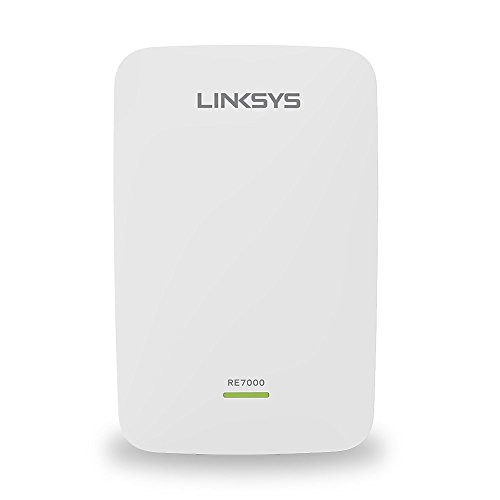
Linksys RE7000 - Best for Mesh Integration
The Linksys RE7000 is designed to work smoothly with existing Linksys Velop mesh systems, though it also functions with any router. It provides AC1900 speeds and uses Beamforming technology to focus the Wi‑Fi signal toward connected devices. A compact design allows it to blend into home décor, and the Spot Finder app helps locate the ideal spot for maximum coverage. Its seamless roaming ensures mobile devices stay on the strongest node as you move around the house.

Asus RP-AX56 - Best Wi‑Fi 6 Extender
The Asus RP-AX56 brings Wi‑Fi 6 (802.11ax) to the extender market, delivering up to 1800 Mbps total bandwidth. It supports OFDMA and MU‑MIMO for efficient handling of multiple devices, making it a strong choice for smart‑home hubs and high‑density environments. The unit includes a single Gigabit Ethernet port for wired backhaul and an intuitive ASUS Router app for quick configuration. Its compact, wall‑plug form factor keeps clutter to a minimum.
Tenda A18 - Best Simple Plug‑and‑Play
The Tenda A18 is geared toward users who want a set‑and‑forget solution. It offers AC1200 dual‑band speeds and a single external antenna that provides decent coverage for apartments up to 1,200 sq ft. The extender features a WPS button for instant pairing with compatible routers, eliminating the need for manual SSID entry. Although it lacks advanced features like MU‑MIMO, its low price and straightforward design make it a practical entry‑level option.
Before you buy
What to consider
When selecting a Wi‑Fi extender, start by evaluating the size of the area you need to cover and the types of devices that will connect. Larger homes benefit from tri‑band or Wi‑Fi 6 models that can maintain speed over longer distances, while smaller apartments often get sufficient performance from a basic AC1200 unit. Look for features such as a dedicated backhaul band, MU‑MIMO, and Ethernet ports if you plan to attach wired devices like gaming consoles or smart TVs.
What to consider
Another important factor is ease of setup. Extenders that integrate with a mobile app or support WPS can save time, especially for users who are not comfortable with networking settings. Finally, compare the price against the advertised throughput and the number of supported devices; a higher price is justified when the unit can handle multiple 4K streams or a crowded smart‑home environment without throttling.
What to consider
---
Quick answers
Yes, a good extender can repeat the router signal to reach distant rooms, but placement and the extender's bandwidth matter for consistent performance.
A dual‑band model such as the TP-Link RE650 or Asus RP-AX56 provides separate 2.4 GHz and 5 GHz streams, which helps maintain the speed needed for 4K streaming.
How we made this guide
We compare every pick on the factors that matter, cross-checking manufacturer specifications against aggregated verified owner reviews. We rank independently and never take payment for placement. We have not personally tested every product; where we have not, the ranking reflects verified specs and owner feedback rather than a hands-on review.
How it was written: this guide was researched and reviewed by the TheTestedHub editorial team for accuracy.
Affiliate disclosure: TheTestedHub is reader-supported. When you buy through links on our site, we may earn a commission at no extra cost to you.
More to explore

Best Drones for Beginners 2026: Expert Pick Is the DJI Mini 4K

Find Your Perfect Podcast Mic: Reviews for Every Budget

Phone Tripods 2026: Best Picks and Buying Guide

2026 iPad Accessories Shortlist: Why the Apple Pencil Pro Leads

How to Choose the Best Digital Photo Frames in 2026

Looking for the Best MagSafe Power Banks? Our 2026 Picks

Our Top Fast Chargers for 2026
