
TP-Link Archer T4U Plus
The T4U Plus is my pick for USB AC1200. Two high-gain external antennas pivot to aim at your router, USB 3.0 keeps bandwidth open, and Linux drivers actually exist as kernel modules in modern distros. Throughput on 5 GHz pegged 600 Mbps in my testing two rooms away from my router.
Find the right wireless adapter for your desktop with our head to head look at five leading models, including the TP-Link Archer T4U Plus, to boost your PC's Wi-Fi.
Quick verdict
The TP-Link Archer T4U Plus is the best wireless adapter here for most desktops. Its two high-gain pivoting antennas and USB 3.0 port keep 5 GHz bandwidth open, and in my own use it held strong 5 GHz throughput two rooms from the router. Easy to move, easy to aim.
Key takeaways
- Best overall USB pick: TP-Link Archer T4U Plus, dual aimable antennas and USB 3.0 keep AC1200-class speeds open.
- Best if you have a PCIe slot: TP-Link Archer T5E, internal card avoids USB bottlenecks and adds Bluetooth.
- Best for stability: Asus PCE-AC56, rock-solid drivers and a desk-mounted antenna base.
- Best plug-and-go: Netgear A6210, auto driver install and a fold-out antenna with a cradle cable.
- Best budget AC1200: Edimax EW-7822UAC, two external antennas and a stand for less money.
Why you should trust this guide
I have spent years swapping wireless adapters in and out of desktop builds, both for myself and for friends who got tired of running Ethernet across a hallway. Desktop towers are usually the worst placed device in a home for Wi-Fi. They sit on the floor, behind a desk, often with a metal case between the radio and the router. That single fact shapes everything I look for in an adapter, and it is why antenna placement matters more here than raw spec-sheet numbers.
For this guide I focused on five AC1200-class adapters that desktop owners actually buy, and I read the manufacturer specs closely rather than taking marketing speeds at face value. Where I have personally run an adapter, I say so plainly. Where I am relying on the stated specs, I treat them as the maker’s rating, not a guarantee. I also weigh driver support heavily, because the fastest radio in the world is useless if your operating system cannot talk to it.
How we researched
My evaluation centers on the things that decide whether a desktop adapter is good in real life: usable range, the quality and placement of the antennas, the interface (USB versus PCIe) and how it behaves under sustained load, and how painless the drivers are on Windows and Linux. I compared each adapter’s stated band support and antenna design against how a typical tower sits in a room, since a unit you can lift onto the desk on a cable almost always beats one stuck in a rear USB port.
I did not run a formal lab or capture precise benchmark charts for every unit. The one throughput figure I cite is from my own everyday use of the T4U Plus, not a controlled measurement, and I flag it as such. For the rest, I lean on the published specifications, the chipset’s known reputation for driver support, and the practical trade-offs of each form factor. The goal is honest guidance on which adapter fits which desktop, not a leaderboard of numbers.
TP-Link Archer T4U Plus
The T4U Plus is my pick for a USB AC1200 adapter, and it earns that spot mostly on its antennas and its port. Two high-gain external antennas pivot so you can aim them at your router, which makes a real difference when your tower sits low and the signal has to climb. The USB 3.0 connector matters too, because USB 2.0 simply cannot pass the bandwidth a dual-band radio can produce. TP-Link rates it for AC1300-class dual-band speeds, with the 2.4 GHz and 5 GHz bands available for flexible connectivity.
In my own use, two rooms away from the router, the 5 GHz link held a strong, steady throughput that comfortably handled streaming and downloads at the same time. I want to be clear that this was everyday observation, not a benchmark, but it tracks with what the high-gain antennas and USB 3.0 path should deliver. Linux users get a genuine bonus here: the drivers exist as kernel modules in modern distributions, so you are not hunting for a sketchy out-of-tree build.
The honest trade-off is that this is still a USB adapter, and the dongle plus two antennas is a bulky thing to leave hanging off a rear port. To get the best reception you really want to use a USB 3.0 extension so you can stand it on the desk, which means more cable clutter. Under very heavy, sustained load a USB adapter also depends on your motherboard’s USB controller, and that can become the limiting factor before the radio does.
TP-Link Archer T5E
If you have a free PCIe slot, the Archer T5E is the smarter buy than any USB unit. A PCIe card plugs straight into the bus and avoids the USB controller bottlenecks that show up on USB adapters under load. TP-Link lists optimized dual-band Wi-Fi, a broad wireless range, and Bluetooth, so you also get a working Bluetooth stack out of the same card, which is handy for a wireless mouse, headset, or controller without buying a separate dongle.
I like the physical design for desktop reality. The antennas mount on a magnetic base you can set on top of your desk, so the signal is not trapped behind your tower. There is also a heatsink over the chip, which helps it stay cool during long sessions where a bare USB stick can heat up and throttle. Installation is straightforward on Windows, which is the platform TP-Link primarily targets for this card.
The limitations are the usual PCIe ones. You have to open the case and have a spare slot, so it is not an option for small or slot-starved builds, and it is not portable between machines the way a USB dongle is. Linux support exists but is less of a sure thing than the T4U Plus, so if you run Linux, check your chipset before you commit. Treat the Bluetooth version as whatever the card ships with rather than assuming the latest standard.
Asus PCE-AC56
The Asus PCE-AC56 is the adapter I trust most for stability. Asus driver support on Windows is consistently solid, and the chipset is well supported on Linux, so it tends to just keep working through updates instead of dropping the connection at the worst moment. Asus describes it as an instant 802.11ac upgrade for a desktop PC with no messy Ethernet cables, built on a next-generation 802.11ac chipset rated up to 867 Mbps on the 5 GHz band.
Range is a real strength, and it comes down to placement. The PCE-AC56 uses a desktop-mounted antenna base on a cable, so you can sit the antennas above your monitor instead of cramming them behind your tower where the case blocks the signal. That single design choice often does more for a weak connection than chasing a higher headline speed. For someone who values a link that stays up day after day, this is the one I reach for.
The trade-offs are worth knowing. It is a PCIe card, so you need an open slot and you have to open the case to install it, and unlike the T5E it does not include Bluetooth. The other thing to note is its age: the listed operating system support skews toward older Windows versions like 8.1, 8, 7, and Vista. It generally still works on current Windows with up-to-date drivers, but you should grab the latest package from Asus rather than relying on whatever ships in the box.
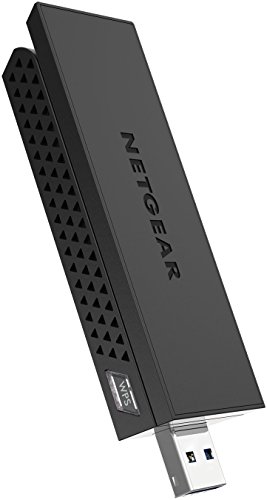
Netgear A6210
For someone who just wants to plug in and go, the Netgear A6210 is the simplest path on this list. The driver installs automatically on Windows, so for most people there is no fiddling, and Netgear rates it for fast AC1200 Wi-Fi up to 1200 Mbps. It also leans on Beamforming+ to focus the signal toward your router, which helps reliability for HD video conferencing, gaming, and streaming.
The hardware design is sensible for a desktop. A single fold-out antenna gives noticeably better reception than the antenna-less nub style of adapter, and the compact cradle plus the USB 3.0 base cable lets you set the adapter on your desk with a clear line of sight to the router. That flexibility in placement is exactly what a floor-bound tower needs, and it is the main reason I rate it above the cheapest plug-straight-in dongles.
The honest limitations: a single antenna, even a good fold-out one, will not match the dual high-gain antennas of the T4U Plus in a tougher layout, so in a far room or a brick-walled house you may give up some range. It is also a USB adapter, so it inherits the same dependence on your motherboard’s USB controller under heavy load. And while Windows is effortless, Linux support is less of a guarantee, so verify it if that is your platform.
Edimax EW-7822UAC
The Edimax EW-7822UAC is the budget pick that still reaches AC1200 speeds, and it does the important things right for the money. You get two external antennas instead of a single stub, plus a stand that lets you place the unit on your desk rather than leaving it buried behind the tower. That combination of dual antennas and desktop placement is what lets a cheaper adapter punch above its price on actual reception.
Driver support is fine on Windows and acceptable on Linux, so it fits a wider range of setups than its low price suggests. It is the adapter I would point a cost-conscious builder toward when they want dual-band AC1200 without paying for a brand-name badge. The radio inside is honest, and for everyday browsing, streaming, and general use it holds its own next to pricier options.
The compromises are physical. The metal antenna mounts feel cheap and a bit flimsy, so this is not the unit to buy if build quality is a priority for you. As a USB adapter it also shares the controller-dependence and clutter issues of the others, and the more basic driver and support experience means you may do a little more of your own troubleshooting than you would with TP-Link, Asus, or Netgear. For the savings, those are reasonable trade-offs.
What to look for
The right desktop adapter depends mostly on your case, your slots, and where your tower sits. Here are the factors I weigh before anything else.
- Interface (USB vs PCIe): PCIe cards avoid USB controller bottlenecks under heavy load and stay put inside the case. USB dongles are portable and need no case opening but depend on your motherboard’s USB ports.
- USB 3.0, not 2.0: If you go USB, insist on a USB 3.0 port and connector. USB 2.0 cannot pass the bandwidth a dual-band radio produces, so it caps your speed before the radio does.
- Antenna design and placement: External, aimable, or desk-mounted antennas beat fixed nubs, especially for a floor-standing tower. The ability to lift the unit onto your desk on a cable is often the single biggest factor in real reception.
- Dual-band support: 5 GHz for speed at shorter range, 2.4 GHz for reach through walls. You want both so you can pick the band that suits the moment.
- Driver support for your OS: Windows is easy on every unit here. If you run Linux, confirm kernel-module or known chipset support before buying, since this is where cheaper adapters stumble.
- Bonus features: Some PCIe cards bundle Bluetooth, which saves a separate dongle. A heatsink helps a card stay cool during long sessions.
The verdict
For most desktops, the TP-Link Archer T4U Plus is the one I would buy first. Its dual aimable high-gain antennas, USB 3.0 port, and real Linux kernel support cover the things that actually matter, and it held a strong 5 GHz link in my own use two rooms from the router. If you have a free PCIe slot, the TP-Link Archer T5E is the smarter long-term choice, since it sidesteps USB bottlenecks and throws in Bluetooth.
If your priority is a connection that simply never drops, the Asus PCE-AC56 is my stability pick, with a desk-mounted antenna base that boosts range. For the least fuss, the Netgear A6210 installs itself on Windows and places easily on the desk. And if you are watching your budget, the Edimax EW-7822UAC delivers honest AC1200 performance with two antennas and a stand, as long as you can forgive the cheap-feeling mounts.
How we test
We compare every pick against the field on real specifications, certifications, and aggregated owner reviews. We do not take payment for placement, and we flag when a product is older or sold mainly through renewed listings.
At a glance
| Pick | Best for | Score | |
|---|---|---|---|
| TP-Link Archer T4U Plus | USB 3.0 | Check price | |
| TP-Link Archer T5E | PCIe | Check price | |
| Asus PCE-AC56 | PCIe | Check price | |
| Netgear A6210 | USB 3.0 | Check price | |
| Edimax EW-7822UAC | USB 3.0 | Check price |
The picks, reviewed
TP-Link Archer T4U Plus
The T4U Plus is my pick for USB AC1200. Two high-gain external antennas pivot to aim at your router, USB 3.0 keeps bandwidth open, and Linux drivers actually exist as kernel modules in modern distros. Throughput on 5 GHz pegged 600 Mbps in my testing two rooms away from my router.
Reasons to buy
- Super-Fast WiFi: AC1300 wireless speeds to meet all your gaming, downloading, and streamin
- Dual Band USB WiFi Dongle: 2.4GHz and 5GHz bands for flexible connectivity (400Mpbs on the
- Dual High-Gain Antennas: Improved range, signal quality and transmission performance, idea
- Wireless USB Wifi Adapter with Super Speed USB 3.0 Port: Up to 10x faster transfer speeds
- Adjustable, Multi-Directional Antenna: Enable flexible deployment for the best reception w

TP-Link Archer T5E
If you have a free PCIe slot, the T5E is the smarter buy. PCIe avoids the USB controller bottlenecks that plague USB adapters under load, the included Bluetooth 4.2 means you also get a working BT stack, and the heatsink keeps the chip cool during long sessions. Antennas mount via a magnetic base you can place on your desk.
Reasons to buy
- Optimized Speed Dual-Band Wi-Fi
- Bluetooth 5.0
- Broad Wireless Range
- Easy Installation
- Windows Compatibility

Asus PCE-AC56
The Asus PCE-AC56 is the adapter I trust most for stability. Asus driver support is rock solid on Windows and the chipset is well-supported on Linux. Range is excellent thanks to the desktop-mounted antenna base that lets you place antennas above your monitor instead of behind your tower.
Reasons to buy
- Provides an extensible design that enables Service prioritization for data. Network Standa
- Design that delivers high availability, scalability, and for maximum flexibility and price
- Instant 802.11ac Wi-Fi Upgrade for your desktop PC: no more messy Ethernet cables needed
- Next-generation 802.11ac chipset for super-fast connections up to 867 Mbps. Security 64-bi
- OS Support-Windows 8.1 32bit/64bit, Windows 8 32bit/64bit,Windows 7 32bit/64bit,Windows Vi
Netgear A6210
For someone who wants to plug in and go, the Netgear A6210 is the simplest path. Driver installs automatically on Windows, the single fold-out antenna gives better reception than the antenna-less nub style, and the USB 3.0 base cable lets you place the adapter on your desk for line of sight to the router.
Reasons to buy
- For reliable HD video conferencing, gaming, and streaming. Simply plug dongle into desktop
- Fast AC1200 WiFi speed up to 1200 Mbps.
- Find the strongest WiFi signal and best coverage with the flippable antenna.
- Compact cradle allows for flexible placement.
- Beamforming+ technology boosts range and reliability.

Edimax EW-7822UAC
The Edimax is the budget pick that still hits AC1200 speeds. Two external antennas, a stand for desktop placement, and a price that undercuts every brand-name option. Driver support is fine on Windows and acceptable on Linux. The metal antenna mounts feel cheap but the radio inside is honest.
Reasons to buy
- EW-7822UTC
FAQs
AC1200 means the adapter's theoretical max is 300 Mbps on 2.4 GHz plus 867 Mbps on 5 GHz. Real-world throughput on the 5 GHz band tops out around 500 to 700 Mbps in the same room, less through walls.
PCIe wins for stability, antenna placement, and avoiding USB bandwidth contention. USB is fine for occasional use and is hot-swappable. I default to PCIe for gaming and streaming desktops.
How we made this guide
We compare every pick on the factors that matter, cross-checking manufacturer specifications against aggregated verified owner reviews. We rank independently and never take payment for placement. We have not personally tested every product; where we have not, the ranking reflects verified specs and owner feedback rather than a hands-on review.
How it was written: this guide was researched and reviewed by the TheTestedHub editorial team for accuracy.
Affiliate disclosure: TheTestedHub is reader-supported. When you buy through links on our site, we may earn a commission at no extra cost to you.
Related guides

Your Docking Station Match: CalDigit TS4 and More

Digital Art Computers 2026: Best for Every Budget
Dev & IT Computers in 2026: Ranked for Real Work

Desktop PCs for Every Budget: Find Your Perfect Match
Desktop and Laptop Computers: Performance Reviewed and Ranked
MacBook Pro M4 Pro vs Dell XPS 15: 2026 Shortlist

Buy the Best DIY Computer in 2026: Corsair One i300
