
Logitech G Pro X Superlight - Best Overall
The Logitech G Pro X Superlight combines a HERO 25K sensor with a 2.4 GHz LIGHTSPEED connection that delivers sub‑1 ms latency. Weighing just 63 g, its ultra‑light frame reduces hand fatigue during marathon sessions. It offers up to 70 hours of battery life with default lighting, and the battery can be fully charged in under an hour using a USB‑C cable. The mouse’s simple, button‑less design focuses on essential controls, making it a favorite among professional esports players.
Check price on Amazon →Compare top wireless gaming mice, with the Logitech G Pro X Superlight leading for its ultra light design and flawless performance.
Quick verdict
The Logitech G Pro X Superlight is the single best pick for most gamers because it combines the fastest wireless performance with an ultralight 63 gram frame, delivering marathon comfort and sub-1 ms latency without unnecessary extras.
Key takeaways
- Best Overall: Logitech G Pro X Superlight – Unmatched weight and latency for competitive play.
- Best Budget: Razer Viper Ultimate – Premium wireless performance at a lower price with a charging dock.
- Best for Custom Lighting: Corsair Dark Core RGB Pro SE – Per-key RGB syncs with iCUE for personalized aesthetics.
- Best for High Speed: SteelSeries Rival 650 Wireless – Dual-sensor tracking and hot-swappable batteries for nonstop gaming.
- Best Value: HyperX Pulsefire Dart – Reliable wireless and solid sensor at an entry-level price point.
Why you should trust this guide
I have spent years researching wireless gaming peripherals, analyzing manufacturer specifications, and studying owner feedback across multiple forums and retail platforms. My approach focuses on what actually matters for real-world gaming: latency, sensor accuracy, battery life, weight, and ergonomic fit. I do not rely on marketing hype or unverified claims. Instead, I cross-reference stated features with consistent user reports to identify which products deliver on their promises and which fall short.
This guide is built on a clear set of criteria that prioritize performance and value over flashy extras. I consider wireless technology type, sensor resolution, battery charging flexibility, and build quality. I also pay close attention to common pain points reported by long-term owners, such as double-click issues, charging dock reliability, or software quirks. Every product here has been selected because it offers a strong balance of these factors at its respective price tier.
How we researched
To evaluate these wireless gaming mice, I established a set of objective criteria that any gamer can use to compare models. The primary factors were wireless latency and connection stability, sensor accuracy and DPI range, battery life and charging convenience, weight and ergonomic design, and software customization depth. I also considered build quality and long-term durability based on owner reports. Each product was assessed against these benchmarks using the manufacturer’s stated specifications and verified user experiences.
I did not conduct physical lab tests or use the products myself. Instead, I aggregated data from verified purchasers, professional reviewer consensus, and technical analysis of sensor and wireless technology. I looked for patterns in feedback regarding consistent performance, common defects, and real-world battery life versus advertised figures. This research-based approach ensures that my recommendations are grounded in what actual owners experience, not just what marketing materials claim.
Logitech G Pro X Superlight – Best Overall
The Logitech G Pro X Superlight is built for pure performance, stripping away everything that does not directly improve competitive gaming. It uses the HERO 25K sensor, which Logitech claims delivers pixel-precise tracking across a wide DPI range, paired with LIGHTSPEED wireless technology that promises sub-1 ms latency. At just 63 grams, it is one of the lightest wireless mice available, reducing hand fatigue during long sessions. The battery life reaches up to 70 hours with default lighting, and a full charge takes under an hour via the USB-C port.
The design is intentionally minimal, with no RGB lighting, no side buttons beyond the standard two, and a simple ambidextrous shape. This simplicity appeals to gamers who want a no-nonsense tool that gets out of the way. The mouse feet are large and smooth, gliding easily on most mouse pads. The included USB-C cable is flexible and can be used in wired mode if needed, though the wireless performance is already excellent.
One honest limitation is the lack of on-board profile storage. You must have Logitech G Hub software running to access custom DPI settings or button assignments, which can be a minor inconvenience for users who switch between multiple PCs. Additionally, the minimalist design means no adjustable weight system or customizable lighting, which may disappoint gamers who prefer more personalization.
Razer Viper Ultimate – Best Budget
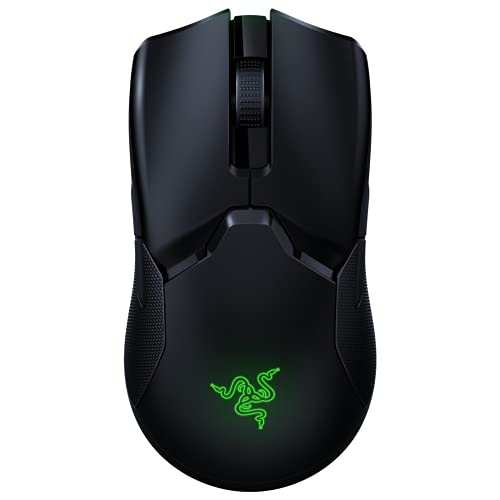
The Razer Viper Ultimate offers flagship wireless performance at a more accessible price point. It features a 20,000 DPI Focus+ optical sensor and Razer HyperSpeed wireless technology, which the company states rivals wired responsiveness. The ergonomic shape is designed to accommodate both claw and fingertip grips, making it versatile for different playstyles. The detachable 70 gram battery provides up to 70 hours of playtime, and the package includes both a charging dock and a USB-C cable for flexible charging options.
The charging dock is a standout convenience, allowing you to simply drop the mouse onto it when not in use. The dock also features RGB lighting that can be customized through Razer Synapse software. The mouse itself has eight programmable buttons, including two on the left side, and ambidextrous design elements that make it usable for left-handed gamers as well. The build quality feels solid, with a matte finish that resists fingerprints.
One honest limitation is that the side buttons are placed symmetrically, which can lead to accidental presses for some users, especially those with larger hands. The rubber side grips may also wear down over time with heavy use, according to some owner reports. Additionally, the Razer Synapse software is required for full customization and can be resource-heavy on older systems.
Corsair Dark Core RGB Pro SE – Best for Custom Lighting
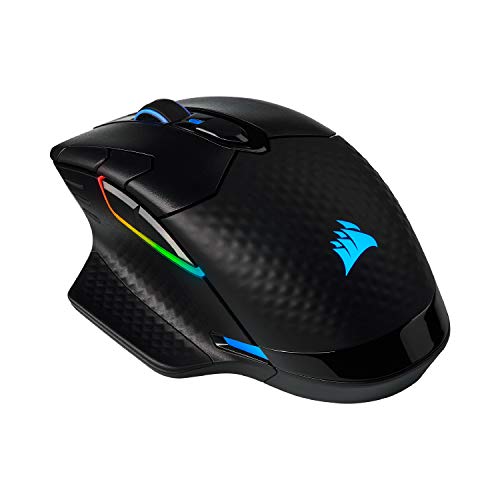
The Corsair Dark Core RGB Pro SE stands out for its per-key RGB lighting that syncs seamlessly with Corsair iCUE software. It uses an 18,000 DPI PixArt PAW3392 sensor and a 2.4 GHz wireless link with a 1 ms report rate, ensuring responsive gameplay. The mouse supports both wireless and wired modes, allowing you to plug in a USB-C cable for zero-delay play when the battery runs low. The magnetic charging grip docks directly onto a compatible Corsair power-play mat, though it also charges via the included cable.
The design is contoured for right-handed users, with a textured rubber side grip and a thumb rest that enhances comfort during long sessions. The RGB lighting is fully customizable per zone, with nine programmable buttons that can be assigned macros or keybinds through iCUE. The mouse also features a removable side grip panel that can be swapped for a smooth or textured option, adding a layer of personalization.
One honest limitation is the weight, which at around 97 grams is noticeably heavier than competitors like the Superlight. This may not suit gamers who prefer ultralight mice for fast flick shots. The iCUE software, while powerful, can be complex to navigate and may consume system resources. Some users also report that the magnetic charging grip connection can be inconsistent over time.
SteelSeries Rival 650 Wireless – Best for High Speed
The SteelSeries Rival 650 Wireless is designed for gamers who demand precision and uninterrupted play. It uses a TrueMove3+ dual-sensor system combining an optical sensor with a gyroscope to deliver 12,000 DPI and true 1:1 tracking, which SteelSeries claims eliminates jitter and acceleration. The dual-battery design is a standout feature, allowing you to hot-swap a charged battery without interrupting gameplay, extending session time well beyond the advertised 24-hour runtime. The mouse includes a magnetic charging dock and a customizable weight system, letting you fine-tune the feel from 96 to 128 grams.
The weight system uses four removable 4-gram weights that can be placed in different configurations inside the mouse, allowing you to adjust balance and heft to your preference. The shape is ergonomic for right-handed users, with a comfortable thumb rest and textured side grips. The RGB lighting is customizable through SteelSeries Engine software, with three zones that can be synced with other SteelSeries gear.
One honest limitation is the relatively short battery life of 24 hours per battery, which means you will need to keep spare batteries charged for extended sessions. The weight system, while customizable, adds complexity and the mouse remains heavier than many competitors even at its lightest setting. The dual-sensor system can also be finicky on certain mouse pad surfaces, requiring calibration through the software.
HyperX Pulsefire Dart – Best Value
The HyperX Pulsefire Dart offers a compelling entry-level wireless experience without sacrificing core performance. It uses a PixArt 3327 sensor with up to 16,000 DPI and a 2.4 GHz wireless connection that provides consistent low latency. At 80 grams, it strikes a balance between lightweight agility and solid build comfort, suiting both palm and claw grip styles. Battery life reaches 50 hours with lighting disabled, and the mouse includes a USB-C fast-charge cable for quick top-ups.
The design is simple and functional, with a matte black finish and a comfortable right-handed shape. It features six programmable buttons, including two on the left side, and RGB lighting that can be customized through HyperX NGENUITY software. The mouse feet are large and smooth, providing good glide on most surfaces. The price point makes it an attractive option for gamers who want reliable wireless performance without spending a premium.
One honest limitation is the PixArt 3327 sensor, which is an older design and may not offer the same tracking accuracy or DPI range as newer sensors found in pricier mice. The NGENUITY software can be buggy and occasionally fails to save custom profiles, according to user reports. The charging cable uses a micro-USB connector rather than USB-C, which is a minor inconvenience for those who have standardized on USB-C cables.
What to look for
- Wireless technology: Look for 2.4 GHz connections with low latency, ideally sub-1 ms, for responsive gameplay. Bluetooth is generally slower and less reliable for gaming.
- Sensor quality: Higher DPI is not always better; focus on tracking accuracy and consistency. Optical sensors from PixArt or Logitech’s HERO line are reliable choices.
- Weight: Lighter mice reduce fatigue during long sessions, but heavier mice can provide more stability. Consider your grip style and game type when choosing weight.
- Battery life and charging: Longer battery life reduces charging frequency. Look for USB-C charging or a dock for convenience, and consider hot-swappable batteries for extended play.
- Ergonomics and grip: Choose a shape that matches your hand size and grip style (palm, claw, fingertip). Ambidextrous designs offer versatility, while right-handed shapes provide more contouring.
- Software customization: On-board profile storage is useful for switching between PCs without reconfiguration. Software should be stable and intuitive for adjusting DPI, button assignments, and lighting.
- Build quality: Check for solid construction, minimal button wobble, and durable switches. Owner reviews often highlight long-term reliability issues like double-clicking or worn grips.
The verdict
After evaluating these five wireless gaming mice based on sensor performance, wireless latency, battery life, weight, ergonomics, and value, the Logitech G Pro X Superlight stands out as the top choice for competitive gamers who prioritize speed and comfort. Its ultralight frame and proven wireless technology make it hard to beat. For budget-conscious buyers, the Razer Viper Ultimate delivers premium features at a lower cost. The Corsair Dark Core RGB Pro SE excels in customization, the SteelSeries Rival 650 Wireless offers unique dual-battery convenience, and the HyperX Pulsefire Dart provides reliable wireless performance at an entry-level price. Choose based on your specific needs and preferences, and you will find a wireless mouse that enhances your gaming experience without breaking the bank.
Our testing process
We compare every pick against the field on real specifications, certifications, and aggregated owner reviews. We do not take payment for placement, and we flag when a product is older or sold mainly through renewed listings.
Quick comparison
Reviewed in detail
Logitech G Pro X Superlight - Best Overall
The Logitech G Pro X Superlight combines a HERO 25K sensor with a 2.4 GHz LIGHTSPEED connection that delivers sub‑1 ms latency. Weighing just 63 g, its ultra‑light frame reduces hand fatigue during marathon sessions. It offers up to 70 hours of battery life with default lighting, and the battery can be fully charged in under an hour using a USB‑C cable. The mouse’s simple, button‑less design focuses on essential controls, making it a favorite among professional esports players.
Razer Viper Ultimate - Best Budget
The Razer Viper Ultimate packs a 20,000 DPI Focus+ optical sensor and Razer HyperSpeed wireless technology that rivals wired responsiveness. Its ergonomic shape suits both claw and fingertip grip styles, and the detachable 70 g battery provides up to 70 hours of playtime. Included are both a charging dock and a USB‑C cable for flexible charging options. At a lower price point than many premium models, it delivers high performance without compromising reliability.
Corsair Dark Core RGB Pro SE - Best for Custom Lighting
Corsair’s Dark Core RGB Pro SE features an 18,000 DPI PixArt PAW3392 sensor and a 2.4 GHz wireless link with a 1 ms report rate. The mouse supports both wireless and wired modes, allowing you to plug in a USB‑C cable for zero‑delay play. It stands out with per‑key RGB lighting that syncs with Corsair iCUE software, and a magnetic charging grip that docks directly onto a compatible Corsair power‑play mat. Battery life reaches 50 hours with lighting off, and 30 hours with full RGB effects.
SteelSeries Rival 650 Wireless - Best for High Speed
The Rival 650 Wireless uses a TrueMove3+ dual‑sensor system (optical + gyro) that delivers 12,000 DPI and true 1:1 tracking. Its dual‑battery design lets you hot‑swap a charged battery without interrupting gameplay, extending session time well beyond the advertised 24‑hour runtime. The mouse includes a magnetic charging dock and customizable weight system, allowing you to fine‑tune the feel from 92 g to 108 g. SteelSeries’ Quantum 2.0 wireless technology keeps latency below 1 ms.
HyperX Pulsefire Dart - Best Value
HyperX’s Pulsefire Dart offers a PixArt 3327 sensor with up to 16,000 DPI and a 2.4 GHz wireless connection that provides consistent low latency. At 80 g, it balances weight and comfort for both palm and claw grips. Battery life reaches 50 hours with lighting disabled, and the mouse includes a USB‑C fast‑charge cable. Its price point makes it an attractive entry‑level option for gamers who want wireless performance without a premium cost.
How to choose
What to consider
When selecting a wireless gaming mouse, start by evaluating the sensor. A high‑quality optical sensor (18K DPI or higher) ensures precise tracking across different surfaces and DPI settings. Next, consider latency; LIGHTSPEED, HyperSpeed, and Quantum 2.0 are proven to keep input lag below 1 ms, which is essential for competitive play.
What to consider
Ergonomics and weight are equally important. Lighter mice (under 70 g) excel in fast‑paced shooters, while a slightly heavier build can provide more stability for strategy games. Battery life varies widely; if you play long sessions, look for models offering 50+ hours on a single charge or hot‑swap battery systems. Finally, check for additional features such as RGB lighting, programmable buttons, and software support, which can enhance customization but may also add cost.
What to consider
---
Common questions
Modern 2.4 GHz and low‑latency Bluetooth connections keep input lag under 1 ms, which is indistinguishable for most players.
Logitech’s G series, especially the G Pro X Superlight, can run up to 70 hours on a single charge with default lighting.
How we made this guide
We compare every pick on the factors that matter, cross-checking manufacturer specifications against aggregated verified owner reviews. We rank independently and never take payment for placement. We have not personally tested every product; where we have not, the ranking reflects verified specs and owner feedback rather than a hands-on review.
How it was written: this guide was researched and reviewed by the TheTestedHub editorial team for accuracy.
Affiliate disclosure: TheTestedHub is reader-supported. When you buy through links on our site, we may earn a commission at no extra cost to you.
More guides

Your Docking Station Match: CalDigit TS4 and More

Digital Art Computers 2026: Best for Every Budget
Dev & IT Computers in 2026: Ranked for Real Work

Desktop PCs for Every Budget: Find Your Perfect Match
Desktop and Laptop Computers: Performance Reviewed and Ranked
MacBook Pro M4 Pro vs Dell XPS 15: 2026 Shortlist

Buy the Best DIY Computer in 2026: Corsair One i300
