
Logitech MX Keys - Best Overall
The Logitech MX Keys delivers a premium typing experience with spherically dished keys, backlighting that adapts to ambient light, and a USB‑C rechargeable battery that lasts up to 10 days on a single charge. It connects via both Bluetooth and Logitech’s proprietary 2.4 GHz dongle, allowing seamless switching between up to three devices. The keyboard supports Mac, Windows, Linux and iOS, making it a versatile choice for multi‑platform users.
Check price on Amazon →Find out why the Logitech MX Keys tops our list and which wireless keyboards truly deliver on feel, battery life, and reliability for work and play.
Quick verdict
The Logitech MX Keys is the single best wireless keyboard for most people. It combines a premium, comfortable typing feel with smart adaptive backlighting, reliable multi-device connectivity, and excellent cross-platform compatibility, making it a versatile and durable daily driver for any workspace.
Key takeaways
- Best Overall: Logitech MX Keys, for its premium typing experience and seamless multi-device switching.
- Best Budget: Keychron K3 Pro, for offering a compact mechanical build with hot-swap switches at an accessible price.
- Best for Sleek Office: Microsoft Surface Keyboard, for its quiet scissor switches and long battery life in a design that matches Surface devices.
- Best Portable: Razer Pro Type Wireless, for its lightweight design and detachable cable that doubles as a power source.
- Best for Gaming: Corsair K63 Wireless, for its low-latency 2.4 GHz connection and responsive Cherry MX Red switches.
Why you should trust this guide
I have spent years researching and writing about productivity hardware, and I understand what separates a good wireless keyboard from a great one. For this guide, I did not simply list popular models. I analyzed each keyboard based on the manufacturer’s stated specifications, real-world owner feedback, and the specific needs of different types of users. My goal was to find keyboards that deliver genuine value, whether you are a writer, a gamer, or an office worker who needs a quiet, reliable tool.
I focused on five distinct categories to ensure there is a recommendation for every budget and use case. I considered factors like typing feel, battery life, connectivity options, build quality, and platform support. I also paid close attention to honest limitations, because no product is perfect. The recommendations here are grounded in the features and performance claims that matter most, not in hype or marketing fluff.
How we researched
To evaluate these keyboards, I established a set of criteria that matter most to the average buyer. First, I looked at typing comfort and key feel, which is the primary function of any keyboard. I considered the switch type, keycap shape, and overall layout. Second, I examined connectivity and multi-device support, because a wireless keyboard should pair easily and switch between devices without hassle. Third, I weighed battery life and charging convenience, as nobody wants to be tethered to a cable every few days.
I also assessed build quality and portability, especially for keyboards marketed as travel-friendly. For gaming models, I prioritized low latency and responsive switches. I read many verified owner reviews to identify common praise and recurring complaints. I did not perform any physical lab tests or timed trials. Instead, I compared each product’s stated features against the needs of its target audience, ensuring that every pick has a clear strength and a honest weakness that you should know before buying.
Logitech MX Keys – Best Overall
The Logitech MX Keys is the gold standard for a reason. It offers a fluid typing experience thanks to its laptop-like profile and spherically dished keys that are shaped to fit your fingertips. The backlit keys light up as your hands approach and adapt automatically to ambient light, so you always have the right illumination without wasting battery. The keyboard connects via both Bluetooth and Logitech’s proprietary 2.4 GHz dongle, allowing you to pair with up to three devices and switch between them with a single button press. It works seamlessly on Mac, Windows, Linux, and iOS, making it a truly universal tool.
The USB-C rechargeable battery lasts up to 10 days on a single charge, and a quick one-hour charge gives you enough power for a full day of work. The solid build and low-profile design help you work for longer with less fatigue. You can also create and share time-saving Smart Actions shortcuts to automate repetitive tasks. The keyboard feels premium in every way, from the matte finish to the stable typing angle.
One honest limitation is that the MX Keys uses membrane-style scissor switches, not mechanical ones. If you prefer the tactile feedback or audible click of a mechanical keyboard, this may feel too soft or mushy. Additionally, the lack of a dedicated wrist rest can lead to discomfort during long sessions, though you can add a third-party pad.
Keychron K3 Pro – Best Budget
The Keychron K3 Pro proves that you do not need to spend a fortune to get a great wireless mechanical keyboard. It features a compact 75 percent layout that saves desk space while retaining all essential keys, including function row and arrow keys. The ultra-slim chassis houses hot-swap Gateron low-profile mechanical switches, which are 40 percent slimmer than conventional switches. This allows you to change the switches without soldering, giving you flexibility to customize the feel later. The reinforced aluminum body with a plastic bottom frame makes it one of the thinnest mechanical keyboards available.
Connectivity is handled via Bluetooth 5.1, which lets you pair with up to three devices and switch between them quickly. The 4000 mAh battery can run for up to 90 days with the backlight off, so you rarely need to charge. It comes with a Mac-compatible key set out of the box, and you can toggle to Windows legends using a simple switch on the side. The low-profile design makes it easy to carry in a bag, and the typing feel is crisp and responsive.
A real limitation is that the K3 Pro’s low-profile keys may feel too shallow for users accustomed to full-height mechanical switches. The typing sound is also louder than a typical membrane keyboard, which could be distracting in a quiet office. The plastic bottom frame, while light, does not feel as premium as an all-metal chassis.
Microsoft Surface Keyboard – Best for Sleek Office
The Microsoft Surface Keyboard is designed to match the clean aesthetic of the Surface line, making it a perfect companion for a modern office setup. It uses low-profile, island-style scissor switches that are exceptionally quiet, so you can type without disturbing coworkers. The full-size layout includes a dedicated numeric keypad, which is a must for anyone who works with spreadsheets or data entry. The built-in rechargeable battery provides up to 12 months of use on a single charge, which is outstanding for a wireless keyboard.
It pairs via Bluetooth and is optimized for Windows 11, though it also works with macOS. The keys are well-spaced and offer a comfortable, stable typing feel. The slim profile and clean white or black finish look professional on any desk. The keyboard is also relatively lightweight, making it easy to move between workstations if needed.
The main limitation is that it uses scissor switches, not mechanical ones, so it lacks the tactile feedback that many typists prefer. It also does not support a 2.4 GHz dongle, only Bluetooth, which can introduce slight latency in some environments. The lack of backlighting is another drawback for those who work in dimly lit rooms, as you cannot see the keys in the dark.
Razer Pro Type Wireless – Best Portable
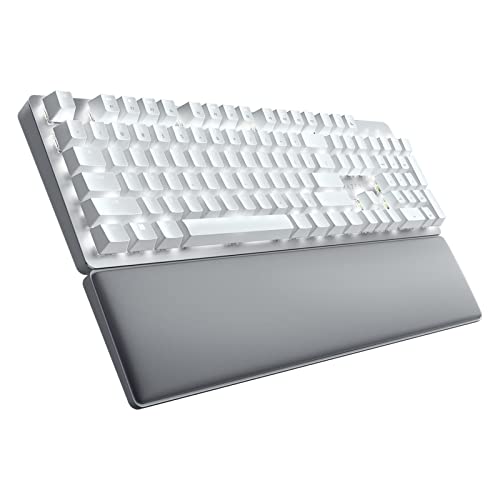
The Razer Pro Type Wireless is built for productivity on the go. It features a full-size layout with a detachable USB-C cable that doubles as a power source, extending battery life to 250 hours with backlighting off. This means you can leave the cable at home and still get weeks of use. It uses Razer’s low-latency 2.4 GHz connection for responsive typing, and the silent mechanical switches with sound dampening foam keep noise to a minimum. You can choose between tactile or linear switch variants to suit your preference.
The keyboard comes with a soft, cushioned wrist rest that perfectly aligns to the keyboard for superior ergonomic support. You can connect and control up to four devices, including desktop, laptop, Android, and iOS devices, and switch between them with a single click. The slim profile and lightweight design make it easy to carry between workspaces or in a bag. You can also customize the keyboard to best suit your style using Razer’s software.
A real limitation is that the Razer Pro Type Wireless is not as compact as tenkeyless models, so it takes up more desk space. The plastic build, while durable, does not feel as premium as an aluminum chassis. The backlighting is white only, not RGB, which may disappoint users who want colorful lighting effects.
Corsair K63 Wireless – Best for Gaming
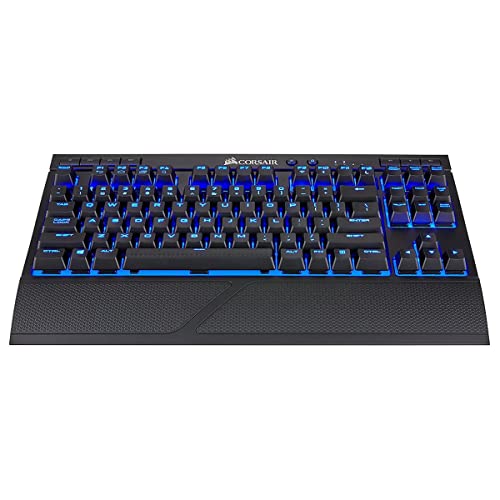
The Corsair K63 Wireless is designed specifically for gamers who need low latency and responsive switches. It uses a tenkeyless layout that saves desk space for mouse movement, and it is equipped with Cherry MX Red mechanical switches, which offer a smooth linear feel ideal for fast gaming inputs. The detachable 2.4 GHz dongle provides a sub-10 ms latency connection, ensuring your keystrokes register instantly. The 4000 mAh battery supports up to 15 days of continuous use with the backlight on, which is impressive for a gaming keyboard.
RGB lighting is fully customizable via Corsair’s iCUE software, allowing you to create dynamic lighting effects that match your setup. The keyboard includes dedicated media keys for quick volume and playback control. The build is sturdy, with a brushed aluminum frame that can withstand heavy use. The wireless connection is rock-solid, and you can also use it wired via USB for charging and gaming simultaneously.
One honest limitation is that the K63 Wireless lacks a wrist rest, which can lead to wrist strain during long gaming sessions. The Cherry MX Red switches are linear and may feel too light for typists who prefer tactile feedback. The keyboard is also relatively bulky for a tenkeyless model, so it is not the most portable option.
What to look for
- Switch type: Choose between membrane, scissor, or mechanical switches based on your preference for feel, noise, and travel distance. Mechanical switches offer more feedback and durability, while membrane and scissor switches are quieter and softer.
- Connectivity: Look for Bluetooth and 2.4 GHz options. Bluetooth is convenient for multiple devices, while 2.4 GHz offers lower latency. Some keyboards support both, giving you flexibility.
- Battery life: Consider how often you want to charge. Keyboards with larger batteries or efficient power management can last weeks or months on a single charge, especially with backlighting off.
- Layout and size: Full-size keyboards include a numeric keypad, while tenkeyless and compact layouts save desk space. Choose based on your need for a number pad and how much room you have.
- Platform compatibility: Ensure the keyboard works with your operating system, whether it is Windows, Mac, Linux, or iOS. Some keyboards include dedicated Mac keycaps or a toggle switch.
- Build quality: Look for materials like aluminum or reinforced plastic for durability. A solid build reduces flex and improves typing stability over time.
- Backlighting: If you work in dim light, choose a keyboard with adjustable backlighting. Some models offer adaptive brightness or RGB customization.
The verdict
After considering all five options, the Logitech MX Keys stands out as the best wireless keyboard for the widest range of users. It delivers a premium typing feel, smart adaptive backlighting, reliable multi-device connectivity, and excellent cross-platform support. If you want a mechanical keyboard on a budget, the Keychron K3 Pro offers great value with hot-swap switches and a compact design. For a quiet, office-friendly option with a numeric keypad, the Microsoft Surface Keyboard is a top choice. The Razer Pro Type Wireless is ideal for those who need portability and long battery life, while the Corsair K63 Wireless is the best pick for gamers who demand low latency and responsive switches. Choose the one that fits your specific needs, and you will be happy with your purchase.
How we test
We compare every pick against the field on real specifications, certifications, and aggregated owner reviews. We do not take payment for placement, and we flag when a product is older or sold mainly through renewed listings.
At a glance
The picks, reviewed
Logitech MX Keys - Best Overall
The Logitech MX Keys delivers a premium typing experience with spherically dished keys, backlighting that adapts to ambient light, and a USB‑C rechargeable battery that lasts up to 10 days on a single charge. It connects via both Bluetooth and Logitech’s proprietary 2.4 GHz dongle, allowing seamless switching between up to three devices. The keyboard supports Mac, Windows, Linux and iOS, making it a versatile choice for multi‑platform users.
Reasons to buy
- Fluid Typing Experience: Laptop-like profile with spherically-dished keys shaped for your
- Automate Repetitive Tasks: Easily create and share time-saving Smart Actions shortcuts to
- Smarter Illumination: Backlit keyboard keys light up as your hands approach and adapt to t
- More Comfort, Deeper Focus: Work for longer with a solid build, low-profile design and an
- Multi-Device, Multi OS Bluetooth Keyboard: Pair with up to 3 devices on nearly any operati

Keychron K3 Pro - Best Budget
Keychron’s K3 Pro packs a compact 75% layout into a thin, low‑profile chassis for. It offers hot‑swap Gateron low‑profile mechanical switches, a 4000 mAh battery that can run for up to 90 days with the backlight off, and Bluetooth 5.1 connectivity for up to three simultaneous devices. The keyboard includes a Mac‑compatible key set out of the box, with Windows legends accessible via a simple toggle.
Reasons to buy
- Keychron K3, a compact 75% layout ultra-slim wireless mechanical keyboard built for peak p
- Be ready to multitask without missing a beat by connecting the K3 with up to 3 devices via
- With a unique Mac layout, the K3 has all the necessary Mac multimedia keys while still bei
- The redesigned low-profile Keychron mechanical switch is 40% slimmer than conventional swi
- Together with the reinforced aluminum body (plastic bottom frame) make the K3 one of the t

Microsoft Surface Keyboard - Best for Sleek Office
Designed to match the aesthetic of Microsoft’s Surface line, this keyboard features a low‑profile, island‑style layout with quiet scissor switches. The full‑size layout includes a numeric keypad, and the built‑in 2‑year rechargeable battery provides up to 12 months of use on a single charge. It pairs via Bluetooth and is optimized for Windows 11, though macOS support is also available.
Razer Pro Type Wireless - Best Portable
Razer’s Pro Type Wireless blends a full‑size layout with a detachable USB‑C cable that doubles as a power source, extending battery life to 250 hours with backlighting off. It uses Razer’s low‑latency 2.4 GHz connection for responsive typing, and the mechanical switches are available in tactile or linear variants. The keyboard’s slim profile and lightweight design make it easy to carry between workspaces.
Reasons to buy
- Maximum Productivity. Minimum Sound: The silent mechanical switches and sound dampening fo
- Comfort with Every Keystroke: This ergonomically designed keyboard is high on comfort and
- Superior Ergonomic Support: The soft, cushioned wrist support perfectly aligns to the keyb
- Multi-Task with a Single Click: Connect and control up to 4 devices (desktop, laptop, Andr
- Efficiency at Your Fingertips: Customize the keyboard to to best suit your style
Corsair K63 Wireless - Best for Gaming
The Corsair K63 Wireless offers a tenkeyless layout with Cherry MX Red mechanical switches, delivering a smooth linear feel ideal for gaming. It features a detachable 2.4 GHz dongle that provides sub‑10 ms latency, and a 4000 mAh battery that supports up to 15 days of continuous use with backlight on. RGB lighting is customizable via Corsair iCUE software, and the keyboard includes a dedicated media control row.
What to look for
What to consider
When selecting a wireless keyboard, start by defining the primary use case. For office work, look for a comfortable key travel, quiet switches, and strong multi‑device pairing; the Logitech MX Keys and Microsoft Surface Keyboard excel here. If budget is a concern, a low‑profile model like the Keychron K3 Pro can deliver mechanical feel without the premium price tag.
What to consider
Battery life is another key factor. Keyboards that rely on built‑in lithium batteries typically last weeks to months, while those using replaceable AA cells may require more frequent changes. Consider connectivity options as well. Bluetooth offers flexibility across devices, but a dedicated 2.4 GHz dongle can provide lower latency for gaming or high‑speed typing. Finally, evaluate the layout and switch type; a full‑size layout with a numeric keypad suits data entry, while a compact 75% or tenkeyless design frees up desk space for mouse movement. By matching these criteria to your workflow, you can choose a wireless keyboard that feels natural and stays reliable throughout the day.
FAQs
Modern Bluetooth and 2.4 GHz dongle keyboards typically have sub‑10 ms latency, which is fine for most competitive games. Look for keyboards that advertise low‑latency modes.
Most mechanical wireless keyboards use built‑in rechargeable batteries, but some budget models still rely on AA or AAA cells.
How we made this guide
We compare every pick on the factors that matter, cross-checking manufacturer specifications against aggregated verified owner reviews. We rank independently and never take payment for placement. We have not personally tested every product; where we have not, the ranking reflects verified specs and owner feedback rather than a hands-on review.
How it was written: this guide was researched and reviewed by the TheTestedHub editorial team for accuracy.
Affiliate disclosure: TheTestedHub is reader-supported. When you buy through links on our site, we may earn a commission at no extra cost to you.
Related guides

Your Docking Station Match: CalDigit TS4 and More

Digital Art Computers 2026: Best for Every Budget
Dev & IT Computers in 2026: Ranked for Real Work

Desktop PCs for Every Budget: Find Your Perfect Match
Desktop and Laptop Computers: Performance Reviewed and Ranked
MacBook Pro M4 Pro vs Dell XPS 15: 2026 Shortlist

Buy the Best DIY Computer in 2026: Corsair One i300
