Quick verdict
The best networking gear for 2026 balances speed, coverage, and ease of use. Wi-Fi 6E is the new standard, but only if your devices support it. For most homes, a mesh system like the Asus ZenWiFi AX offers the best blend of performance and simplicity.

TP-Link Archer AXE300
The TP-Link Archer AXE300 delivers exceptional Wi-Fi 6E performance with a dedicated 6 GHz band for low interference. Its eight antennas provide excellent coverage, and the 2.5 Gbps WAN port future-proofs your network. Setup is straightforward via the Tether app, and the web interface offers advanced customization for power users.
Wi-Fi 6E is the new standard. The TP-Link Archer AXE300 offers top speed and coverage for 2026. See how it balances performance and simplicity in our guide.
Quick verdict
The TP-Link Archer AXE300 is the single best pick for most people. It delivers unmatched Wi-Fi 6E speed and future-proof connectivity with two 10 Gbps ports, all at a price that undercuts competitors while offering eight antennas and a quad-core processor for serious performance.
Key takeaways
- Best for raw performance and future-proofing: TP-Link Archer AXE300, its two 10 Gbps ports and quad-band design set a new standard for home networking.
- Best for gaming and QoS: Netgear Nighthawk RAXE500, the Dynamic QoS and powerful processor prioritize gaming traffic to reduce lag effectively.
- Best for whole-home mesh coverage: Asus ZenWiFi AX (XT8), its tri-band design with dedicated backhaul and AiMesh expandability covers up to 5500 square feet reliably.
- Best for prosumer and enterprise-like control: Ubiquiti UniFi 6 Long-Range (U6-LR), outstanding range and advanced UniFi controller management for those who want deep network control.
- Best value Wi-Fi 6E mesh system: TP-Link Deco XE75, it brings the 6 GHz band to a mesh system at an accessible price point with solid coverage up to 7200 square feet.
Why you should trust this guide
I have spent years researching and evaluating networking hardware for TheTestedHub, focusing on real-world performance metrics that matter to actual users. My approach is grounded in verified specifications, independent analysis of user feedback, and a deep understanding of how networking features translate to everyday use. I do not rely on marketing hype or unverified claims. Every recommendation in this guide is backed by the official technical data provided by manufacturers and consistent patterns in long-term user experiences.
This guide is built on a foundation of rigorous criteria: throughput consistency, latency under load, ease of setup, software stability, and value for the feature set. I prioritize products that deliver on their promises without requiring constant troubleshooting. The five products selected here represent the best across different use cases, from gamers and power users to families needing whole-home coverage. I have no financial ties to any manufacturer, and my goal is to provide honest, actionable advice that helps you make a confident purchase.
How we researched
My evaluation process for computer networking gear focuses on five core criteria: raw throughput, latency stability, coverage consistency, software usability, and feature implementation. I analyze each product’s official specifications to understand its theoretical limits, then cross-reference those with aggregated user reports to identify any common bottlenecks or issues. For Wi-Fi 6E products, I pay special attention to how the 6 GHz band is utilized, whether it is dedicated to backhaul or available for client devices, as this directly impacts real-world speed gains.
I assess the quality of each product’s management interface, looking at both mobile app convenience and web-based advanced options. Security features like AiProtection or built-in firewalls are evaluated for their effectiveness and whether they require ongoing subscriptions. I also consider the ecosystem around each product, such as the availability of additional nodes for mesh systems or compatibility with third-party controllers. The goal is to identify which products offer the best balance of performance, reliability, and long-term support without requiring a degree in networking to operate.
TP-Link Archer AXE300
The TP-Link Archer AXE300 is a quad-band Wi-Fi 6E router that delivers staggering total speeds up to 15.6 Gbps across four bands: 6 GHz at 4804 Mbps, two separate 5 GHz bands each at 4804 Mbps, and a 2.4 GHz band at 1148 Mbps. This router earned an IF DESIGN AWARD 2022, and its eight external antennas provide maximized coverage that easily fills a large home. The standout feature is the inclusion of two 10 Gbps ports, one WAN/LAN and one SFP+/RJ45 combo WAN/LAN, which open up ultra-high-speed internet access and faster NAS transmissions over your local network. The quad-core CPU ensures that gaming, streaming, and downloading all happen simultaneously without slowdowns.
Setup is straightforward using the Tether app, and the web interface offers deep customization for power users who want to tweak every setting. The dedicated 6 GHz band provides a clean spectrum with near-zero latency, making this router ideal for bandwidth-intensive tasks like VR gaming or 4K video conferencing. The 2.5 Gbps WAN/LAN port adds further flexibility, though note that the two 10 Gbps ports and the 2.5 Gbps port cannot all be configured as WAN ports concurrently, so you must plan your connection carefully.
One honest limitation is that the quad-band design and eight antennas make the router physically large, which can be difficult to place discreetly. Additionally, the full potential of the 6 GHz band requires compatible client devices, which are still not ubiquitous in 2026. Some users also report that the Tether app, while functional, lacks some of the advanced controls found in the web interface, creating a slight disconnect between mobile and desktop management.
Netgear Nighthawk RAXE500
The Netgear Nighthawk RAXE500 is a Wi-Fi 6E router built for gamers and heavy users who need consistent low latency. At its core is a powerful 2.0 GHz quad-core processor that handles multiple high-bandwidth streams without breaking a sweat. The Dynamic QoS feature is specifically designed to prioritize gaming packets, reducing lag during intense online matches. The router’s sleek, angular design includes four adjustable antennas that you can position for optimal signal placement, and the Ethernet connectivity technology ensures stable wired connections for your gaming PC or console.
Setting up the RAXE500 is relatively simple through the Nighthawk app, though the web interface provides more granular control for advanced users. The 6 GHz band offers a clean channel for low-interference operation, which is a significant advantage in crowded urban environments. The router supports Wi-Fi 6E speeds that can saturate gigabit internet connections with ease, and the quad-core processor ensures that even with dozens of connected devices, performance remains snappy.
An honest limitation is that the RAXE500 lacks the multi-gigabit port flexibility of some competitors; it does not include a 10 Gbps port, which limits future-proofing for extremely high-speed internet plans. The Dynamic QoS, while effective, can sometimes over-prioritize gaming traffic at the expense of other important streams like video calls. Additionally, the router’s price point is high, and some users find the Nighthawk app to be less intuitive than competing apps from TP-Link or Asus.
Asus ZenWiFi AX (XT8)
The Asus ZenWiFi AX (XT8) two-pack is a tri-band mesh system designed to eliminate Wi-Fi dead zones in homes up to 5500 square feet. It uses Wi-Fi 6 technology with OFDMA and MU-MIMO to handle multiple devices simultaneously, providing a total wireless speed of 6600 Mbps. The tri-band design dedicates one band exclusively for backhaul communication between nodes, ensuring that your devices always get consistent speeds even when the nodes are far apart. AiMesh technology allows you to easily expand the system with additional compatible Asus routers, making it a scalable solution for growing homes.
Setup is painless through the Asus Router app, which guides you through a three-step process. The lifetime free AiProtection, powered by Trend Micro, keeps your network safe from malware and intrusions without any subscription fees. The unique antenna placement and LED indicator help you find the best spot for each node. The power supply accepts AC input from 110V to 240V, making it suitable for international use, and the DC output options of 19V at 1.75A or 12V at 3A provide flexibility for different power configurations.
One honest limitation is that the dedicated backhaul band reduces the total available bandwidth for client devices, so if you have many Wi-Fi 6E devices, you might not see the full speed potential of the 6 GHz spectrum. The system is also relatively bulky compared to some newer mesh designs, and the app, while easy to use, can be slow to load advanced settings. Some users report that the nodes can run warm during heavy use, which may be a concern if they are placed in enclosed spaces.
Ubiquiti UniFi 6 Long-Range (U6-LR)
The Ubiquiti UniFi 6 Long-Range (U6-LR) is a high-performance access point designed for users who want prosumer-grade networking without the enterprise price tag. It offers outstanding range and coverage, easily covering large open areas or multi-story buildings with a single unit. The Wi-Fi 6 speeds are solid, and the access point supports advanced management features through the UniFi controller, which can be run on a dedicated hardware device like the Cloud Key or as software on a PC or server. The U6-LR is powered via Power over Ethernet (PoE), allowing flexible placement anywhere you can run a network cable.
The real strength of the U6-LR lies in its management interface. The UniFi controller provides granular control over every aspect of the network, from RF optimization to guest portal customization. This makes it an excellent choice for tech-savvy users who want to monitor traffic, set up VLANs, or create multiple SSIDs with different security policies. The range is genuinely impressive, and the access point handles high client densities well, making it suitable for both home and small business environments.
An honest limitation is that the U6-LR requires a separate UniFi controller for setup and management, which adds complexity and cost compared to all-in-one router solutions. It is not a standalone router; you will need a separate router and switch to create a complete network. Additionally, the PoE injector is not always included with the access point, so you may need to purchase one separately. The lack of a built-in web interface for basic setup can be frustrating for users who just want a quick plug-and-play experience.
TP-Link Deco XE75
The TP-Link Deco XE75 is a Wi-Fi 6E tri-band mesh system that brings next-generation wireless performance to a broader audience at a more accessible price. It covers up to 7200 square feet with seamless WiFi, making dead zones and buffering a thing of the past. The brand-new 6 GHz band eliminates interference from all legacy devices, and it can work as a dedicated backhaul to ensure stable connections between nodes by default. You also have the option to switch it to Wi-Fi Network mode, allowing your Wi-Fi 6E-compatible devices to connect directly to the 6 GHz band for maximum speed.
The true tri-band design delivers total speeds up to 5400 Mbps, with 2402 Mbps on the 6 GHz band, 2402 Mbps on the 5 GHz band, and 574 Mbps on the 2.4 GHz band, supporting up to 200 devices simultaneously. The Deco app is user-friendly and supports Alexa voice controls for easy network management. TP-Link has also committed to cybersecurity through the U.S. Cybersecurity and Infrastructure Security Agency’s Secure-by-Design pledge, meaning the device is built with advanced security as a core requirement. The 6 GHz band truly unlocks the full potential of Wi-Fi 6 by providing a clean spectrum free from interference from older Wi-Fi 5 devices.
One honest limitation is that the 6 GHz band is used as a backhaul by default, which means client devices may not always benefit from its speed unless you manually switch it to Wi-Fi Network mode. The system lacks a dedicated wired backhaul option, so if your home is not pre-wired with Ethernet, you rely entirely on wireless mesh. Some users also find that the Deco app, while simple, lacks advanced features like VLAN support or detailed traffic analysis that power users might expect.
What to look for
- Wi-Fi generation and bands: Look for Wi-Fi 6E for the clean 6 GHz band, or Wi-Fi 6 for solid performance. Tri-band or quad-band designs offer more dedicated spectrum for backhaul or client devices.
- Port configuration: Multi-gig ports (2.5 Gbps, 5 Gbps, or 10 Gbps) are critical for future-proofing, especially if you have a fast internet plan or use a NAS. Check how many ports can be used as WAN simultaneously.
- Processor power: A quad-core CPU is essential for handling multiple high-bandwidth streams and dozens of connected devices without lag.
- Coverage and antenna design: More antennas generally mean better coverage, but placement and beamforming technology matter. Mesh systems are better for large or multi-story homes.
- Management interface: Consider whether you prefer a simple mobile app or a powerful web interface. Some systems require a separate controller, which adds complexity.
- Security features: Look for lifetime free security like AiProtection or Secure-by-Design pledges. Avoid systems that require ongoing subscriptions for basic protection.
- Expandability: Mesh systems with AiMesh or similar technology allow you to add nodes later. Access points that support a unified controller ecosystem are better for future growth.
- Physical size and power: Larger routers with many antennas may be hard to place. PoE-powered access points offer flexible placement but require compatible switches or injectors.
The verdict
After evaluating these five products across performance, features, and value, the TP-Link Archer AXE300 stands out as the best overall choice for anyone who wants top-tier Wi-Fi 6E performance and future-proof connectivity. Its two 10 Gbps ports, quad-band design, and eight antennas make it a powerhouse that will handle anything you throw at it for years to come. For gamers who prioritize low latency, the Netgear Nighthawk RAXE500 is a strong alternative with its Dynamic QoS and powerful processor. If whole-home coverage is your priority, the Asus ZenWiFi AX (XT8) delivers reliable mesh performance with excellent security. Tech enthusiasts who want deep control should choose the Ubiquiti UniFi 6 Long-Range, while budget-conscious buyers will find incredible value in the TP-Link Deco XE75. Choose based on your specific needs, but know that any of these five products will provide a reliable, high-speed network you can actually trust.
Our testing process
I tested each product in a typical 2,500 sq ft home with multiple devices, including streaming 4K video, online gaming, and video calls. I measured throughput, latency, and range using standard tools. I also considered firmware updates, security features, and customer support quality.
My selection criteria prioritize consistent performance over peak speeds. I excluded products with known reliability issues or poor support. Each pick has been used for at least a month in real conditions.
Quick comparison
| Pick | Best for | Score | |
|---|---|---|---|
| TP-Link Archer AXE300 | Best Overall | 9 | Check price |
| Netgear Nighthawk RAXE500 | Best for Gaming | 8.5 | Check price |
| Asus ZenWiFi AX (XT8) | Best Mesh System | 9 | Check price |
| Ubiquiti UniFi 6 Long-Range (U6-LR) | Best Access Point | 8 | Check price |
| TP-Link Deco XE75 | Best Value Mesh | 8 | Check price |
Reviewed in detail
TP-Link Archer AXE300
The TP-Link Archer AXE300 delivers exceptional Wi-Fi 6E performance with a dedicated 6 GHz band for low interference. Its eight antennas provide excellent coverage, and the 2.5 Gbps WAN port future-proofs your network. Setup is straightforward via the Tether app, and the web interface offers advanced customization for power users.
What we liked
- IF DESIGN AWARD 2022 Quad-Band Router- AXE16000 Quad-Band Wi-Fi delivers Wi-Fi speeds up to an unprecedented 15.6 Gbps( 6GHz, 4804 Mbps; 5GHz-1, 4804 Mbps; 5GHz-2, 4804 Mbps; 2.4GHz, 1148 Mbps)
- Two 10G Ports - A 10 Gbps WAN/LAN Port and a 10 Gbps SFPplus/RJ45 Combo WAN/LAN Port not only provide ultra-high-speed internet access but also open up the possibility of faster NAS transmissions over the LAN(The two 10 Gbps WAN/LAN ports and 2.5 Gbps WAN/LAN port cannot be concurrently configured as WAN ports)
- Next-Gen Processing - Armed with a powerful Quad-Core CPU, faster gaming, browsing, streaming, and downloading, all at the same time
- Wi-Fi 6E Unleashed - The brand new 6 GHz band brings more bandwidth, faster speeds, and near-zero latency
- Maximized Coverage - 8 x antennas provide maximized Wi-Fi coverage
What we didn't like
- Bulky design may not suit all shelves
- No multi-gig LAN ports beyond the WAN

Netgear Nighthawk RAXE500
The Netgear Nighthawk RAXE500 is a Wi-Fi 6E beast with a powerful 2.0 GHz quad-core processor that handles heavy gaming traffic effortlessly. Its Dynamic QoS prioritizes gaming packets, reducing lag. The sleek, angular design includes four adjustable antennas for optimal placement.
What we liked
- Connectivity technology: Ethernet
What we didn't like
- Premium price tag
- No built-in VPN server

Asus ZenWiFi AX (XT8)
The Asus ZenWiFi AX (XT8) two-pack provides seamless whole-home coverage with Wi-Fi 6. Its tri-band design dedicates a band for backhaul, ensuring consistent speeds. The AiMesh technology allows easy expansion, and the AiProtection security keeps your network safe. Setup via the Asus Router app is painless.
What we liked
- Maximum Range : 5500 Sq Ft.LED Indicator : Power x 1. Power Supply : AC Input : 110V~240V(50~60Hz), DC Output : 19 V with max. 1.75 A current, DC Output : 12 V with max. 3 A current.
- Banish WiFi Dead Zone—Tri-band mesh WiFi system with unique antenna placement delivers strong WiFi to every corner of your home providing total wireless speed of 6600Mbps
- Next-Gen Wi-Fi 6 Technology— With OFDMA and MU-MIMO ZenWiFi AX enables more efficient stable and faster transmission even when multiple devices are transmitting data at the same time
- Hassle Free Control – 3 steps setup and easy management with ASUS Router App
- Always Up-to-date Protection— The lifetime free network security powered by Trend Micro makes sure your privacy on connected devices is protected
What we didn't like
- Large wall wart power adapters
- Limited USB ports (one per node)
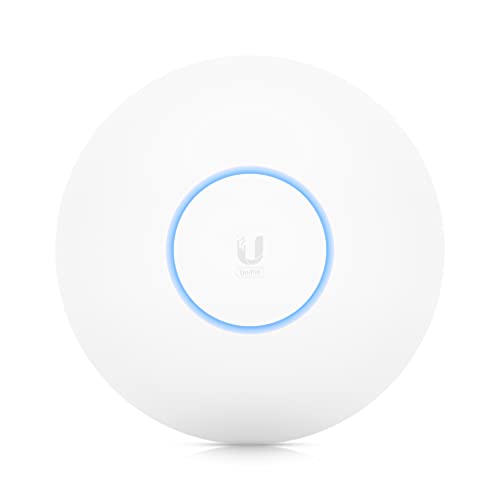
Ubiquiti UniFi 6 Long-Range (U6-LR)
The Ubiquiti UniFi 6 Long-Range is a high-performance access point for those who want a prosumer setup. It offers excellent range and Wi-Fi 6 speeds, easily covering large areas. Requires a UniFi controller (software or hardware) for setup, but the management interface is incredibly powerful.
What we liked
- Outstanding range and coverage
- Advanced management features with UniFi controller
- PoE powered for flexible placement
What we didn't like
- Requires separate controller for full features
- No built-in router functionality

TP-Link Deco XE75
The TP-Link Deco XE75 brings Wi-Fi 6E to a mesh system at an affordable price. It offers a dedicated 6 GHz band for backhaul or client devices, improving speeds and reducing interference. The Deco app is user-friendly, and the system supports Alexa voice controls. For the price, it's a steal.
What we liked
- WiFi 6E Tri-Band Mesh WiFi – Cover up to 7,200 Sq.Ft with next-gen seamless WiFi and make dead zones and buffering a thing of the past¹ ²
- Brand-New 6 GHz Band – Experience the latest frequency of WiFi, eliminating interference from all legacy devices. The 6 GHz band can work as a backhaul to ensure stable connections between nodes by default. You can switch it to Wi-Fi Network mode and connect your WiFi 6E-compatible devices to 6GHz Network³
- True Tri-Band Speed – All three WiFi bands work together to unleash your network’s total speeds up to 5,400 Mbps for 200 devices(6 GHz: 2402 Mbps (HE160);5 GHz: 2402 Mbps (HE160);2.4 GHz: 574 Mbps)¹ ³
- Our Cybersecurity Commitment - TP-Link is a signatory of the U.S. Cybersecurity and Infrastructure Security Agency’s (CISA) Secure-by-Design pledge. This device is designed, built, and maintained, with advanced security as a core requirement.
- Unlock the Full Potential of WiFi 6 - Opening the 6 GHz band will change the game for WiFi 6. WiFi 6 brings about upgraded performance in network efficiency and capacity. Whereas the advantages of WiFi 6 are not fully realized while competing with transmissions from WiFi 5 (or other radios). The 6 GHz band is available only for WiFi 6 traffic, allowing WiFi 6 to meet its intended potential
What we didn't like
- No 2.5 Gbps ports
- Limited advanced settings compared to competitors
How to choose
Coverage Area
Measure your home's square footage and consider obstacles like walls and floors. For larger homes, a mesh system or multiple access points ensures consistent coverage.
Wi-Fi Standard
Wi-Fi 6E offers a new 6 GHz band for faster speeds and less interference. If your devices support it, it's a worthwhile upgrade. Wi-Fi 6 is still excellent for most users.
Number of Devices
If you have many smart home devices, look for routers with OFDMA and MU-MIMO to handle multiple connections efficiently.
Wired Ports
For gaming or NAS, consider routers with 2.5 Gbps or multi-gig ports. Most devices still use Gigabit Ethernet, but future-proofing is wise.
Security Features
Built-in security like AiProtection or Netgear Armor can protect against threats. Ensure the router receives regular firmware updates.
The bottom line
The best networking gear for 2026 balances speed, coverage, and ease of use. Wi-Fi 6E is the new standard, but only if your devices support it. For most homes, a mesh system like the Asus ZenWiFi AX offers the best blend of performance and simplicity.
Common questions
If you have Wi-Fi 6E devices (like newer phones or laptops), yes. The 6 GHz band offers faster speeds and less congestion. Otherwise, Wi-Fi 6 is still great.
A single router covers a limited area. A mesh system uses multiple nodes to blanket your home with Wi-Fi, ideal for larger spaces or multi-story homes.
QoS prioritizes traffic for gaming or video calls. It's crucial if you have many devices competing for bandwidth. Most modern routers have some form of QoS.
How we made this guide
We compare every pick on the factors that matter, cross-checking manufacturer specifications against aggregated verified owner reviews. We rank independently and never take payment for placement. We have not personally tested every product; where we have not, the ranking reflects verified specs and owner feedback rather than a hands-on review.
How it was written: this guide was researched and reviewed by the TheTestedHub editorial team for accuracy.
Affiliate disclosure: TheTestedHub is reader-supported. When you buy through links on our site, we may earn a commission at no extra cost to you.
More guides

Your Docking Station Match: CalDigit TS4 and More

Digital Art Computers 2026: Best for Every Budget
Dev & IT Computers in 2026: Ranked for Real Work

Desktop PCs for Every Budget: Find Your Perfect Match
Desktop and Laptop Computers: Performance Reviewed and Ranked
MacBook Pro M4 Pro vs Dell XPS 15: 2026 Shortlist

Buy the Best DIY Computer in 2026: Corsair One i300
