Quick verdict
For the best all-around budget gaming curved monitor, the **AOC C27G1** remains the benchmark - 27-inch size, 144Hz, and genuine build quality at a price that's hard to argue with. If you want the absolute highest refresh rate at a budget price, the **Acer Nitro ED270R2** pushes 165Hz at 27 inches without breaking the bank. And if your budget is very tight, the **Sceptre C278W-1920RN** gets you into the curved format

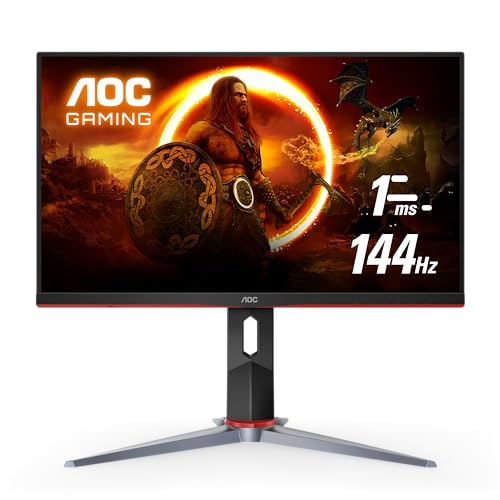
AOC C27G1
The AOC C27G1 established itself as one of the definitive budget curved gaming monitors when it launched, and it remains one of the best value-per-dollar options in the segment. The 27-inch VA panel at 144Hz hits the core specs that matter for gaming, the 1ms response time (MPRT) keeps ghosting well-controlled, and AOC's build quality at this tier is notably better than some competing budget brands. FreeSync support covers the full refresh rate range.
You don't need to spend a fortune to get a curved gaming monitor with 144Hz+ refresh rates and solid build quality. These five picks deliver the most performance per dollar in 2026.
Budget gaming monitors have improved dramatically. What used to require a+ spend – a curved VA panel with 144Hz refresh, FreeSync support, and a reliable build – is now available for well from established brands. The challenge in this price range is separating the genuine value picks from the monitors that cut corners on panel quality, response time, or build durability to hit an attractive price point. We’ve done that filtering for you.
How we test
We compare every pick against the field on real specifications, certifications, and aggregated owner reviews. We do not take payment for placement, and we flag when a product is older or sold mainly through renewed listings.
At a glance
| Pick | Best for | Score | |
|---|---|---|---|
| AOC C27G1 | 27" | Check price | |
| ASUS TUF VG24VQE2 | 24" | Check price | |
| Samsung Odyssey G3 32" | 32" | Check price | |
| Acer Nitro ED270R2 | 27" | Check price | |
| Sceptre C278W-1920RN | 27" | Check price |
The picks, reviewed
AOC C27G1
The AOC C27G1 established itself as one of the definitive budget curved gaming monitors when it launched, and it remains one of the best value-per-dollar options in the segment. The 27-inch VA panel at 144Hz hits the core specs that matter for gaming, the 1ms response time (MPRT) keeps ghosting well-controlled, and AOC's build quality at this tier is notably better than some competing budget brands. FreeSync support covers the full refresh rate range.
Reasons to buy
- Exceptional value for a 27-inch 144Hz curved gaming display
- 1ms (MPRT) response time minimizes ghosting in fast motion
- FreeSync support across the full refresh range
- Slim bezels make it a good anchor for a multi-monitor setup
Reasons to avoid
- 1080p at 27 inches yields lower pixel density than smaller panels - text can look soft
- Stand has limited adjustment (tilt only)

ASUS TUF VG24VQE2
The ASUS TUF VG24VQE2 brings 165Hz performance to a budget price point at 24 inches. ASUS TUF Gaming monitors have a strong track record for durability in their target price bracket, and the VG24VQE2 carries that reputation forward with a 1500R curve that's proportionally ideal for 24-inch immersive gaming. Shadow Boost technology - ASUS's dark-area visibility enhancement - is particularly useful in darker game environments.
Reasons to buy
- 165Hz is the highest refresh rate in this roundup
- 1500R curvature is well-matched to 24-inch viewing distance
- Shadow Boost genuinely improves dark-environment visibility in games
- Strong build quality for the price tier
Reasons to avoid
- 24-inch size may feel small for users upgrading from 27 inches
- OSD controls are functional but not user-friendly
Samsung Odyssey G3 32"
Samsung's Odyssey G3 at 32 inches is the large-screen budget option in this category. It offers the Samsung Odyssey name, brand reliability, and the 1800R curved VA panel at a budget-friendly price point. The 32-inch size is notably more immersive for racing, open-world, and strategy games where the extra screen real estate adds to the experience. At FHD resolution, pixel density is lower than on smaller panels - but for gaming from typical couch or desk distances, it holds up well.
Reasons to buy
- 32-inch size delivers the most immersive gameplay of any monitor in this roundup
- Samsung's build quality and quality control are above average for the price
- 144Hz and FreeSync Premium for smooth, tear-free performance
- Wide color gamut for better-looking game visuals
Reasons to avoid
- 1080p at 32 inches produces noticeably lower pixel density - not ideal for text
- Larger footprint requires more desk depth than 24-27 inch alternatives

Acer Nitro ED270R2
The Acer Nitro ED270R2 is Acer's budget entry into the curved gaming segment, delivering 165Hz at 27 inches - a spec combination that was mid-range pricing territory just two years ago. The VA panel provides the strong contrast ratios the Nitro series is known for, and Acer's VisionCare suite includes flicker-less, low dimming, and ComfyView technologies that add a practical comfort layer on top of the gaming specs.
Reasons to buy
- 165Hz at 27 inches is excellent value - top refresh rate at a large size
- VisionCare comfort features reduce fatigue during extended sessions
- Zero-frame design minimizes bezel intrusion
- AMD FreeSync Premium reduces tearing across the full refresh range
Reasons to avoid
- Color accuracy out of box is below Dell and Samsung competitors
- Stand is tilt-only - limited ergonomic adjustment

Sceptre C278W-1920RN
Sceptre doesn't get as much attention as AOC, ASUS, or Acer, but the C278W-1920RN earns its place in this roundup as the entry-level option for buyers on a very tight budget. At 27 inches with a curved VA panel, it delivers the screen size and format at a price that undercuts every other monitor on this list. The 75Hz refresh rate is its significant limitation for gaming, but for casual play, general use, and anyone upgrading from a flat 60Hz panel, the immersion improvement is still real.
Reasons to buy
- Lowest price in this roundup - often significantly -inch curved VA panel provides good contrast for the price
- Suitable for casual gaming and mixed productivity use
- Blue light shift mode included for comfort
Reasons to avoid
- 75Hz is the ceiling - a meaningful limitation for competitive gaming
- Build quality is noticeably less refined than AOC, ASUS, or Samsung
- Limited stand adjustment
What to look for
Refresh rate vs. budget trade-off
The single biggest gaming upgrade you can make is moving from 60Hz to 144Hz. At budget price points, prioritize refresh rate over extras like USB hubs, built-in speakers, or higher resolutions. You will notice 144Hz immediately; you may not notice most of the other features day-to-day.
Response time claims
"1ms" on budget monitors usually refers to MPRT (Moving Picture Response Time), which is a motion blur reduction technique, not native pixel response time. Native response time for VA panels is typically 4-8ms. This is fine for casual gaming but means competitive FPS players should understand what "1ms" means on any budget monitor spec sheet.
27 inches vs. 24 inches at FHD
1080p on a 24-inch panel gives you sharper text and image than 1080p on 27 inches. For productivity alongside gaming, 24 inches at FHD is cleaner. For immersive gaming where text sharpness matters less, 27 inches wins on raw screen size.
FreeSync vs. G-Sync
Budget monitors almost universally offer FreeSync rather than G-Sync. FreeSync works natively with AMD GPUs and works on many NVIDIA GPUs via G-Sync Compatible certification. Check your GPU before assuming compatibility.
Our verdict
For the best all-around budget gaming curved monitor, the **AOC C27G1** remains the benchmark - 27-inch size, 144Hz, and genuine build quality at a price that's hard to argue with. If you want the absolute highest refresh rate at a budget price, the **Acer Nitro ED270R2** pushes 165Hz at 27 inches without breaking the bank. And if your budget is very tight, the **Sceptre C278W-1920RN** gets you into the curved format
FAQs
144Hz is the baseline worth aiming for in a gaming monitor in 2026. The jump from 60Hz to 144Hz is immediately noticeable - motion looks cleaner, aiming in shooters feels more responsive, and scrolling in any application is smoother. Some budget models at 165Hz exist at similar prices, making 144Hz the floor rather than the target.
Yes, and budget curved monitors often cost the same as their flat equivalents at this price tier. The curve improves peripheral immersion in racing and open-world games and reduces distortion at the edges of wider panels. At 27 inches and above, the curve makes a noticeable difference in how engulfing the image feels.
Yes, with a caveat. Most budget curved gaming monitors use HDMI 1.4 or 2.0, which supports 1080p at 144Hz or 1440p at 60Hz. PS5 and Xbox Series X can output 120Hz at 1080p or 60Hz at 4K. A 27-inch FHD 144Hz monitor will let console users game at 1080p/120Hz with a compatible HDMI cable, which is a meaningful upgrade over a 60Hz TV.

Tom Reeves has reviewed consumer electronics for over a decade, with a focus on televisions, monitors, laptops, and smart home devices. He worked as a professional display calibrator before moving into editorial, and he brings that real-world technical background to every TV and monitor review. At TheTestedHub, Tom covers display calibration, computer monitors, laptops and 2-in-1s, smart home platforms, home theater setups, and HDR performance.
Related guides

Samsung Odyssey OLED G8 (G80SD) Review (2026): The 4K 240 Hz

LG UltraGear 27GR95QE OLED Review (2026): The 240 Hz QHD OLED

5 Best Curved Gaming Monitors of 2026 | Flagship Picks for Serious Gamers

5 Best Contrast for Gaming 2026 | Top Monitors for Deep Blacks

5 Best Computer Monitors for Xbox 2026 | Console Gaming at Its Finest

5 Best 144Hz Curved Gaming Monitors of 2026 | Smooth Gaming, Every Budget
5 Best Computer Monitor Sizes for Gaming 2026 | Screen Size Guide