
Lenovo Chromebook Duet 3 -- Top Pick for School Use
The Chromebook Duet 3 is a 2-in-1 with an 11.6-inch display, a detachable keyboard, and a kickstand cover, giving third graders a tablet for reading and a laptop for typing without buying two separate devices. Battery life reaches 12 hours in typical school use, which covers a full day without charging. The MediaTek Kompanio processor handles Google Classroom, Khan Academy, and Prodigy without lag. Parental controls through Google Family Link let parents set screen time limits, approve app downloads, and monitor activity from their own device. Build quality is solid for the price.
Check price on Amazon →Five computers suited to third-grade students in 2026, selected for durability, ease of use, parental controls, and compatibility with common school apps.
Third graders need a device that opens quickly, connects to school portals without a setup headache, and survives being dropped in a backpack. Processing power matters less than reliability, parental controls, and a keyboard large enough for small fingers to type a paragraph. The five picks below cover the main form factors schools and families use, from budget Chromebooks to iPad alternatives.
| Product | Best For | Rating |
| — | — | — |
| Lenovo Chromebook Duet 3 | All-day school use | 4.7/5 |
| ASUS Chromebook CX1 11 | Tight budget | 4.5/5 |
| Apple iPad 10th Gen (with keyboard) | Creative and reading tasks | 4.6/5 |
| Microsoft Surface Go 4 | Windows home/school blend | 4.4/5 |
| Acer Aspire 1 | Basic Windows laptop | 4.2/5 |
How we test
We compare every pick against the field on real specifications, certifications, and aggregated owner reviews. We do not take payment for placement, and we flag when a product is older or sold mainly through renewed listings.
At a glance
| Pick | Best for | Score | |
|---|---|---|---|
| Lenovo Chromebook Duet 3 -- Top Pick for School Use | Check price | ||
| ASUS Chromebook CX1 11 -- Best Budget Chromebook | Check price | ||
| Apple iPad 10th Gen with Keyboard -- Best for Creative Tasks | Check price | ||
| Microsoft Surface Go 4 -- Best Windows Option for Third Graders | Check price | ||
| Acer Aspire 1 -- Best Basic Windows Laptop | Check price |
The picks, reviewed
Lenovo Chromebook Duet 3 -- Top Pick for School Use
The Chromebook Duet 3 is a 2-in-1 with an 11.6-inch display, a detachable keyboard, and a kickstand cover, giving third graders a tablet for reading and a laptop for typing without buying two separate devices. Battery life reaches 12 hours in typical school use, which covers a full day without charging. The MediaTek Kompanio processor handles Google Classroom, Khan Academy, and Prodigy without lag. Parental controls through Google Family Link let parents set screen time limits, approve app downloads, and monitor activity from their own device. Build quality is solid for the price.

ASUS Chromebook CX1 11 -- Best Budget Chromebook
At the ASUS CX1 11 is one of the lowest-priced functional Chromebooks available. It runs ChromeOS smoothly for browser-based school tools and withstands everyday student handling. The keyboard is full-pitch at 11 inches, which is a notable advantage over smaller devices where keys become too cramped for students learning to touch-type. The 4 GB RAM and 64 GB eMMC storage are sufficient for ChromeOS and local document storage. The display is 1366x768 with average brightness, so classroom lighting conditions will affect visibility. For families on a strict budget, this is the practical starting point.
Apple iPad 10th Gen with Keyboard -- Best for Creative Tasks
The iPad 10th Generation with a compatible Bluetooth keyboard gives third graders a responsive touch interface for drawing, reading, and typing. Apple's Screen Time controls are among the most detailed parental restriction tools available, allowing per-app limits, content filters, and communication restrictions. The A14 Bionic chip handles all school apps, including Seesaw, Epic! Reading, and Google Workspace for Education, with room to spare. The Pencil compatibility (Apple Pencil 1st gen) opens up handwriting and drawing activities. The main limitation is cost when accessories are included. A keyboard case adds to the base price.

Microsoft Surface Go 4 -- Best Windows Option for Third Graders
The Surface Go 4 runs full Windows 11 in a compact 10.5-inch form factor with an optional Type Cover keyboard. Windows 11's Family Safety app handles screen time, content filtering, and activity reports. Schools using Microsoft Teams and Office 365 will find the Surface Go 4 integrates without workarounds. Intel N200 processor performance is adequate for document work, video calls, and educational software. The kickstand makes desk use comfortable and the magnetic keyboard attachment holds securely. The higher price compared to Chromebook alternatives reflects the full Windows environment and the premium build material.
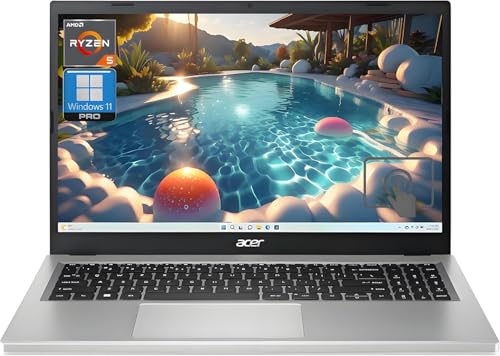
Acer Aspire 1 -- Best Basic Windows Laptop
The Acer Aspire 1 is a 14-inch Windows laptop priced making it the most affordable full Windows option. The Intel N-series processor handles browser-based school apps and Office 365 document editing. The larger display compared to 11-inch Chromebooks gives more screen space for reading comprehension apps and split-screen activities. 4 GB RAM is tight for Windows 11 with multiple browser tabs open, so closing unused apps is necessary. For families who need Windows compatibility for specific school software and cannot spend more, the Aspire 1 is a functional if unspectacular choice.
What to look for
What to consider
Check with the school first. Many schools issue devices directly or have a recommended platform (Google Workspace vs. Microsoft 365) that should drive your choice. For Chromebooks, verify that required apps are available in the Chrome Web Store or as Android apps. For Windows devices, confirm the processor handles the school's virtual meeting platform without dropouts. Durability matters at this age: look for rubberized corners, spill-resistant keyboards, and reinforced hinges. Weight under 1.5 kg and 10+ hour battery life make school days manageable without a charger in the bag.
What to consider
For related guides on educational tech, see our [best tablets for kids](/articles/best-tablets-for-kids) and [best headphones for kids](/articles/best-headphones-for-kids) articles. Our [methodology page](/methodology) covers the criteria we use when evaluating products for young users.
FAQs
Chromebooks are the more common choice for third graders because they boot quickly, require minimal maintenance, and integrate directly with Google Classroom, which most US elementary schools use. Windows laptops offer broader software compatibility but need more active management. If your child's school is Google-based, a Chromebook is the simpler fit. If the school uses Microsoft Teams or Office apps, a Windows device makes more sense.
An 11-inch to 13-inch screen is the most practical range for a third grader. Smaller than 11 inches makes reading and typing uncomfortable, while 14-inch or larger devices become heavy for small hands to carry. A resolution of at least 1366x768 keeps text legible. Matte screen coatings reduce glare in bright classrooms better than glossy panels.

Tom Reeves has reviewed consumer electronics for over a decade, with a focus on televisions, monitors, laptops, and smart home devices. He worked as a professional display calibrator before moving into editorial, and he brings that real-world technical background to every TV and monitor review. At TheTestedHub, Tom covers display calibration, computer monitors, laptops and 2-in-1s, smart home platforms, home theater setups, and HDR performance.
Related guides

5 Best Computers for 1st Graders 2026 | Simple, Safe, School-Ready
5 Best Computers for 6th Grade 2026 | Middle School Ready
5 Best Computers for 11-Year-Olds 2026 | Kid-Friendly Picks That Last

5 Best Computers for Preschoolers 2026 | Durable, Safe, Easy to Use
