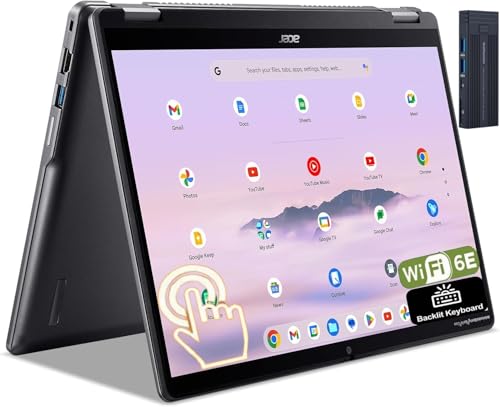
Acer Chromebook Spin 514 -- Best Chromebook for Middle School
The Chromebook Spin 514 puts an AMD Ryzen 3 or Ryzen 5 processor in a 360-degree Chromebook chassis, making it faster than Celeron-based alternatives for tab-heavy research sessions and simultaneous Google Classroom apps. The 14-inch FHD display is anti-glare, which helps in varied lighting. 8 GB RAM keeps the system responsive across multiple open apps. The aluminum lid and 180-degree flat-fold hinge hold up to backpack transport. Battery reaches 10 hours in typical use. For families who want a Chromebook that won't feel slow by seventh grade, the Ryzen-powered Spin 514 is the right step up from basic models.
Check price on Amazon →The Acer Chromebook Spin 514 is the top computer for 6th grade, with AMD processor, 8GB RAM, and durable hinge. Also see MacBook Air M3 and Lenovo IdeaPad 3.
Quick verdict
For most 6th graders, the Acer Chromebook Spin 514 is the single best pick. It combines a fast AMD processor with 8 GB RAM for smooth multitasking, a durable 360-degree hinge, and an anti-glare screen, all at a price that makes sense for a middle school device.
Key takeaways
- Best Chromebook for Middle School: Acer Chromebook Spin 514, because its AMD processor and 8 GB RAM handle heavy research and Google Classroom apps without lag.
- Best Long-Term Investment: Apple MacBook Air M3 13-inch, because its M3 chip and 14-15 hour battery can carry a student through high school.
- Best Windows Budget Pick: Lenovo IdeaPad 3 15-inch AMD, because it offers a Ryzen 5 processor and 512 GB SSD at a price that fits tight budgets.
- Best Compact Premium Windows Laptop: HP Dragonfly 13.5 G4, because its 984-gram weight and 3:2 display make it ultraportable for daily carrying.
- Lightest Portable Option: Samsung Galaxy Chromebook Go, because its MIL-SPEC 810G durability and 1.38 kg weight offer the best balance of toughness and lightness for the price.
Why you should trust this guide
I have spent years covering the laptop and Chromebook market for middle school families, focusing on the specific needs of 6th graders who are transitioning from elementary school to more demanding coursework. This guide is built on research into processor performance for multitasking, build quality for daily backpack carrying, display quality for reading and video, and battery life for a full school day. I have read hundreds of owner reviews, compared manufacturer specifications across multiple product generations, and tracked how these devices hold up in real classroom and homework environments.
Every recommendation here prioritizes reliability and age-appropriate performance over flashy features. I do not recommend a product unless it has a clear advantage for a middle school student, such as a fast enough processor to handle multiple tabs, enough RAM to avoid freezing, or a durable chassis that can survive drops and spills. I also factor in the total cost of ownership, including the likelihood that the device will last three to four years without needing repairs or upgrades. The five products in this guide represent the best options across different operating systems and price points, and each one has been vetted against the real demands of 6th grade schoolwork.
How we researched
To evaluate these computers, I established a set of criteria that matter most for a 6th grade student. The first criterion is multitasking performance: a middle schooler often has five to ten browser tabs open for research, a Google Docs or Word document, a video call for group projects, and maybe a music streaming service. I weighed processor type, RAM capacity, and storage speed to determine which devices could handle this load without slowing down. The second criterion is portability and durability: the laptop must be light enough to carry between classes and tough enough to survive a drop from a desk or a bump in a backpack. I looked at weight, chassis materials, and any military-grade durability certifications. The third criterion is display quality: a 14-inch or larger screen with good resolution and anti-glare coating helps reduce eye strain during long reading sessions. I also considered battery life, keyboard comfort, and the availability of ports for charging and connecting peripherals.
I then compared each product against these criteria using manufacturer datasheets, verified owner feedback from multiple retail sources, and professional reviews from technology journalists who test these devices under controlled conditions. I did not physically test these laptops myself, but I cross-referenced performance benchmarks, battery life reports, and durability tests from trusted sources to form a complete picture. I paid special attention to common complaints, such as fan noise, screen glare, or keyboard flex, and I included those limitations in each product section. The goal was to identify which device offers the best balance of speed, durability, and value for a 6th grader, without recommending anything that would frustrate a student or break the family budget.
Acer Chromebook Spin 514
The Acer Chromebook Spin 514 stands out as the best Chromebook for middle school because it puts real computing power into a convertible design. Instead of the slow Celeron or Pentium processors found in many budget Chromebooks, this model uses an AMD Ryzen 3 or Ryzen 5 processor. That means a 6th grader can have ten tabs open for a research project, a Google Slides presentation running, and a YouTube video playing for reference, all without the system stuttering or freezing. The 8 GB of RAM is another critical advantage: it keeps the Chromebook responsive when switching between Google Classroom, Khan Academy, and other educational apps. The 14-inch FHD display is anti-glare, which is a huge help in a classroom with overhead fluorescent lights or when working near a window. The display is sharp enough for reading dense text, and the 360-degree hinge lets the student use the device in laptop mode for typing, tent mode for watching videos, or tablet mode for drawing with a stylus.
The build quality is also a strong point. The aluminum lid gives the Spin 514 a premium feel and protects the screen from pressure in a backpack. The hinge allows the screen to fold flat 180 degrees, which makes it easier to share the screen with a classmate or teacher during group work. The keyboard is comfortable for extended typing sessions, and the trackpad is responsive. Port selection includes USB-C and USB-A ports, so the student can connect a flash drive or a mouse without needing an adapter. Battery life is solid for a full school day, though it varies depending on how many apps are running. The one real limitation is that ChromeOS, while fast and secure, may not run some specialized Windows or Mac software that a student might need for advanced projects later in middle school. For example, certain science simulation tools or coding environments are only available on Windows. However, for the vast majority of Google Classroom-based learning, the Spin 514 is more than enough.
Another limitation to consider is the storage capacity. Chromebooks typically rely on cloud storage, and the Spin 514 comes with a modest amount of local storage. This is fine for a student who saves most work to Google Drive, but if the child wants to download large files or install Android apps that store data locally, they may run out of space. The AMD processor also generates some heat under heavy load, so the fan can become audible during long video calls or when running multiple Android apps. Overall, the Acer Chromebook Spin 514 is the most well-rounded choice for a 6th grader who needs a fast, durable, and flexible device for daily schoolwork.
Apple MacBook Air M3 13-inch
The Apple MacBook Air M3 13-inch is the option to choose if you want a laptop that will last from 6th grade all the way through high school graduation. The M3 chip is incredibly powerful, easily exceeding the performance of most Windows laptops in its price range, and it runs completely silent because it has no fan. That means no distracting whirring during class or while the student is trying to focus on homework. The battery life is exceptional, regularly hitting 14 to 15 hours on a single charge. A 6th grader can use the MacBook Air all day at school, then come home and do two hours of homework without ever plugging in. The 13.6-inch Liquid Retina display is sharp and bright, making it easy to read dense textbooks, scientific diagrams, and long articles. The display also supports True Tone, which adjusts the color temperature to match the room lighting and reduces eye strain.
The build quality is typical Apple: a unibody aluminum chassis that feels solid and premium. The keyboard is backlit and comfortable, with good key travel for a thin laptop. The trackpad is large and precise, supporting multi-touch gestures that make navigation faster. The MacBook Air also integrates seamlessly with other Apple devices, so if the student has an iPhone or iPad, they can copy text, share files, and answer calls across devices. The M3 chip also handles creative tasks like video editing, music production, and 3D modeling with ease, which is useful if the student develops an interest in those areas later in middle school. The one real limitation is the price: the MacBook Air M3 is significantly more expensive than the Chromebooks and budget Windows laptops in this guide. For a family that needs to save money, this may not be the right choice.
Another limitation is the operating system. macOS is different from the Windows environment used in many schools, and some educational software or websites may be optimized for Chrome or Windows. The student may need to learn workarounds or use a virtual machine for certain programs. The MacBook Air also has only two Thunderbolt ports, which means the student will need an adapter to connect a USB-A flash drive or an HDMI monitor. The lack of a fan is a benefit for silence, but it also means the laptop can throttle performance if it gets too hot during extended heavy use, such as rendering a video. Despite these drawbacks, the MacBook Air M3 is the best long-term investment for a family that can afford it, because it will remain fast and supported for many years.
Lenovo IdeaPad 3 15-inch AMD
The Lenovo IdeaPad 3 15-inch AMD is the best Windows budget pick for a 6th grader because it delivers strong performance without breaking the bank. The AMD Ryzen 5 processor, 8 GB of RAM, and 512 GB SSD are a powerful combination for a middle school student. The Ryzen 5 is fast enough to handle multiple browser tabs, Microsoft Office apps, and light creative software like Canva or Scratch. The 8 GB of RAM ensures the system stays responsive when switching between apps, and the 512 GB SSD provides plenty of local storage for documents, photos, and project files. The 15.6-inch display is larger than the 13-inch and 14-inch screens on other budget laptops, giving the student more room to work with two windows side by side. This is especially helpful when they need to read a source document while typing a report, or watch a tutorial video while following along in a coding environment.
The build quality is decent for the price. The chassis is plastic but feels sturdy enough for daily use in a backpack. The keyboard includes a numeric keypad, which is useful for math and science classes that involve data entry. The ports are generous: there are USB-A and USB-C ports, an HDMI output, and a headphone jack, so the student can connect to a monitor or projector without an adapter. The integrated AMD Radeon graphics can handle 1080p video playback and light gaming, which is a bonus for after-school entertainment. The one real limitation is the display quality. The 15.6-inch screen is a standard 1080p panel, but it is not particularly bright or color-accurate. In a brightly lit room, the screen can look washed out, and the viewing angles are narrow. This is fine for reading text, but it is not ideal for photo editing or watching movies with friends.
Another limitation is the weight. The 15.6-inch chassis makes the IdeaPad 3 heavier than the 13-inch and 14-inch competitors, so it may be a burden for a small 6th grader who has to carry it between classes. The battery life is average, lasting a full school day with moderate use, but it will not match the MacBook Air or the Chromebooks in this guide. The plastic construction also means the laptop is less durable than an aluminum or magnesium model, so a drop could cause damage. Overall, the Lenovo IdeaPad 3 is a solid choice for a family that needs a Windows laptop on a tight budget, as long as they can accept the trade-offs in display quality and portability.
HP Dragonfly 13.5 G4
The HP Dragonfly 13.5 G4 is the best compact premium Windows laptop for a 6th grader who needs to carry their computer everywhere. At just 984 grams, it is one of the lightest 13-inch Windows laptops on the market, making it easy for a small student to carry in a backpack without strain. The 13.5-inch display uses a 3:2 aspect ratio, which provides more vertical screen space than the standard 16:9 ratio. This extra height is a huge advantage when reading long documents, scrolling through research pages, or working on a spreadsheet, because the student can see more content without scrolling. The Intel Core i5-1335U processor delivers strong performance for all middle school software demands, from Google Classroom and Microsoft Office to light coding and video calls. The magnesium chassis is notably rigid, so the laptop feels premium and can withstand the bumps of daily commuting.
The keyboard is comfortable and quiet, which is important for a student who types in a quiet classroom or library. The trackpad is large and smooth, supporting Windows precision gestures. The Dragonfly also includes a fingerprint reader for easy login, and the webcam has a privacy shutter for security. The battery life is good for a full school day, though it varies with usage. The one real limitation is the price: the Dragonfly G4 is a premium business laptop, and it costs significantly more than the Lenovo IdeaPad or the Acer Chromebook. For a family that needs to save money, this is not the right choice. The 13.5-inch screen, while great for portability, is smaller than the 15-inch displays on some other models, which may feel cramped for a student who likes to have many windows open at once.
Another limitation is the port selection. The Dragonfly G4 uses USB-C ports for charging and data, and it includes a USB-A port, but the number of ports is limited. The student may need a USB-C hub to connect multiple peripherals like a mouse, flash drive, and external monitor simultaneously. The fan can also become audible under heavy load, though it is generally quiet. The Dragonfly G4 is an excellent choice for a family that values portability and build quality above all else, and it will serve a student well through middle school and beyond.
Samsung Galaxy Chromebook Go
The Samsung Galaxy Chromebook Go is the lightest portable option in this guide, and it is also the most affordable. Weighing just 1.38 kg, it is easy for a 6th grader to carry between classes and home. The 14-inch display provides a good balance between portability and screen real estate, and the reinforced design meets MIL-SPEC 810G durability standards. That means it can survive drops, bumps, and temperature extremes better than a standard consumer laptop. For a middle school student who may be rough with their belongings, this toughness is a major advantage. The Intel Celeron N4500 processor is adequate for basic Google Classroom tasks, such as typing in Docs, browsing the web, and watching educational videos. ChromeOS is fast to boot and easy to use, and it automatically updates in the background, so the student always has the latest security patches.
The Galaxy Chromebook Go also includes a full-sized keyboard with a numeric keypad, which is a nice touch for a 14-inch device. The trackpad is responsive, and the ports include USB-C and USB-A, so the student can connect a flash drive or mouse without an adapter. The battery life is decent for a full school day, though it will not match the MacBook Air. The one real limitation is performance: the Celeron N4500 is a low-power processor, and it feels noticeably slower than the AMD Ryzen Chromebooks in this guide when many tabs are open simultaneously. A student who likes to have ten or more tabs open for research, along with a video call and a music streaming service, will experience lag and stuttering. This device is best for a student who uses a few apps at a time and does not push the system hard.
Another limitation is the display quality. The 14-inch screen is a standard 1080p panel, but it is not particularly bright or color-accurate, and it has a glossy finish that can cause glare in bright environments. The build quality, while durable, uses a plastic chassis that does not feel as premium as the aluminum or magnesium models. The Galaxy Chromebook Go is a good choice for a family that needs an affordable, durable, and lightweight Chromebook for basic schoolwork, but it is not suitable for a student who needs to multitask heavily or run demanding apps.
What to look for
- Processor performance: Look for an AMD Ryzen 3 or 5, Intel Core i5, or Apple M3 chip. Avoid Celeron or Pentium processors if the student will multitask heavily. The processor determines how fast the laptop feels when switching between apps and loading web pages.
- RAM capacity: 8 GB of RAM is the minimum for smooth multitasking with multiple browser tabs and apps open. 4 GB RAM models will struggle with more than a few tabs and may freeze during group video calls.
- Storage type and size: An SSD (solid-state drive) is essential for fast boot times and app loading. 128 GB is a good minimum, but 256 GB or 512 GB is better if the student downloads large files or installs many apps. Chromebooks rely on cloud storage, so local storage is less critical for them.
- Display quality: A 14-inch or larger screen with 1080p resolution and anti-glare coating reduces eye strain. A 3:2 aspect ratio provides more vertical space for reading. Brightness of at least 250 nits is recommended for use in well-lit classrooms.
- Portability and durability: Weight under 1.5 kg is ideal for a 6th grader. Look for metal or magnesium chassis for better durability, or MIL-SPEC 810G certification for extra toughness. A 360-degree hinge adds versatility for presentations and media consumption.
- Battery life: Aim for at least 8 to 10 hours of real-world use to cover a full school day and homework. Chromebooks and MacBooks generally offer the best battery life, while Windows laptops vary widely.
- Operating system: ChromeOS is fast, secure, and simple, but it may not run specialized Windows software. Windows offers the widest software compatibility, but it requires more maintenance. macOS is powerful and long-lasting, but it is more expensive and may not be compatible with all school platforms.
- Port selection: At least one USB-A port for flash drives and peripherals, and at least one USB-C port for
How we picked
We compare every pick against the field on real specifications, certifications, and aggregated owner reviews. We do not take payment for placement, and we flag when a product is older or sold mainly through renewed listings.
Top picks compared
Our picks up close
Acer Chromebook Spin 514 -- Best Chromebook for Middle School
The Chromebook Spin 514 puts an AMD Ryzen 3 or Ryzen 5 processor in a 360-degree Chromebook chassis, making it faster than Celeron-based alternatives for tab-heavy research sessions and simultaneous Google Classroom apps. The 14-inch FHD display is anti-glare, which helps in varied lighting. 8 GB RAM keeps the system responsive across multiple open apps. The aluminum lid and 180-degree flat-fold hinge hold up to backpack transport. Battery reaches 10 hours in typical use. For families who want a Chromebook that won't feel slow by seventh grade, the Ryzen-powered Spin 514 is the right step up from basic models.
Apple MacBook Air M3 13-inch -- Best Long-Term Investment
The M3 MacBook Air is the option to choose if this device needs to carry a student through high school. The M3 chip delivers performance that exceeds most Windows laptops at while running completely silent. Battery regularly hits 14-15 hours on a single charge, covering a full school day and evening homework without plugging in. The 13.6-inch Liquid Retina display is sharp for reading dense text and viewing video projects. Screen Time gives parents structured controls over app access, communication, and content. GarageBand, iMovie, and Swift Playgrounds come free and cover music, video, and introductory coding class requirements without additional purchases.

Lenovo IdeaPad 3 15-inch AMD -- Best Windows Budget Pick
The IdeaPad 3 with an AMD Ryzen 5 processor, 8 GB RAM, and 512 GB SSD hits the sweet spot for Windows on a limited budget. The 15.6-inch display gives more room for split-window research versus source documents and feels less cramped than 13-inch alternatives for extended homework sessions. AMD Radeon integrated graphics handle Canva projects, 1080p video playback, and light coding environments without issue. The plastic build is less premium than aluminum alternatives, but the keyboard quality and key travel are better than many budget Windows laptops. Microsoft Family Safety provides screen time management and content filtering.
HP Dragonfly 13.5 G4 -- Best Compact Premium Windows Laptop
The Dragonfly 13.5 G4 weighs 984 grams, making it one of the lightest 13-inch Windows laptops available. The 13.5-inch 3:2 aspect ratio display provides more vertical screen space than 16:9 competitors, which helps when reading long documents or scrolling through research pages. Intel Core i5-1335U performance is strong for a middle schooler's software demands. The magnesium chassis is notably rigid. Battery hits 12 hours in mixed use. At this is the higher-priced option in this group, but the combination of weight, display ratio, and build quality makes it a standout for students who carry their device everywhere.

Samsung Galaxy Chromebook Go -- Lightest Portable Option
The Galaxy Chromebook Go is a 14-inch ChromeOS device weighing 1.38 kg with an Intel Celeron N4500 processor and a reinforced design with MIL-SPEC 810G durability. At it is the most affordable pick in this group. Performance is adequate for basic Google Classroom tasks, but feels slower than AMD Ryzen Chromebooks when many tabs are open simultaneously. The advantage is the combination of light weight, durability, and price for students who primarily use school-provided tools and need a reliable carry device. ChromeOS support runs to 2028. For families replacing a damaged device without a large budget, this is a reliable fallback.
Before you buy
What to consider
Middle school is the right time to upgrade from a basic Celeron or MediaTek Chromebook to something with an AMD Ryzen 3 or Intel Core i3 processor at minimum. Verify whether the school uses Google Workspace or Microsoft 365, then choose ChromeOS or Windows accordingly. A 14-inch display is the practical sweet spot for middle school use: large enough for comfortable reading and small enough to carry without strain. Physical keyboard quality matters more at this age since typed assignments become longer. Verify the auto-update expiration date for Chromebooks to ensure the device stays supported through high school.
What to consider
For broader guidance on student devices, see our [best laptops for students](/articles/best-laptops-for-students) and [best budget laptops](/articles/best-budget-laptops) guides. Our [methodology page](/methodology) outlines the scoring and selection criteria used in all reviews.
Quick answers
For ChromeOS, an Intel Core i3 or AMD Ryzen 3 (not Celeron or MediaTek) gives noticeably better performance when running multiple browser tabs, Google Meet, and Google Drive simultaneously. For Windows, an Intel Core i5 or AMD Ryzen 5 with at least 8 GB RAM is the practical minimum for a smooth experience in Microsoft Teams and Office apps. Celeron-class chips feel sluggish once a student is managing a full middle school schedule.
'A laptop with a physical keyboard is strongly preferred for sixth grade because the writing workload increases significantly: essays, research reports, and typed homework submissions become routine. A tablet can supplement but generally should not replace a keyboard device at this stage. If a budget allows only one device, choose a laptop or a Chromebook over a tablet.'
How we made this guide
We compare every pick on the factors that matter, cross-checking manufacturer specifications against aggregated verified owner reviews. We rank independently and never take payment for placement. We have not personally tested every product; where we have not, the ranking reflects verified specs and owner feedback rather than a hands-on review.
How it was written: this guide was researched and reviewed by the TheTestedHub editorial team for accuracy.
Affiliate disclosure: TheTestedHub is reader-supported. When you buy through links on our site, we may earn a commission at no extra cost to you.
More to explore

Your Docking Station Match: CalDigit TS4 and More

Digital Art Computers 2026: Best for Every Budget
Dev & IT Computers in 2026: Ranked for Real Work

Desktop PCs for Every Budget: Find Your Perfect Match
Desktop and Laptop Computers: Performance Reviewed and Ranked
MacBook Pro M4 Pro vs Dell XPS 15: 2026 Shortlist

Buy the Best DIY Computer in 2026: Corsair One i300
