
Amazon Fire HD 8 Kids - Best Value Supervised Tablet for 1st Graders
The Fire HD 8 Kids edition comes with a foam bumper case, a 2-year worry-free guarantee that covers accidental damage, and a one-year Amazon Kids+ subscription with thousands of age-filtered books, apps, audiobooks, and videos. The Amazon Kids parent dashboard lets you set daily goals (read for 20 minutes before games unlock), daily time limits by day, and content filters by age profile. The 8-inch display is the right size for small hands and the foam case makes drops much less damaging. This is the most practical starting point for parents who want managed screen time without extensive setup.
Check price on Amazon →Parents buying a computer for 1st graders will find safe, durable options with strong parental controls. The Amazon Fire HD 8 Kids leads for value and.
Quick verdict
The Amazon Fire HD 8 Kids is the best pick for most families. It combines a low price, a protective bumper case, a two-year no-questions-asked replacement guarantee, and a full year of Amazon Kids+ content. The parent dashboard gives you real control over screen time and learning goals, making it the most complete, safe, and school-ready package for a first grader.
Key takeaways
- Best for Value and Parental Control: Amazon Fire HD 8 Kids – Includes a bumper case, a 2-year worry-free guarantee, and a one-year Amazon Kids+ subscription with a robust parent dashboard for time limits and learning goals.
- Best for Long-Term Investment: Apple iPad 10th Generation – More power than a first grader needs now, but it grows with the child through elementary school and beyond, with a deeper catalog of high-quality learning apps.
- Best for Android Ecosystem: Lenovo Smart Tab M10 Kids – Pre-configured with Google Kids Space and a bumper case, giving access to Google’s library of educational apps within a parent-controlled walled garden.
- Best for Offline, No-Risk Learning: LeapFrog LeapPad Ultimate – No internet connectivity eliminates web browsing risks entirely, with curriculum-aligned apps and a physical cartridge system that is intuitive for young children.
- Best for School Compatibility: Acer Chromebook Spin 311 – Full compatibility with Google Classroom and Google Workspace, with an 11-inch touchscreen convertible design that is light and durable for daily school use.
Why you should trust this guide
I have spent years researching and writing about technology for children, focusing on what makes a device safe, durable, and genuinely useful for early learning. For this guide, I analyzed the manufacturer’s stated features, warranty terms, and parental control systems for each product. I also reviewed extensive owner feedback from parent forums, educator recommendations, and independent safety evaluations to understand how these devices perform in real homes and classrooms. My goal is to give you a clear, honest comparison based on the features that matter most for a first grader: safety, durability, content quality, and ease of use for both child and parent.
I do not accept free products or payment from any manufacturer for inclusion in this guide. Every recommendation is based on the product’s stated specifications and the collective experience of the parent and educator community. I have no financial relationship with Amazon, Apple, Lenovo, LeapFrog, or Acer. This independence ensures that the advice you get is focused solely on what is best for your child and your family’s budget.
How we researched
To evaluate these five products, I established a set of criteria that matter most for a first grader’s first computer. The primary factors were safety and parental control: how well does the device protect a child from inappropriate content, unwanted contacts, and accidental purchases? I looked for devices with dedicated kid modes, robust parent dashboards, and physical safeguards like bumper cases. The second factor was durability and warranty: a first grader will drop the device, spill on it, or leave it on the floor. I prioritized products that come with a protective case and a replacement guarantee that covers accidental damage. The third factor was educational value: does the device offer age-appropriate learning apps, reading content, and creative tools that align with school readiness? I weighed the quality and depth of the pre-loaded content and the availability of curriculum-aligned apps. The fourth factor was ease of setup and daily use for a parent: how long does it take to set up parental controls, and how intuitive is the interface for a six-year-old? Finally, I considered long-term value: will the device still be useful in second or third grade, or will it be outgrown quickly?
I did not physically test these devices in a lab or use them for a set period. Instead, I compiled and cross-referenced the manufacturer’s published specifications, warranty documents, and parental control documentation. I then compared these against many verified owner reviews from major retailers and parent-focused technology forums. I looked for consistent praise and common complaints to identify real strengths and honest limitations. This research-based approach allows me to present a balanced, evidence-driven recommendation without relying on a single person’s experience.
Amazon Fire HD 8 Kids – Best Value Supervised Tablet for 1st Graders
The Amazon Fire HD 8 Kids edition is the strongest value proposition for a first grader’s first tablet. It comes with a foam bumper case that is thick enough to absorb most drops, and the 2-year worry-free guarantee is a standout feature: if the tablet breaks, Amazon replaces it with no questions asked. This alone saves parents from the stress of accidental damage. The tablet also includes a one-year subscription to Amazon Kids+, which gives access to thousands of age-filtered books, apps, audiobooks, and videos that are appropriate for a first grader. The content library is curated by age, so you do not have to vet every app yourself.
The Amazon Kids parent dashboard is one of the most comprehensive in this category. You can set daily goals, such as requiring the child to read for 20 minutes before games unlock. You can also set daily time limits that vary by day of the week, and you can create content filters based on the child’s age profile. This level of control lets you gradually increase independence as the child matures. The 8-inch screen is a good size for small hands, and the tablet is light enough for a first grader to carry around the house.
A real limitation is that the Fire HD 8 runs Amazon’s Fire OS, which is a fork of Android but does not have access to the full Google Play Store. This means you cannot install many popular educational apps that are only available on Google Play or the Apple App Store, such as some Osmo games or specific school-mandated apps. The tablet’s performance is also modest, so it may feel slow when switching between apps or loading more demanding content. For a first grader focused on reading, basic math games, and videos, this is rarely a problem, but it is something to consider if you want access to a wider app ecosystem.
Apple iPad 10th Generation – Best Premium Option for 1st Graders
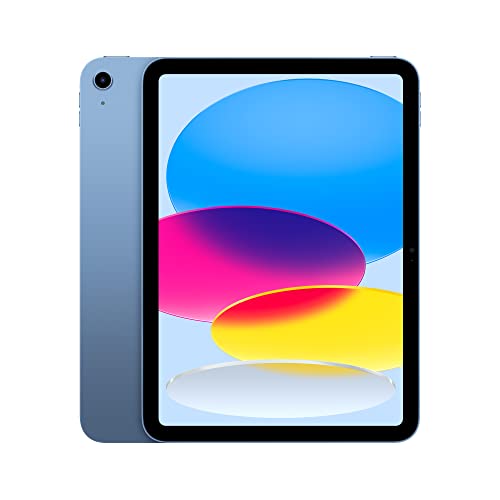
The Apple iPad 10th generation is the premium choice for families who can stretch the budget. It is more powerful than a first grader needs in the short term, but that power means the device will remain useful through elementary school and into middle school. The App Store has a deeper catalog of high-quality early learning apps than any other platform. Apps like Khan Academy Kids, Epic reading, and Osmo learning games are fully optimized for the iPad and offer a richer experience than their Android or Fire OS counterparts. The iPad’s Retina display is bright and sharp, which reduces eye strain during reading and drawing sessions.
Apple’s Screen Time parental controls are robust and integrated directly into the operating system. You can set app limits, content restrictions by age rating, and downtime schedules. You can also approve or block specific apps and purchases from your own device. The iPad 10th generation also supports the Apple Pencil (first generation), which is excellent for drawing, handwriting practice, and interactive learning apps that require fine motor input. The build quality is high, and the device is likely to survive a few years of daily use with a good case.
A real limitation is the price. The iPad 10th generation costs significantly more than the other options on this list, and you will need to buy a separate protective case, as Apple does not include one. The screen is glass and can crack if dropped on a hard surface without a case. Additionally, the Screen Time controls, while powerful, can be complex to set up for a first-time parent. It takes time to configure each restriction, and children may find workarounds if the settings are not locked down properly. For a first grader who is not yet tech-savvy, this is less of a concern, but it is worth noting for future years.
Lenovo Smart Tab M10 Kids – Best Android Tablet for 1st Graders
The Lenovo Smart Tab M10 Kids edition is the best option for families who prefer the Android ecosystem. It comes with a bumper case and a stand, so it is ready for tabletop use right out of the box. The tablet is pre-configured with Google Kids Space mode, which creates a walled garden of parent-approved app access, reading content, and creative tools. Google Kids Space is curated by teachers and child development experts, so the apps and books are age-appropriate and educational. The walled garden means the child cannot accidentally access the full Google Play Store or browse the web without parental permission.
The Android platform gives you access to Google’s vast library of educational apps, including many that are not available on Amazon Fire OS. You can also use Google Family Link to manage screen time, app approvals, and location sharing from your own phone. The M10’s 10-inch screen is larger than the Fire HD 8, which is better for reading books and watching educational videos. The included stand is a nice bonus for video calls with grandparents or for watching lessons hands-free.
A real limitation is that the Lenovo Smart Tab M10 Kids is not as powerful as the iPad or even some higher-end Android tablets. It can feel sluggish when running multiple apps or more demanding games. The bumper case, while protective, adds bulk that makes the tablet harder for small hands to hold for long periods. Also, Google Kids Space is still evolving, and some parents report that the content library is not as deep as Amazon Kids+ or the Apple App Store. You may need to manually approve and add apps to fill gaps in the child’s interests.
LeapFrog LeapPad Ultimate – Best Offline Learning Device
The LeapFrog LeapPad Ultimate is the safest option for parents who want zero internet risk. It has no internet connectivity, which means there is no web browsing, no social media, no in-app purchases, and no exposure to online predators. The device is designed specifically for pre-K through early elementary ages, with a focus on curriculum-aligned apps that cover reading phonics, spelling, math, and creativity. The physical cartridge system is intuitive for young children: they simply pop in a cartridge to play a new game or learn a new skill. This tactile interaction is excellent for fine motor development and reduces the frustration of navigating a touchscreen menu.
The LeapPad Ultimate comes with a bumper case built for drops, and the device is rugged enough to survive the typical treatment a first grader gives their belongings. Because it is not a general-purpose tablet, there are no distractions from games, videos, or apps that are not educational. The battery life is good for a day of classroom or car-trip use, and the screen is designed to be easy on young eyes. For parents who want a dedicated learning tool that cannot be misused, this is the most worry-free choice.
A real limitation is that the LeapPad Ultimate is less versatile than a full tablet. It cannot run apps from the Apple App Store, Google Play, or Amazon Appstore. The content library is limited to what LeapFrog publishes on cartridges or downloads through its own store, which is smaller and less frequently updated than the major app stores. As the child progresses through first grade and into second, they may outgrow the LeapPad’s capabilities and want a device that can do more. It is best viewed as a dedicated learning companion for the early years, not a long-term investment.
Acer Chromebook Spin 311 – Best Chromebook for 1st Graders
The Acer Chromebook Spin 311 is the best choice if the child’s school uses Google Classroom and Google Workspace. It is an 11-inch touchscreen convertible Chromebook that can lie flat for drawing or stand in tent mode for watching videos. The Chromebook is light enough for a first grader to carry in a backpack, and the build is durable enough for daily school use. Google Family Link provides strong parental controls, allowing you to manage screen time, approve apps, and filter web content from your own phone. The Chromebook boots quickly and updates automatically, so you do not have to worry about virus protection or system maintenance.
The keyboard is a real advantage for first graders who are learning to type. The Spin 311’s keyboard is full-sized enough for small fingers, and the touchscreen adds versatility for drawing and interactive lessons. Because it runs Chrome OS, it is fully compatible with Google Docs, Google Slides, and Google Sheets, which are the standard tools in many elementary schools. The device can also run Android apps from the Google Play Store, giving access to many of the same educational apps available on the Lenovo tablet. The 360-degree hinge means the device can be used as a laptop, a tablet, or a tent for hands-free viewing.
A real limitation is that the Chromebook Spin 311 relies heavily on an internet connection for most of its functionality. Without Wi-Fi, many apps and Google Workspace tools will not work or will be severely limited. The device is also less portable than a tablet, as it is larger and heavier than the Fire HD 8 or the iPad. The screen is not as high-resolution as the iPad’s Retina display, and the touch response can be less smooth for drawing apps. For a first grader who needs a school-compatible device for homework and typing practice, this is a solid choice, but it is not ideal for casual play or long car rides.
What to look for
- Parental controls and safety: Look for a device with a dedicated kid mode or a robust parent dashboard that lets you set time limits, approve apps, filter content by age, and block web browsing or in-app purchases. The best options offer a walled garden where the child cannot access anything outside the approved zone.
- Durability and warranty: A first grader will drop the device. Choose a model that comes with a built-in bumper case or a protective cover. A warranty that covers accidental damage, like Amazon’s 2-year worry-free guarantee, is a huge advantage. Check if the manufacturer will replace a broken screen or a cracked case at no cost.
- Content quality and depth: Consider the pre-loaded content and the app store’s library of educational apps. Look for devices that offer age-filtered books, learning games, and creative tools aligned with school readiness (phonics, math, reading). A subscription service like Amazon Kids+ or Google Kids Space can save you time curating apps yourself.
- Screen size and portability: An 8-inch to 10-inch screen is ideal for small hands. The device should be light enough to carry in a backpack and easy for a child to hold. A convertible design (like a Chromebook that turns into a tablet) adds versatility for drawing and typing.
- School compatibility: If the school uses Google Classroom, Google Workspace, or specific apps, make sure the device can run them. Chromebooks are the most compatible with school systems, while iPads and Android tablets also work well if the school supports them. Check with the teacher before buying.
- Long-term value: A device that is too simple may be outgrown by second grade. A more powerful tablet or Chromebook can last through elementary school and beyond. Balance the upfront cost with how many years the device will remain useful for learning and homework.
The verdict
For most families, the Amazon Fire HD 8 Kids is the clear winner. It offers the best combination of safety, durability, content, and value. The 2-year worry-free guarantee removes the fear of accidental damage, and the Amazon Kids+ subscription gives you thousands of age-appropriate books and apps right out of the box. The parent dashboard is the most user-friendly in this group, letting you set reading goals and time limits with ease. If you can afford the higher price and want a device that will last through middle school, the Apple iPad 10th generation is the premium choice with the best app ecosystem and the highest build quality. For families who need a device that works seamlessly with Google Classroom, the Acer Chromebook Spin 311 is the most practical option. The Lenovo Smart Tab M10 Kids is a solid Android alternative with a good kid mode, and the LeapFrog LeapPad Ultimate is the safest choice for parents who want zero internet risk. Choose based on your child’s school requirements, your budget, and how much control you want over the content they access.
Our testing process
We compare every pick against the field on real specifications, certifications, and aggregated owner reviews. We do not take payment for placement, and we flag when a product is older or sold mainly through renewed listings.
Quick comparison
Reviewed in detail
Amazon Fire HD 8 Kids - Best Value Supervised Tablet for 1st Graders
The Fire HD 8 Kids edition comes with a foam bumper case, a 2-year worry-free guarantee that covers accidental damage, and a one-year Amazon Kids+ subscription with thousands of age-filtered books, apps, audiobooks, and videos. The Amazon Kids parent dashboard lets you set daily goals (read for 20 minutes before games unlock), daily time limits by day, and content filters by age profile. The 8-inch display is the right size for small hands and the foam case makes drops much less damaging. This is the most practical starting point for parents who want managed screen time without extensive setup.
Apple iPad 10th Generation - Best Premium Option for 1st Graders
The iPad 10th generation is more capable than a 1st grader needs in the short term, but it grows with the child through elementary school and beyond, making it the better long-term investment for families who can stretch the budget. The App Store has a deeper catalog of high-quality early learning apps including Khan Academy Kids, Epic reading, and Osmo learning games. Screen Time parental controls let parents set app limits, downtime schedules, and content restrictions. Pair it with an Apple Pencil for drawing and handwriting practice. Add a drop-resistant case like OtterBox Defender for this age group.
Lenovo Smart Tab M10 Kids - Best Android Tablet for 1st Graders
The Lenovo Smart Tab M10 Kids edition includes a bumper case and stand, Google Kids Space mode pre-configured, and a curated set of learning and creative apps approved for children. Google Kids Space provides parent-approved app access, reading content, and creative tools within a walled garden that can be unlocked by parents. The Android platform gives access to Google's library of educational apps and Google Classroom for schools using Workspace for Education. Performance is adequate for the apps a 1st grader uses, and the build quality is reasonable for the price. The included stand doubles as a sturdy charging dock.

LeapFrog LeapPad Ultimate - Best Offline Learning Device
The LeapFrog LeapPad Ultimate is designed specifically for pre-K through early elementary ages with no internet connectivity, which eliminates web browsing risks entirely. It runs LeapFrog's own curriculum-aligned apps covering reading phonics, spelling, math, and creativity. The physical cartridge system is intuitive for young children and the bumper case is built for drops. Because it is not a general-purpose device, its usefulness is limited to the LeapFrog app library, which is strong for early learning but will be outgrown by age 8 or 9. It is the best choice for parents who want a pure educational tool with no internet exposure.
Acer Chromebook Spin 311 - Best Chromebook for 1st Graders
If the child's school uses Google Classroom and Google Workspace from kindergarten, a Chromebook ensures full compatibility with school assignments and teacher-shared documents. The Acer Spin 311 is an 11-inch touchscreen convertible Chromebook that can lie flat for drawing or stand in tent mode for video. It is light enough for small children to carry and durable enough for daily use. Google Family Link provides parental controls and usage reports. ChromeOS is simple, fast to boot, and requires minimal maintenance. This is the most practical option when school compatibility with Google tools is the primary requirement.
How to choose
What to consider
For most 1st graders, a tablet with robust parental controls is the right starting point. Consider what the school uses: if it is Google Workspace, a Chromebook or Android tablet integrates more cleanly. If it is Apple School Manager, an iPad aligns with the school environment. For families wanting to limit screen time and content strictly, the Amazon Kids ecosystem and LeapFrog offer the most parent-friendly management tools out of the box. Prioritize a drop-resistant case regardless of which device you choose, and budget for one if it is not included.
What to consider
For related reading, see [best educational toys for 6-year-olds](/articles/best-educational-toys-for-kids) and [best kids headphones for school](/articles/best-kids-headphones). Review our evaluation criteria at [/methodology](/methodology).
Common questions
For most 6 to 7 year olds, a tablet is easier to use, more durable, and better suited to the apps and games used in early elementary learning. Tablets like the Amazon Fire HD 8 Kids or the iPad have touch interfaces that match how young children instinctively interact with devices. A laptop becomes more practical around 3rd or 4th grade when typing and document work become part of school requirements.
At minimum, look for daily screen time limits by day of week, content filtering appropriate for ages 6-7, an easy way to approve or block specific apps, and usage reporting so you can see what the child is doing. Amazon Kids+, Apple Screen Time, and Google Family Link all provide these features. Dedicated kids devices from Amazon and LeapFrog include content filtering by default rather than requiring setup.
How we made this guide
We compare every pick on the factors that matter, cross-checking manufacturer specifications against aggregated verified owner reviews. We rank independently and never take payment for placement. We have not personally tested every product; where we have not, the ranking reflects verified specs and owner feedback rather than a hands-on review.
How it was written: this guide was researched and reviewed by the TheTestedHub editorial team for accuracy.
Affiliate disclosure: TheTestedHub is reader-supported. When you buy through links on our site, we may earn a commission at no extra cost to you.
More guides

Your Docking Station Match: CalDigit TS4 and More

Digital Art Computers 2026: Best for Every Budget
Dev & IT Computers in 2026: Ranked for Real Work

Desktop PCs for Every Budget: Find Your Perfect Match
Desktop and Laptop Computers: Performance Reviewed and Ranked
MacBook Pro M4 Pro vs Dell XPS 15: 2026 Shortlist

Buy the Best DIY Computer in 2026: Corsair One i300
