BenQ ScreenBar Plus -- Best Monitor-Mounted No-Glare Lamp
The ScreenBar Plus clips to the top of a monitor and angles light downward onto the desk surface only, eliminating screen reflections entirely. It uses an asymmetric optical design that prevents any light from reaching the monitor face. The included wireless dial controller adjusts brightness and color temperature (2700K to 6500K) without touching the lamp itself. Auto-dimming mode uses a sensor to maintain consistent illumination as room light changes. At 130 dollars it is a purpose-built monitor companion that solves glare at the hardware design level rather than relying on placement adjustments.
Check price on Amazon →A well-designed desk lamp controls glare, reaches your work surface evenly, and keeps eye strain low during long monitor sessions. These five picks suit different desk setups and budgets.
Eye strain during computer work often comes from the contrast between a bright screen and a dark surrounding area, not from the screen itself. A desk lamp that lights the immediate work area raises ambient brightness and reduces that contrast. The five options below cover different form factors, from classic arm lamps to monitor-mounted bars, and different price points from budget to premium.
| Product | Best For | Rating |
| ——— | ———- | ——– |
| BenQ ScreenBar Plus | Monitor-mounted, no glare | 4.7/5 |
| TaoTronics LED Desk Lamp TT-DL13 | Budget adjustable arm | 4.4/5 |
| Elgato Key Light | Desk and video call use | 4.6/5 |
| Xiaomi Mi LED Desk Lamp 1S | Smart app control | 4.3/5 |
| Humanscale Diffrient Task Light | Professional ergonomic setup | 4.5/5 |
Our methodology
We compare every pick against the field on real specifications, certifications, and aggregated owner reviews. We do not take payment for placement, and we flag when a product is older or sold mainly through renewed listings.
Side by side
| Pick | Best for | Score | |
|---|---|---|---|
| BenQ ScreenBar Plus -- Best Monitor-Mounted No-Glare Lamp | Check price | ||
| TaoTronics LED Desk Lamp TT-DL13 -- Best Budget Adjustable Arm | Check price | ||
| Elgato Key Light -- Best for Desk and Video Call Use | Check price | ||
| Xiaomi Mi LED Desk Lamp 1S -- Best Smart App Control | Check price | ||
| Humanscale Diffrient Task Light -- Best Professional Ergonomic Setup | Check price |
The full reviews
BenQ ScreenBar Plus -- Best Monitor-Mounted No-Glare Lamp
The ScreenBar Plus clips to the top of a monitor and angles light downward onto the desk surface only, eliminating screen reflections entirely. It uses an asymmetric optical design that prevents any light from reaching the monitor face. The included wireless dial controller adjusts brightness and color temperature (2700K to 6500K) without touching the lamp itself. Auto-dimming mode uses a sensor to maintain consistent illumination as room light changes. At 130 dollars it is a purpose-built monitor companion that solves glare at the hardware design level rather than relying on placement adjustments.
TaoTronics LED Desk Lamp TT-DL13 -- Best Budget Adjustable Arm
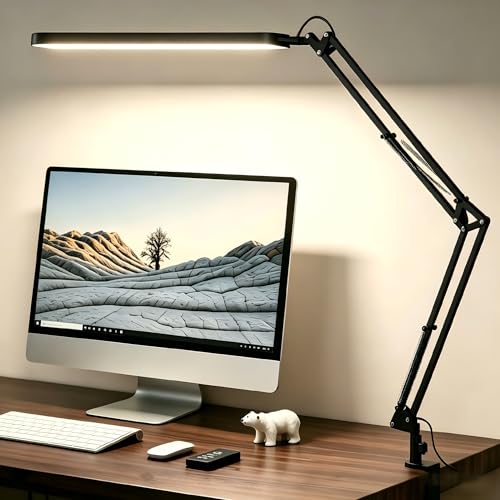
The TaoTronics TT-DL13 offers five color modes and seven brightness levels, covering everything from warm reading light to cool task light. The arm adjusts at three pivot points, letting you position the head precisely over a keyboard, a notebook, or a secondary monitor. A built-in USB-A charging port on the base keeps a phone charged without using a wall outlet. At 40 dollars it represents strong value for a student desk or secondary workstation. Build quality is plastic throughout, which is expected at this price, but the lamp feels stable during use.

Elgato Key Light -- Best for Desk and Video Call Use
The Elgato Key Light is a large panel lamp designed for content creators and video call participants who need both desk lighting and flattering on-camera illumination. It mounts on a desk clamp and positions at eye level or above. Color temperature runs from 2900K to 7000K and brightness goes up to 2800 lumens, which is significantly brighter than standard desk lamps. App control via Elgato's software allows instant switching between preset lighting configurations. For anyone on frequent video calls, the Key Light serves double duty that standard desk lamps cannot match.
Xiaomi Mi LED Desk Lamp 1S -- Best Smart App Control
The Mi LED Desk Lamp 1S connects to the Mi Home app and to voice assistants, making it part of a broader smart desk setup. It supports 16 million color combinations and adjustable brightness from 1 to 100 percent in fine increments. The base touch panel controls basic functions without the app. At 50 dollars with app and voice control, it undercuts competitors with similar smart features by a significant margin. The arm is not as freely adjustable as dedicated task lamps, but the head swivels enough for most desk layouts.
Humanscale Diffrient Task Light -- Best Professional Ergonomic Setup
The Humanscale Diffrient Task Light is built around an optical design that mimics natural daylight distribution. Its single-arm mounting means no pivoting segments to readjust during the day: pull the head to position it and it holds. The shade directs 90 percent of output onto the work surface with minimal spill. This lamp is designed for commercial office environments where consistent lighting quality matters more than feature count. At 300 dollars it is priced for professionals investing in a long-term ergonomic workspace rather than budget-conscious buyers.
What matters most
What to consider
Match the lamp form factor to your monitor setup first. Monitor-mounted bars work best with a single screen; arm lamps suit dual-monitor arrangements or desks with separate document reading areas. Check the brightness ceiling: for large desks or rooms with high ambient light, look for at least 500 lux at 50 cm. Color temperature adjustability is worth paying for; a fixed 4000K lamp that cannot warm down becomes uncomfortable for evening use. Finally, assess arm reach and pivot points. A lamp that cannot reach your actual work zone adds shadow rather than solving it.
What to consider
For a complete desk lighting setup, pair a good computer lamp with the right [best computer light for zoom calls](/articles/best-computer-light-for-zoom-calls) and review our [best computer lighting](/articles/best-computer-lighting) roundup for broader ambient solutions. Our full selection process is at [methodology](/methodology).
Frequently asked
For extended screen work, a color temperature between 4000K and 5000K (cool white to daylight) keeps you alert and reduces the contrast between a bright monitor and dark surroundings. For evening use, a warmer 2700K to 3000K setting is easier on the eyes and less disruptive to sleep patterns. A lamp with adjustable color temperature handles both scenarios.
Direct light on a monitor creates glare, which increases eye strain. Position the lamp to light your desk surface and any physical documents, not the screen itself. A monitor-mounted lamp or a side-positioned arm lamp angled slightly downward achieves this while keeping ambient light levels balanced around your workspace.

