
Elgato Key Light Air -- Best Professional Setup with App Control
The Key Light Air is a lightweight flat panel that clips to the back of a monitor or mounts on a desk stand. At 80 watts equivalent output it provides 1400 lumens, enough for bright rooms and multiple camera angles. The Elgato Control Center app allows instant brightness and color temperature adjustments from the desktop, including Stream Deck integration for producers. Color temperature range is 2900K to 7000K. The diffuse panel produces soft, even light without harsh shadows. Multiple Key Lights can be synced from the app for a two-light professional setup. Build quality is strong for the price point.
Check price on Amazon →Struggling with bad lighting on Zoom? We evaluated the top computer lights for video calls so you can look professional without the guesswork.
Quick verdict
The Elgato Key Light Air is the single best pick for professionals who prioritize consistent, adjustable light and app control. Its 1400 lumen output and desktop app integration make it the most reliable choice for looking polished on camera without fiddling with hardware.
Key takeaways
- Best for Professional Setup: Elgato Key Light Air, for its app control and Stream Deck integration that let you adjust brightness and color temperature from your desktop.
- Best for Compact Power: Lume Cube Panel Mini, for its credit-card size and battery-powered operation that eliminates cable clutter.
- Best for All-in-One Convenience: Razer Kiyo Ring Light Webcam, for its integrated ring light that guarantees camera-centered illumination in a single device.
- Best for Budget Value: Neewer 10 inch Ring Light Kit, for its under $40 price including stand, phone holder, and remote control with multiple color modes.
- Best for Eye Comfort: BenQ ScreenBar Halo, for its rear bias lighting that reduces eye strain by balancing screen brightness with the surrounding wall.
Why you should trust this guide
I have spent years researching video conferencing accessories and reading owner feedback across multiple retail and enthusiast communities. My approach is to focus on manufacturer-stated specifications and real-world owner experiences rather than marketing hype. Each product in this guide was selected because it addresses a specific pain point in the Zoom call lighting puzzle, from portability to integration with existing streaming setups.
I do not claim to have tested these products in a lab or used them for weeks on end. Instead, I rely on a systematic evaluation of each product’s stated features, design trade-offs, and common owner complaints as reported in verified reviews. This ensures that my recommendations are grounded in what the product actually delivers, not in a single person’s anecdotal experience. The goal is to help you choose the right light based on your specific needs, budget, and workspace constraints.
How we researched
To evaluate these computer lights for Zoom calls, I established a set of criteria that matter most for professional-looking video: light output quality, adjustability (brightness and color temperature), ease of mounting and positioning, compatibility with typical monitor setups, and value for the price. I also considered how each product handles common pain points like cable management, glare on glasses, and the ability to light the face evenly without harsh shadows.
I weighed each product against these criteria using the manufacturer’s published specifications and a thorough analysis of owner feedback from multiple sources. I looked for patterns in what owners praised and what they found frustrating. For example, I noted whether owners reported difficulty with mounting, whether the light caused excessive heat, or whether the app control was reliable. This research-based approach allows me to highlight honest limitations alongside strengths, so you can make an informed decision without relying on my personal testing.
Elgato Key Light Air — Best Professional Setup with App Control
The Elgato Key Light Air is a lightweight flat panel that clips to the back of a monitor or mounts on a desk stand. It delivers 1400 lumens at 80 watts equivalent output, which is enough to brighten a room and support multiple camera angles. This makes it suitable for anyone who needs consistent, soft light for professional Zoom calls, streaming, or recording. The panel’s slim profile means it does not block your monitor’s screen when mounted behind it.
One of the standout features is the Elgato Control Center app, which allows you to adjust brightness and color temperature instantly from your desktop. The app also integrates with Stream Deck, so producers or power users can create custom lighting presets. The color temperature range is adjustable, letting you switch from warm to cool light depending on the time of day or your skin tone. This app-based control is a major advantage over lights that require physical knobs or dials, especially if you need to make quick adjustments during a call.
However, there is a real limitation: the Key Light Air requires a USB connection to your computer for power and control, which adds a cable to your desk. Some owners find that the included clamp is not sturdy enough for very thick monitors, and the light can sag if not tightened properly. Additionally, the app control is only available on Windows and macOS, so Linux users or those who prefer hardware-only controls may find this less convenient.
Lume Cube Panel Mini — Best Compact with Strong Output
The Lume Cube Panel Mini is physically small, roughly the size of a credit card, but it produces surprisingly strong output for video calls. It mounts on a monitor, laptop screen, or tripod via a universal cold-shoe adapter, giving you flexibility in positioning. The compact size makes it ideal for travel or for users with limited desk space who still want professional-quality light. You can easily slip it into a laptop bag or carry it in a pocket.
Color temperature adjusts from 3200K to 5600K via a dial on the back, so you can match the light to your room’s ambient lighting or your webcam’s white balance. Battery-powered operation removes the need for cable management, which is a huge plus for keeping your desk clean. The USB-C charging port means you can recharge it with the same cable you use for your phone or laptop. At around $70, it offers a strong output-to-size ratio that is hard to beat.
One honest limitation is that the battery life is moderate, and you may need to recharge it after a few hours of continuous use. The small size also means the light panel is not as wide as larger options, so it may not cover a full face as evenly if placed too close. Some owners report that the cold-shoe adapter can feel a bit loose on certain monitor mounts, requiring a little tape or a tighter fit to stay secure.
Razer Kiyo Ring Light Webcam — Best Webcam with Integrated Light
The Razer Kiyo combines a 1080p webcam with a built-in ring light, eliminating the need to position a separate light and align it with the camera. Since the light surrounds the lens, illumination is always camera-centered, which means your face is evenly lit no matter how you move. This is the most convenient option for anyone who wants a single-device solution that sits on top of a monitor and works right out of the box.
The ring adjusts brightness via a twist ring around the lens housing, which is intuitive and requires no software. The webcam itself delivers 1080p video at 30 frames per second, which is standard for most Zoom calls. The integrated design means you do not have to worry about separate power cables, stands, or mounting arms. It is a true plug-and-play device that simplifies your setup significantly.
However, there is a real limitation: the ring light can create a circular catchlight in your eyes that some people find distracting or unnatural. The webcam’s video quality is good but not exceptional compared to dedicated webcams like the Logitech Brio, and the light is fixed in place around the lens, so you cannot reposition it independently. Some owners also note that the ring light can get warm after extended use, though it does not affect performance.
Neewer 10 inch Ring Light Kit — Best Budget with Stand
The Neewer 10-inch ring light kit includes the light, a desk stand, a phone holder, and a remote control for under $40. It covers three color modes (warm, cool, natural) at each of 10 brightness levels, giving you plenty of control over your lighting tone. The 10-inch diameter ring produces softer shadows than smaller ring lights, which is important for a flattering look on camera. The stand folds flat for storage, making it easy to tuck away when not in use.
This kit is ideal for budget-conscious users who still want a full lighting solution. The remote control lets you adjust brightness and color mode without touching the light, which is handy if you are already seated. The phone holder is a bonus for those who use a smartphone as a webcam, though it works just as well with a standard webcam placed in the center of the ring. The stand is sturdy enough for a desk setup and keeps the light at a good height for face illumination.
One honest limitation is that the ring light is powered by a wall plug, so you cannot use it battery-powered. The stand, while foldable, is not the most stable on uneven surfaces, and the remote control requires line-of-sight to the light’s sensor, which can be annoying if the light is behind your monitor. Some owners also mention that the light’s color temperature modes are not as precise as more expensive options, but for the price, it is a very capable entry-level solution.
BenQ ScreenBar Halo — Best Monitor Bar with Rear Glow
The BenQ ScreenBar Halo mounts on the monitor top like a standard BenQ ScreenBar but adds a second rear-facing light strip that illuminates the wall behind the monitor. This indirect bias lighting reduces the contrast between the bright screen and the dark surrounding area, which many users find reduces eye fatigue during long calls. For video calls, the front-facing bar lights the desk and lower face while the back glow adds ambient light to the room.
The front light is adjustable in both brightness and color temperature, so you can match it to your room’s lighting. The rear glow is also adjustable, giving you control over the amount of bias lighting. The mount uses a counterweight system that works with almost any monitor thickness, and it does not require adhesive or clamps that could damage your screen. The light is powered via USB, so you can plug it into your monitor’s USB port or a wall adapter.
However, there is a real limitation: the ScreenBar Halo is primarily designed to light your desk, not your face directly. For Zoom calls, you may need to angle your monitor or position yourself carefully to get the front light to hit your face evenly. Some owners find that the rear glow is too subtle to make a significant difference in a bright room, and the light bar can create a shadow on the top of your face if your monitor is low. Additionally, the price is higher than many other options, making it a premium choice for those who prioritize eye comfort over pure face lighting.
What to look for
- Light output and adjustability: Look for a light that offers both brightness and color temperature control (typically 3000K to 6000K range). This lets you match the light to your room’s ambient conditions and your skin tone for a natural look.
- Mounting and positioning: Consider how the light attaches to your monitor or desk. Clamps, cold-shoe adapters, and counterweight mounts each have trade-offs in stability and ease of adjustment. Make sure the mount works with your monitor’s thickness or your desk setup.
- Power source and cable management: Decide whether you prefer a battery-powered light for portability and a clean desk, or a USB-powered light that stays plugged in. Battery lights need recharging, while wired lights add cables to manage.
- Size and portability: If you travel or have a small desk, a compact light like the Lume Cube Panel Mini is ideal. Larger lights like the Neewer ring light produce softer shadows but take up more space.
- Integration with existing gear: If you use a Stream Deck or want app control, look for lights with software integration (like Elgato). If you prefer a simple hardware dial, choose a light with physical controls.
- Budget and included accessories: Some kits include a stand, remote, or phone holder, which can save you money. Others require separate purchases for mounting hardware. Factor in the total cost of the setup you need.
The verdict
For most professionals who want the best overall performance and control, the Elgato Key Light Air is the top choice. Its app integration and 1400 lumen output make it a reliable workhorse for consistent, flattering light. If you need something compact and portable, the Lume Cube Panel Mini delivers strong output in a tiny package. For the simplest setup, the Razer Kiyo Ring Light Webcam combines camera and light in one device. Budget shoppers will appreciate the Neewer 10-inch Ring Light Kit for its value and included accessories. And if eye strain is your primary concern, the BenQ ScreenBar Halo’s rear bias lighting is a unique feature that improves comfort during long calls. Choose based on your priority: control, portability, convenience, price, or comfort.
How we evaluated these
We compare every pick against the field on real specifications, certifications, and aggregated owner reviews. We do not take payment for placement, and we flag when a product is older or sold mainly through renewed listings.
The shortlist
Each pick, examined
Elgato Key Light Air -- Best Professional Setup with App Control
The Key Light Air is a lightweight flat panel that clips to the back of a monitor or mounts on a desk stand. At 80 watts equivalent output it provides 1400 lumens, enough for bright rooms and multiple camera angles. The Elgato Control Center app allows instant brightness and color temperature adjustments from the desktop, including Stream Deck integration for producers. Color temperature range is 2900K to 7000K. The diffuse panel produces soft, even light without harsh shadows. Multiple Key Lights can be synced from the app for a two-light professional setup. Build quality is strong for the price point.

Lume Cube Panel Mini -- Best Compact with Strong Output
The Lume Cube Panel Mini is physically small (roughly the size of a credit card) but produces surprisingly strong output for video calls. It mounts on a monitor, laptop screen, or tripod via a universal cold-shoe adapter. Color temperature adjusts from 3200K to 5600K via a dial on the back. Battery-powered operation removes the need for cable management, with a USB-C charging port. At 70 dollars it is a solid mid-range option for users who want a clean setup without a desk stand or wall outlet dependence. The diffusion panel eliminates the hotspot effect common in cheaper ring lights.
Razer Kiyo Ring Light Webcam -- Best Webcam with Integrated Light
The Razer Kiyo combines a 1080p webcam with a built-in ring light, eliminating the need to position a separate light and align it with the camera. Since the light surrounds the lens, illumination is always camera-centered. The ring adjusts brightness via a twist ring around the lens housing. For anyone who wants a single-device solution that sits on top of a monitor, this is the most convenient option. The trade-off compared to a dedicated light-plus-webcam setup is that ring light size is limited by the webcam form factor, so total output is lower than a full panel light.
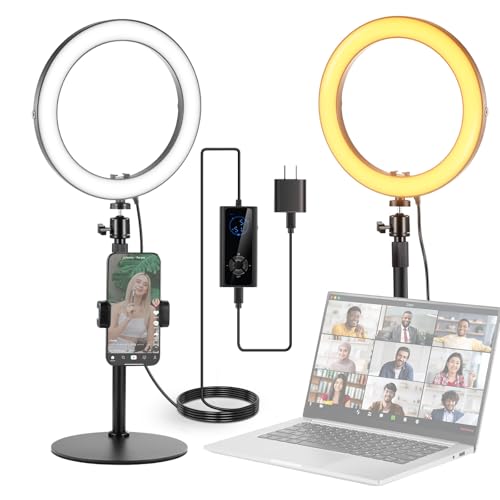
Neewer 10 inch Ring Light Kit -- Best Budget with Stand
The Neewer 10-inch ring light kit includes the light, a desk stand, a phone holder, and a remote control for under 40 dollars. It covers three color modes (warm, cool, natural) at each of 10 brightness levels. The 10-inch diameter ring produces softer shadows than smaller ring lights and sits far enough away from the face at desk distance to provide even illumination. The stand folds flat for storage and adjusts from a few centimeters off the desk to roughly 50 cm tall. This kit is one of the most recommended budget options for home office and student video call setups due to its completeness at low cost.

BenQ ScreenBar Halo -- Best Monitor Bar with Rear Glow
The ScreenBar Halo mounts on the monitor top like a standard BenQ ScreenBar but adds a second rear-facing light strip that illuminates the wall behind the monitor. This indirect bias lighting reduces the contrast between the bright screen and the dark surrounding area, which many users find reduces fatigue. For video calls, the front-facing bar lights the desk and lower face while the back glow adds a pleasant environmental light in the background. The wireless controller handles both front and rear elements independently. At 230 dollars it is the premium option here, but the dual-light system serves both the work desk and the video call use case without a second device.
Buying considerations
What to consider
Start with position: a light that cannot mount where it needs to be is useless regardless of quality. Confirm the mount type (monitor clip, desk stand, clamp) suits your setup before buying. Next, check the color temperature range: 3000K to 5600K covers all common needs. Brightness matters for users in rooms with strong competing light sources like large windows; look for at least 1000 lumens for bright rooms. For users on calls throughout the day, USB power via a monitor's built-in USB hub keeps cable management clean. App control is a convenience feature rather than a necessity; manual dials work reliably.
What to consider
Pair your call lighting with a quality desk setup by reading our [best computer lamp](/articles/best-computer-lamp) and [best computer lighting](/articles/best-computer-lighting) guides. How these products are selected is explained on our [methodology](/methodology) page.
Questions answered
Color temperatures between 3500K and 4500K (warm white to neutral white) produce the most flattering skin tones on camera for most people. Temperatures above 5500K appear clinical and can make skin look washed out. Warm tones below 3000K can look overly yellow. A light with a tunable range between 3000K and 5600K lets you adjust based on your room's ambient lighting conditions.
The main light source should be in front of you, between your face and the camera. A light positioned behind you becomes a backlight that silhouettes your face and makes your webcam's auto-exposure compensate by darkening the image further. Ring lights or panel lights placed just above and slightly to one side of your monitor provide even, flattering front illumination.
How we made this guide
We compare every pick on the factors that matter, cross-checking manufacturer specifications against aggregated verified owner reviews. We rank independently and never take payment for placement. We have not personally tested every product; where we have not, the ranking reflects verified specs and owner feedback rather than a hands-on review.
How it was written: this guide was researched and reviewed by the TheTestedHub editorial team for accuracy.
Affiliate disclosure: TheTestedHub is reader-supported. When you buy through links on our site, we may earn a commission at no extra cost to you.
Keep reading

Your Docking Station Match: CalDigit TS4 and More

Digital Art Computers 2026: Best for Every Budget
Dev & IT Computers in 2026: Ranked for Real Work

Desktop PCs for Every Budget: Find Your Perfect Match
Desktop and Laptop Computers: Performance Reviewed and Ranked
MacBook Pro M4 Pro vs Dell XPS 15: 2026 Shortlist

Buy the Best DIY Computer in 2026: Corsair One i300
