
LG 27BN55U-B 27" 4K IPS -- Balanced 4K for everyday tasks
The LG 27BN55U-B brings 4K resolution to a 27-inch IPS panel at a price that does not require significant compromise. It covers 99% sRGB, which is sufficient for streaming and casual photo viewing. The matte anti-glare surface handles overhead home lighting without turning into a mirror. USB-C with 60W charging connects modern laptops with a single cable. The stand adjusts for height and tilt. Reader Mode reduces blue light levels for evening use. It is not color-grading accurate or built for competitive gaming, but for web browsing, documents, calls, and HD video, it handles all of it cleanly.
A home monitor needs to handle work documents, video calls, streaming, and casual gaming without excelling at just one. These five picks balance picture quality, ergonomics, and price for household use.
A home monitor covers a broader set of tasks than most specialty displays. A given day might include a video call in the morning, spreadsheets at midday, and a movie in the evening. The five monitors below are chosen for this kind of mixed use rather than optimized for a single scenario. Each covers resolution, ergonomics, and connectivity appropriate for a home desk setup.
| Product | Best For | Rating |
| — | — | — |
| LG 27BN55U-B 27″ 4K IPS | Versatile 4K | 4.5/5 |
| Samsung 32″ UR55 4K | Large home screen | 4.5/5 |
| Acer ET322QK 31.5″ 4K | Widescreen viewing | 4.4/5 |
| Dell S2421H 24″ FHD | Compact living room desk | 4.4/5 |
| ASUS VP279QGL 27″ | Budget 1440p IPS | 4.3/5 |
Our testing process
We compare every pick against the field on real specifications, certifications, and aggregated owner reviews. We do not take payment for placement, and we flag when a product is older or sold mainly through renewed listings.
Quick comparison
| Pick | Best for | Score | |
|---|---|---|---|
| LG 27BN55U-B 27" 4K IPS -- Balanced 4K for everyday tasks | Check price | ||
| Samsung 32" UR55 4K UHD -- Large panel for living room desks | Check price | ||
| Acer ET322QK 31.5" 4K -- Wide color for streaming and browsing | Check price | ||
| Dell S2421H 24" FHD -- Compact monitor for tight desks | Check price | ||
| ASUS VP279QGL 27" -- 1440p IPS below the typical price | Check price |
Reviewed in detail
LG 27BN55U-B 27" 4K IPS -- Balanced 4K for everyday tasks
The LG 27BN55U-B brings 4K resolution to a 27-inch IPS panel at a price that does not require significant compromise. It covers 99% sRGB, which is sufficient for streaming and casual photo viewing. The matte anti-glare surface handles overhead home lighting without turning into a mirror. USB-C with 60W charging connects modern laptops with a single cable. The stand adjusts for height and tilt. Reader Mode reduces blue light levels for evening use. It is not color-grading accurate or built for competitive gaming, but for web browsing, documents, calls, and HD video, it handles all of it cleanly.
Samsung 32" UR55 4K UHD -- Large panel for living room desks
At 32 inches and 4K, the Samsung UR55 produces a large, sharp image suitable for a home office that doubles as a media station. Text at 4K and 32 inches is readable at 100% scaling, so no scaling complications arise. Samsung's AMD FreeSync support means occasional gaming is smoother. The VA panel provides a 2500:1 contrast ratio, which gives dark movie scenes visible shadow detail compared to lower-contrast IPS alternatives at this size. The stand is limited to tilt-only, which is the primary shortcoming. A VESA 100x100 mount resolves that if you want full height adjustment.

Acer ET322QK 31.5" 4K -- Wide color for streaming and browsing
The Acer ET322QK at 31.5 inches produces a panel large enough that multiple family members can view from different angles without significant color shift. The IPS panel covers a wide viewing angle and 99% sRGB. It supports HDR10, which activates when streaming from services that deliver HDR content. The stand is height-adjustable, which is useful when multiple people of different heights share a desk. Connectivity includes HDMI 2.0 and DisplayPort 1.2. Response time is 4ms, adequate for moderate gaming. The color accuracy is factory calibrated to a level suitable for home use without requiring manual adjustment.
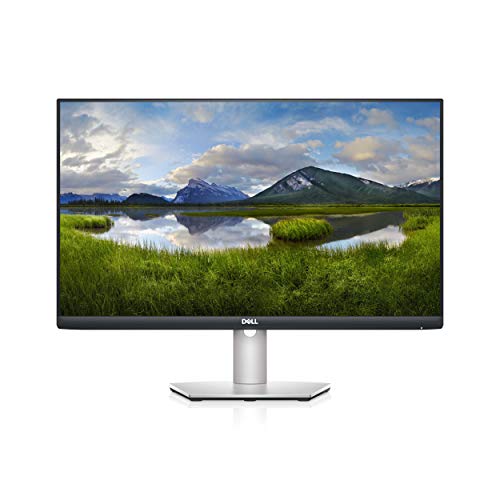
Dell S2421H 24" FHD -- Compact monitor for tight desks
Not every home desk is large enough for a 27-inch panel. The Dell S2421H is a 24-inch 1080p IPS monitor with thin bezels, a clean design, and Dell's ComfortView low blue light technology. It is light enough to move between rooms and fits on desks that are genuinely small. The built-in speakers are thin but functional for video calls where audio quality is not critical. The display is not height-adjustable, but the base is small enough that placing it on a small riser works. At it is one of the better-looking budget options with a reliable manufacturer warranty.
ASUS VP279QGL 27" -- 1440p IPS below the typical price
The ASUS VP279QGL is a 1440p IPS panel at a price that competes with some 1080p monitors. The pixel density of 109 PPI at 27 inches provides noticeably sharper text than a 24-inch 1080p display at the same resolution count. ASUS includes its Low Blue Light and Flicker-Free features. The stand is limited to tilt, so height adjustment requires a third-party arm. Color gamut covers 99% sRGB. This is a practical recommendation for someone buying their first 1440p monitor who wants a measurable upgrade over full HD without spending on ergonomic extras.
How to choose
What to consider
For a home monitor that handles mixed tasks, start by measuring your desk depth. If you have 24 inches or more of depth, a 27-inch panel at arm's length is comfortable. Less than that, a 24-inch panel prevents the edges from filling your peripheral vision uncomfortably.
What to consider
Resolution scales with size. A 24-inch 1080p monitor looks sharp at normal viewing distance. A 27-inch monitor benefits from 1440p to maintain the same perceived sharpness. At 32 inches, 4K is worth the extra cost.
What to consider
Connectivity is often overlooked. If you have a newer laptop with USB-C, a monitor with USB-C power delivery eliminates separate power adapters and keeps the desk tidy. Check whether the monitor has a height-adjustable stand, since fixed-tilt stands often force compromised viewing angles.
What to consider
For more detail on specific use cases, see [best computer monitors for productivity](/articles/best-computer-monitor-for-productivity) and [best computer monitors for eye strain](/articles/best-computer-monitor-for-eye-strain). Selection criteria are at [methodology](/methodology).
Common questions
27 inches is the most versatile size for home desks. It is large enough for split-screen work or streaming without dominating a smaller desk surface. At 1440p resolution it produces crisp text and images without requiring display scaling. If desk space allows, 32 inches provides a cinema-like watching experience while still being practical for documents and video calls.
For movies and video streaming, HDR improves the appearance of highlights and shadow detail when the content is HDR-graded. However, monitors labeled HDR400 or lower provide limited actual HDR performance -- they hit the 400-nit brightness requirement but lack local dimming. Meaningful HDR requires at least HDR600 with full-array local dimming. For general use, a well-calibrated SDR panel often looks better than a cheap HDR implementation.

Tom Reeves has reviewed consumer electronics for over a decade, with a focus on televisions, monitors, laptops, and smart home devices. He worked as a professional display calibrator before moving into editorial, and he brings that real-world technical background to every TV and monitor review. At TheTestedHub, Tom covers display calibration, computer monitors, laptops and 2-in-1s, smart home platforms, home theater setups, and HDR performance.
More guides
5 Best Computer Monitors to Use as a TV 2026 | Dual-Purpose Picks

5 Best Computer Monitors Under 100 2026 | Sharp screen, tight budget

5 Best Computer Monitors for Coding 2026 | Sharp text, wide screen

5 Best Computer Monitors for MacBook 2026 | Sharp color, one cable

5 Best Computer Monitors for Productivity 2026 | More screen, less switching

5 Best Computer Screens for Graphic Designers 2026 | Colour-Accurate Displays That Deliver

5 Best Computer Monitors With Speakers 2026 | Built-In Audio Done Right
