Logitech G840 XL -- Top Pick for Desk Coverage
The Logitech G840 XL stretches 900 by 400 mm, giving enough room for a keyboard, mouse, and anything else on your desk. The micro-textured cloth surface tracks consistently across all DPI settings, and the 3 mm rubber base grips nearly any desk without curling. Stitched edges prevent fraying over months of daily use. It works equally well for graphic design, data entry, and gaming sessions. The single-color design stays neutral in any setup. A minor drawback is that it takes a couple of days to fully flatten after unboxing.
Check price on Amazon →From oversized desk mats to ergonomic wrist-rest pads, these five computer pads deliver precise tracking, durable surfaces, and comfortable daily use.
A computer pad does more than protect your desk. The right surface improves mouse accuracy, reduces wrist fatigue, and keeps your workspace tidy. Whether you want a slim travel mat, a plush wrist-rest pad, or a desk-spanning extended mat, the options below cover every common use case without overcomplicating the decision.
| Product | Best For | Rating |
| — | — | — |
| Logitech G840 XL | Extended gaming / desk mat | 4.8/5 |
| SteelSeries QcK Heavy | Precise optical tracking | 4.7/5 |
| Corsair MM300 Anti-Fray | Durability + large size | 4.6/5 |
| Kensington Duo Gel | Wrist support, office use | 4.5/5 |
| Amazon Basics Extended | Budget desk mat | 4.3/5 |
Our testing process
We compare every pick against the field on real specifications, certifications, and aggregated owner reviews. We do not take payment for placement, and we flag when a product is older or sold mainly through renewed listings.
Quick comparison
| Pick | Best for | Score | |
|---|---|---|---|
| Logitech G840 XL -- Top Pick for Desk Coverage | Check price | ||
| SteelSeries QcK Heavy -- Best for Precision Tracking | Check price | ||
| Corsair MM300 Anti-Fray -- Best for Durability | Check price | ||
| Kensington Duo Gel -- Best for Wrist Support | Check price | ||
| Amazon Basics Extended Gaming Mouse Pad -- Best Budget Pick | Check price |
Reviewed in detail
Logitech G840 XL -- Top Pick for Desk Coverage
The Logitech G840 XL stretches 900 by 400 mm, giving enough room for a keyboard, mouse, and anything else on your desk. The micro-textured cloth surface tracks consistently across all DPI settings, and the 3 mm rubber base grips nearly any desk without curling. Stitched edges prevent fraying over months of daily use. It works equally well for graphic design, data entry, and gaming sessions. The single-color design stays neutral in any setup. A minor drawback is that it takes a couple of days to fully flatten after unboxing.

SteelSeries QcK Heavy -- Best for Precision Tracking
The QcK Heavy uses a high-density micro-woven cloth that optical and laser sensors read cleanly at any speed. At 4 mm thick, it absorbs minor vibrations from typing, which helps maintain stable cursor movement. The rubber base holds position even on glass desks. It comes in medium and large sizes, with the large fitting most single-monitor setups comfortably. Color options are limited to black, but the build quality more than compensates. This pad consistently earns top ratings from users who do detailed work in Photoshop or CAD tools.
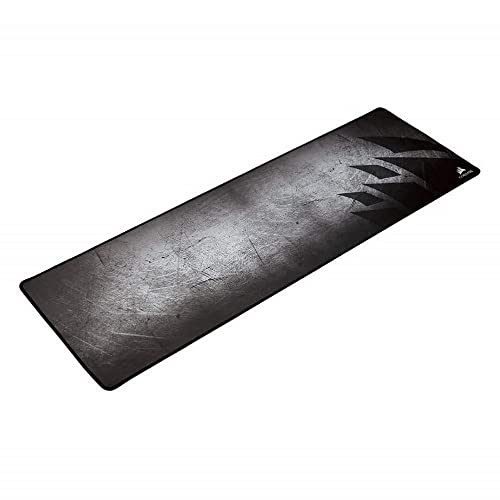
Corsair MM300 Anti-Fray -- Best for Durability
Corsair reinforces the MM300 with stitched edges designed to resist wear even after years of daily sliding. The spill-resistant surface wipes clean with a damp cloth, making it practical for desks where drinks are nearby. The natural rubber base stays flat and non-slip on wood, glass, and laminate surfaces. The extended size covers both keyboard and mouse comfortably. Surface texture sits between fast and control, which suits a broad range of users without forcing a specific play style or work preference.
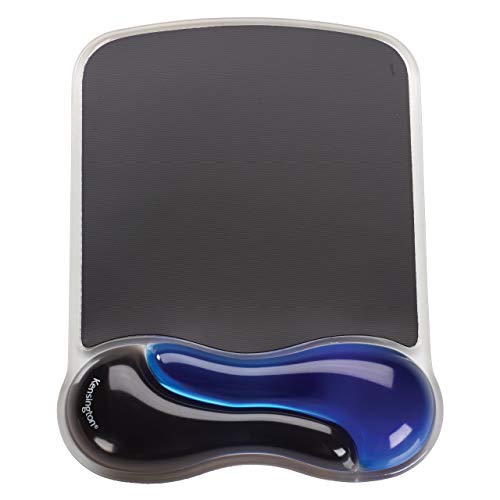
Kensington Duo Gel -- Best for Wrist Support
The Kensington Duo Gel pairs a smooth mousing surface with a raised gel wrist rest on the same pad. The gel cushion reduces pressure on the carpal tunnel area during long work sessions, making it popular among writers and data-entry workers. It fits standard-size mouse areas without taking up excessive desk space. The surface texture is slightly slower than gaming pads, which is fine for office pointer speeds. The gel wrest feels firm enough to support without bottoming out over months of use, which is a common issue with cheaper foam alternatives.

Amazon Basics Extended Gaming Mouse Pad -- Best Budget Pick
For under twenty dollars, the Amazon Basics extended mat delivers a functional cloth surface with a no-slip rubber base and stitched edges. It measures roughly 35 by 14 inches, covering most mid-size desks. Tracking is consistent for everyday computing and casual gaming. It lacks the premium cloth feel of SteelSeries or Logitech, but the performance gap only matters at very high DPI settings. For students, first desks, or spare setups, it provides reliable daily use without a notable investment.
How to choose
What to consider
Start with size. Measure your desk area and decide whether you want a pad that fits just the mouse or one that spans the full workspace. Next, consider surface texture: cloth pads are quieter and more comfortable for long sessions, while hard pads clean easily and offer faster glide. Thickness matters for wrist comfort -- pads 3 mm and above absorb more vibration. Check edge stitching before buying; unstitched edges fray within weeks on budget options. Finally, match pad size to your mouse DPI: higher DPI sensors need less physical space, so a medium pad works fine above 1600 DPI.
What to consider
Finding the right computer pad pairs well with a good keyboard setup. See our picks in [best office keyboards](/articles/best-office-keyboards) and browse ergonomic desk accessories in [best computer posture](/articles/best-computer-posture). For how we evaluate all peripherals, visit our [methodology](/methodology) page.
Common questions
For gaming, an extended or XXL desk mat measuring at least 35 by 15 inches gives your mouse full range of motion without running off the edge. Extended mats also cover your keyboard, reducing noise and protecting your desk surface. If desk space is limited, a large pad around 17 by 13 inches still works well for most setups.
Cloth pads are more comfortable for long sessions and quieter under the mouse, making them ideal for everyday office and gaming use. Hard pads offer faster glide and are easier to clean, which suits users who prefer speed over comfort. Most people find cloth to be the better all-around choice for daily work and browsing.

Tom Reeves has reviewed consumer electronics for over a decade, with a focus on televisions, monitors, laptops, and smart home devices. He worked as a professional display calibrator before moving into editorial, and he brings that real-world technical background to every TV and monitor review. At TheTestedHub, Tom covers display calibration, computer monitors, laptops and 2-in-1s, smart home platforms, home theater setups, and HDR performance.
More guides

Logitech MX Anywhere 3S Mouse Review (2026): The Compact

Anker Prime 100W GaN Charging Station Review (2026): The

5 Best Computer Screen Cleaning Cloth 2026 | Streak-free without the scratches

5 Best Computer Writing Pad 2026 | Digital Inking for Every Workflow

5 Best Computer Wireless Mouse 2026 | Top Picks for Precision & Comfort

5 Best Computer Accessories for Productivity 2026 | Work Smarter Picks

5 Best Computer Cameras to Use with Zoom 2026 | Setup and Quality Guide
