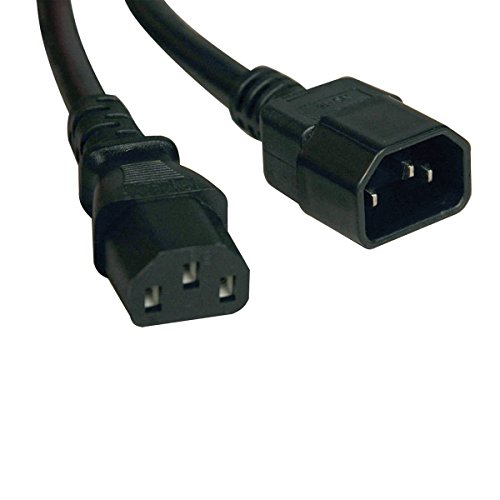
Tripp Lite P004-006 C13 to C14 -- Best Standard Desktop Cord
The C13-to-C14 configuration connects power strips and PDUs to monitors, desktop power supplies, and printers. Tripp Lite's P004-006 is rated for 10A at 125V and 6A at 250V, covering virtually all standard desktop peripherals. The 6-foot length suits most desk-to-outlet distances. The connectors seat firmly without wobbling, which prevents accidental disconnections. Both ends carry UL certification. Tripp Lite backs this cord with a lifetime warranty, which is unusual at this price point. A practical spare to keep on hand for any desktop-heavy setup.
Check price on Amazon →The right computer power cord matches your device's wattage, connector type, and length without creating safety risks. These five picks cover all common setups.
Power cords fail or go missing more often than most users expect. Whether you need a spare for a second location, a longer run for a difficult outlet position, or a replacement for a damaged original, the picks below cover the most common desktop and laptop power cord types with verified safety ratings.
| Product | Best For | Rating |
| — | — | — |
| Tripp Lite P004-006 C13 to C14 | Desktop PSU and monitor runs | 4.8/5 |
| APC AP9870 C19 to C20 | High-draw workstation cord | 4.7/5 |
| Cable Matters C5 Cloverleaf Cord | Laptop adapters and small devices | 4.7/5 |
| Volex 17504 C13 6ft | Premium build desktop cord | 4.6/5 |
| CyberPower SP6 Extension Cord | Long desktop power run | 4.5/5 |
Our testing process
We compare every pick against the field on real specifications, certifications, and aggregated owner reviews. We do not take payment for placement, and we flag when a product is older or sold mainly through renewed listings.
Quick comparison
| Pick | Best for | Score | |
|---|---|---|---|
| Tripp Lite P004-006 C13 to C14 -- Best Standard Desktop Cord | Check price | ||
| APC AP9870 C19 to C20 -- Best for High-Wattage Workstations | Check price | ||
| Cable Matters C5 Cloverleaf Laptop Cord -- Best for Laptop Adapters | Check price | ||
| Volex 17504 C13 6ft -- Best Premium Desktop Power Cord | Check price | ||
| CyberPower SP6 Surge Extension Cord -- Best Long Power Run | Check price |
Reviewed in detail
Tripp Lite P004-006 C13 to C14 -- Best Standard Desktop Cord
The C13-to-C14 configuration connects power strips and PDUs to monitors, desktop power supplies, and printers. Tripp Lite's P004-006 is rated for 10A at 125V and 6A at 250V, covering virtually all standard desktop peripherals. The 6-foot length suits most desk-to-outlet distances. The connectors seat firmly without wobbling, which prevents accidental disconnections. Both ends carry UL certification. Tripp Lite backs this cord with a lifetime warranty, which is unusual at this price point. A practical spare to keep on hand for any desktop-heavy setup.
APC AP9870 C19 to C20 -- Best for High-Wattage Workstations
Workstations with dual CPUs or high-end graphics cards draw more current than a standard C13 cord should handle. The C19-to-C20 connector type handles up to 20A at 250V, well above the load of any consumer PC. APC's AP9870 is 6.5 feet long with a right-angle C19 connector that sits flush against the back of PDUs and UPS units. The build quality is noticeably heavier gauge than budget alternatives. For anyone running a server, high-end workstation, or UPS-backed desktop, this cord handles the load safely without requiring modification.
Cable Matters C5 Cloverleaf Laptop Cord -- Best for Laptop Adapters
The three-pin cloverleaf C5 connector powers the AC adapter bricks for many older and mid-range laptop chargers. Cable Matters produces C5 cords in 6-foot lengths with UL certification and a firmly seated connector that does not pull loose during normal use. The 18 AWG wire rating handles the modest current draw of laptop adapters without generating excess heat. It is a common replacement need for travelers who lose the short cord segment that runs from the wall to the charger brick. Packs of two or three are cost-effective for frequent travelers.
Volex 17504 C13 6ft -- Best Premium Desktop Power Cord
Volex manufactures power cords for OEMs including Apple and HP, and their retail cords reflect that production quality. The 17504 uses thicker jacket material than most retail alternatives, the connectors have a positive snap-fit engagement, and the bend radius at stress points is reinforced with strain relief boots. It carries UL, CSA, and CE certifications. For users who want the closest match to the original cord that shipped with a premium desktop or monitor, the Volex 17504 is the most appropriate choice. Slightly higher cost than generic alternatives is justified by the build consistency.
CyberPower SP6 Surge Extension Cord -- Best Long Power Run
When outlets are far from the desk, a basic power cord falls short. The CyberPower SP6 is a 6-outlet, 6-foot surge protector extension rated for 1875W that extends reach safely without daisy-chaining. The heavy-duty 14 AWG cord handles longer runs without voltage drop at typical PC loads. It includes 900 joules of surge protection and a connected equipment warranty. The low-profile flat plug fits behind furniture without bending. For temporary setups, conference rooms, or rearranged offices, this extension handles both the reach problem and adds surge protection simultaneously.
How to choose
What to consider
Match connector type first. Desktop monitors and PSUs most commonly use C13 on the device end. Laptop adapters use C5 (three-pin cloverleaf) or C7 (figure-8). Verify the amperage rating matches or exceeds the original cord. For runs over 10 feet, move to 16 AWG or lower gauge. Always check for UL, CSA, or CE safety certification on the product listing -- uncertified cords from unknown brands carry genuine fire risk. Length is secondary to gauge; a 3-foot 18 AWG cord is safer than a 10-foot 18 AWG cord under the same load.
What to consider
For a complete power setup, see [best computer power strip](/articles/best-computer-power-strip) and [best computer power supply](/articles/best-computer-power-supply). Our evaluation standards are at [methodology](/methodology).
Common questions
Check the wattage rating of the original cord and match or exceed it in the replacement. Verify the connector type on the device end -- C13 and C14 are the most common for desktop monitors and power supplies, while C5 and C7 connectors appear on smaller electronics. Length matters for cable management; measure the distance from outlet to device before ordering. Always buy cords with safety certifications such as UL, CSA, or CE.
Yes, as long as the cord is rated for the load and is not coiled during use. Coiled cords generate heat under current draw, which creates a fire risk. For runs over 15 feet, choose a cord rated at 14 AWG or lower gauge number rather than the standard 18 AWG, as thicker wire handles longer distances at full load more safely. Never daisy-chain extension cords.

Tom Reeves has reviewed consumer electronics for over a decade, with a focus on televisions, monitors, laptops, and smart home devices. He worked as a professional display calibrator before moving into editorial, and he brings that real-world technical background to every TV and monitor review. At TheTestedHub, Tom covers display calibration, computer monitors, laptops and 2-in-1s, smart home platforms, home theater setups, and HDR performance.
More guides

Logitech MX Anywhere 3S Mouse Review (2026): The Compact

Anker Prime 100W GaN Charging Station Review (2026): The

5 Best Computer Screen Cleaning Cloth 2026 | Streak-free without the scratches

5 Best Computer Writing Pad 2026 | Digital Inking for Every Workflow

5 Best Computer Wireless Mouse 2026 | Top Picks for Precision & Comfort

5 Best Computer Accessories for Productivity 2026 | Work Smarter Picks

5 Best Computer Cameras to Use with Zoom 2026 | Setup and Quality Guide
