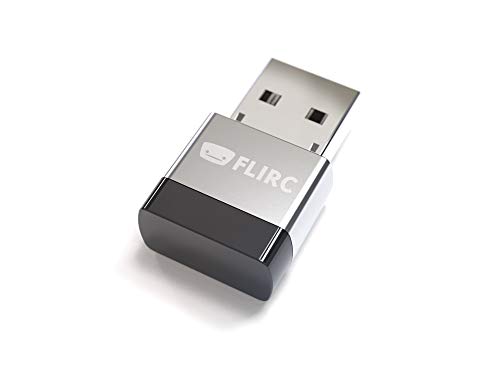
Flirc USB Universal Remote Receiver -- Best PC Remote Control Adapter
The Flirc is not a remote itself but an elegantly simple USB dongle that teaches any IR remote to control a computer. Plug the Flirc into a USB port, open the Flirc configuration software, press a button on any IR remote, and assign it a keyboard shortcut or media function. This approach lets users repurpose a spare TV remote or a preferred universal remote instead of buying a dedicated device. The build quality is aluminum, plug-and-play compatible across Windows, macOS, and Linux, and the software supports Kodi, Plex, and most media center applications natively. For those who already own a good remote, Flirc is the most practical path.
Check price on Amazon →Top computer remote controls in 2026 for HTPCs, living room PCs, and media center setups. These wireless remotes make controlling a PC from the couch simple and reliable.
A dedicated computer remote control transforms a PC into a comfortable media center experience, letting users browse, play, pause, and navigate from across the room without getting up. Whether the goal is a home theater PC running Kodi, a living room streaming setup on Plex, or simply controlling a presentation, the right remote makes the difference between a fluid experience and constant trips back to the desk. These five picks are the strongest options available in 2026.
| Product | Best For | Rating |
| — | — | — |
| Flirc USB Universal Remote Receiver | Programming any remote to work with PC | 4.7/5 |
| Logitech Spotlight Presentation Remote | Professional presentations | 4.6/5 |
| Rii MX3 Air Mouse | HTPC navigation and media playback | 4.5/5 |
| SofaBaton X1 | Universal remote for PC and AV gear | 4.6/5 |
| Microsoft All-In-One Media Keyboard | Combined keyboard and trackpad remote | 4.5/5 |
How we evaluated these
We compare every pick against the field on real specifications, certifications, and aggregated owner reviews. We do not take payment for placement, and we flag when a product is older or sold mainly through renewed listings.
The shortlist
| Pick | Best for | Score | |
|---|---|---|---|
| Flirc USB Universal Remote Receiver -- Best PC Remote Control Adapter | Check price | ||
| Logitech Spotlight Presentation Remote -- Best PC Remote for Presentations | Check price | ||
| Rii MX3 Air Mouse -- Best Budget HTPC Remote Control | Check price | ||
| SofaBaton X1 -- Best Universal Remote for PC and AV System Control | Check price | ||
| Microsoft All-In-One Media Keyboard -- Best Keyboard Remote for Living Room PC | Check price |
Each pick, examined
Flirc USB Universal Remote Receiver -- Best PC Remote Control Adapter
The Flirc is not a remote itself but an elegantly simple USB dongle that teaches any IR remote to control a computer. Plug the Flirc into a USB port, open the Flirc configuration software, press a button on any IR remote, and assign it a keyboard shortcut or media function. This approach lets users repurpose a spare TV remote or a preferred universal remote instead of buying a dedicated device. The build quality is aluminum, plug-and-play compatible across Windows, macOS, and Linux, and the software supports Kodi, Plex, and most media center applications natively. For those who already own a good remote, Flirc is the most practical path.

Logitech Spotlight Presentation Remote -- Best PC Remote for Presentations
The Logitech Spotlight is the presentation remote that professionals consistently choose. Its standout feature is the digital spotlight effect that draws viewer attention to the specific area of a slide being discussed, visible on screen without requiring any special projector mode. Advanced pointer precision works through Logitech's Presentation software. Range extends to 30 meters, covering large conference rooms comfortably. Charging via USB means no battery replacement is needed. The minimal three-button design keeps operation simple under pressure. Compatibility covers Windows, macOS, and Linux through a USB receiver or Bluetooth.

Rii MX3 Air Mouse -- Best Budget HTPC Remote Control
The Rii MX3 combines a standard IR remote layout on one side with a backlit QWERTY keyboard and gyroscope-based air mouse on the other. Flipping it over activates the keyboard and mouse functions, while the IR side handles basic playback controls. The gyroscope pointer works reasonably well for navigating media center interfaces and streaming app menus without needing a flat surface. The RF USB receiver plugs into any USB port and requires no software installation on Windows. Backlit keys make it usable in dim living room conditions. At this price, it is the most complete HTPC control solution available without spending more.
SofaBaton X1 -- Best Universal Remote for PC and AV System Control
The SofaBaton X1 is a Bluetooth and RF universal remote that controls a home theater PC alongside other AV devices like a TV, soundbar, and streaming boxes through a single device. The companion app on Android or iOS walks through setup and stores device profiles. The X1 supports customizable macros that trigger sequences of commands with one button press, useful for setting up an HTPC watching mode that adjusts TV input and audio simultaneously. The rechargeable battery lasts several weeks per charge. For households that want to consolidate remotes without a complex IR blaster hub, the X1 delivers solid all-in-one performance.
Microsoft All-In-One Media Keyboard -- Best Keyboard Remote for Living Room PC
The Microsoft All-In-One Media Keyboard bridges the gap between remote control and keyboard with a compact full-layout keyboard that includes a built-in multi-touch trackpad. This makes it possible to navigate any Windows interface from the couch without limiting the user to media-center-specific software. Dedicated media keys handle playback functions. The RF USB receiver connects without driver installation. Battery life on two AAA batteries is measured in months. For setups where occasional typing is needed alongside media playback control, such as entering a streaming service password or searching for content by title, this is the most practical single device solution.
Buying considerations
What to consider
Identify your primary use case before choosing a form factor. Pure media playback from the couch works well with a simple remote or air mouse combo. Presentations require a laser or spotlight pointer with advance and back buttons. Full PC navigation from a distance benefits most from a compact keyboard with trackpad. Check whether the remote uses IR, RF, or Bluetooth, and confirm the receiver method matches your PC's available ports and setup location. If you have an existing universal remote, consider the Flirc adapter approach before buying a dedicated device. Range requirements vary by room size, so check manufacturer specifications against your actual space.
What to consider
For more accessories, see [best wireless keyboards for living room PCs](/articles/best-wireless-keyboards) and [best HDMI switches for home theater setups](/articles/best-hdmi-switches). Review how these picks are chosen at [/methodology](/methodology).
Questions answered
IR (infrared) remotes require line-of-sight between the remote and the receiver, similar to a standard TV remote. RF (radio frequency) remotes transmit through walls and work without pointing directly at the receiver, which is useful when the PC is inside a cabinet or AV rack. Most modern computer remotes use USB RF receivers or Bluetooth for flexibility, while IR setups often require a dedicated USB IR receiver dongle to be visible in the room.
Most RF and Bluetooth PC remotes function as USB HID devices and send standard keyboard or media key signals that work across any software including Windows Media Player, Kodi, Plex, Jellyfin, and streaming browser windows. Some remotes include companion software that enables programmable buttons or macros for specific applications. IR remotes paired with LIRC or EventGhost on Windows or Linux can be programmed for software-specific control but require more configuration effort.

Tom Reeves has reviewed consumer electronics for over a decade, with a focus on televisions, monitors, laptops, and smart home devices. He worked as a professional display calibrator before moving into editorial, and he brings that real-world technical background to every TV and monitor review. At TheTestedHub, Tom covers display calibration, computer monitors, laptops and 2-in-1s, smart home platforms, home theater setups, and HDR performance.
Keep reading

Logitech MX Anywhere 3S Mouse Review (2026): The Compact

Anker Prime 100W GaN Charging Station Review (2026): The

5 Best Computer Screen Cleaning Cloth 2026 | Streak-free without the scratches

5 Best Computer Writing Pad 2026 | Digital Inking for Every Workflow

5 Best Computer Wireless Mouse 2026 | Top Picks for Precision & Comfort

5 Best Computer Accessories for Productivity 2026 | Work Smarter Picks

5 Best Computer Cameras to Use with Zoom 2026 | Setup and Quality Guide
