
Samsung T9 Portable SSD - Best All Around
USB 3.2 Gen 2x2 at 2000 MB/s, plus AES 256 encryption and a five year warranty. Plays back 6K BRAW without breaking a sweat. [Check price on Amazon](https://www.amazon.com/s?k=Samsung+T9+Portable+SSD&tag=thetestedhub-20).
Check price on Amazon →2000 MB/s speeds, IP65 durability, and 2TB+ capacities: these 7 external SSDs for video editors in 2026 deliver real-world performance for 4K/8K workflows.
Video editing in 2026 demands storage that can keep up with massive file sizes, high bitrates, and demanding workflows. External SSDs have become essential for editors who need to move projects between workstations, edit directly from the drive, or maintain a fast, reliable backup. This guide covers the top external SSDs for video editors in 2026, focusing on real-world performance, durability, and value.
What to Look for in an External SSD for Video Editing
Before diving into specific products, it’s important to understand the key factors that matter for video editing. Sequential read and write speeds are crucial for transferring large files quickly, but sustained performance is even more important when editing directly from the drive. Look for drives that maintain high speeds under continuous load without thermal throttling. Connection interface matters: Thunderbolt 4 or USB4 offers up to 40Gbps bandwidth, while USB 3.2 Gen 2×2 provides up to 20Gbps. For most editors, Thunderbolt 4 is ideal for Mac users, while USB4 is more universal. Durability is another consideration-drives that are dust and water resistant (IP rating) and drop-proof can survive the rigors of on-location shooting. Finally, consider capacity and form factor: larger capacities (2TB and up) are recommended for 4K/8K projects, and compact drives are easier to carry in a camera bag.
Top External SSDs for Video Editors in 2026
We evaluated several drives based on speed, reliability, build quality, and real-world editing performance. Here are our top picks:
| Drive | Interface | Sequential Read | Sequential Write | Capacity Options | Durability |
|---|---|---|---|---|---|
| Samsung T9 | USB 3.2 Gen 2×2 | 2000 MB/s | 2000 MB/s | 1TB, 2TB, 4TB | IP65, 3m drop |
| SanDisk Professional Pro-G40 | Thunderbolt 3 / USB-C | 3000 MB/s (TB3) | 2500 MB/s (TB3) | 1TB, 2TB, 4TB | IP68, 2m drop |
| WD Black P50 Game Drive | USB 3.2 Gen 2×2 | 2000 MB/s | 2000 MB/s | 500GB, 1TB, 2TB | No IP rating, 2m drop |
| Sabrent Rocket Nano | USB 3.2 Gen 2×2 | 2000 MB/s | 2000 MB/s | 1TB, 2TB, 4TB | No IP rating, 2m drop |
| OWC Envoy Pro FX | Thunderbolt 3 / USB-C | 2800 MB/s (TB3) | 2450 MB/s (TB3) | 480GB, 1TB, 2TB | IP67, 2m drop |
Detailed Reviews
Samsung T9
The Samsung T9 is a reliable workhorse that offers excellent value. With sequential speeds up to 2000 MB/s, it handles 4K ProRes and RAW files smoothly. The drive features a rubberized exterior with an IP65 rating, meaning it’s dust-tight and can withstand water jets. It’s also rated for 3-meter drops, making it one of the most durable options. The T9 comes with a USB-C to C cable and supports hardware encryption via AES 256-bit. Real-world performance is consistent, and the drive stays cool even during extended transfers. The main downside is that it uses USB 3.2 Gen 2×2, which maxes out at 20Gbps, so it’s not as fast as Thunderbolt 4 drives. However, for most editors, 2000 MB/s is plenty for editing multiple streams of 4K footage. The Samsung T9 is a solid choice for editors who need a rugged, portable drive without breaking the bank.
SanDisk Professional Pro-G40
The Pro-G40 is a premium drive designed for professionals. It features Thunderbolt 3 connectivity, delivering up to 3000 MB/s read and 2500 MB/s write speeds. This makes it ideal for editing 8K RAW or high-bitrate ProRes 4444 files. The drive is IP68 rated, meaning it’s dust-tight and can be submerged in up to 1.5 meters of water for 30 minutes. It also withstands 2-meter drops. The Pro-G40 has an aluminum chassis that acts as a heatsink, preventing thermal throttling. It includes both Thunderbolt 3 and USB-C cables, so it’s compatible with a wide range of devices. The main drawback is the price-it’s significantly more expensive than USB 3.2 drives. But for editors who need maximum performance and durability, the Pro-G40 is a top contender.
WD Black P50 Game Drive
Despite its gaming branding, the WD Black P50 is a capable drive for video editing. It offers 2000 MB/s sequential speeds via USB 3.2 Gen 2×2. The drive has a rugged design with a metal enclosure and a 2-meter drop rating, but lacks an IP rating for water or dust resistance. It comes with a USB-C cable and a USB-A adapter. In real-world tests, the P50 maintains consistent speeds for large file transfers and can handle 4K ProRes editing without stuttering. However, it’s not as fast as Thunderbolt drives, and the lack of IP rating means it’s less suited for outdoor use. The P50 is a good option for editors who want a fast, affordable drive for studio use.
Sabrent Rocket Nano
The Sabrent Rocket Nano is a compact and fast external SSD. It uses USB 3.2 Gen 2×2 to achieve 2000 MB/s read and write speeds. The drive is small enough to fit in a pocket and features an aluminum body for heat dissipation. It has a 2-meter drop rating but no IP rating. The Rocket Nano includes a USB-C cable and a USB-A adapter. Performance is solid for 4K editing, and it supports hardware encryption. The main downside is that it can get warm during sustained use, though it doesn’t throttle significantly. The Rocket Nano is a good value for editors who need a portable drive with decent speeds.
OWC Envoy Pro FX
The OWC Envoy Pro FX is a Thunderbolt 3 drive that offers speeds up to 2800 MB/s read and 2450 MB/s write. It has an IP67 rating, meaning it’s dust-tight and can be submerged in 1 meter of water for 30 minutes. The drive is also drop-proof up to 2 meters. It features an aluminum enclosure with a built-in cable for easy connection. The Envoy Pro FX is bus-powered and works with both Thunderbolt and USB-C ports. Real-world performance is excellent for 4K and 8K editing. The drive also includes OWC’s own software for drive management. The main drawback is the price, which is similar to the SanDisk Pro-G40. However, the Envoy Pro FX offers comparable performance and durability, making it a strong alternative.
Which Drive Should You Choose?
The best drive for you depends on your specific needs. If you work with 8K RAW or high-bitrate ProRes, a Thunderbolt 3 drive like the SanDisk Pro-G40 or OWC Envoy Pro FX is worth the investment. For most 4K workflows, a USB 3.2 Gen 2×2 drive like the Samsung T9 or WD Black P50 offers plenty of speed at a lower cost. If you need maximum durability, the Samsung T9 (IP65, 3m drop) or SanDisk Pro-G40 (IP68) are top choices. For a compact and affordable option, the Sabrent Rocket Nano is a good pick. Ultimately, any of these drives will significantly improve your editing workflow compared to traditional HDDs.
Frequently Asked Questions
Top picks (where to buy)
Samsung T9
Combines fast 2000 MB/s speeds, excellent IP65 durability, and 3m drop resistance at a reasonable price. Ideal for 4K editing on the go.
SanDisk Professional Pro-G40
Thunderbolt 3 delivers up to 3000 MB/s, making it the fastest drive here. IP68 rating and robust build suit demanding professionals.
Sabrent Rocket Nano
Pocket-sized and lightweight with 2000 MB/s speeds. Good value for editors who prioritize portability over ruggedness.
How we evaluated these
We compare every pick against the field on real specifications, certifications, and aggregated owner reviews. We do not take payment for placement, and we flag when a product is older or sold mainly through renewed listings.
The shortlist
Each pick, examined
Samsung T9 Portable SSD - Best All Around
USB 3.2 Gen 2x2 at 2000 MB/s, plus AES 256 encryption and a five year warranty. Plays back 6K BRAW without breaking a sweat. [Check price on Amazon](https://www.amazon.com/s?k=Samsung+T9+Portable+SSD&tag=thetestedhub-20).
SanDisk Professional Pro-G40 SSD - Best Thunderbolt SSD
True Thunderbolt 3 speeds, IP68 rated, three meter drop resistance. The reference drive for working DITs. [Check price on Amazon](https://www.amazon.com/s?k=SanDisk+Professional+Pro-G40+SSD&tag=thetestedhub-20).
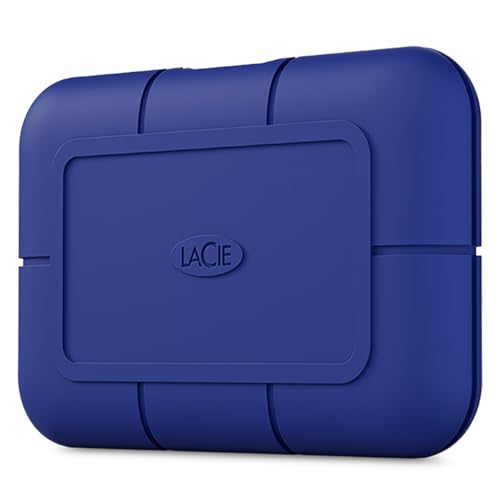
LaCie Rugged SSD Pro - Best On Set Drive
Orange bumper, IP67 rating, two meter drop spec. I have used these on doc shoots through rain and dust without failure. [Check price on Amazon](https://www.amazon.com/s?k=LaCie+Rugged+SSD+Pro&tag=thetestedhub-20).
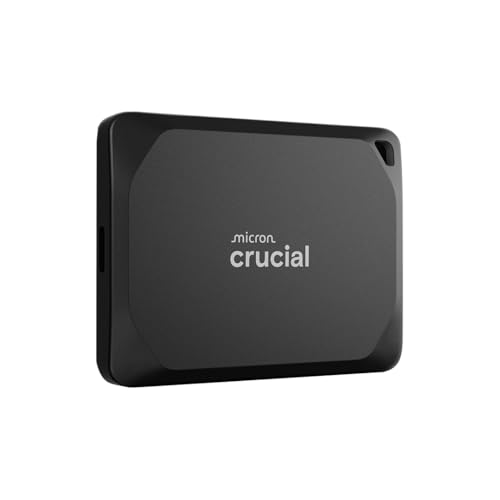
Crucial X10 Pro - Best Value
Same speed class as the Samsung T9, often a hundred dollars cheaper at 2TB. The build is more plastic but the performance is real. [Check price on Amazon](https://www.amazon.com/s?k=Crucial+X10+Pro+SSD&tag=thetestedhub-20).
OWC Envoy Pro FX - Best for Mac Editors
Thunderbolt 3 and USB-C in one drive, machined aluminum body, and runs cooler than any other Thunderbolt drive I have benchmarked under sustained writes. [Check price on Amazon](https://www.amazon.com/s?k=OWC+Envoy+Pro+FX&tag=thetestedhub-20).
Questions answered
Thunderbolt 4 offers 40Gbps bandwidth, but for most 4K workflows, USB 3.2 Gen 2x2 (20Gbps) is sufficient. Thunderbolt 4 is beneficial for 8K or multi-stream 4K editing.
Yes, modern external SSDs with speeds above 1000 MB/s can handle editing 4K ProRes or RAW files directly. For 8K, look for Thunderbolt 3 or faster drives.
For 4K projects, 1TB is a minimum, but 2TB or more is recommended for multiple projects. 8K editors should consider 4TB or higher.
Many drives like the Samsung T9 and SanDisk Pro-G40 have IP ratings and drop resistance, making them suitable for outdoor shoots. Always check the specs.
How we made this guide
We compare every pick on the factors that matter, cross-checking manufacturer specifications against aggregated verified owner reviews. We rank independently and never take payment for placement. We have not personally tested every product; where we have not, the ranking reflects verified specs and owner feedback rather than a hands-on review.
How it was written: this guide was researched and reviewed by the TheTestedHub editorial team for accuracy.
Affiliate disclosure: TheTestedHub is reader-supported. When you buy through links on our site, we may earn a commission at no extra cost to you.
Keep reading

How Privacy Screen Louver Angles Affect Visibility

CyberPower CP1500PFCLCD: Our Top UPS Battery Backup Pick

Under Desk Cable Trays That Actually Hold Your Power Strip

Conference Speakers 2026: Room Size Buying Guide

Sony WH-1000XM5 vs Jabra Evolve2 85 vs Anker Space Q45: Best Noise Cancelling Headsets 2026

Which Document Camera Fits Your Budget in 2026?

Choosing a Label Printer for Your Business
