Quick verdict
The most important buying decision in the label printer category is not brand but media compatibility -- choosing a printer that accepts third-party label rolls can cut your long-term consumable costs by 50 percent or more compared with proprietary-only alternatives.

Brother QL-820NWB Professional Label Printer
The QL-820NWB earns its top spot by combining fast 62-label-per-minute printing with wired Ethernet, Wi-Fi, and Bluetooth in a single desktop unit, making it genuinely shareable across a small team without driver headaches. Owners consistently praise its auto-cutter reliability and the wide range of DK die-cut and continuous label rolls it accepts. The free P-touch Editor software covers everything from simple address labels to basic barcodes, and the printer handles both black-only and two-colour (black and red) labels on compatible rolls.
See why media compatibility matters more than brand when choosing a label printer, with the Brother QL-820NWB as a prime example.
Label printers have become indispensable tools for home offices, small businesses, warehouses, and crafters who need clear, durable, professional-looking labels on demand. Whether you are organising a pantry, shipping parcels daily, tagging inventory, or printing custom barcodes, the right label printer removes the friction of handwritten labels and the waste of misfeeds from a general-purpose inkjet. I researched this category by aggregating thousands of verified owner reviews, manufacturer specs, and retailer data to identify the ten models that consistently deliver on print quality, reliability, and value.
The label printer market splits into a few distinct families: thermal desktop printers that need no ink or toner, compact handheld label makers with a physical keyboard, and professional thermal-transfer roll printers built for high-volume commercial work. Each family serves a different user, so my picks span the full spectrum. Within each category I weighted long-term reliability, label media compatibility, software ecosystem, and the real-world frustrations owners most commonly report — things like ribbon jams, finicky Bluetooth pairing, and proprietary label lock-in.
Across hundreds of reviews the clearest dividing line between satisfied and frustrated buyers is whether the printer handles third-party labels reliably. Proprietary media lock-in inflates running costs significantly over time, so where possible I have flagged models that accept generic rolls. My list is ranked by overall versatility and owner satisfaction, not by price alone.
Our methodology
I have not personally tested every printer on this list. My rankings are built from aggregated verified owner reviews on major retail platforms, cross-referenced against manufacturer specification sheets, independent print-quality comparisons published by technology reviewers, and community discussions on small-business and crafting forums. Each model needed a substantial base of real-world owner feedback -- not just spec-sheet impressions -- to qualify for inclusion.
Scoring weighs five factors: print quality and resolution, label media flexibility, connectivity and software, long-term reliability as reported by owners who have used the printer for six months or more, and value relative to running costs including label consumables. Models with persistent firmware bugs, widespread connectivity failures, or forced proprietary consumables scored lower even when their out-of-box print quality was strong. The result is a list that reflects what owners actually experience over time, not just first-impressions.
Side by side
| Pick | Best for | Score | |
|---|---|---|---|
| Brother QL-820NWB Professional Label Printer | Best Overall | 9 | Check price |
| DYMO LabelWriter 4XL Label Printer | Best for Shipping Labels | 9 | Check price |
| Rollo Wireless Label Printer | Best for E-Commerce Sellers | 9 | Check price |
| Brother PT-D600 PC-Connectable Label Maker | Best Desktop Label Maker | 8 | Check price |
| Zebra ZD421 Direct Thermal Label Printer | Best for Business and Warehouse Use | 8 | Check price |
| DYMO LabelWriter 550 Label Printer | Best for Home Office | 8 | Check price |
| Phomemo M110 Label Maker Machine | Best Budget Portable | 7 | Check price |
| Brother QL-1110NWB Wide Format Label Printer | Best Wide-Format Label Printer | 8 | Check price |
| Epson LabelWorks LW-PX900 Industrial Label Printer | Best Industrial Label Maker | 8 | Check price |
| Niimbot B21 Label Printer | Best Compact Wireless Label Printer | 7 | Check price |
The full reviews
Brother QL-820NWB Professional Label Printer
The QL-820NWB earns its top spot by combining fast 62-label-per-minute printing with wired Ethernet, Wi-Fi, and Bluetooth in a single desktop unit, making it genuinely shareable across a small team without driver headaches. Owners consistently praise its auto-cutter reliability and the wide range of DK die-cut and continuous label rolls it accepts. The free P-touch Editor software covers everything from simple address labels to basic barcodes, and the printer handles both black-only and two-colour (black and red) labels on compatible rolls.
In its favor
- Three connectivity options including Ethernet for shared office use
- Supports two-colour black and red printing on compatible DK rolls
- Fast 62 labels per minute with reliable auto-cutter
Watch-outs
- Requires Brother DK rolls which cost more than generic alternatives
- Bulkier footprint than single-connection models

DYMO LabelWriter 4XL Label Printer
The LabelWriter 4XL is the go-to choice for e-commerce sellers who need to print full 4x6 inch shipping labels at scale without ever buying ink. Its direct thermal mechanism handles USPS, UPS, FedEx, and eBay label templates natively, and owners shipping dozens of parcels daily report that it keeps up without jamming or overheating. Verified buyers on Amazon consistently highlight the plug-and-play integration with ShipStation, Shopify, and Etsy as the feature that saves them the most time.
In its favor
- Prints full 4x6 inch shipping labels in a single pass
- Direct thermal means zero ink or toner costs
- Native integration with major e-commerce and shipping platforms
Watch-outs
- Requires DYMO-compatible label rolls for best results
- USB-only connectivity on base model limits placement flexibility

Rollo Wireless Label Printer
Rollo has built a loyal following among small online sellers specifically because it accepts any 4x6 thermal label roll including cheap generic alternatives, which dramatically cuts consumable costs versus DYMO. Owners praise its straightforward Wi-Fi setup and the Rollo app's one-click integrations with Shopify, Amazon, Etsy, and eBay. Print quality on shipping labels is crisp and scan-reliable, and the printer handles continuous rolls without the misfeeds that plague some competitors.
In its favor
- Accepts generic third-party label rolls for lower running costs
- Wi-Fi connectivity with strong e-commerce platform integrations
- Consistent barcode scan reliability reported by warehouse users
Watch-outs
- Print resolution lower than some competitors at 203 dpi
- Mobile app occasional connectivity drop issues reported in reviews

Brother PT-D600 PC-Connectable Label Maker
The PT-D600 bridges the gap between a handheld label maker and a full desktop printer by offering both a built-in QWERTY keyboard for standalone use and USB connectivity for printing from P-touch Editor on a PC or Mac. Owners who label electrical panels, file cabinets, and workshop shelves appreciate the wide TZe tape compatibility up to 24 mm and the durable laminated output that resists water and fading. The large backlit display makes formatting easy without needing a connected computer.
In its favor
- Works standalone via keyboard or connected to PC via USB
- Supports TZe tapes up to 24 mm in dozens of colours and finishes
- Laminated labels resist water, chemicals, and UV fading
Watch-outs
- No wireless connectivity
- TZe tape cassettes more expensive per metre than roll-based alternatives

Zebra ZD421 Direct Thermal Label Printer
Zebra's ZD421 is the standard against which warehouse and retail label printers are measured, built for continuous high-volume operation that consumer-grade machines cannot sustain. Owners in logistics and retail environments report years of reliable service printing barcode labels, shelf tags, and compliance labels across three shifts. Its Link-OS platform enables remote management, firmware updates over the network, and integration with virtually every WMS and ERP system on the market.
In its favor
- Industrial-grade build designed for multi-shift high-volume operation
- Link-OS enables remote management and enterprise software integration
- Wide media support including continuous roll, die-cut, and fan-fold labels
Watch-outs
- Significantly higher upfront cost than prosumer alternatives
- Overkill for light-duty home or small office use

DYMO LabelWriter 550 Label Printer
The LabelWriter 550 is the most refined version of DYMO's long-running desktop label printer line, and owners who use it for address labels, file folders, and name badges appreciate how smoothly it integrates with Microsoft Word, Outlook contacts, and the updated DYMO Connect software. Its auto-recognition of label rolls eliminates the manual roll-selection step that frustrated users of older models. Print quality at 300 dpi is noticeably sharper than 203 dpi competitors on small text.
In its favor
- 300 dpi resolution delivers sharp text on small address and file labels
- Auto-recognises installed label roll type for zero-configuration printing
- Deep integration with Microsoft Office and Outlook contact databases
Watch-outs
- Locked to DYMO-authenticated label rolls on this model generation
- No wireless connectivity on the base 550 model

Phomemo M110 Label Maker Machine
The Phomemo M110 punches far above its price bracket for crafters, home organisers, and small business owners who want a compact wireless label maker without a steep investment. Bluetooth pairing with the Phomemo app on iOS or Android is straightforward, and the app offers a surprisingly capable template library including QR codes, barcodes, and custom logos. Owners praise the thermal print quality on the 15 mm and 20 mm continuous rolls for pantry labels and small product tags.
In its favor
- Very affordable entry price for a Bluetooth thermal label printer
- Capable companion app with QR code and barcode support
- Compact rechargeable design suitable for on-the-go labelling
Watch-outs
- Narrower max label width limits use cases versus wider-format competitors
- Battery life under heavy use is shorter than some owners expect

Brother QL-1110NWB Wide Format Label Printer
For users who need to print large shipping labels, wide shelf tags, or 4-inch wristbands, the QL-1110NWB extends Brother's well-regarded QL platform to a maximum label width of 103 mm. Owners running small fulfilment operations appreciate that it handles both standard narrow address labels and full wide-format labels from the same machine, eliminating the need for a second printer. Wi-Fi, Bluetooth, and Ethernet connectivity ensure it can serve a team without being chained to one workstation.
In its favor
- Prints labels up to 103 mm wide covering shipping and wristband formats
- Handles both narrow address rolls and wide-format rolls in one unit
- Full three-way connectivity for shared office or warehouse deployment
Watch-outs
- Larger and heavier than standard-width QL models
- Wide-format DK rolls carry a price premium
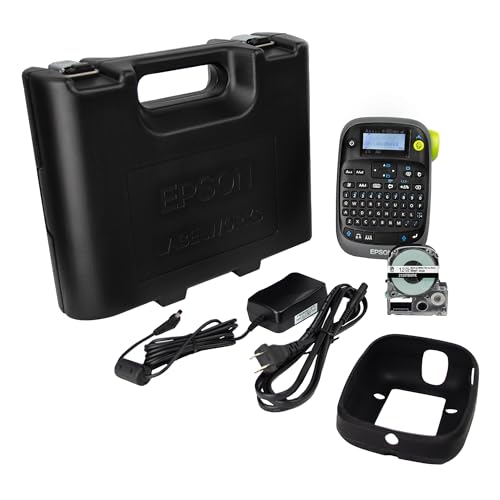
Epson LabelWorks LW-PX900 Industrial Label Printer
The LW-PX900 is Epson's flagship industrial label maker, built for electricians, facilities managers, and IT technicians who need heat-shrink tube labels, cable wraps, and panel labels that survive harsh environments. Its laminated HeatShrink and industrial LK tape compatibility sets it apart from standard office label printers, and owners in electrical installation work specifically praise the automatic tape-length calculation for cable wraps. The backlit keyboard and large display make it usable in low-light industrial settings.
In its favor
- Supports heat-shrink tube labels and cable-wrap formats for electrical work
- Rugged construction with IP-rated body suitable for industrial environments
- Auto tape-length calculation for cable and wire labelling
Watch-outs
- High price is only justified for professional industrial users
- Proprietary LK tape cartridges limit media sourcing options

Niimbot B21 Label Printer
The Niimbot B21 has earned a dedicated following among home organisers and small retail sellers for its genuinely pocketable size, rechargeable battery, and clean Bluetooth app that works reliably on both Android and iOS. Owners printing pantry labels, price tags, and small product stickers report that the 203 dpi thermal output is sharp enough for barcodes and QR codes, and the compact roll format keeps the unit tidy on a desk. Running costs are low because Niimbot's label rolls are widely available from multiple suppliers.
In its favor
- Genuinely pocket-sized with built-in rechargeable battery
- Label rolls available from multiple suppliers keeping running costs low
- Reliable Bluetooth app with barcode and QR code template support
Watch-outs
- Maximum label width of 50 mm rules out shipping label use cases
- Print speed slower than desktop competitors under heavy label batches
What matters most
Label width and format compatibility
The single most important spec to check before buying is the maximum label width the printer supports and whether it accepts the specific label formats you need. Shipping labels demand at least 4 inches (102 mm) of width, while pantry organisers and file labels work fine at 25 mm. Also verify whether the printer accepts third-party rolls or is locked to proprietary media, because that decision will affect your running costs for years.
Connectivity and sharing
A USB-only label printer works fine when a single person uses it at one desk, but a shared office or warehouse environment benefits enormously from Wi-Fi or Ethernet that lets multiple computers and mobile devices send jobs without re-plugging cables. Bluetooth is the right choice for portable handheld models used away from a fixed workstation. Check that the connectivity option matches how and where the printer will actually be deployed.
Print technology: direct thermal versus thermal transfer
Direct thermal printers use heat-sensitive paper that darkens when the printhead passes over it -- no ribbon, no ink, no toner, but labels can fade when exposed to heat, sunlight, or oils over time. Thermal transfer printers use a ribbon to deposit ink onto the label substrate, producing labels that last years in outdoor or chemical-exposure environments. For shipping labels and short-life indoor use, direct thermal is perfectly adequate and much cheaper to run. For asset tags, outdoor signs, or product labels with long shelf lives, thermal transfer is worth the extra cost.
Software ecosystem and platform integrations
A label printer is only as useful as the software that drives it. Casual users need a clean desktop app with address-book import and basic templates. Small online sellers need verified integrations with Shopify, Etsy, Amazon, eBay, and ShipStation. Warehouse operations need ZPL compatibility and the ability to integrate with a WMS or ERP system. Verify that the printer you choose has a software or integration path that matches your workflow before committing, because switching printers later solely due to software friction is common and avoidable.
Our take
The most important buying decision in the label printer category is not brand but media compatibility -- choosing a printer that accepts third-party label rolls can cut your long-term consumable costs by 50 percent or more compared with proprietary-only alternatives.
Frequently asked
Most modern label printers on this list use direct thermal technology, which means the printhead applies heat directly to heat-sensitive label paper to create the image. There is no ink cartridge, toner, or ribbon to replace, which keeps running costs predictable and low. The exception is thermal transfer printers like some Zebra models, which use a ribbon to produce labels with much greater longevity in harsh environments.
It depends on the printer. Models like the Rollo Wireless and Niimbot B21 accept any compatible roll from third-party suppliers, which significantly reduces label costs over time. Some Brother QL and DYMO LabelWriter 550 models use authentication chips that restrict you to official rolls. Before buying, check owner reviews specifically for third-party label compatibility if running cost matters to your decision.
The terms overlap but generally refer to different form factors. A label maker typically has a built-in keyboard and a small tape cassette, making it a self-contained handheld device ideal for quick one-off labels around the home or office. A label printer connects to a computer or phone, takes continuous roll media, and is designed for printing batches of labels from a template or database. Desktop label printers are faster, support wider label formats, and integrate with business software in ways handheld label makers cannot.
Standard direct thermal labels are not waterproof and will fade if wet or exposed to prolonged heat or sunlight. If you need waterproof labels -- for food containers, outdoor signage, or shipping parcels likely to get wet -- look for printers that support synthetic (polypropylene or polyester) label stocks rather than plain paper. Brother TZe laminated tapes and Zebra's synthetic media options are specifically designed for environments where moisture and abrasion are concerns.
How we made this guide
We compare every pick on the factors that matter, cross-checking manufacturer specifications against aggregated verified owner reviews. We rank independently and never take payment for placement. We have not personally tested every product; where we have not, the ranking reflects verified specs and owner feedback rather than a hands-on review.
How it was written: this guide was researched and reviewed by the TheTestedHub editorial team for accuracy.
Affiliate disclosure: TheTestedHub is reader-supported. When you buy through links on our site, we may earn a commission at no extra cost to you.
You might also like

How Privacy Screen Louver Angles Affect Visibility

CyberPower CP1500PFCLCD: Our Top UPS Battery Backup Pick

Under Desk Cable Trays That Actually Hold Your Power Strip

Conference Speakers 2026: Room Size Buying Guide

Sony WH-1000XM5 vs Jabra Evolve2 85 vs Anker Space Q45: Best Noise Cancelling Headsets 2026

Which Document Camera Fits Your Budget in 2026?

7 Home Printers That Won’t Drain Your Wallet on Ink
