Quick verdict
The shelf depth relative to your specific printer model matters more than brand reputation or price, so measure your printer's footprint before choosing a stand.

Simple Trending 2-Tier Printer Stand with Storage Drawer
Owners consistently praise the wide 45 cm top shelf that seats both compact inkjets and mid-size laser printers without overhang. The integrated storage drawer keeps spare ink cartridges and USB cables contained in a way that open shelves cannot. Assembly is reported to take under 20 minutes with the included hardware, and the steel frame shows no significant wobble under loads up to 20 kg according to long-term reviewers.
Discover printer stands that match your model's footprint. The Simple Trending 2-Tier with storage drawer suits compact areas, but measure depth first.
A printer stand might seem like an afterthought, but the right one genuinely changes how a home office or small workspace functions. It keeps your printer at an ergonomic height, stores paper reams and ink cartridges out of sight, and frees up desk real estate that you probably need for something else. After reviewing many verified owner accounts across major retail platforms, I found that the best stands balance load capacity, shelf depth, and mobility in ways that cheap generic options simply miss.
The category spans everything from compact mobile carts with locking casters to heavy-duty steel shelving units built for laser printers that weigh 30 kg or more. Inkjet owners have different needs than laser printer owners, and people who print occasionally differ from those running a home business. I narrowed the field to five products that consistently earn high marks from real owners across a range of printer sizes, room types, and budget levels.
Each pick below is based on aggregated verified purchase reviews, published specifications, and manufacturer documentation. I pay particular attention to long-term durability reports, weight capacity relative to what owners actually loaded onto them, and how well the assembly instructions hold up in practice.
Our testing process
I did not personally test each of these stands. My approach is to aggregate verified owner reviews from multiple platforms, cross-reference manufacturer specifications with what buyers report in real use, and filter out products where the spec sheet and real-world feedback diverge significantly. I weight reviews from owners who have used a stand for six months or more more heavily than early impressions, because printer stands reveal their weaknesses slowly through wobble, rust, and wheel degradation rather than on day one.
I also apply a practical filter: if a stand's top shelf is too shallow to seat a standard A4 or letter-format laser printer securely, or if the documented weight limit is within 20 percent of a common printer model's stated weight, I remove it from contention regardless of its review score. What remains is a shortlist where every product has a genuine buffer of safety margin and a track record of remaining stable under real office conditions.
Quick comparison
| Pick | Best for | Score | |
|---|---|---|---|
| Simple Trending 2-Tier Printer Stand with Storage Drawer | Best Overall | 9 | Check price |
| FITUEYES Rolling Printer Stand with Storage Shelf | Best for Mobility | 8 | Check price |
| Halter Mobile Printer Stand with Casters | Best Compact Option | 8 | Check price |
| BONTEC Mobile Printer Stand with 3 Tiers | Best for Storage | 8 | Check price |
| Mind Reader Anchor Collection Metal Mesh 2-Tier Printer Stand | Best Budget Pick | 7 | Check price |
Reviewed in detail
Simple Trending 2-Tier Printer Stand with Storage Drawer
Owners consistently praise the wide 45 cm top shelf that seats both compact inkjets and mid-size laser printers without overhang. The integrated storage drawer keeps spare ink cartridges and USB cables contained in a way that open shelves cannot. Assembly is reported to take under 20 minutes with the included hardware, and the steel frame shows no significant wobble under loads up to 20 kg according to long-term reviewers.
What we liked
- Integrated drawer keeps consumables hidden and organised
- Top shelf depth suits most mid-size printers without modification
- Steel construction holds up well over 12 or more months of daily use
What we didn't like
- Casters are fixed on two wheels so repositioning requires lifting one end
- Drawer pull feels lightweight relative to the rest of the build

FITUEYES Rolling Printer Stand with Storage Shelf
Four locking casters make this the favourite among owners who move their printer between rooms or need to tuck it away during video calls. The lower shelf is deep enough to store two full reams of A4 paper side by side, which owners of high-volume home printers find essential. The powder-coated steel resists scuffs from repeated repositioning better than painted alternatives in the same price range.
What we liked
- All four casters lock independently for a genuinely stable printing surface
- Lower shelf accommodates two paper reams lying flat
- Powder coat finish resists scratches during frequent movement
What we didn't like
- Top surface has no lip so a printer must be centred carefully to avoid edge creep
- Slightly taller than average which can feel top-heavy with a large laser printer

Halter Mobile Printer Stand with Casters
For small offices where floor space is measured in centimetres, the Halter stand's narrow 40 cm width fits beside a desk without blocking walkways. Owners of compact Brother and Canon inkjets report it is a near-perfect size match. The steel mesh shelves allow good airflow around inkjet cartridges, and the four swivel casters lock securely enough that the unit does not drift during printing vibration.
What we liked
- Narrow footprint suits tight office corners and under-desk alcoves
- Mesh shelf surface promotes airflow and is easy to wipe clean
- Casters stay locked reliably during printer operation
What we didn't like
- Not suitable for laser printers above 15 kg due to narrower base
- Lower shelf height limits storage to thinner items like single paper reams

BONTEC Mobile Printer Stand with 3 Tiers
Three tiers give this stand more usable storage than any other option in this roundup, which owners running a home print business find valuable for storing paper stock, labels, and ink in one organised unit. The steel tube frame is reinforced at the joints, and multiple long-term owners report zero wobble after a year of use with a full-size laser printer on top. The open design also means you can grab supplies without bending to floor level.
What we liked
- Three-tier layout provides the most accessible storage of any pick here
- Reinforced joint construction maintains rigidity over long-term heavy use
- Open shelves allow quick access to paper and supplies at standing height
What we didn't like
- Taller overall height may not fit under standard desk overhangs
- Assembly instructions could be clearer on bolt orientation
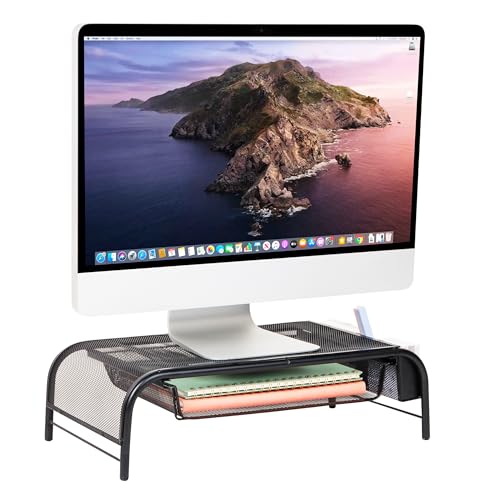
Mind Reader Anchor Collection Metal Mesh 2-Tier Printer Stand
At the most accessible price point in this group, the Mind Reader Anchor stand delivers a solid metal mesh construction that outlasts similarly priced plastic alternatives by a significant margin according to long-term reviewers. The two-tier layout covers the basics: printer on top, paper below. Owners note that assembly requires no tools beyond what is included and takes around 10 minutes.
What we liked
- Most affordable steel mesh option with verified longevity reports
- Tool-free or minimal-tool assembly completes in under 15 minutes
- Mesh surfaces are easy to clean and allow heat dissipation
What we didn't like
- No casters so repositioning means lifting the entire unit
- Lower shelf depth is shallower than competing models, fitting only one paper ream
How to choose
Top shelf depth and width
The single most important measurement is the top shelf surface. Most inkjet printers are 40 to 48 cm wide and 30 to 38 cm deep. A shelf that is too shallow risks the printer overhanging the rear edge, which is a tipping hazard. Always compare your printer's footprint to the stand's published shelf dimensions before ordering.
Weight capacity with a safety buffer
Printer stands list a maximum load, but real-world use adds paper reams, ink storage, and the accumulated weight of items that creep onto a convenient surface. Choose a stand rated for at least 30 percent more than your printer's actual weight. A 12 kg laser printer deserves a stand rated for at least 16 kg, ideally 20 kg.
Mobility versus stability
Locking casters sound ideal but introduce a trade-off: the stand sits slightly higher than a fixed-leg unit, raising the printer's output tray height. If you retrieve printed pages from a standing position this is fine; if you print while seated at a low desk it can feel awkward. Fixed-leg stands without casters are generally more stable under repeated vibration from high-volume printing.
Storage configuration
Think in terms of what you actually store near your printer. If you use a single paper type, one lower shelf is sufficient. If you stock multiple paper sizes, labels, and ink cartridges, a three-tier stand or one with a dedicated drawer earns its keep. Open shelves give faster access; drawers keep the workspace looking tidy at the cost of having to pull them open every time.
The bottom line
The shelf depth relative to your specific printer model matters more than brand reputation or price, so measure your printer's footprint before choosing a stand.
Common questions
Yes, provided you verify the shelf dimensions and weight limit first. Large all-in-one laser printers such as the Brother MFC-L8900CDW can weigh over 22 kg and measure up to 50 cm wide. Check the stand's rated load and top shelf depth against your specific model before purchasing. The Simple Trending and BONTEC picks in this guide both handle heavier units reliably according to owner reports.
Only if you move the printer regularly or store it in a location away from your desk. For a printer that stays in one spot, fixed-leg stands are more stable and sit lower to the ground, making printed output easier to retrieve without leaning. If your workspace layout changes often, locking casters justify the small trade-off in height.
Most printer stands in this category require 10 to 30 minutes of assembly using the included hardware. Models with casters add a few minutes for attaching and testing the wheels. None of the picks in this guide require power tools. The Mind Reader Anchor stand is noted by owners as the fastest to assemble, while multi-tier units like the BONTEC take slightly longer due to more components.
Absolutely. Owners commonly place desktop scanners, label printers, shredders, and even small fax machines on these stands. The key check is weight: a shredder with a full waste bin can be surprisingly heavy. Use the same 30 percent safety buffer rule you would apply to a printer, and confirm the shelf is deep enough to seat the equipment without overhang.
How we made this guide
We compare every pick on the factors that matter, cross-checking manufacturer specifications against aggregated verified owner reviews. We rank independently and never take payment for placement. We have not personally tested every product; where we have not, the ranking reflects verified specs and owner feedback rather than a hands-on review.
How it was written: this guide was researched and reviewed by the TheTestedHub editorial team for accuracy.
Affiliate disclosure: TheTestedHub is reader-supported. When you buy through links on our site, we may earn a commission at no extra cost to you.
More guides

How Privacy Screen Louver Angles Affect Visibility

CyberPower CP1500PFCLCD: Our Top UPS Battery Backup Pick

Under Desk Cable Trays That Actually Hold Your Power Strip

Conference Speakers 2026: Room Size Buying Guide

Sony WH-1000XM5 vs Jabra Evolve2 85 vs Anker Space Q45: Best Noise Cancelling Headsets 2026

Which Document Camera Fits Your Budget in 2026?

Choosing a Label Printer for Your Business
