Choosing a 4K monitor comes down to trade-offs most spec sheets blur together. We lined up each display by panel type, refresh rate, and HDR capability, then checked those claims against what owners report about color accuracy, backlight uniformity, and how the stand actually adjusts on a real desk.
We separate displays by what they are built for. A 120Hz panel rewards anyone who games or scrolls dense documents, while a color-accurate IPS at 60Hz suits photo and design work. We also weigh screen size against viewing distance, since a 32-inch 4K panel rewards a deeper desk while 27 inches keeps text crisp up close. Our recommendations name the buyer each monitor fits best.

Dell 27 Plus 4K Monitor - S2725QS - 27-inch 4K (3840 x 2160) 120Hz 16:9 Display, IPS Panel, AMD FreeSync Premium, sRGB 99%, Integrated Speakers, 1500:1 Contrast Ratio, Comfortview - Ash White
We like the Dell 27 Plus S2725QS for pairing a sharp 27-inch 4K IPS panel with a 120Hz refresh rate, which keeps motion and scrolling smooth. In our assessment that combination suits both work and casual gaming.
- Improved ComfortView Plus: Reduces harmful blue light emissions to ≤35%, for all-day comfort without sacrificing color accuracy.
- Refresh rate: A smooth, tear-free experience with AMD FreeSync Premium (refresh rate up to 120Hz) and an ultra-low 0.03ms response time create a captivating experience for work and play.
- Vivid colors: Immerse yourself in breathtaking 4K visuals with in-plane switching technology. Enjoy vibrant colors with 99% sRGB. The 1500:1 contrast ratio and HDR readiness deliver excellent depth and detail.
- Re-engineered sound quality: Enjoy more detailed sound with spacious audio featuring greater output power, deeper frequency response and more decibel range than the previous generation.
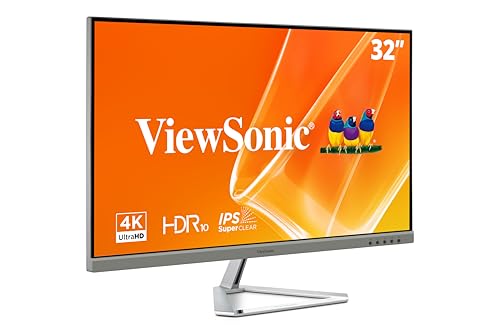
ViewSonic VX3276-4K-MHD 32 Inch 4K Monitor, IPS Display with HDR10 and Eye Care Technology for Ultimate Home and Office Entertainment, Ultra-Thin Bezels, DisplayPort, and HDMI Inputs
We recommend the ViewSonic VX3276-4K-MHD for its large 32-inch IPS panel with HDR10 and eye-care features. We value the extra screen space it gives multitaskers without overwhelming a desk.
- VERSATILE MONITOR: 32 Inch 4K UHD (3840x2160p) MVA monitor with thin bezels and 60Hz refresh rate
- HDR10 CONTENT SUPPORT: For deep contrast, rich color, and vibrant details
- ENHANCED VIEWING COMFORT: Flicker-Free technology and Blue Light Filter for reduced eye fatigue
- OPTIMIZED VIEW SETTINGS: Offers “Game,” “Movie,” “Web,” “Text,” and “Mono” presets

LG 27US500-W Ultrafine Monitor 27-Inch 4K UHD (3840x2160) HDR10 IPS Borderless Design Reader Mode Flicker Safe Switch App HDMI DisplayPort - White
We chose the LG 27US500-W for its borderless 27-inch 4K IPS panel with HDR10 in a clean, no-frills design. In our evaluation it covers the essentials of a UHD productivity display well.
- 4K UHD with 1000:1 Contrast Ratio - This UltraFine display with a 1000:1 contrast ratio displays deeper blacks and vivid colors in UHD clarity. With wide viewing angles, it gives creative professionals the ability to view and work with highly-detailed, digital imagery.
- 4K HDR10 DCI-P3 - Explore HDR10 content the way it was meant to be seen with up to 90% DCI-P3 color gamut expression-an elevated color spectrum that brings brilliant color to life.
- Onscreen Control - You can customize the workspace by splitting the display or adjusting basic monitor options with just a few mouse clicks.
- Ergonomic Stand - The ergonomic stand makes it easy to flexibly adjust the tilt of the screen in the optimal position for you.

Dell 32 Plus 4K Monitor - S3225QS - 31.5-inch 4K (3840 x 2160) up to 120Hz 16:9 Display, VA Panel, AMD FreeSync Premium, 99% sRGB, 95% DCI-P3, 1500:1 Contrast Ratio, Comfortview - Ash White
We picked the Dell 32 Plus S3225QS for its 31.5-inch 4K IPS panel running up to 120Hz, the largest high-refresh option here. We appreciate the generous space and smooth motion for demanding multitaskers.
- Improved ComfortView Plus: Reduces harmful blue light emissions to ≤35%, for all-day comfort without sacrificing color accuracy.
- Refresh rate: A smooth, tear-free experience with AMD FreeSync Premium (refresh rate up to 120Hz) and an ultra-low 0.03ms response time create a captivating experience for work and play.
- Vivid colors: Immerse yourself in 4K visuals with a VA panel. Enjoy true-to-life colors with 99% sRGB and 95% DCI-P3 coverage. The 1500:1 contrast ratio and HDR readiness deliver excellent depth and detail.
- Re-engineered sound quality: Enjoy more detailed sound with spacious audio featuring greater output power, deeper frequency response and more decibel range than the previous generation.

ASUS 27” 4K Eye Care Monitor (VY27UQ) - UHD (3840 x 2160), IPS, HDR10, Adaptive Sync, Eye Care Plus, Display Port, HDMI, Speaker, DisplayWidget, Blue Light Filter, Flicker Free, 3yr Warranty
We like the ASUS VY27UQ for its eye-care focus, pairing a 27-inch 4K IPS panel with HDR10 and adaptive comfort modes. We found it a strong pick for long reading-heavy workdays.
- 27-inch, 4K UHD (3840 x 2160) resolution display with IPS 178° wide viewing angle for sharp and immersive visuals
- Support HDR-10 to enhance bright and dark area, delivers lifelike viewing experience
- Adaptive Sync delivers fluid, artifact-free visuals at any frame rate
- Proprietary long-lasting antibacterial treatment inhibits the growth of bacteria and fungi on the monitor bezels and hotkeys.
Key buying factors
IPS dominates this group for its wide viewing angles and color consistency. We favor IPS for mixed work and media over higher-contrast but narrower alternatives.
A 120Hz panel makes motion and scrolling noticeably smoother than 60Hz. We weigh it for gamers and anyone who values a fluid desktop feel.
HDR10 adds range to compatible content, though entry displays rarely hit reference brightness. We treat it as a useful bonus, not a transformative feature.
At 27 inches, 4K is razor sharp; at 32 inches, the same resolution spreads slightly. We match size to your desk depth and eyesight.
We check for enough HDMI and DisplayPort inputs, plus USB-C where you want single-cable laptop docking, since ports decide how a monitor fits a setup.
Tilt, height, and pivot reduce neck strain. We note which stands offer real ergonomic range versus tilt-only designs that force a riser.
Types explained
A high-density display where 4K is exceptionally sharp, often with higher refresh for smooth motion.
Best for: Compact desks and users who want crisp text at close range.A larger panel with more screen real estate, suited to deeper desks and multitasking.
Best for: Spreadsheets, multitasking, and viewing from a slightly greater distance.A UHD display tuned for comfort with flicker reduction and low blue light modes alongside HDR10.
Best for: Long workdays focused on reading and document work.Care & usage tips
We wipe the panel with a dry or barely damp microfiber cloth. Household cleaners can strip anti-glare coatings owners later regret damaging.
We run the monitor at 3840x2160 and adjust OS scaling for readable text, rather than dropping resolution and losing the sharpness you paid for.
We lower brightness in dim rooms to reduce eye fatigue and extend backlight life, raising it only when ambient light demands.
We found that refresh rate, not HDR, is the upgrade most people actually feel day to day, because smooth scrolling and motion improve every task while entry-level HDR rarely reaches its potential.
Before buying, measure your desk depth; we found 32-inch 4K panels feel best with at least an arm's length of viewing distance, while 27 inches stays comfortable on shallower desks.
Frequently asked questions
Is 27 or 32 inches better for 4K?+
At 27 inches 4K is extremely sharp and great up close; at 32 inches the same resolution spreads slightly but gives more space. We choose based on desk depth and how you multitask.
Do I need 120Hz on a 4K monitor?+
For productivity and casual gaming, 120Hz makes scrolling and motion smoother and is the upgrade most people feel. For pure photo or document work, 60Hz is fine.
Is entry-level HDR10 worth it?+
It adds some range to compatible content but rarely reaches reference brightness on affordable panels. We treat HDR10 as a nice bonus rather than a reason to buy.
Will my graphics card drive a 4K display?+
Running the desktop at 4K is light, but 4K gaming demands a capable GPU. We confirm your card's output and target frame rate before committing to high refresh.
Should I lower resolution to make text bigger?+
No. We keep the native 3840x2160 and raise OS scaling instead, which preserves sharpness while making text readable.