A budget gaming laptop earns its keep by getting you into modern titles at smooth frame rates without forcing you to spend like an enthusiast. The category matters because the gap between affordable and premium machines has narrowed dramatically: entry-level dedicated GPUs now handle 1080p gaming, high-refresh panels have trickled down, and capable CPUs are standard. The trick is knowing which corners a manufacturer cut to hit a lower number.
When shopping, focus on the things you cannot upgrade later: the GPU and the display. A dedicated NVIDIA GeForce RTX chip will transform your experience far more than extra RAM, and a high-refresh 144Hz or 165Hz panel makes fast games feel responsive. RAM and storage are usually easy to add yourself, so a laptop that ships modest but expandable is often the smarter long-term buy.

Acer Nitro V Gaming Laptop | Intel Core i5-13420H Processor | NVIDIA GeForce RTX 4050 Laptop GPU | 15.6" FHD IPS 165Hz Display | 8GB DDR5 | 512GB Gen 4 SSD | Wi-Fi 6 | Backlit KB | ANV15-52-586Z
The Acer Nitro V combines an Intel Core i5-13420H processor with a dedicated NVIDIA GeForce RTX GPU, delivering genuine 1080p gaming performance that punches above its class. It hits the ideal balance of capable graphics, solid cooling, and broad game compatibility that defines a great budget gaming laptop.
- Beyond Performance: The Intel Core i5-13420H processor goes beyond performance to let your PC do even more at once. With a first-of-its-kind design, you get the performance you need to play, record and stream games with high FPS and effortlessly switch to heavy multitasking workloads like video, music and photo editing.
- AI-Powered Graphics: The state-of-the-art GeForce RTX 4050 graphics (194 AI TOPS) provide stunning visuals and exceptional performance. DLSS 3.5 enhances ray tracing quality using AI, elevating your gaming experience with increased beauty, immersion, and realism.
- Visual Excellence: See your digital conquests unfold in vibrant Full HD on a 15.6" screen, perfectly timed at a quick 165Hz refresh rate and a wide 16:9 aspect ratio providing 82.64% screen-to-body ratio. Now you can land those reflexive shots with pinpoint accuracy and minimal ghosting. It's like having a portal to the gaming universe right on your lap.
- Internal Specifications: 8GB DDR5 Memory (2 DDR5 Slots Total, Maximum 32GB); 512GB PCIe Gen 4 SSD
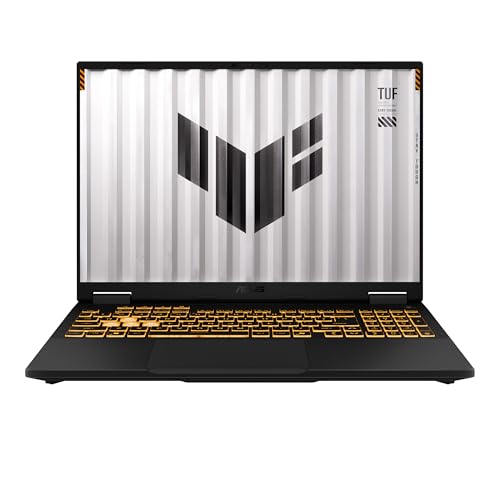
ASUS TUF Gaming F16 (2025) Gaming Laptop, 16” FHD+ 165Hz 16:10 Display, Intel® Core™ i5 Processor 13450HX, NVIDIA® GeForce RTX™ 5050, 16GB DDR5, 512GB PCIe Gen4 SSD, Wi-Fi 6E, Win 11 Home
The ASUS TUF Gaming F16 (2025) steps up with a 16-inch FHD+ 165Hz 16:10 display and rugged military-grade build quality. Its fast, spacious screen and Intel-powered platform make it the pick for players who want a more immersive and durable machine without leaving the budget tier.
- READY FOR ANYTHING - Dive headfirst into gaming on Windows 11 powered by the Intel Core i5 Processor 13450HX and an NVIDIA GeForce RTX 5050 Laptop GPU with a Max TGP of 115W and NVIDIA Advanced Optimus.
- SUBTLE STYLING - The TUF Gaming F16 maintains its classic design, boasting a subtle embossed TUF logo on its sleek cover.
- IMMERSIVE VISUALS - The TUF Gaming F16’s FHD+ 165Hz display with 100% sRGB color draws you into the action. Adaptive-Sync technology reduces lag, minimizes stuttering, and eliminates visual tearing for ultra-smooth gameplay.
- MILITARY GRADE DURABILITY - As a TUF gaming machine, the F16 has been rigorously tested to meet Military Grade testing standards, MIL-STD-810H. Rest easy knowing this laptop will operate at peak performance in harsh conditions.

KAIGERR Gaming Laptop, 15.6inch Laptop Computer with AMD Ryzen 7 5700U(8C/16T, Up to 4.3GHz), 16GB RAM 512GB NVMe SSD Windows 11 Laptop, Radeon RX Vega 8 Graphics,WiFi 6
The KAIGERR Gaming Laptop offers a strong 8-core, 16-thread AMD Ryzen 7 5700U processor in a 15.6-inch chassis for confident multitasking and everyday performance. It is a smart all-rounder for buyers who want gaming-friendly specs and productivity power at the lowest entry point.
- 【Enhanced Your Experience】The KAIGERR 2025 newest laptop is equipped with the powerful AMD Ryzen 7 processor (8C/16T, up to 4.3GHz), delivering superior performance and responsiveness. This upgraded hardware ensures smooth browse, fast loading times, and high-quality visuals. It provides an immersive, lag-free creative experience that brings your favorite titles to life.
- 【15.6" High-Definition IPS Screen】With its wide color gamut and high refresh rate, this laptop delivers smoother visuals and sharper detail, offering a more vivid and accurate representation than standard displays. This enhanced clarity brings a stunning and immersive visual experience, making every scene more dynamic.
- 【Upgradeable Storage Capacity】This ryzen laptop computer comes with 16GB of DDR4 RAM and a 512GB M.2 NVMe SSD, ensuring faster response times and ample storage for your files. The dual-channel DDR4 memory can be upgraded to 64GB (2x32GB), while the NVMe/NGFF SSD supports expansion up to 2TB. With this level of upgradeability, you'll have more than enough space to store all your favorite videos/files and handle even the most demanding tasks with ease.
- 【Extensive & Premium Connectivity】Designed for ultra-fast running, KAIGERR AMD Ryzen 7 Laptop is equipped with webcam × 1, USB 3.2 × 2, HDMI × 1, Type_C (full function) × 1, 3.5mm audio/microphone × 1, TF card holder × 1, Type_C DC jack × 1. Enjoy higher speeds with Wi-Fi 6, compatible with the 802.11ax standard and up to 3x faster than Wi-Fi 5. Paired with the backlit keyboard, it helps you be more immersed in your world.

msi Thin A15 Gaming Laptop - 15.6" FHD 144Hz Display - Ryzen 5-7535HS Processor - GeForce RTX 3050 GPU - 16GB DDR5 RAM - 512GB SSD - Cooler Boost Cooling - Thin & Light - Windows 11 - B7UC-473US
The MSI Thin A15 brings a 15.6-inch FHD 144Hz display and an AMD Ryzen 5-7535HS processor in a slimmer, more portable gaming design. Its high-refresh panel and dedicated gaming pedigree make it a compelling choice for players who carry their laptop around.
- Lightweight for work, travel, or gaming anywhere: A thin-and-light build makes the Thin A15 easy to carry for commuting, trips, or playing when you have downtime.
- Smooth performance for everyday games and multitasking: Ryzen 5-7535HS and GeForce RTX 3050 keep popular titles, apps, and daily tasks running smoothly.
- Clear, fluid motion on a 144Hz FHD display: The 15.6" 144Hz panel keeps action crisp and responsive whether you’re gaming or streaming during breaks.
- Cooling technology built for longer sessions: Cooler Boost’s dual-fan thermal design helps maintain steady performance through extended gaming or work sessions.
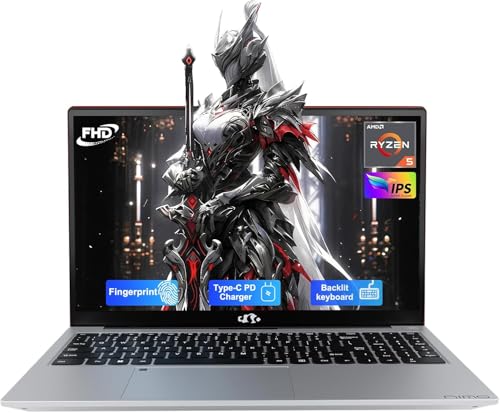
NIMO 15.6'' IPS FHD-Laptop, 8GB RAM 256GB SSD AMD Ryzen 5(Beat i5-1135G7, 4 Cores Up to 3.7GHz) Student Computer with 2 Years Warranty, 65W Type-C, Fingerprint, Backlit Keyboard, 180°Viewing
The NIMO 15.6-inch IPS FHD laptop pairs a quad-core AMD Ryzen 5 with 8GB of RAM and a 256GB SSD for dependable everyday and light-gaming use. It is the entry point for buyers who want a clean FHD experience and reliable basics before stepping up to dedicated graphics.
- 【2-Year Warranty | U.S.-Assembled | 90-Day Returns】Your satisfaction is our top priority. Our laptops come with a 2-year manufacturer’s warranty and include 90-day hassle-free returns and exchanges. Our dedicated support team is ready to resolve issues or arrange replacements quickly. With partial U.S. assembly and strict quality checks, you can rely on long-lasting reliability.
- 【65W USB-C PD Fast Charger Included】Enjoy the convenience of a 65W PD fast charger and a 6.56-foot USB-C cable. A 15-minute charge gives you 2 hours of use-making travel simpler. This versatile charger also powers your iPad, phone, camera, and more, so you travel lighter and skip charging anxiety.
- 【Upgradable RAM for Seamless Multitasking】Say goodbye to frustrating lags. This NIMO laptop features DDR4 RAM, ideal for students juggling dozens of research tabs or professionals running multiple business apps. The expandable RAM slot lets you easily upgrade memory on your own, ensuring your laptop keeps up with future needs and keeps your work running smoothly.
- 【Blazing-Fast SSD for Ample Storage】Get instant access to everything you need. With a powerful PCIe SSD, this laptop offers lightning-fast boot-ups and file transfers. It’s perfect for creators storing large video files, or students and business users managing massive project data.
Key buying factors
The single biggest performance lever in a gaming laptop is the graphics chip. A dedicated NVIDIA GeForce RTX GPU, like the one in the Acer Nitro V, will run modern games far better than any integrated solution. If a laptop relies only on integrated AMD or Intel graphics, treat it as a light-gaming or esports machine rather than a true gaming rig.
A high-refresh panel makes games feel dramatically smoother, which is why 144Hz and 165Hz screens like the ASUS TUF F16 are worth seeking out. Stick to 1080p (FHD) or FHD+ resolution at this tier, since pushing higher resolutions strains budget GPUs. The 16:10 aspect ratio on newer models also gives you extra vertical space for work and browsing.
Your processor handles physics, AI, and feeding the GPU, so it matters more than people assume. Look for current-generation chips such as Intel Core i5-13420H or AMD Ryzen 7535HS, which balance gaming and multitasking well. Older or ultra-low-power U-series chips can bottleneck demanding titles even with a decent GPU.
Many budget laptops ship with 8GB of RAM, which is tight for modern gaming where 16GB is the comfortable baseline. Check whether the RAM is soldered or sits in accessible SODIMM slots so you can upgrade cheaply later. The same logic applies to storage: an extra M.2 slot lets you expand without replacing the whole drive.
Sustained gaming generates heat, and a poorly cooled laptop will throttle and lose performance after a few minutes. Gaming-focused chassis like the MSI Thin A15 and ASUS TUF series include proper dual-fan cooling and ventilation. Quieter office-style laptops often cannot maintain peak clocks during long sessions.
Budget gaming laptops range from rugged, military-grade ASUS TUF builds to lighter, thinner designs that prioritize carrying ease. Decide whether you want a durable desk-replacement or something you will commute with daily. A 15.6-inch chassis is the most portable sweet spot, while 16-inch models trade a little bulk for more screen.
Types explained
These pair a dedicated NVIDIA GeForce RTX GPU with a capable Intel or AMD CPU to run modern AAA titles at 1080p. They deliver ray tracing and DLSS support that integrated-graphics machines simply cannot match.
Best for: Players who want to run current AAA games and expect real gaming performance, not just esports titles.Built around fast 144Hz or 165Hz panels, often in larger 16-inch 16:10 formats, these emphasize fluid motion. They suit competitive shooters and fast-paced games where responsiveness wins matches.
Best for: Competitive and esports players who prioritize smooth, high-frame-rate gameplay.These use efficient AMD Ryzen processors to deliver strong multitasking and solid 1080p performance at the lowest entry points. Many lean on integrated or modest graphics, making them great all-rounders rather than maxed-out gaming machines.
Best for: Budget-first buyers who mix gaming with everyday work, study, and lighter titles.Thinner gaming laptops like the MSI Thin series shave weight and bulk while keeping a dedicated GPU and high-refresh screen. They balance gaming capability with the ability to carry the machine around all day.
Best for: Students and commuters who need one laptop for gaming and portability.Care & usage tips
Out of the box, plug in the charger for gaming since dedicated GPUs throttle heavily on battery. Install the manufacturer's control app (such as ASUS Armoury Crate or MSI Center) to enable performance mode and confirm the high refresh rate is actually switched on in Windows display settings, since it often defaults to 60Hz.
Update your NVIDIA GeForce drivers regularly through GeForce Experience for the best performance and game compatibility. Use the laptop on a hard, flat surface rather than a bed or lap so the intake vents stay clear, and consider a laptop cooling stand for long sessions.
Every few months, gently clear dust from the exhaust vents with compressed air to prevent heat buildup and fan noise. Keep at least 15 percent of your SSD free so the system stays responsive, and run the included battery-health tools to limit charging stress when you mostly game plugged in.
The most overlooked truth about budget gaming laptops is that two machines with identical-sounding GPUs can perform very differently because of their power limit (TGP) and cooling, not the chip name on the box. A well-cooled laptop running its GPU at a higher wattage will routinely beat a thinner, quieter rival with the same GPU model. Always weigh thermal design and chassis ventilation as heavily as the spec sheet.
Before buying, check whether the RAM and storage are user-accessible, then plan to start with the base configuration and add memory or an SSD yourself, since self-upgrades cost a fraction of paying for a higher factory configuration.
Frequently asked questions
Can a budget gaming laptop really run modern AAA games?+
Yes, as long as it has a dedicated NVIDIA GeForce RTX GPU. Models like the Acer Nitro V can run most current AAA titles smoothly at 1080p, especially with features like DLSS enabled, though you may need to lower a few settings on the most demanding releases.
Is 8GB of RAM enough for gaming in 2026?+
8GB is the bare minimum and will feel tight in many modern games, which increasingly assume 16GB. If a laptop ships with 8GB, check that it has accessible RAM slots so you can upgrade to 16GB, which makes a noticeable difference in stutter and load times.
Does refresh rate or resolution matter more on a budget laptop?+
At this tier, a high refresh rate matters more than chasing higher resolution. A 144Hz or 165Hz 1080p panel like the one on the ASUS TUF F16 gives you smoother, more responsive gameplay, while budget GPUs struggle to drive higher resolutions at playable frame rates.
Should I choose Intel or AMD for a budget gaming laptop?+
Both are excellent, and the GPU matters far more than the CPU brand. Intel chips like the Core i5-13420H and AMD Ryzen options such as the 7535HS both handle modern gaming well, so pick based on the overall package, cooling, and display rather than the processor maker alone.
How long will a budget gaming laptop stay relevant?+
With a dedicated RTX GPU and 16GB of RAM, expect three to four years of comfortable 1080p gaming if you adjust settings over time. Choosing a model with upgradeable RAM and storage extends its useful life and helps it keep pace with newer titles.