A monitor stand is one of the cheapest upgrades that makes a daily difference. Raising your screen to eye level keeps your neck neutral, reduces slouching during long sessions, and clears the clutter that piles up under most displays. You do not need to spend much to get these benefits, which is exactly why a good budget stand is worth seeking out.
When shopping cheap, focus on three things: how the stand supports your monitor’s weight and footprint, how much height it actually adds, and whether it offers any adjustability. Simple risers are stable and tidy, wooden platforms add storage and style, and adjustable arms give you full control over height, tilt and reach. Match the type to your desk and screen size, and a low-cost stand will feel like a far bigger upgrade than its price suggests.

WALI Computer Monitor Stand for Desk, Adjustable Laptop Riser, Desk Monitor Stand Underneath Storage for Office, Home, School Supplies (STT003), 1 Pack, Black
The WALI Computer Monitor Stand pairs a sturdy adjustable design with usable desk clearance, working equally well for a monitor or as a laptop riser. Its straightforward build and reliable height boost make it the most dependable budget pick for the majority of desks.
- Design: The monitor stand for the desk has a large 14.6 x 9.3 inches metal shelf that fits most flat screen displays, laptops, and printers, with a maximum support weight of up to 44 lbs (20kg). Rubber pads prevent slipping or damage to your work surface
- Ergonomic: The height-adjustable monitor riser can raise a computer monitor, notebook, or any device by 3.9 inches, 4.7 inches, or 5.5 inches off the desk to create a comfortable viewing and sitting position which helps reduce stress on the neck and back
- Ventilated: The computer stand has a large sturdy platform with vented holes, this stand will prevent overheating and keep the device running cool
- Organization: The sleek modern black design complements any desk while adding extra space underneath the stand for storage

Single LCD Computer Monitor Free-Standing Desk Stand Mount Riser for 13 inch to 32 inch screen with Swivel, Height Adjustable, Rotation, Vesa Base Stand Holds One (1) Screen up to 77Lbs(HT05B-001))
This single LCD free-standing desk stand mounts and raises screens from thirteen inches upward without clamping your desk. It delivers solid height and stability in a simple package, making it a smart choice for anyone who wants adjustability without complexity.
- COMPATIBILITY ☞ Single Computer monitor mount free standing Desk Stand Riser fitting screens for 13,15,17,19,21,23,27,30,32 inch LCD LED Plasma flat screens TV with 50x50mm,75x75mm or 100x100mm backside mounting holes, Includes cable management to keep cords clean and organized
- ERGONOMIC VIEWING ☞ designed to elevate your monitor to a better viewing angle encouraging better posture for your neck and back while working long desk hours
- FUNCTIONAL DESIGN☞ Adjustable bracket offers -15°to +10° tilt, -50° to +50° swivel, 360° rotation, and 4 level height adjustment along the center tube. Monitor can be placed in portrait or landscape shapes
- EASY INSTALLATION - Mounting your monitor is a simple process with an open top slot VESA plate. you can install it within 15 minutes according to the instruction manual, We provide all the necessary tools and hardware for easy assembly
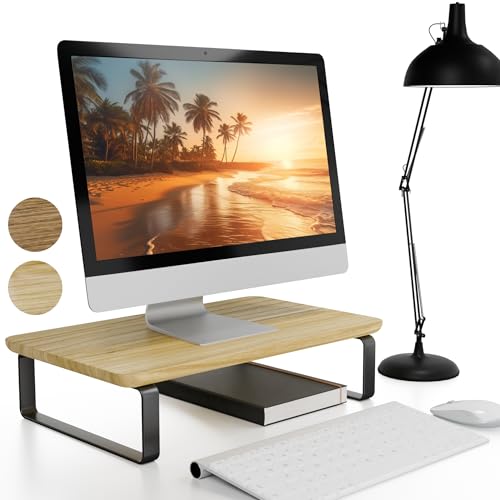
Beautiful Wooden Monitor Stand for Desk - Sturdy Stand Rises Your Monitor to the Perfect Ergonomic Level - Sleek and Functional Computer/Laptop Rack Design Elevates Any Workspace & Maximizes Space
This beautiful wooden monitor stand brings a warm, intentional look while sturdily lifting your monitor to a comfortable eye level. Its solid platform doubles as tidy storage underneath, giving a home office a polished feel without overspending.
- Elevate Your View, Elevate Your Game: KIBAGAs’ 15x9x3.5 inches wood monitor stand puts your screen at the perfect eye level, boosting your workflow and creativity while keeping you comfy and organized. Say hello to ergonomic efficiency!
- Style That Stands Out: The laptop riser is a decorative statement piece for your desk! Crafted from beautiful wood with sleek metal legs, it adds a touch of modern industrial charm & minimalist sophistication to your workspace. Who says work can't be stylish?
- Built To Last & Impress: Made from 0.6 inches thick paulownia wood in natural color, the sturdy monitor stand for your desk supports your computer or laptop with ease. This type of wood is both durable and impressively lightweight. Say goodbye to wobbly setups and hello to stability with the monitor riser!
- Unlock Your Desk's Hidden Space: The monitor stand maximizes your workspace by creating a 2.9” space between the desk & stand edge for essentials like your keyboard and notebooks. Keep your desk organized and clutter-free while you conquer your tasks!

WALI Computer Monitor Stand for Desk, Adjustable Laptop Riser, Desk Monitor Stand Underneath Storage for Office, School Supplies (PTT001-B), 1 Pack, Black
A second WALI Computer Monitor Stand earns its place with the same adjustable, dual-purpose monitor-and-laptop design in an alternative configuration. It is an easy fallback when you want WALI's proven sturdiness and need a slightly different fit for your setup.
- Design: The monitor stand for the desk has a large 14.6 x 9.3 inches plastic shelf that fits most flat screen displays, laptops, and printers, with a maximum support weight of up to 44 lbs (20kg). Rubber pads prevent slipping or damage to your work surface
- Ergonomic: The height-adjustable monitor riser can raise a computer monitor, notebook, or any device by 4.5 inches, 5.3 inches, or 6.1 inches off the desk to create a comfortable viewing and sitting position which helps reduce stress on the neck and back
- Ventilated: The computer stand has a large sturdy platform with vented holes, this stand will prevent overheating and keep the device running cool
- Organization: The sleek modern black design complements any desk while adding extra space underneath the stand for storage

ErGear Single Monitor Arm, Fully Adjustable Monitor Mount for 13-34 Inch Screens, Fast Install Computer Monitor Stand with Tool-Free VESA Mount, Cable Management, Holds 19.8 lbs, Max VESA 100x100mm
The ErGear Single Monitor Arm clamps to the desk and fully adjusts for thirteen to thirty-four inch screens, clearing the entire surface beneath. It offers the most positioning freedom here, letting you dial in height, tilt and reach for a custom ergonomic setup.
- Ultrawide Compatibility: The ErGear heavy-duty monitor arm is compatible with most 13″-34″ flat or curved monitors up to 19.8 lbs with VESA mounting patterns 75x75mm or 100x100mm. Please verify the screen size, weight, and VESA pattern of your monitor before purchase.
- Engineered for Lasting Performance: This adjustable monitor arm features a 40% wider VESA head and a tighter-fitting VESA panel to enhance stability and keep your monitor firmly in place. The high-performance durable core has been tested through 20,000+ cycles, delivering smooth, effortless adjustments and dependable performance for years of daily use.
- Full Motion Flexibility: This premium VESA monitor mount delivers precise height adjustment up to 17.5″ and reach up to 18.1″, helping you achieve the perfect eye-level position to reduce neck and shoulder strain. It features +80°/-50° tilt, ±90° swivel, and 360° rotation, so you can always find your ideal viewing angle.
- Streamlined Finish with Cable Management: The upgraded cable clips open easily with no tools required, making cable organization faster and more convenient. This monitor arm lifts your screen to free up desk space while keeping cables tidy, helping you stay focused and productive in a clean, clutter-free workspace.
Key buying factors
Check the rated load before buying and leave headroom above your monitor's actual weight. A stable stand should not wobble when you type or bump the desk, and metal or solid-wood builds generally resist flex better than thin plastic. Stability matters most with larger screens that sit higher off the desk.
The whole point is getting the top of your screen near eye level. Measure your current setup and choose a stand that adds enough lift for your seated height. Fixed risers give a set boost, while arms let you fine-tune the exact position.
A good riser should match or fit within your monitor's base so you reclaim the space underneath. Look for designs with clearance for a keyboard or storage slots for accessories. Clamp-mounted arms free up almost the entire desktop.
Decide whether you need a fixed height or full positioning. Simple stands are sturdy and cheap but lock you into one height, while adjustable arms add tilt, swivel and reach. More movement means more flexibility but usually a slightly higher price and more setup.
Metal and wood feel more premium and last longer than lightweight plastic. Wooden stands suit warm or home-office aesthetics, while powder-coated steel arms blend into most modern setups. Pick a finish that matches your desk and the wear you expect.
Confirm screen-size range and, for arms, that your monitor has a VESA mount or that an adapter is included. Clamp arms need a desk edge of suitable thickness, while risers and platforms work on any flat surface. Always verify dimensions before ordering.
Types explained
A single-piece shelf that lifts your monitor a set height while leaving room underneath. Simple, stable and tool-free, with no moving parts to fail.
Best for: Anyone who wants a quick, no-fuss height boost and extra desk clearance.A solid wood platform that adds warmth and storage alongside the ergonomic lift. It blends into home offices and often hides a slot for a keyboard or accessories.
Best for: Style-conscious buyers who want a sturdy, attractive riser that looks intentional.A weighted-base or pole stand that holds the monitor without clamping the desk. It offers height and tilt adjustment while protecting your desk surface.
Best for: People who cannot or do not want to clamp their desk but still want adjustability.A VESA arm that clamps to the desk edge and floats the screen, freeing the entire surface beneath. It allows full height, tilt, swivel and reach adjustment.
Best for: Users who want maximum positioning control and a completely clear desktop.Care & usage tips
Place the riser or position the arm so the screen sits squarely in front of you with the top edge at or just below eye level. For arms, route the cables through any clips and confirm the clamp is fully tightened before letting go of the monitor.
Keep your monitor and any added accessories within the stand's rated capacity to avoid sag or tipping. Distribute weight evenly on platform stands and avoid hanging extra gear off an arm beyond what it is designed to hold.
Wipe wooden and metal surfaces with a dry or lightly damp cloth, avoiding harsh solvents on finishes. Every few months, re-tighten arm joints and clamp screws since normal use can loosen them over time.
The most common budget mistake is buying purely on price and ending up with a stand that is too short. A riser that lifts only a couple of inches often leaves the screen below eye level for taller users, which defeats the ergonomic purpose. Measure the gap between your current screen-top and eye line first, then buy for the height you actually need rather than the cheapest option on the page.
Before committing to an adjustable arm, confirm your monitor has VESA holes and that your desk edge is thick enough for the clamp; if not, a free-standing riser or platform will save you the hassle of returns.
Frequently asked questions
How tall should a monitor stand be?+
Aim for the top of your screen to sit at or slightly below eye level when you are seated upright. For most people that means adding two to five inches of lift, though taller users or low desks may need an adjustable arm to reach the right height.
Are cheap monitor stands sturdy enough?+
Yes, as long as you stay within the rated weight capacity and choose a solid build. Metal risers, solid-wood platforms and quality clamp arms hold typical monitors securely; just avoid overloading thin plastic models with heavy screens.
Do I need a VESA mount for a monitor stand?+
Only for clamp-mounted arms, which attach to the VESA holes on the back of your monitor. Risers and platform stands simply support the monitor's existing base, so VESA compatibility does not matter for them.
Will a monitor stand fit my screen size?+
Check the listed size and weight range before buying, since most budget stands cover roughly thirteen to thirty-four inch screens. Larger or curved ultrawide monitors may need a stand specifically rated for that footprint.
Can a monitor stand hold a laptop too?+
Many risers and platforms double as laptop stands, which is handy for a clean dual-purpose setup. Adjustable arms are designed for VESA monitors, so a laptop would need a separate tray or adapter to mount.