A good monitor arm transforms a cramped desk into an ergonomic workspace, lifting your screen to eye level, freeing up surface area, and letting you pull the display closer or push it back as the task demands. You do not need to spend a fortune to get there. The budget category has matured to the point where smooth gas-spring motion, generous weight ratings, and cable management are all within reach.
When shopping in this range, focus on three things: the mount type that fits your space (desk clamp, wall, or ceiling), the screen size and weight your monitor falls under, and the VESA pattern on the back of your display. Match those correctly and the difference between a budget arm and a premium one largely comes down to how silky the motion feels and how long the finish lasts.
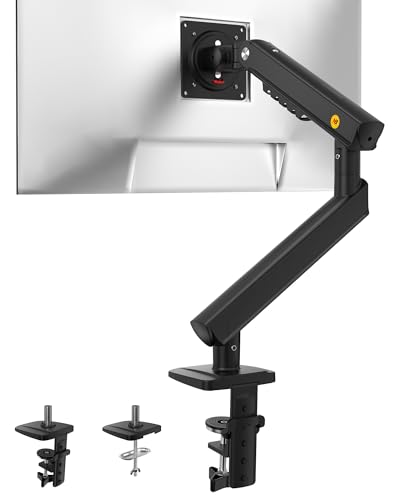
NB Smoovex Single Computer Monitor Mount, Monitor Stand fits up to 32 Inch, Mechanical Spring Monitor Arm, VESA 75/100 mm, Model-A5(Black)
The NB Smoovex Single Monitor Mount pairs a smooth gas-spring mechanism with support for screens up to 32 inches, delivering effortless height, tilt, and rotation in one well-built package. Its mech-style design and easy clamp installation make it the most capable all-rounder in the budget category.
- 1. 2026 New-Generation Mechanical Spring: No gas loss, no sagging. New upgrade from gas spring to precision mechanical spring.
- 2. Support up to 32" Monitors Slimmer build saves space and solves the common wall-blocking problem. Upgraded joints keep it even more solid and secure.
- 3. 3-Step Installation No complicated assembly. Set it up solo in minutes via C-clamp or grommet base.
- 4. Smooth Beyond Imagination 360° rotation · −25° to 90° tilt · 230 mm height travel. Move your screen exactly where you want it.

VIVO Under Cabinet Articulating 13 to 27 inch Single Monitor and Small TV Mount, Height Adjustable Long Extension Arm, Max VESA 100x100, Black, MOUNT-VC01A
The VIVO Under Cabinet Articulating Mount fits 13 to 27 inch monitors and small TVs while reclaiming desk and counter space by hanging the screen beneath a cabinet or shelf. Its articulating arm folds the display away when not in use, making it a smart pick for kitchens and compact workspaces.
- Fits 13” to 27” Screens: Installs to the underside of a cabinet for space-saving screen mounting capability. Fits monitors and small TVs 13” to 27” in size, up to 11 lbs in weight, and with 75x75mm or 100x100mm VESA patterns
- Pin Lock Height Adjustment: Find just the right height setting and lock it in place with 5 spring-locking positions that hold your screen 8.5”, 9”, 9.5”, 10.3”, or 11” from the cabinet surface
- Long Arm Extension: Enjoy maximum flexibility with an arm that extends a total of 20.8” and folds against itself for a space-efficient, 9.5” profile
- Articulation: Further adjust your screen angle with +90° to -90° tilt, 180° swivel, and 360° rotation

MOUNT PRO Single Monitor Wall Mount for 13 to 32 Inch Computer Screens, Height Adjustable Wall Mount Monitor Arm Holds Up to 19.8lbs, Full Motion Wall Bracket, VESA Mount 75x75, 100x100, Black
The MOUNT PRO Single Monitor Wall Mount handles 13 to 32 inch screens with full height adjustment and articulation off a solid wall anchor. It clears your desktop entirely and feels noticeably more refined and stable than typical budget wall mounts.
- Full Motion Adjustments - Adjustable monitor wall mount arm offers +90° to -90° tilts, 180° swivel, and 360° rotation. This monitor arm extends up to 21.6", making it easy to set the monitor at the optimum angle and position for increased productivity and comfort. Perfect for remote workers, gamers, content creators, traders, students, developers, and professionals who share screens in collaborative environments. Easily switch between portrait and landscape modes for coding, design, or any task.
- Wide Compatibility - This computer monitor wall mount widely fits 13 - 32 Inch computer Screens with VESA pattern 75x75mm and 100x100mm, not limited to 32 30 28 27 25 24 23 22 21 20 19 17 inch screen, but not compatible with 1000R/1500R/1800R curved screens, and supports 4.4-19.8lbs monitors.
- Free up your desktop space - This wall monitor mount holds your monitor on the wall, free up much valuable space on your workstation. The easily detachable integrated cable management system helps keep AV and power cords out of sight and organized. Ideal for home offices, gaming stations, and professional workspaces.
- Effortless Height Adjustment System - This wall monitor arm is built for thousands of movement by passing 20000-cycle tests, which achieve flexibility and stability than traditional mechanical monitor stand. It can be adjusted to the weight of your monitor creating a suspended free-float effect. Please adjust it according to your monitor weight before use.

WALI Computer Monitor Wall Mount for 17 to 32 Inch Screens, Single Monitors Mount Holds up to 22lbs, Fully Adjustable Wall Mount Monitor Arm, 75x75/100x100mm VESA Mount (GSWM001), Black
The WALI Computer Monitor Wall Mount supports 17 to 32 inch single monitors with a sturdy articulating arm and a trusted name in mounting hardware. It is a dependable wall-mounted alternative for freeing up desk space without sacrificing reach or adjustability.
- Compatibility: Fits Monitors up to 32". Mounting Holes 75x75mm or 100x100mm detachable. Heavy-duty wall plate is integrated with both brick wall and wood wall.
- Sturdy Construction: The high-grade material arm can be extended 19.3" and retracted, +70°/-45° tilt and +90°/-90° swivel to change reading angles, and 360° rotate from landscape to portrait mode.
- Double Benefits: Double efficiency and productivity by opening up desk space allowing the new range of adaptable positions for your displays.
- Dynamic: Our monitor arm is easily adjustable, allowing you to work in a more comfortable, ergonomically correct position to reduce neck and eye strain.

VIVO MOUNT-M-FD27 Manual Folding Ceiling Mount for 13-27 inch Flat Screens, Tilt Roof, Under Cabinet Mount for LCD TVs and Monitors
The VIVO MOUNT-M-FD27 Manual Folding Ceiling Mount holds 13 to 27 inch flat screens with tilt adjustment and a fold-down design for spaces where desk and wall mounting are not options. Its simple manual operation keeps it affordable while staying rock solid once installed.
- Compatibility - Fits Screens up to 13" - 27" screens with 75x75mm or 100x100mm mounting capability. Mounts to ceilings, cabinets (61cm deep cabinets only), upper desk shelving, and more. Please Note: Not for use in moving vehicle
- Motion - Tilts -90° to 0° allowing for easy storage, cleared up space, and out-of-way safety; 45° swivel to allow for a variety of viewing angles
- Capacity - Supports weight up to 20.0kg and strength tested at 3 times this weight to ensure complete screen safety
- Material - Constructed of solid steel and aluminum for durability and longevity. Features sleek modern design fitting well in any home or office environment
Key buying factors
Decide whether you need a desk clamp, a wall mount, an under-cabinet mount, or a ceiling mount before anything else. Desk clamps are the most flexible and require no drilling, while wall and ceiling options save desk space entirely but demand studs or solid anchoring.
Every arm lists a supported screen size range and a maximum weight. Confirm your monitor falls comfortably inside both figures, since an overloaded gas spring will droop and an underloaded one may drift upward.
Check the hole pattern on the back of your monitor, usually 75x75mm or 100x100mm. Most budget arms support both, but ultrawide or very thin panels sometimes need an adapter plate.
Look at height, tilt, swivel, and rotation specs together rather than just one number. Gas-spring arms offer effortless height changes, while folding and articulating designs excel at reaching around obstacles or tucking the screen away.
Gas-spring arms move with a light push and hold position automatically, which suits people who reposition often. Manual tension or folding mounts cost less and stay rock solid, making them ideal for set-and-forget installations.
Integrated clips or channels keep cords tidy and prevent snagging during movement. Aluminum or steel construction with a powder-coated finish lasts far longer than thin plastic joints that loosen over time.
Types explained
Uses a pressurized spring to counterbalance the monitor so it floats to any height with a gentle nudge. It is the most versatile choice for daily repositioning and standing-desk setups.
Best for: Users who frequently adjust height, angle, or reach throughout the day.Bolts directly into studs or a solid wall and swings the screen out over the desk on an articulating arm. It clears your desktop completely and works well where clamp space is limited.
Best for: Small desks, shared workstations, or rooms where floor and desk space is scarce.Attaches beneath a shelf or overhead cabinet and folds the monitor or small TV down into view. It reclaims counter space in kitchens, workshops, and tight office nooks.
Best for: Kitchens, garages, and compact spaces that need a tuck-away second screen.Suspends the display from above and folds or tilts it into a comfortable viewing angle. It is the answer when neither desk nor wall mounting is practical.
Best for: Industrial setups, point-of-sale stations, or any spot with no usable wall or desk edge.Care & usage tips
After attaching your monitor, adjust the gas-spring or tension knob until the screen holds firmly at any height without drifting up or sagging down. This single step prevents most wobble and droop complaints later on.
Run power and video cables through the arm's clips while leaving enough slack for full range of motion. Pulling cables taut strains both the ports and the joints every time you move the screen.
Bolted and clamped connections can loosen over months of movement and vibration. Give the base clamp and VESA bolts a quarter-turn check every few months to keep the mount stable and safe.
The weight rating matters more than the size rating on a gas-spring arm. A 27 inch monitor that is unusually heavy can overwhelm a spring that handles larger but lighter screens fine, causing slow droop, so always verify the actual weight of your panel against the spec rather than trusting the diagonal measurement alone.
Before drilling or clamping anything, hold your monitor at the height and distance you want for a minute to confirm the ergonomics, since the ideal eye level is usually higher than people first assume.
Frequently asked questions
Can a monitor arm under 100 really hold a 32 inch screen?+
Yes. Several arms in this range, including gas-spring desk mounts and sturdy wall mounts, are rated for screens up to 32 inches as long as your monitor's weight stays within the listed maximum.
How do I know if my monitor is VESA compatible?+
Look at the back of your monitor for four threaded holes in a square pattern, typically 75x75mm or 100x100mm apart. If your monitor lacks these holes, you will need a VESA adapter bracket designed for your model.
Do I need a gas-spring arm or is a manual one fine?+
Choose a gas-spring arm if you reposition your screen often or use a standing desk, since it floats to any height effortlessly. A manual tension or folding mount is perfectly fine and very stable if you set your position once and rarely change it.
Will a desk clamp damage my desk?+
Quality clamps include rubber or foam pads that protect the surface, and most spread pressure across a wide footprint. For glass or thin laminate desks, double-check the clamp's thickness range and use the included padding.
What is the difference between a wall mount and a ceiling mount?+
A wall mount bolts into studs and swings the screen out horizontally, ideal when desk space is tight. A ceiling mount suspends the display from above, which is the better option when you have no suitable wall or desk edge to anchor to.