A portable mechanical keyboard gives you the tactile satisfaction and durability of real switches in a body small enough to slide into a backpack or laptop sleeve. That matters because laptop and tablet keyboards feel mushy and cramped, while a compact mechanical board restores accurate, comfortable typing whether you are answering email at a coffee shop or gaming in a hotel room.
When shopping, the most important things to weigh are size and layout, connectivity, switch type, and battery life. A 75% or 84-key layout keeps arrows and function keys for productivity, while a 60% or 65% board is smaller and travel-friendly but drops a few keys. Decide whether you need Bluetooth, USB-C wired, or both, and whether the switches are tactile, linear, or clicky for your taste and your neighbors.

Keychron K3 Version 2, 84 Keys Ultra-Slim Wireless Bluetooth/USB Wired Mechanical Keyboard with White LED Backlit, Low-Profile Keychron Mechanical Brown Switch Compatible with Mac Windows
The Keychron K3 Version 2 packs 84 keys into an ultra-slim low-profile body with both wireless Bluetooth and USB-C wired modes, giving you arrows and a function row without the bulk. Its multi-device pairing and slim, durable build make it the most versatile portable mechanical keyboard for work and travel alike.
- Keychron K3, a compact 75% layout ultra-slim wireless mechanical keyboard built for peak productivity and a great tactile typing experience.
- Be ready to multitask without missing a beat by connecting the K3 with up to 3 devices via the stable Broadcom Bluetooth 5.1 chipset and switch between your laptop, PC, tablet and phone seamlessly. *Keep the distance between the keyboard and the device within reasonable limits to minimize signal interference.
- With a unique Mac layout, the K3 has all the necessary Mac multimedia keys while still being compatible with Windows. Extra keycaps for both Windows and Mac operating systems are included. *If it doesn't match your device exactly, you can try updating the keyboard's firmware.
- The redesigned low-profile Keychron mechanical switch is 40% slimmer than conventional switches with a shorter pre-travel and total travel distance that triggers an input and feedback faster than conventional/normal-profile mechanical switches.

MageGee Portable 60% Mechanical Gaming Keyboard, MK-Box LED Backlit Compact 68 Keys Mini Wired Office Keyboard with Red Switch for Windows Laptop PC Mac - Black/Grey
The MageGee MK-Box is a 60% compact board with 68 keys and LED backlighting that hits a strong balance of portability and tactile mechanical typing. Its small footprint frees up desk and bag space, making it an easy, no-fuss pick for gamers and travelers.
- Mini portable 60% compact layout: MK-BOX is a 68 keys mechanical keyboard have cute small size, but with separate arrow keys and F1-F12, Fn function keys you need, can use it for gaming or work while saving space.
- Mechanical red switch: characterized for being linear and smoother, slight key sound has no paragraph sense with minimal resistance, but fast action without a tactile bump feel which makes it easier to tap the keyboard.
- Classic charming blue LED backlit: Customize multiple illuminated LED light effects, supports about 16 backlight modes, press Fn + Ins can control it, FN + ←/→ control backlight speed, FN + ↑/↓ control backlight brightness.
- Full anti-ghosting keyboard: all 68 keys are no conflict, black grey red mash up design, ergonomic suspension double-color injection keycap, double kickstand feet adjustable typing angle and detachable usb cable, both practical and beautiful.

Logitech MX Mechanical Mini Wireless Illuminated Keyboard, Clicky Switches, Backlit, Bluetooth, USB-C, macOS, Windows, Linux, iOS, Android, Metal
The Logitech MX Mechanical Mini is a polished wireless illuminated keyboard with clicky switches, smart backlighting, and Logitech's reliable multi-device connectivity. Its refined build and software ecosystem make it the standout choice for professionals who want a premium compact typing experience.
- Clicky mechanical key switches with a gratifying, audible click and tactile feedback with every keystroke - for a familiar mechanical feel and sound
- Low-profile keys, more comfort: A keyboard layout designed for effortless precision, with a small, compact form factor and low-profile mechanical switches for better ergonomics
- Smart illumination: Backlit keys light up the moment your hands approach the cordless keyboard and automatically adjust to suit changing lighting conditions
- Faster workflow, more customization: Customize Fn keys, assign backlighting effects, enable Flow cross-computer, multi-device control, and more in the improved Logi Options+ (1)

ProtoArc Foldable Bluetooth Keyboard, XK01 Full-Size Portable Wireless Keyboard for Travel, 105 Keys, 0.65" Keycaps, Multi-Device Sync for iPad Tablet Smartphone Laptop PC Windows iOS Android, Black
The ProtoArc XK01 is a foldable full-size Bluetooth keyboard that collapses to a pocketable shape yet opens to a comfortable typing width. It is the most carry-friendly option here for people who want full-size layout in the smallest possible package for phones and tablets.
- 【Tri-Fold & Travel-Ready Design】The folding keyboard can folds to just 8.46 x 4.68 x 0.78 inches. Internal aluminum hinge tested for 10,000+ folds, delivers reliable durability for the frequent traveler. The simple fold-and-go design requires no locking clips, so you can set up and start typing in seconds, anywhere. PLEASE NOTE: the keyboard has no backlight, for backlit version, consider our upgraded "XK01 Plus" model
- 【True Full-Size Portable Keyboard】105 keys with 0.65in keycaps deliver a desktop-grade, precise typing experience - full numeric pad, dedicated function row and precise navigation controls. No compromises for developers, writers, and professionals working from a café, co-working space, or home office(Keyboard is flat, NO TILT)
- 【Seamless 3-Device Switching】Connect up to three devices simultaneously via Bluetooth 5.1 and switch instantly with a single button press. Perfect for multitaskers who move between a laptop, tablet, and phone. Works seamlessly across Windows, macOS, iOS, and Android, keeping your workflow fluid and interruption-free
- 【Long-Lasting USB-C Rechargeable】Quick recharge via the included USB-C cable(not for connecting). The travel keyboard features an auto-sleep function extends standby time to 150 days. That means less time charging and more time being productive
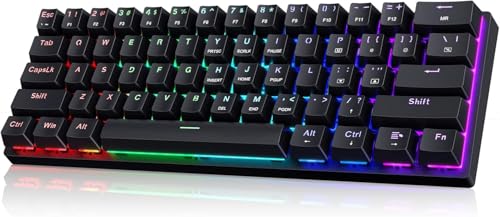
CACKBIRD Portable 60% Mechanical Gaming Keyboard, Wired Keyboard with Blue Switches,LED Customization Backlit,61 Keys Ultra-Compact Mini OfficeKeyboard for PC/Mac/Xbox,Easy to Carry On Trip-Black
The CACKBIRD is a wired 60% mechanical gaming keyboard with blue switches that deliver crisp, clicky feedback and zero-latency performance. Its simple plug-and-play design and compact size make it an affordable, dependable travel and backup board.
- 🌟【60% Keyboard: 61 Keys Compact Design】Ultra-compact layout with 61 keys that free up your desktop, leaving more space for mouse movements. Especially,there is a long detachable Type-C cable on the right side of the keyboard, ensuring safe transport in your travel bag. For FPS gamers who are focused on speed & secure connection,this 60% keyboard is proper to pick.( 💙Simply Press Fn+Space key to switch to direction keys for efficient operates)
- 🌟【Mechanical keyboard: Responsive Blue Switches】CACKBIRD gaming keyboard features blue mechanical keys that give a satisfyingly "click" sound and tactile resistance with each keystroke, so you can be confident with every move you make.This keyboard is more comfortable to type on since it features deeper key travel,greater feedback,and more space between keys.Great for gamers, office workers, copywriters, programmers and editors.( 💙 Include a keycaps puller for cleaning or other needs.)
- 🌟【Rainbow LED Backlit Accompanies Your Night】18 LED Rainbow Backlight Effects,5 brightness levels & speeds,1 customization mode.Exchange lighting mode for every mood and environment--making your gaming experience one-of-a-kind.Moreover,this gaming keyboard features double injection ABS engineered keycaps that bring crystal clear uniform backlight to greatly improve your typing accuracy at night.
- 🌟【Ergonomic Design & Full keys Anti-ghosting】All keys can work simultaneously,thus you can fully enjoy your game without program errors.Our Keyboard with the scientific stair-up keycaps design and stable foldable kickstands brings maximum comfort,keeping your hand in the most natural state to minimize hand fatigue after longtime use and help you minimize typos.
Key buying factors
Portable boards range from full 84-key layouts down to compact 60% designs with 68 or fewer keys. Larger layouts keep dedicated arrows and a function row for productivity, while smaller ones save desk and bag space at the cost of some keys. Choose based on whether you type documents and code or mainly game and browse.
Look at whether the keyboard offers Bluetooth, a 2.4GHz dongle, USB-C wired, or a combination. Multi-device Bluetooth lets you switch between a laptop, tablet, and phone, while wired mode delivers the lowest latency for gaming. The most flexible boards support both wireless and wired use.
Mechanical switches come in tactile, linear, and clicky flavors that change how typing feels and sounds. Clicky blue switches are crisp but loud, linear reds are smooth and quiet for gaming, and tactile browns sit in between. Low-profile switches make a board thinner and easier to pack.
Wireless portable keyboards live and die by their battery, so check the rated hours and whether backlighting drains it quickly. USB-C charging is now standard and lets you keep typing while topping up. Boards with both wired and wireless modes remove battery anxiety entirely.
A travel keyboard should survive being tossed in a bag, so look for a sturdy frame, stable feet, and minimal flex. Weight and thickness matter more here than on a desktop board. Foldable and slim low-profile designs are easiest to carry but verify the hinge or chassis feels solid.
Confirm the keyboard works with your operating systems, since many offer both Windows and Mac key layouts and modes. Backlighting or RGB helps in dim rooms but reduces battery life, so single-color or adjustable lighting is often the smarter travel choice. Hot-swap sockets are a bonus for customizing switches later.
Types explained
These boards use short low-profile switches and thin cases to stay easy to pack, while still offering 75% or 84-key layouts with arrows and function keys. They pair over Bluetooth with multiple devices and usually charge over USB-C.
Best for: Travelers and hybrid workers who want a productivity layout that disappears into a laptop bag.A 60% or 65% board strips away the number pad, function row, and sometimes the arrows to reach the smallest practical footprint. They are light and bag-friendly but rely on key combinations for missing functions.
Best for: Gamers and minimalists who prioritize the smallest possible size and extra mouse space.Foldable designs collapse a full-size layout into a pocketable shape using a hinge, then open up to a comfortable typing width. They are the most compact option for carrying but trade some rigidity and switch feel for portability.
Best for: Phone and tablet users who want full-size typing in the smallest carry size.Wired compact boards skip batteries and wireless radios in favor of a simple USB connection and reliable low latency. They are typically affordable and durable, making them easy to stash as a backup or travel board.
Best for: Gamers and budget buyers who want zero latency and never want to worry about charging.Care & usage tips
If your keyboard supports Bluetooth pairing slots, assign each one to a specific device during setup so you can cycle through them with a single shortcut. Also choose the correct Windows or Mac mode up front, since this remaps modifier keys for a more natural typing experience.
Backlighting is the biggest drain on wireless portable boards, so lower the brightness or turn it off when you do not need it. Recharge over USB-C before the battery fully empties, and use wired mode on long trips to extend the time between charges.
Brush out crumbs and dust with a soft brush or compressed air, and wipe keycaps with a slightly damp cloth as needed. Carry the keyboard in a sleeve or hard case to protect the switches and keycaps, and avoid leaving it in hot cars where heat can stress the battery.
Key count is not the same as portability. A well-designed 75% or 84-key board can be just as easy to carry as a 60% one because slim low-profile switches and a thin case shrink the board vertically rather than horizontally, and they keep the arrows and function row you actually use every day. For most people the smarter trade is going low-profile rather than going smaller, since a cramped layout you fight with daily costs more in productivity than the centimeters it saves in your bag.
Before a trip, pair your keyboard over Bluetooth at home and confirm the correct Windows or Mac mode, then top off the battery and pack a short USB-C cable so you can fall back to wired mode if the charge runs low.
Frequently asked questions
Is a 60% keyboard too small for everyday work?+
A 60% layout drops the function row, number pad, and often the arrow keys, which you access through key combinations instead. It is great for gaming and browsing, but if you write documents, code, or use spreadsheets often, a 65%, 75%, or 84-key board with dedicated arrows will be far less frustrating.
Should I choose Bluetooth or wired for a portable keyboard?+
Bluetooth is best for switching between a laptop, tablet, and phone and keeps your bag cable-free, while wired USB delivers the lowest latency for gaming. The most flexible portable boards offer both, so you can go wireless day to day and plug in when you need speed or your battery is low.
Which switch type is best for travel?+
Linear switches are smooth and quiet, tactile switches give feedback without much noise, and clicky switches are crisp but loud. For shared spaces like offices, planes, and cafes, tactile or linear switches are the polite choice, and low-profile versions also make the keyboard thinner and easier to pack.
Do portable mechanical keyboards work with Mac, iPad, and Android?+
Most modern portable mechanical keyboards support Windows, macOS, iOS, and Android over Bluetooth, and many include both Windows and Mac keycaps or a switchable mode. Always check the product listing for your specific devices and confirm whether a special mode is needed for Apple or Android layouts.
How long do the batteries last on wireless models?+
Battery life varies widely depending on use and backlighting, with lights off greatly extending runtime and RGB lighting draining it fastest. Many boards last days to weeks of typing with backlighting off, and USB-C charging lets you keep working while topping up.