A small gaming monitor proves that compact does not mean compromised. For cramped desks, dorm rooms, dual-monitor stacks, or travel kits, a 15.6 to 24-inch screen keeps your entire field of view inside one sharp glance, which actually helps reaction time in fast shooters. The tighter pixel density of a small panel also makes 1080p look crisp without the cost or GPU demand of larger high-resolution displays.
When shopping, the three numbers that matter most are refresh rate, response time, and panel type. Aim for at least 100Hz, with 144Hz or 160Hz being the sweet spot for competitive play, paired with a 1ms to 5ms response time to avoid ghosting. IPS panels give you the best color and viewing angles, FreeSync keeps motion tear-free, and connectivity like HDMI, DisplayPort, or USB-C determines how easily the monitor slots into your setup.

Sceptre New 22-Inch Gaming Monitor, FHD 1080p, Up to 144Hz, HDMI, DisplayPort, Built-in Speakers, Machine Black (E225W-FW144 Series, 2026)
The Sceptre New 22-Inch hits the ideal small-monitor formula with a Full HD 1080p panel running up to 144Hz, plus both HDMI and DisplayPort for flexible high-refresh connections. Its compact 22-inch frame fits any desk while delivering the smooth, responsive motion competitive gamers want.
- 【INTEGRATED SPEAKERS】Whether you're at work or in the midst of an intense gaming session, our built-in speakers provide rich and seamless audio, all while keeping your desk clutter-free.
- 【EASY ON THE EYES】 Protect your eyes and enhance your comfort with Blue-Light Shift technology. This feature reduces harmful blue light emissions from your screen, helping to alleviate eye strain during long hours of use and promoting healthier viewing habits.
- 【WIDEN YOUR PERSPECTIVE】Our sleek minimal bezel design ensures undivided attention. The nearly bezel-free display seamlessly connects in a dual monitor arrangement, delivering an unobstructed view that lets you focus on more at once, completely distraction-free.

MNN Portable Monitor 15.6inch FHD 1080P 60Hz USB C HDMI Gaming Ultra-Slim IPS Display w/Smart Cover & Speakers,HDR Plug&Play, External Monitor for Laptop PC Phone Mac (15.6'' 1080P)
The MNN Portable Monitor brings a 15.6-inch FHD 1080p IPS display in an ultra-slim body that runs over USB-C or HDMI, turning a laptop or console into a dual-screen rig. Its 60Hz panel is geared more toward portability and clean visuals than high-refresh competitive play.
- Full HD Portable Monitor - MNN 15.6inch portable laptop monitor with 1920*1080 resolution, advanced IPS matte screen support 178° full viewing angle, it renders accurate and bright color, draws you into the video or game with lifelike colors and amazing detail.It can effectively reduce blue light radiation damage, no flickering, eye-care, and make it easier to watch for a long time.A second monitor for working from home.
- Double Type-C Port -For Plug & Play, the MNN monitor provides 2 Full Feature Type-C ports. Only One USB Type-C Cable is required to connect to the power supply & display signal transmission. NOTE: Your device should support thunderbolt 3.0 or USB 3.1 Type C DP ALT-MODE.which supports multiple connect ways to your laptops, PC, Phones, Macbooks, PS5/PS4, Xbox, and Switch.Tips: Please use the original USB-C to USB-C cable that came with the monitor in box. Don't use the other cables.
- Lightweight Ultra Slim for Travel - As a portable external monitor,MNN portable laptop monitor easily accommodate to every suitcase and backpack and stress-free when you are holding it for a long time. They are truly portable computer monitors for travelers, students, gamers,engineers, and everyone.
- Give consideration to work and games - through multiple display modes [Copy Mode/Extended Mode/Second Screen Mode/Portrait Mode], we can bring you a clear second screen in the meeting, and expand the screen anytime and anywhere to improve work efficiency and improve the quality of life. Adjusting to HDR mode can upgrade the image to a new level, providing you with brighter highlights,deeper and more realistic colors, more realistic images, and amazing viewing/gaming experience.

Philips 221V8LB 22 inch Class Thin Full HD (1920 x 1080) Monitor, 100Hz Refresh Rate, VESA, HDMI x1, VGA x1, LowBlue Mode, Adaptive Sync, 4 Year Advance Replacement Warranty
The Philips 221V8LB pairs a thin 22-inch Full HD panel with a 100Hz refresh rate, comfortably clearing the smooth-motion threshold for everyday gaming. It delivers crisp 1920 x 1080 visuals in a slim, no-nonsense package that fits compact setups.
- CRISP CLARITY: This 22 inch class (21.5″ viewable) Philips V line monitor delivers crisp Full HD 1920x1080 visuals. Enjoy movies, shows and videos with remarkable detail
- 100HZ FAST REFRESH RATE: 100Hz brings your favorite movies and video games to life. Stream, binge, and play effortlessly
- SMOOTH ACTION WITH ADAPTIVE-SYNC: Adaptive-Sync technology ensures fluid action sequences and rapid response time. Every frame will be rendered smoothly with crystal clarity and without stutter
- INCREDIBLE CONTRAST: The VA panel produces brighter whites and deeper blacks. You get true-to-life images and more gradients with 16.7 million colors

SANSUI 24" 1ms 160Hz Gaming Monitor, FHD 1080P Computer Screen, FreeSync Sync, 4000:1 Contrast, 110% sRGB, HDMI & DP Ports, VESA Mount, HDMI Cable Included
The SANSUI 24-inch combines a fast 1ms response time with a 160Hz refresh rate and FreeSync, making it the most performance-focused small panel in this lineup. Its 24-inch FHD 1080p screen gives you the largest compact size here without sacrificing speed or tear-free motion.
- SANSUI 24 Inch Gaming Monitor 160Hz FHD 1080 FreeSync Technology for Game/Office
- Fast & Smooth - 160Hz Refresh Rate, 1ms MPRT Response Time; FreeSync technology; CrossHair/Timer/RTS/FPS /RACING game assistants
- Vivid Image Colos - 109% sRGB Color Gamut, HDR, 300cd/m² Brightness, 4000:1 Contrast; Anti-flicker, Anti-Glare, Low Blue Light Eye Care Technology
- HDMI & DP Ports - Easily Connect Gaming or Work Devices, One HDMI Cable Included in the Package. (No Built-in Speakers)
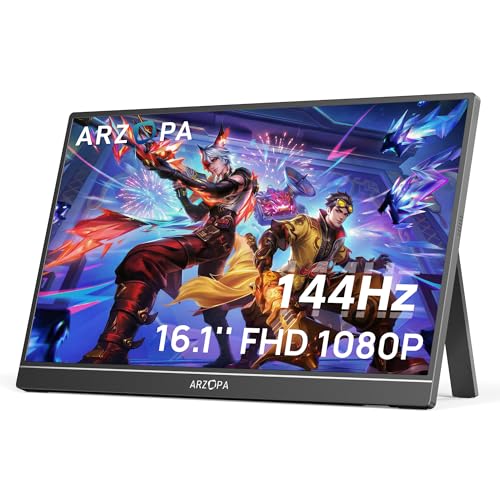
ARZOPA 16.1'' 144Hz Portable Gaming Monitor, 106% sRGB 1080P FHD Kickstand Portable Monitor with HDR, Ultra Slim, Eye Care, External Second Screen for Laptop, PC, PS5, Mac, Xbox-Z1FC
The ARZOPA 16.1'' portable monitor stands out with a 144Hz refresh rate and 106% sRGB color in a travel-ready FHD panel with a built-in kickstand. It delivers desktop-class smoothness and vivid visuals in a compact form you can game on anywhere.
- 16.1" 144Hz Display: Arzopa Z1FC 16.1" portable monitor has 144Hz ultra-high refresh rate for higher motion clarity and smoother gaming visuals. The 144Hz high refresh rate brings lower input latency and higher videos, work and game screen quality(no adaptive sync or freesync)
- Portable Monitor with Kickstand: The portable gaming monitor comes with a built-in stand that allows for easy adjustment of the tilt angle to accommodate different usage needs. Lightweight and easier to carry
- 106% sRGB IPS Screen: The 16.1" portable monitor features 1080P FHD high-definition resolution and 106% sRGB gamut brings clear picture quality, immerse yourself in vibrant colors and crisp details
- Second Monitor for Your Laptop: The ARZOPA portable monitor can very well act as your second screen and improve your work efficiency. You can work and perform multiple tasks simultaneously while using this monitor. You can also switch the screen view between horizontal and vertical modes for the perspective you prefer
Key buying factors
Higher refresh means smoother, more responsive motion. For small gaming monitors, 100Hz is the practical floor, while 144Hz and 160Hz deliver the fluid feel competitive players rely on. Confirm your GPU can actually push those frame rates at 1080p.
A low response time, ideally 1ms to 5ms, prevents smearing and ghosting during fast camera movement. Pair this with adaptive sync like FreeSync to eliminate screen tearing. Together they keep fast-paced games sharp and readable.
IPS panels offer the widest viewing angles and most accurate color, which matters more on a small screen viewed up close. VA and TN alternatives can be faster or cheaper but trade off color or angle consistency. For mixed gaming and media use, IPS is usually the safest pick.
Check for the ports your system needs, whether HDMI, DisplayPort, or USB-C. USB-C is especially valuable on portable models because a single cable can carry video and power. DisplayPort typically unlocks the highest refresh rates on desktop panels.
Match the screen to your space and viewing distance. A 22 to 24-inch panel suits a desk, while a 15.6 to 16-inch portable fits a bag or a secondary travel station. Smaller screens keep the full image in your central vision, which can aid awareness in shooters.
Desktop models should offer a stable stand and VESA mounting so you can wall-mount or add an arm. Portable monitors should include a built-in kickstand or folio cover and weigh little enough to carry daily. Adjustability affects long-session comfort more than buyers expect.
Types explained
Full-size performance in a smaller footprint, these panels deliver high refresh rates and proper stands for a permanent desk setup. They balance immersion and space efficiency for home gaming.
Best for: Players with limited desk space who want a dedicated, high-refresh primary display.Ultra-slim 15.6 to 16-inch screens powered and fed video over a single USB-C cable. They turn a laptop, console, or handheld into a dual-screen or large-screen setup anywhere.
Best for: Travelers, students, and console gamers who need a screen they can pack and go.Affordable small monitors that still hit 100Hz or more with FreeSync support. They prioritize smooth motion over premium extras like HDR or fancy stands.
Best for: First-time buyers and casual gamers who want fast frames without paying for frills.Small panels tuned for wide color coverage such as 106% sRGB alongside fast refresh rates. They serve double duty for gaming and creative or media work.
Best for: Users who game and also edit photos, watch films, or value vivid, accurate color.Care & usage tips
Plugging in is not enough. Open your display settings and manually select the panel's highest refresh rate, then enable FreeSync or adaptive sync in both the OS and your GPU control panel to unlock the smooth motion you paid for.
Use a dry or lightly dampened microfiber cloth and wipe in straight motions, never paper towels or household glass cleaner. Ammonia-based sprays can strip anti-glare coatings, especially on matte IPS portable panels.
Always store a portable monitor in its folio cover or a padded sleeve, and disconnect cables before packing. Avoid leaving it in hot cars, since heat can stress the thin panel and built-in battery if present.
On a small screen, pixel density works in your favor. A 22-inch 1080p panel packs the same pixels into less space than a 27-inch model, so text and edges actually look sharper up close, which is why many competitive players deliberately choose smaller displays rather than settling for them.
If your GPU can drive it, always connect a high-refresh desktop monitor over DisplayPort rather than HDMI, since many compact panels reach their top refresh rate only through DisplayPort.
Frequently asked questions
Is a small gaming monitor good for competitive gaming?+
Yes, and many esports players prefer them. A smaller screen keeps your entire view inside your central vision, so you spot movement faster without scanning across a large display. Paired with a 144Hz or higher refresh rate, a compact panel is excellent for competitive play.
What size counts as a small gaming monitor?+
Generally anything from about 15.6 inches up to 24 inches. Portable models cluster around 15.6 to 16 inches, while compact desktop monitors run 22 to 24 inches. Both are small relative to the 27-inch and larger panels common today.
Is 1080p enough for a small gaming monitor?+
For screens at or below 24 inches, 1080p is the ideal resolution. The smaller surface area gives 1080p a high pixel density that looks crisp up close, and it is far easier for your GPU to drive at high frame rates than 1440p or 4K.
Can I use a portable monitor for gaming consoles?+
Many can, as long as the portable monitor has an HDMI input or supports the console's USB-C output. Check that the panel's refresh rate and resolution match what your console outputs, and remember some portables need external power when connected to a console.
What refresh rate should I look for?+
Aim for at least 100Hz for noticeably smoother motion, with 144Hz being the competitive sweet spot and 160Hz a welcome bonus. Make sure your graphics card and the cable you use can actually deliver that refresh rate at 1080p.