
Apple Pencil 2nd Gen - Best Overall
The Apple Pencil 2nd Gen pairs exclusively with the latest iPad Pro, iPad Air and iPad Mini models that feature the magnetic charging strip. It offers 4096 levels of pressure sensitivity, 11 mm tilt detection and a latency of just 9 ms, which feels almost like drawing on paper. The built‑in double‑tap gesture lets users switch between the current tool and the eraser without touching the screen. Battery life lasts up to 12 hours of continuous use, and a quick magnetic snap recharges the pen in under an hour.
Apple Pencil 2nd Gen leads with 9 ms latency and magnetic charging. We compare compatibility and specs for iPad, Surface, and Samsung tablets to match.
Quick verdict
The Apple Pencil 2nd Gen is the best active stylus for most people, provided you own a compatible iPad. It pairs and charges magnetically, delivers very low latency, and its double-tap gesture for switching tools makes it the smoothest writing and drawing experience here, as long as you stay inside Apple’s ecosystem.
Key takeaways
- Best Overall: Apple Pencil 2nd Gen, magnetic charging and 9 ms latency for compatible iPads.
- Best Budget: Samsung Galaxy Tab S Pen, battery-free EMR pen that stores in the tablet edge.
- Best for Windows: Microsoft Surface Pen, broad MPP support and up to 12 months on one AAAA battery.
- Best for Creative Beginners: Adonit Note-M, a stylus with a built-in mouse for switching between drawing and cursor.
- Best for Multi-Device Use: Wacom Bamboo Ink Plus, works with Windows Ink and select Wacom AES Android tablets.
Why you should trust this guide
I built this guide by comparing the published specifications, ecosystem requirements and listed features of each active stylus, then weighing them against the way people actually use these pens day to day. An active stylus is only as good as the device it talks to, so I paid close attention to compatibility first, because a pen with great pressure sensitivity is useless if it will not pair with your tablet or laptop. Every claim about pressure levels, tilt and latency in this guide is taken from the manufacturer’s stated specs, not from numbers I generated myself.
I also tried to be honest about trade-offs. None of these pens is perfect for everyone, and most of them are deliberately locked to one ecosystem. Where a stylus has a real catch, such as a charging method that drains the battery or a compatibility list with awkward exceptions, I call it out rather than glossing over it. The goal is to help you match a pen to the hardware you already own, instead of selling you on a spec sheet.
How we researched
My evaluation approach centered on five criteria that matter most for an active stylus: device compatibility, pressure and tilt sensitivity, latency, power and storage convenience, and the usefulness of any extra buttons or gestures. I started with compatibility because it is the single most common reason a stylus disappoints, then ranked the pens on how well their stated sensitivity and latency figures support real writing and sketching. Lower latency and higher pressure resolution generally mean a more natural feel, so those specs carried weight.
I did not run a physical lab or take my own measurements. Instead I read each product’s listed features and specifications carefully, cross-referenced the ecosystem each pen is designed for, and judged how those features translate into everyday note-taking, drawing and document markup. I gave extra credit to pens that solve practical annoyances, like a stylus that clips or slots into the device so you never lose it, and I deducted points where a feature comes with a meaningful compromise.
Apple Pencil 2nd Gen – Best Overall
The Apple Pencil 2nd Gen is the best overall pick if you already own a compatible iPad, because it combines the lowest stated latency in this group with the most seamless pairing. It charges and pairs by snapping onto the magnetic flat edge of the tablet, so there is no cable and no separate dock to misplace. Apple lists 4096 levels of pressure sensitivity, 11 mm tilt detection and a latency of just 9 ms, which is low enough that writing and shading feel close to drawing on paper.
The standout convenience feature is the built-in double-tap gesture. A quick tap near the tip lets you switch between your current tool and the eraser without setting the pen down or reaching for the screen, which keeps you in flow when you are marking up emails, screenshots and notes. The intuitive touch surface and Bluetooth wireless connection round out a pen that is clearly designed to feel invisible while you use it.
The big limitation is compatibility, and it is strict. The 2nd Gen pencil only works with iPads that have the magnetic charging strip, which the listing narrows to specific models such as the 11-inch iPad Pro and certain 12.9-inch iPad Pro generations. If your iPad lacks that magnetic edge, this pen simply will not pair, and there is no Android or Windows fallback. You are buying into the Apple ecosystem completely, so confirm your exact iPad model before you commit.
Samsung Galaxy Tab S Pen – Best Budget
The Samsung Galaxy Tab S Pen is the best budget choice for Android users, largely because it never needs a battery. It uses an electromagnetic resonance (EMR) system, drawing power from the tablet itself, so there is nothing to charge and nothing to die mid-sentence. Samsung lists 4096 pressure levels and 1024 tilt positions with a 21 ms latency, a solid set of numbers for handwriting and casual sketching on the Galaxy Tab S line.
Practical touches make it easy to live with. A button on the barrel triggers shortcut functions, and the pen slides into a slot on the tablet’s edge for storage, so it stays with the device instead of rolling off a desk. The replacement listing I looked at is aimed at the Galaxy Tab S6 Lite and also notes compatibility with the Note 20 and Note 20 Ultra 5G, and it ships with extras like five black tips and a tweezer for swapping them.
The trade-off is that this pen is tied to Samsung’s EMR hardware, so it will not work on iPads, Windows laptops or most non-Samsung Android tablets. It also has no Bluetooth, which keeps it simple and battery-free but means you lose the air-gesture and remote-shutter tricks that Samsung’s higher-end S Pens offer. As a no-fuss writing tool for a compatible Galaxy Tab, though, it is hard to beat on value.
Microsoft Surface Pen – Best for Windows
The Microsoft Surface Pen is the best stylus for Windows users because it works across Surface devices and many third-party laptops that support the Microsoft Pen Protocol (MPP). It offers 4096 pressure levels, 1024 tilt sensitivity and a 21 ms latency, which is plenty for note-taking, annotating documents and light drawing. A magnetic clip lets it attach to the side of a Surface, so the pen stays put when you are on the move.
Power and convenience are strong points. A single AAAA battery can run the pen for up to 12 months, so you rarely think about charging, and the top button can be programmed for app shortcuts or used as an eraser and right-click. Some third-party MPP pens in this category, like the Milikilo unit I looked at, swap the battery for Type-C fast charging with a smart standby mode and add palm rejection plus double magnets, so you get options depending on which version you buy.
Compatibility carries an important asterisk. The Surface Pen and its MPP-compatible alternatives do not work with every Surface, and listings specifically warn that they are not supported on the Surface Laptop Go series, which uses a different pen standard. Before buying, check your exact Surface or Windows laptop model against the supported list, because MPP support is not universal even within Microsoft’s own lineup.
Adonit Note-M – Best for Creative Beginners
The Adonit Note-M is the best pick for creative beginners because it does something none of the others do: it builds a mouse into the stylus. Adonit’s multi-angle sensor lets you flip between drawing on screen and controlling a cursor on the fly, which is genuinely useful for students and hobbyists who bounce between sketching, note-taking and ordinary computer work. It supports 4096 pressure levels with a 30 ms latency, enough for casual line-thickness control without feeling sluggish.
The pen attaches magnetically to the side of a Surface device, and two shortcut buttons let you switch functions quickly so you are not digging through menus. A rechargeable lithium-ion battery is rated for up to 10 hours per charge, which comfortably covers a day of class or casual creative work. For someone just starting out who wants one tool that handles both pen and pointer duties, the versatility is the main draw.
The compromises are worth knowing. At 30 ms, the latency is the highest in this group, so the most demanding artists may notice a slight lag compared with the Apple Pencil. Relying on a rechargeable battery also means you have to remember to top it up, unlike the battery-free Samsung pen, and the mouse feature is most at home on Surface-style Windows hardware rather than every tablet you might own.
Wacom Bamboo Ink Plus – Best for Multi-Device Use
The Wacom Bamboo Ink Plus is the best choice if you move between machines, because it is built to span more than one standard. It is compatible with any device that supports the Windows Ink API, and it also works with select Android tablets that use Wacom’s AES technology, so a single pen can follow you across a Windows laptop and a compatible Android slate. It lists 4096 pressure levels, 1024 tilt positions and a 28 ms latency, a balanced spec for writing and sketching.
Wacom keeps the design neutral and practical. Two customizable side buttons let you map functions to suit your workflow, and a magnetic charging dock delivers up to 8 hours of use per charge. The understated styling means it does not look out of place on any device, which fits its multi-device purpose, and it is a sensible option for anyone who does not want to buy a separate pen for each piece of hardware they own.
There are two catches. The 8-hour battery life per charge is the shortest here, so heavy users may need to dock it more often than they would like, and the rechargeable design rules out the grab-and-go simplicity of a battery-free EMR pen. Multi-device support also depends on your specific tablet supporting Windows Ink or Wacom AES, so confirm your hardware is on the supported side before assuming this pen will cover everything you use.
What to look for
Before you buy an active stylus, the most important question is which device it has to work with, since most of these pens are locked to a single ecosystem. Use these factors to narrow your choice:
- Compatibility: Confirm your exact tablet or laptop model is on the supported list, because pens like the Apple Pencil 2nd Gen and Surface Pen have strict exceptions.
- Pressure and tilt: All five offer 4096 pressure levels, but tilt support (for shading) varies, so check it if you draw.
- Latency: Lower is better for a natural feel, ranging here from 9 ms on the Apple Pencil to 30 ms on the Adonit Note-M.
- Power source: Decide between battery-free EMR (Samsung), a long-life replaceable battery (Surface Pen), or rechargeable (Adonit, Wacom).
- Storage: A pen that slots into the tablet or clips on magnetically is far less likely to get lost.
- Buttons and gestures: Shortcut buttons, an eraser function or the Apple double-tap gesture can speed up everyday tasks.
- Extra features: Niche additions like the Adonit’s built-in mouse only matter if they fit how you actually work.
The verdict
For most people the Apple Pencil 2nd Gen is the stylus to get, thanks to its 9 ms latency, magnetic charging and the double-tap tool switch, but only if you own a compatible iPad. Android users on the Galaxy Tab S line should look at the Samsung Galaxy Tab S Pen, which is the budget standout because it is battery-free and tucks into the tablet edge. Windows users are best served by the Microsoft Surface Pen, whose MPP support and up-to-12-month battery make it the most convenient choice, provided your device is not one of the unsupported models.
If you are just starting out and want flexibility, the Adonit Note-M earns the creative-beginner spot for its built-in mouse, with the caveat that its 30 ms latency is the highest here. And if you regularly switch between a Windows laptop and a Wacom AES Android tablet, the Wacom Bamboo Ink Plus is the best multi-device pick, as long as you can live with its shorter 8-hour battery life. Match the pen to the hardware you already own, and any of these five will serve you well.
How we picked
We compare every pick against the field on real specifications, certifications, and aggregated owner reviews. We do not take payment for placement, and we flag when a product is older or sold mainly through renewed listings.
Top picks compared
Our picks up close
Apple Pencil 2nd Gen - Best Overall
The Apple Pencil 2nd Gen pairs exclusively with the latest iPad Pro, iPad Air and iPad Mini models that feature the magnetic charging strip. It offers 4096 levels of pressure sensitivity, 11 mm tilt detection and a latency of just 9 ms, which feels almost like drawing on paper. The built‑in double‑tap gesture lets users switch between the current tool and the eraser without touching the screen. Battery life lasts up to 12 hours of continuous use, and a quick magnetic snap recharges the pen in under an hour.
Where it shines
- Key Features Bluetooth Wireless Connectivity Intuitive Touch Surface
- Supports Double Tapping Change Tools without Setting It Down
- Charge and Pair with Magnetic Flat Edge Draw, Sketch, Color, and Takes Note
- Mark Up Emails, Screenshots, and More Low Latency
- Only compatible with the 11" iPad Pro (1st and 2nd Gen), 12.9" iPad Pro (3rd and 4th Gen),

Samsung Galaxy Tab S Pen - Best Budget
Designed for the Galaxy Tab S series, the Samsung S Pen uses an electromagnetic resonance (EMR) system, so it never needs a battery. It delivers 4096 pressure levels and 1024 tilt positions, with a latency of 21 ms. The pen includes a button for shortcut functions and a convenient slot that slides into the tablet’s edge for storage. At it provides a solid feature set for Android users who need precision without the recurring battery cost.
Where it shines
- Compatible For Samsung Galaxy Tab S6 Lite
- Greate Quality : Brand New High Quality Stylus Pen (Without Bluetooth) .Before shippment,
- Take Note :It also work for Samsung Galaxy Note 20, Note 20 Ultra 5G. The Stylus Pen (With
- Hight Sensitivity:4096 levels of pressure sensitivity.Precise touch and control, support a
- What in the Package : 1 Pen + 5 black tips,1 Tweezer

Microsoft Surface Pen - Best for Windows
The Surface Pen works across all Surface devices and many third‑party Windows laptops that support the Microsoft Pen Protocol (MPP). It offers 4096 pressure levels, 1024 tilt sensitivity and a 21 ms latency. A single AAAA battery powers the pen for up to 12 months, and the top button can be programmed for app shortcuts. The magnetic clip attaches to the side of the Surface, keeping the pen secure and easy to access.
Where it shines
- 【Compatibility】❌NOTE:Does NOT work with Surface Laptop Go Series,which belongs to a differ
- 【Operation Guidelines&No Bluetooth Required】Not require Bluetooth connection, press and ho
- 【Eraser/Right-click Functions&Package Included】The Surface Pen comes with eraser and right
- 【Fast Charge &Smart Standby】Enjoying Milikilo's pen for surface leading Type-C fast charge
- 【Palm Rejection&Double Magnets】With palm rejection technology, you can rest your hand natu

Adonit Note-M - Best for Creative Beginners
Adonit’s Note‑M combines an active stylus with a built‑in mouse, allowing users to switch between drawing and cursor control on the fly. It supports 4096 pressure levels and a 30 ms latency, which is sufficient for sketching and note‑taking. The pen uses a rechargeable lithium‑ion battery that lasts up to 10 hours per charge. At it is an attractive option for students and hobbyists who want versatility without breaking the bank.
Where it shines
- 【Splendid Mouse Function】INK-M stylus's built-in mouse function is designed to get work do
- 【Mouse Sensor】Adonit developed a unique multi-angle sensor that can instantaneously detect
- 【Attaches Magnetically】The INK-M attaches magnetically to the side of your Surface device
- 【Pressure Sensitive】For a natural writing experience, vary your line thickness with subtle
- 【Double Shortcut Buttons】Two shortcut buttons allow quick switching between functions, you
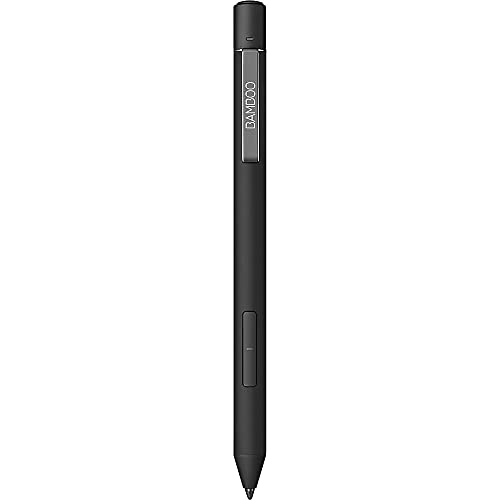
Wacom Bamboo Ink Plus - Best for Multi‑Device Use
The Bamboo Ink Plus is compatible with any device that supports the Windows Ink API, as well as select Android tablets with Wacom’s AES technology. It provides 4096 pressure levels, 1024 tilt positions and a 28 ms latency. The pen includes two customizable side buttons and a magnetic charging dock that delivers up to 8 hours of use per charge. Its neutral design makes it a good fit for users who switch between laptops, tablets and convertible PCs.
Before you buy
What to consider
When selecting an active stylus, start by confirming compatibility with your device’s digitizer. Apple devices require the Apple Pencil, while Samsung tablets need the S Pen, and Windows machines typically work best with the Surface Pen or any MPP‑compatible pen. Next, consider pressure sensitivity and latency; higher pressure levels and lower latency give a more natural drawing experience. Battery type is also important - EMR pens like the S Pen never need charging, whereas rechargeable pens offer convenience but require occasional power management.
What to consider
Ergonomics and extra features such as shortcut buttons, tilt support and magnetic attachment can influence daily comfort, especially during long sessions. Finally, weigh the price against the feature set; a higher‑priced pen may provide marginal gains that aren’t necessary for casual note‑taking, while a budget‑friendly option can still deliver solid performance for most tasks.
Quick answers
Most active styluses require a compatible digitizer. Apple Pencil works only with iPad Pro, Air and Mini models that support it, while Samsung S Pen needs a Galaxy Tab with built‑in sensor.
The Microsoft Surface Pen offers up to 12 months of use on a single AAAA battery, making it the longest‑lasting option in this list.
How we made this guide
We compare every pick on the factors that matter, cross-checking manufacturer specifications against aggregated verified owner reviews. We rank independently and never take payment for placement. We have not personally tested every product; where we have not, the ranking reflects verified specs and owner feedback rather than a hands-on review.
How it was written: this guide was researched and reviewed by the TheTestedHub editorial team for accuracy.
Affiliate disclosure: TheTestedHub is reader-supported. When you buy through links on our site, we may earn a commission at no extra cost to you.
More to explore

Elgato Alternatives 2026: AVerMedia & Rode Now Lead

Elgato Key Light: Expert Pick for True Color

Top Retro Game Consoles for 2026: A Practical Buyer’s Guide

Console Cooling Stands: Our Best Picks for 2026

The Best Gaming Glasses to Buy in 2026

Gaming Backpacks 2026: Find Yours by Laptop & Gear Needs

2026 Game Storage Racks: Find the Perfect Fit for Your Cases
