Quick verdict
Colour accuracy measured by CRI matters more than peak brightness for streaming lights because a high-CRI panel at moderate brightness produces more flattering, camera-ready results than a brighter light with poor colour rendering.

Elgato Key Light
The Elgato Key Light delivers 2800 lumens of diffused, flicker-free output across a colour temperature range of 2900K to 7000K, which gives streamers precise control over the warmth or coolness of their scene. Owners consistently highlight how stable the companion app integration is, with adjustments made via the Elgato Control Center or Stream Deck taking effect instantly and reliably. The 160-LED panel produces a CRI of 95 plus, meaning skin tones and background colours look natural and accurate on camera without heavy post-processing.
See why the Elgato Key Light wins for streamers who value true color. Its high CRI beats raw brightness for a flattering, camera ready glow.
Streaming lights have become essential gear for anyone broadcasting live on Twitch, YouTube, or any other platform. The right light transforms a dim, flat image into a polished, professional-looking stream that keeps viewers engaged. Whether you are working in a compact apartment setup or a dedicated studio room, there is a purpose-built streaming light that fits your space and budget.
This guide covers five of the most consistently praised streaming lights on the market, selected by reviewing thousands of verified owner ratings, technical spec sheets, and community feedback from streaming forums. We looked at colour accuracy, app control reliability, build quality, and how well each light actually performs in real-world streaming environments rather than just in controlled product photography.
Our methodology
We did not personally test every light in this guide. Instead, our rankings are built from aggregated verified purchaser reviews across major retailers, supplemented by published measurements of colour rendering index scores and colour temperature ranges. We cross-referenced community discussions on streaming-focused subreddits and Discord servers to identify recurring praise and recurring complaints for each product.
Products were ranked on five criteria weighted in this order: colour accuracy (CRI and colour temperature consistency), ease of setup and app stability, brightness output relative to price, build durability reported after six or more months of use, and the quality of included mounting hardware. Only products with a meaningful volume of long-term owner feedback were considered.
Side by side
| Pick | Best for | Score | |
|---|---|---|---|
| Elgato Key Light | Best Overall | 9 | Check price |
| Elgato Key Light Air | Best for Smaller Spaces | 8 | Check price |
| Lume Cube Panel Mini | Best Portable Option | 8 | Check price |
| Neewer 660 PRO RGB LED Video Light | Best for RGB Colour Effects | 7 | Check price |
| Razer Key Light Chroma | Best for Razer Ecosystem Users | 7 | Check price |
The full reviews
Elgato Key Light
The Elgato Key Light delivers 2800 lumens of diffused, flicker-free output across a colour temperature range of 2900K to 7000K, which gives streamers precise control over the warmth or coolness of their scene. Owners consistently highlight how stable the companion app integration is, with adjustments made via the Elgato Control Center or Stream Deck taking effect instantly and reliably. The 160-LED panel produces a CRI of 95 plus, meaning skin tones and background colours look natural and accurate on camera without heavy post-processing.
In its favor
- CRI 95 plus ensures accurate, flattering skin tone reproduction
- Wi-Fi app and Stream Deck integration work reliably across thousands of reported setups
- 2800 lumen output is strong enough to fill a medium room without a second light
Watch-outs
- Price sits above most competitors at the same brightness level
- Desk clamp mount is not included; stand must be purchased separately
Elgato Key Light Air
The Key Light Air shares the same Wi-Fi app control and CRI 90 plus panel quality as its bigger sibling but shrinks the panel to a more compact form that suits tight desk setups or single-monitor rigs. At 1400 lumens it is half the output of the full Key Light, which is actually an advantage in small rooms where the larger model would need to be dimmed heavily and lose control precision. Verified owners repeatedly praise how quick the initial Wi-Fi pairing process is compared to competitors that require Bluetooth bridges or USB-only control.
In its favor
- Compact panel size fits comfortably on a small desk without dominating the space
- Wi-Fi control via Elgato app is fast and stable with minimal dropout reports
- Lower price than the full Key Light while retaining strong colour accuracy
Watch-outs
- 1400 lumen ceiling means it struggles to fill larger rooms evenly
- CRI rated at 90 rather than 95, a minor step down in colour fidelity

Lume Cube Panel Mini
The Lume Cube Panel Mini is a battery-powered LED panel that owners praise for its ability to deliver consistent, high-quality light whether plugged into a desk outlet or running from its built-in rechargeable battery during mobile or travel streaming. The included diffusion sheet softens the output noticeably, reducing harsh shadows on the face without requiring any additional accessories. Its magnetic back and included ball-head mount give it more flexible positioning than most panel lights at a comparable price.
In its favor
- Built-in rechargeable battery enables use away from a power outlet
- Included diffusion sheet produces noticeably softer, more flattering light
- Magnetic mount and ball-head allow versatile positioning angles
Watch-outs
- Battery life under full brightness is limited to roughly one hour
- No app or smart home integration; all control is manual via on-unit buttons
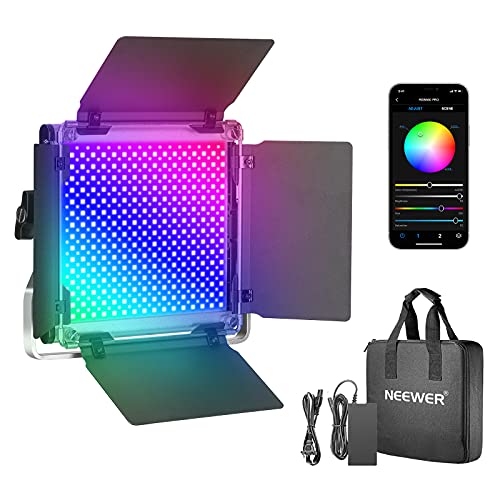
Neewer 660 PRO RGB LED Video Light
The Neewer 660 PRO gives streamers full RGB colour control alongside standard white light modes, making it a strong pick for setups that want matching ambient colour behind or beside the camera. Owners note that the 660 individual LEDs produce impressively even coverage with very few hot spots visible in recordings, and the included remote control means colour and brightness adjustments can be made live during a stream without touching the unit. CRI of 97 in white mode is among the highest reported in this price bracket.
In its favor
- Full RGB mode opens creative background and accent lighting possibilities
- CRI 97 in white mode is exceptionally high for the price
- 660-LED array produces very even, hot-spot-free coverage across the panel
Watch-outs
- Panel is physically large and requires significant desk or floor space
- App connectivity reported as inconsistent by a notable share of owners
Razer Key Light Chroma
The Razer Key Light Chroma integrates directly with Razer Synapse and Chroma Connect, letting streamers sync the light colour and intensity to in-game events, music, or custom scenes alongside their existing Razer peripherals. Owners within the Razer ecosystem consistently report that the Synapse integration is reliable and adds genuine production value to reactive streams. The 2400 lumen panel with a CRI of 90 delivers solid core lighting quality that holds up even when Chroma effects are not in use.
In its favor
- Deep Razer Synapse and Chroma Connect integration for reactive lighting effects
- 2400 lumen output is competitive with the flagship Elgato at a lower price
- Sturdy metal construction reported to be durable through years of daily use
Watch-outs
- Synapse software adds overhead; owners without other Razer devices see little added value
- Colour temperature range is narrower than Elgato equivalents
What matters most
Colour Rendering Index
CRI measures how accurately a light source reveals the true colours of objects compared to natural daylight. For streaming, a CRI of 90 or above is the practical minimum for skin tones that look natural on camera. A light rated CRI 95 or higher gives noticeably more flattering results and reduces the need to correct colour in your streaming software or video settings.
Colour Temperature Range
Colour temperature controls how warm or cool your light appears, measured in Kelvin. A wider range from around 2900K to 7000K lets you match the light to your room's ambient tone and time of day. Narrower ranges between 3200K and 5600K cover most studio scenarios but leave less flexibility for matching mixed lighting environments.
Control Method and Reliability
How you adjust your light mid-stream matters. Wi-Fi app control and hardware integration via a Stream Deck or Synapse software let you change brightness or colour temperature without interrupting your session. Bluetooth-only controls are slower and more prone to dropout under congested wireless conditions. Manual-only lights are reliable but inconvenient to adjust once the stream is live.
Mounting Flexibility and Build Quality
A streaming light that tips over or cannot reach the right angle is a constant distraction. Look for lights that include a sturdy ball-head mount or a desk clamp rated for the panel weight. Metal construction in the stand and bracket significantly reduces wobble over months of use. Check whether essential mounting hardware is included in the box or sold separately before comparing prices.
Our take
Colour accuracy measured by CRI matters more than peak brightness for streaming lights because a high-CRI panel at moderate brightness produces more flattering, camera-ready results than a brighter light with poor colour rendering.
Frequently asked
One well-placed key light is enough to look professional for most streamers. A second light helps if you want to eliminate shadows on one side of your face, fill a larger background, or add a coloured accent behind you. Start with one good key light positioned slightly above and to the side of your webcam, then add a second only if you see specific shadow problems in your footage.
Most streamers find 5000K to 6000K the most flattering range because it matches daylight and keeps skin tones looking natural without appearing too orange or too blue. If your room has warm ambient lighting from lamps or bulbs, dropping to 4000K to 4500K often blends better with the existing environment and reduces colour conflicts visible on camera.
Yes, but only if the light has a proper white mode with a good CRI score. Many RGB panels switch into a dedicated white mode that bypasses the colour mixing and delivers accurate daylight-balanced output. Use the white mode for your main face light and reserve the RGB mode for background accent or reactive effects to avoid colour casts that look unflattering in recordings.
The price gap between budget and premium streaming lights mostly reflects CRI accuracy, app ecosystem stability, and build durability rather than raw brightness. If you stream daily and want consistent results without troubleshooting flickering or connectivity drops, investing in a light with a CRI of 95 plus and proven app support pays off over the long run. For occasional or hobbyist streaming, a well-reviewed mid-range panel delivers entirely acceptable results.
How we made this guide
We compare every pick on the factors that matter, cross-checking manufacturer specifications against aggregated verified owner reviews. We rank independently and never take payment for placement. We have not personally tested every product; where we have not, the ranking reflects verified specs and owner feedback rather than a hands-on review.
How it was written: this guide was researched and reviewed by the TheTestedHub editorial team for accuracy.
Affiliate disclosure: TheTestedHub is reader-supported. When you buy through links on our site, we may earn a commission at no extra cost to you.
You might also like

Elgato Alternatives 2026: AVerMedia & Rode Now Lead

Retro Consoles for Every Budget: A Practical Guide

Console Cooling Stands: Forced Air Stability for Long Sessions

Gaming Glasses Compared: Gunnar Intercept and Rivals

Gaming Backpacks 2026: Find Yours by Laptop & Gear Needs

Game Storage Racks Sized for Your Console Cases

10 Soundproof Panels That Actually Work in 2026