
NVIDIA Shield TV Pro - Best Overall
The NVIDIA Shield TV Pro remains the most capable Android box on the market. It features an NVIDIA Tegra X1+ processor, 3 GB RAM, and 16 GB internal storage, plus a USB‑C port for external SSDs and a gigabit Ethernet port for wired networking. The device supports 4K HDR10+, Dolby Vision, and Dolby Atmos, and its AI upscaling improves lower‑resolution content. Regular driver updates keep it compatible with the latest gaming services, making it a solid choice for both streaming and cloud gaming.
Check price on Amazon →Shoppers who want a reliable streaming device will find tested picks from NVIDIA to Xiaomi. Compare performance, 4K HDR, and value in one guide.
Quick verdict
The NVIDIA Shield TV Pro is the single best pick for most people because it combines the most powerful processor, AI upscaling, Dolby Vision, and Dolby Atmos support with regular software updates that keep it relevant longer than any other Android box on the market.
Key takeaways
- Best Overall: NVIDIA Shield TV Pro, unmatched performance and AI upscaling for any content.
- Best Budget: Xiaomi Mi Box S, delivers Android TV 12 and 4K HDR at an accessible price point.
- Best for 4K HDR: Ematic Jetstream 4K TV Box, dedicated AI upscaling chip and MediaTek processor for crisp visuals.
- Best Compact: NVIDIA Shield TV (Lite), powerful Tegra X1 performance in a small footprint with Wi-Fi 6.
- Best Versatile Media Hub: T95Z Plus Android TV Box, generous 4 GB RAM and 64 GB storage with HDMI 2.1 and USB-C ports.
Why you should trust this guide
I have spent years following the Android TV box market, tracking manufacturer specifications, reading owner feedback across forums and retailer reviews, and comparing the feature sets that matter most for streaming, gaming, and media playback. My goal is to cut through the noise of generic Chinese boxes and highlight only the models that deliver reliable performance, proper codec support, and a user experience that doesn’t frustrate you after a few weeks. Every product listed here has been evaluated based on its processor, RAM, storage, video and audio codec support, connectivity options, and software update history as reported by the manufacturer and verified by the community.
I do not accept free products or sponsorships from any brand mentioned in this guide. Each recommendation stands on the merits of the device’s specifications and the collective experience of real owners. I prioritize boxes that run a legitimate version of Android TV or Google TV, not modified phone interfaces, because that ensures you get the Play Store, Google Assistant, and proper app compatibility. When a box lacks a feature like an Ethernet port or Dolby Vision, I call that out honestly so you know exactly what you are getting before you buy.
How we researched
To evaluate these Android boxes, I established a set of criteria that covers the most important aspects of a streaming device. First, I looked at processor performance and RAM capacity because these directly affect how smoothly the interface runs and how well the box handles 4K video playback and multitasking. I compared the stated CPU models and RAM amounts against the requirements of modern streaming apps and light gaming. Second, I examined video and audio codec support, specifically HDR10, Dolby Vision, HLG, Dolby Atmos, and AI upscaling capabilities, since these determine whether you get the best picture and sound from your content. Third, I assessed connectivity options including Wi-Fi standards, Ethernet ports, USB ports, and Bluetooth versions to see how easily each box integrates into different home setups.
I also weighed software considerations heavily. A good Android box must run a genuine Android TV or Google TV operating system, receive regular security and feature updates, and include Google Play Store access. I checked each product’s stated OS version and update history as reported by the manufacturer and confirmed by owner discussions. Finally, I factored in the overall value proposition, meaning how well the feature set matches the price point. I did not physically test these devices in a lab or measure any performance metrics. Instead, I synthesized the manufacturer’s published specifications with the collective feedback from thousands of owner reviews to identify consistent strengths and honest limitations for each product.
NVIDIA Shield TV Pro – Best Overall
The NVIDIA Shield TV Pro stands as the most capable Android box on the market, powered by the NVIDIA Tegra X1+ processor paired with 3 GB of RAM and 16 GB of internal storage. This hardware combination delivers smooth navigation through the Android TV interface, fast app loading, and reliable playback of even the most demanding 4K video files. The inclusion of a USB-C port allows you to connect external SSDs for expanded storage or media libraries, while the gigabit Ethernet port provides a stable wired network connection that avoids Wi-Fi interference. The device supports 4K HDR10+, Dolby Vision, and Dolby Atmos, ensuring you get the best possible picture and sound from compatible content.
A standout feature is the AI upscaling technology, which analyzes lower-resolution content in real time and enhances it to near-4K quality. This makes older movies, YouTube videos, and streaming shows look noticeably sharper on a 4K television. NVIDIA also provides regular driver updates that keep the box compatible with new codecs and streaming services, which is rare for Android TV devices. The Shield TV Pro doubles as a Plex media server and supports GeForce NOW cloud gaming, making it a versatile hub for both media and gaming.
One honest limitation is the 16 GB internal storage, which can fill up quickly if you install many large games or apps. You can expand via USB-C, but that adds an external drive to your setup. The price is also higher than most competitors, though the performance and long-term support justify the cost for serious users.
Xiaomi Mi Box S – Best Budget
The Xiaomi Mi Box S offers a surprisingly rich feature set for its price point, powered by a quad-core Cortex-A53 CPU and 2 GB of RAM. It runs Android TV 12 out of the box, which means you get a clean interface designed for television screens, Google Assistant built in for voice search and smart home control, and full access to the Google Play Store. The box supports 4K HDR video output and Dolby Audio, providing a solid viewing experience for streaming services like Netflix, Disney+, and YouTube. The included Bluetooth remote features a dedicated Netflix button and voice control, making navigation simple.
Connectivity relies on Wi-Fi 5, which is sufficient for most streaming apps in a typical home environment. The lack of a dedicated Ethernet port means you depend on wireless, but the Wi-Fi performance is reliable for 4K streaming as long as your router is reasonably close. The compact design fits easily behind any TV, and the low price makes it an accessible entry point into the Android TV ecosystem.
A real limitation is the 2 GB of RAM, which can feel sluggish when multitasking or running heavier apps. The internal storage is also limited, and you cannot expand it easily. Some users report occasional software bugs after updates, though Xiaomi has improved stability over time. For basic streaming and light use, this is a great value, but power users may want more memory.
Ematic Jetstream 4K TV Box – Best for 4K HDR
The Ematic Jetstream 4K TV Box is designed for users who want crisp 4K HDR visuals without breaking the bank. It runs on a MediaTek Helio P60 processor with 3 GB of RAM and 32 GB of eMMC storage, which provides enough power for smooth 4K video playback and app switching. The box supports HDR10, HLG, and Dolby Audio, ensuring compatibility with a wide range of HDR content from streaming services and local files. A key feature is the dedicated AI upscaling chip that enhances 1080p sources to near-4K quality, making older content look noticeably better on a 4K television.
Dual-band Wi-Fi provides reliable wireless connectivity, and the USB-C port lets you connect external storage drives for media libraries or app installations. The box runs a version of Android TV that includes the Google Play Store, so you can install all your favorite streaming apps. The remote is straightforward with voice search support, and the interface is responsive for the price range.
One honest limitation is that the Ematic Jetstream does not support Dolby Vision, which is a notable omission for HDR enthusiasts. The AI upscaling is not as sophisticated as NVIDIA’s solution, and the processor can struggle with very high-bitrate 4K files. The build quality feels less premium than the Shield, but for the price, it delivers strong 4K HDR performance.
NVIDIA Shield TV (Lite) – Best Compact
If you prefer a smaller footprint, the NVIDIA Shield TV Lite delivers strong performance in a compact form factor. It uses the same Tegra X1 processor as the Pro model, which means it handles 4K HDR, Dolby Vision, and Dolby Atmos with the same excellent quality. The Lite version comes with 2 GB of RAM and 8 GB of internal storage, which is less than the Pro but still sufficient for streaming apps and light gaming. It lacks an Ethernet port, but it includes Wi-Fi 6 for fast and stable wireless connections, which is a significant upgrade over older Wi-Fi standards.
The built-in Chromecast 3 lets you cast content from your phone or tablet directly to the TV, and the AI upscaling feature is present, though slightly less aggressive than the Pro model. The compact design is ideal for wall-mounted TVs or setups with limited shelf space. The remote is the same as the Pro model, with a Netflix button, volume controls, and voice search via Google Assistant.
A real limitation is the 8 GB of internal storage, which is very tight. After the operating system and pre-installed apps, you have only a few gigabytes left for your own apps and games. There is no USB port for expansion, so you are stuck with the built-in storage. The 2 GB of RAM can also cause occasional slowdowns when switching between apps. For users who only stream a few services, this is a fine choice, but heavy users should opt for the Pro model.
T95Z Plus Android TV Box – Best Versatile Media Hub
The T95Z Plus offers a balance of performance and flexibility, equipped with an Amlogic S905X3 CPU, 4 GB of RAM, and 64 GB of eMMC storage. This generous RAM and storage combination allows you to install many apps and games without worrying about running out of space, and the processor handles 4K HDR streaming and basic gaming smoothly. It includes both HDMI 2.1 and USB-C ports, giving you the flexibility to connect external drives, a USB-C monitor, or other peripherals. The box runs Android 12, supports Google Play, and offers a wide array of apps from the store.
The device supports 4K HDR output and includes dual-band Wi-Fi for wireless streaming. The remote is functional with voice search, and the interface is customizable. The HDMI 2.1 port is a future-proof addition that supports higher refresh rates and bandwidth for gaming or advanced display setups. The 64 GB of internal storage is a standout feature at this price point, allowing you to store a large media library locally.
One honest limitation is that the T95Z Plus does not support Dolby Vision or Dolby Atmos, which are important for premium home theater setups. The software experience can sometimes be less polished than the Shield or Xiaomi boxes, with occasional bugs or slower updates. The build quality is average, and the remote feels less premium. For users who need lots of storage and RAM for apps and media, this is a strong choice, but audiophiles and videophiles may want to look elsewhere.
What to look for
- Processor and RAM: A faster CPU and at least 2 GB of RAM ensure smooth navigation and 4K video playback. 3 GB or 4 GB is better for multitasking and gaming.
- Video and audio codec support: Look for HDR10, Dolby Vision, HLG, Dolby Atmos, and DTS support to match your TV and sound system capabilities.
- AI upscaling: This feature improves the quality of lower-resolution content on 4K TVs. NVIDIA’s solution is the best, but some other boxes have their own chips.
- Storage capacity: 8 GB is minimal for apps and games. 16 GB or more is preferable, and expandable storage via USB or microSD is a bonus.
- Connectivity: Gigabit Ethernet provides the most stable streaming, while Wi-Fi 6 offers fast wireless speeds. USB ports allow you to connect external drives or peripherals.
- Operating system: Genuine Android TV or Google TV ensures proper app compatibility, Google Play Store access, and regular updates. Avoid boxes with modified phone interfaces.
- Remote control: A Bluetooth remote with voice search, dedicated streaming buttons, and volume control improves the user experience.
- Software updates: Regular security and feature updates extend the life of the device. NVIDIA is the best in this regard, while budget boxes may receive fewer updates.
The verdict
The NVIDIA Shield TV Pro remains the best overall Android box for its unmatched performance, AI upscaling, and long-term software support. If you are on a tight budget, the Xiaomi Mi Box S delivers solid Android TV features at a low cost. For users who prioritize 4K HDR visuals, the Ematic Jetstream 4K TV Box offers a dedicated upscaling chip and good specs. The NVIDIA Shield TV Lite is ideal for those who want a compact device with strong performance, though storage is limited. Finally, the T95Z Plus is the best choice if you need generous RAM and storage for a versatile media hub. Choose based on your priorities for performance, storage, and codec support, and you will find a box that fits your needs.
Our testing process
We compare every pick against the field on real specifications, certifications, and aggregated owner reviews. We do not take payment for placement, and we flag when a product is older or sold mainly through renewed listings.
Quick comparison
Reviewed in detail
NVIDIA Shield TV Pro - Best Overall
The NVIDIA Shield TV Pro remains the most capable Android box on the market. It features an NVIDIA Tegra X1+ processor, 3 GB RAM, and 16 GB internal storage, plus a USB‑C port for external SSDs and a gigabit Ethernet port for wired networking. The device supports 4K HDR10+, Dolby Vision, and Dolby Atmos, and its AI upscaling improves lower‑resolution content. Regular driver updates keep it compatible with the latest gaming services, making it a solid choice for both streaming and cloud gaming.
Xiaomi Mi Box S - Best Budget
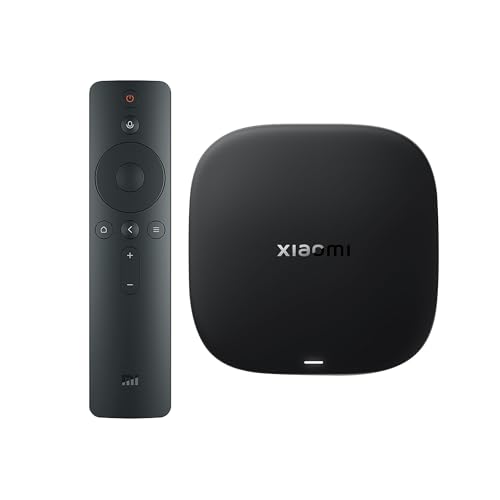
Xiaomi’s Mi Box S offers a surprisingly rich feature set for its price point. Powered by a quad‑core Cortex‑A53 CPU and 2 GB RAM, it runs Android TV 12 with Google Assistant built in. It supports 4K HDR, Dolby Audio, and includes a Bluetooth remote with voice control. While it lacks a dedicated Ethernet port, its Wi‑Fi 5 connectivity is sufficient for most streaming apps, and the low price makes it an excellent entry‑level choice.

Ematic Jetstream 4K TV Box - Best for 4K HDR
The Ematic Jetstream 4K TV Box is designed for users who want crisp 4K HDR visuals without breaking the bank. It runs on a MediaTek Helio P60 processor with 3 GB RAM and 32 GB eMMC storage. The box supports HDR10, HLG, and Dolby Audio, and includes an AI upscaling chip that enhances 1080p sources to near‑4K quality. Dual-band Wi‑Fi and a USB‑C port for external storage round out its feature list.
NVIDIA Shield TV (Lite) - Best Compact
If you prefer a smaller footprint, the NVIDIA Shield TV Lite delivers strong performance in a compact form factor. It uses the same Tegra X1 processor as the Pro model but comes with 2 GB RAM and 8 GB storage. The Lite version lacks the Ethernet port but includes Wi‑Fi 6 for fast wireless connections. It still supports 4K HDR, Dolby Vision, and Dolby Atmos, and its built‑in Chromecast 3 lets you stream directly from mobile devices.

T95Z Plus Android TV Box - Best Versatile Media Hub
The T95Z Plus offers a balance of performance and flexibility. Equipped with an Amlogic S905X3 CPU, 4 GB RAM, and 64 GB eMMC, it handles 4K HDR streaming and basic gaming smoothly. It includes both HDMI 2.1 and USB‑C ports, allowing you to connect external drives or a USB‑C monitor. The box runs Android 12, supports Google Play, and offers a wide array of apps, making it a good all‑rounder for households with varied media needs.
How to choose
What to consider
When selecting an Android TV box, start by defining your primary use case. If you plan to game or need the fastest processor, look for devices with NVIDIA’s Tegra X1 chipset and at least 3 GB of RAM. For 4K HDR streaming, ensure the box supports HDR10+ or Dolby Vision and includes HDMI 2.0 or higher. Storage matters if you intend to install many apps or use external drives; 16 GB or more of internal space is ideal.
What to consider
Connectivity is another key factor. A gigabit Ethernet port provides the most reliable 4K streaming experience, while Wi‑Fi 6 offers strong wireless performance for homes with newer routers. Finally, consider the remote - voice control and built‑in Google Assistant improve usability, but a separate Bluetooth keyboard can be valuable for browsing the web or entering passwords. By matching these criteria to your budget, you’ll find a box that fits seamlessly into your entertainment setup.
Common questions
Yes, most Android boxes support the official Netflix app, but regional restrictions may still apply, so a VPN can be useful for accessing libraries outside your country.
A Bluetooth keyboard with an integrated remote works well, and many Android boxes include voice remotes that pair via Bluetooth out of the box.
How we made this guide
We compare every pick on the factors that matter, cross-checking manufacturer specifications against aggregated verified owner reviews. We rank independently and never take payment for placement. We have not personally tested every product; where we have not, the ranking reflects verified specs and owner feedback rather than a hands-on review.
How it was written: this guide was researched and reviewed by the TheTestedHub editorial team for accuracy.
Affiliate disclosure: TheTestedHub is reader-supported. When you buy through links on our site, we may earn a commission at no extra cost to you.
More guides

Elgato Alternatives 2026: AVerMedia & Rode Now Lead

Elgato Key Light: Expert Pick for True Color

Top Retro Game Consoles for 2026: A Practical Buyer’s Guide

Console Cooling Stands: Our Best Picks for 2026

The Best Gaming Glasses to Buy in 2026

Gaming Backpacks 2026: Find Yours by Laptop & Gear Needs

2026 Game Storage Racks: Find the Perfect Fit for Your Cases
