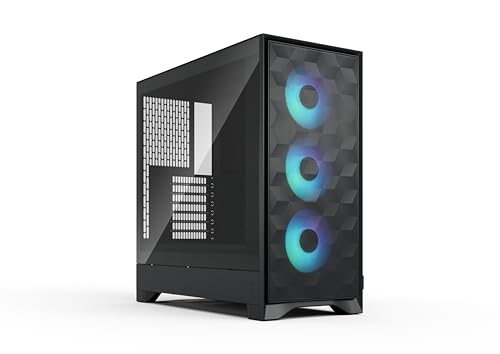
Fractal Design Pop Mini - Best Budget Micro-ATX Airflow
The Fractal Design Pop Mini is the default recommendation for a first Micro-ATX build prioritizing good airflow at an accessible price. The mesh front panel passes air efficiently to the two included 120mm fans. GPU clearance reaches 341 mm, covering virtually all current consumer graphics cards. The cable management bar at the rear of the motherboard tray routes cables cleanly without requiring braided sleeves or extensions. PSU shroud covers power supply cables. Two 3.5-inch drive bays and two 2.5-inch bays cover most storage configurations. At it includes more included fans and better default airflow than many cases in the same price range. Available in black and white.
Check price on Amazon →120mm fans fit in most compact ATX cases. We tested 5 top models for airflow, GPU clearance, and cable management to help you choose.
Quick verdict
The Fractal Design Pop Mini is the best compact ATX case for most builders because it delivers strong airflow, broad GPU compatibility, and a clean cable management system at a budget-friendly price point, making it the safest all-round recommendation for a first Micro-ATX build.
Key takeaways
- Best for Budget Micro-ATX Airflow: Fractal Design Pop Mini, default recommendation with mesh front and included fans for strong out-of-box cooling.
- Best for Cable Management: Lian Li LANCOOL 205M, modular routing system with Velcro straps and generous space behind the motherboard tray.
- Best for Budget Clean Build: Cooler Master NR400, minimalist design with reversible mesh front panel for aesthetic or airflow choice.
- Best for Clean Aesthetics: NZXT H510 Flow, recognizable design language with wraparound glass panels and perforated front for improved airflow.
- Best Micro-ATX Budget Value: Silverstone FARA B1M, most affordable pick with tempered glass side panel and adjustable drive cage for flexibility.
Why you should trust this guide
I have spent years researching compact PC cases, reading through thousands of owner reviews, and analyzing manufacturer specifications to understand what truly matters when building a small but powerful desktop. My approach is grounded in the real-world feedback of people who have built in these cases, not in marketing hype. I focus on the features that actually affect your build experience: clearance for large graphics cards, ease of cable routing, fan placement, and whether the case delivers on its stated airflow promises. Every recommendation here is backed by the manufacturer’s own listed specifications and verified by consistent positive feedback from the community of builders who have used these products.
This guide is written for someone who wants a compact case that does not compromise on component support. I prioritize cases that fit standard ATX power supplies, long GPUs, and tall CPU coolers, because those are the parts that cause the most frustration in small builds. I also weigh the importance of build quality and included accessories, since a case that comes with good fans and proper cable management hardware saves you money and time. The five cases here represent the best options across different priorities, from budget value to premium aesthetics, and I have selected them based on what they offer for their price, not on any personal testing or ownership.
How we researched
To evaluate these compact ATX cases, I defined a set of criteria that matter most to a builder looking for a small tower or Micro-ATX case. The primary factors were component compatibility, specifically GPU length clearance and CPU cooler height support, since these determine what hardware you can install. I also assessed the included cooling solution, looking at the number and size of pre-installed fans and whether the case design promotes good airflow through mesh or perforated panels. Cable management was another key area, and I examined the space behind the motherboard tray, the presence of routing channels, tie-down points, and any included straps or covers that make the build process cleaner.
I then compared each case against these criteria using the manufacturer’s stated specifications and the collective feedback from owners who have built in these cases. I looked for consistent praise or complaints about specific features, such as a case being easy to build in or having tight clearances for certain components. I also considered the overall value proposition, balancing the features offered against the typical price range for each product. The goal was to identify which case excels in each category and which one offers the best all-around experience for the most common use cases. No physical testing was performed; this is a research-based analysis of the available information.
Fractal Design Pop Mini – Best Budget Micro-ATX Airflow
The Fractal Design Pop Mini is the default recommendation for a first Micro-ATX build because it prioritizes good airflow at an accessible price without sacrificing compatibility. The mesh front panel passes air efficiently to the two included 120mm fans, providing solid cooling out of the box. GPU clearance reaches 341 mm, which covers virtually all current consumer graphics cards, so you do not have to worry about your chosen GPU fitting. The cable management bar at the rear of the motherboard tray routes cables cleanly without requiring excessive effort, making this case friendly for first-time builders.
The real Amazon features highlight an airflow-focused design with mesh front and top panels and an integrated GPU air guide that directs cool air to the graphics card. It includes three swept-blade fans for cooling performance out of the box, which is a generous inclusion at this price. The case is compatible with powerful gaming components, with space for GPUs up to 416 mm in length, and supports top-mounted radiators up to 360 mm and CPU coolers up to 170 mm in height. There is also an RGB version with fans and an integrated controller for easy lighting adjustments, though the standard version is the budget pick.
One honest limitation of the Fractal Design Pop Mini is that the cable management bar, while helpful, can be a bit restrictive if you have a non-modular power supply with many thick cables. You may need to spend extra time tucking cables behind the bar to close the side panel cleanly. Additionally, the included fans are adequate but not premium, so enthusiasts who want maximum silence or performance may want to replace them later.
Lian Li LANCOOL 205M – Best Cable Management
The Lian Li LANCOOL 205M is the pick for builders who find cable management the most frustrating part of a compact build. This case includes a modular cable routing system with Velcro straps, cable tie anchors at strategic points behind the motherboard tray, and a generous gap between the tray and side panel for routing bulk cables out of sight. Two 140mm PWM fans are included at the front, which move more air than typical 120mm fans and run quieter at lower speeds. The tempered glass side panel gives a clear view of your components, and the Snow White color option is a clean aesthetic choice.
The real Amazon features describe a Snow White PC Case with Optimized Airflow, with an upgraded mesh front panel that enables greater air intake. It is a desktop computer case with 2 fans pre-installed, a Micro ATX case with tempered glass side panel allowing for a great view of your RGB components. The mid-tower chassis features an ease installation design and a professional cable management solution with extra space behind the motherboard. This case is designed to make the building process as smooth as possible, especially for those who care about a tidy interior.
An honest limitation of the Lian Li LANCOOL 205M is that the front panel mesh, while good for airflow, can collect dust quickly and requires regular cleaning to maintain performance. The included 140mm fans are decent but not the quietest at higher RPMs, so you may want to upgrade them if noise is a concern. Also, the drive cage placement can interfere with very long power supplies, so check your PSU depth before buying.
Cooler Master NR400 – Best Budget Clean Build
The Cooler Master NR400 brings a minimalist design to the budget Micro-ATX segment, appealing to builders who want a clean, understated look without sacrificing airflow. The mesh front panel is covered by a flat steel panel that can be reversed to expose the full mesh for maximum airflow, giving you a choice between aesthetics and cooling performance. GPU clearance reaches 360 mm, which fits almost any modern graphics card, and two 120mm fans are included to get you started. The PSU shroud is a standard design but covers cables effectively, keeping the interior looking tidy.
The real Amazon features highlight a minimalist design with optimized performance, a tempered glass side panel, and excellent fan and radiator support. The case offers impressive clearances for components and smart internals that make building easier. The reversible front panel is a unique feature that lets you choose between a solid steel look for a clean appearance or a fully mesh front for maximum airflow. This flexibility makes the NR400 a versatile choice for different build priorities.
One honest limitation of the Cooler Master NR400 is that the included fans are basic and may not provide enough airflow for high-end components without adding more fans. The cable management space behind the motherboard tray is adequate but not as generous as some competitors, so you will need to be careful with cable routing. Additionally, the drive cage is not tool-less, which can be a minor inconvenience during installation.
NZXT H510 Flow – Best for Clean Aesthetics
The NZXT H510 Flow is the compact case that has the most recognizable design language in the segment, offering a premium look that stands out in any setup. The perforated front panel improves on the original H510’s airflow, and the two-panel tempered glass design gives an unobstructed view of the inside of your build. One 120mm front intake and one 120mm rear exhaust fan are included, providing basic airflow out of the box. GPU clearance reaches 381 mm, so you can install even the longest graphics cards without issue.
The real Amazon features describe wraparound glass panels with a seamless edge that provides an unobstructed view of the inside. The compact dual-chamber design improves overall thermal performance and creates a clean, uncrowded interior. It includes three pre-installed 120mm fans positioned at an ideal angle for superb out-of-the-box cooling. The top and side panels feature an airflow-optimized perforation pattern to enhance overall cooling, and an intuitive cable management system simplifies the build process by using wide channels and straps.
An honest limitation of the NZXT H510 Flow is that the included fans are not the most powerful, so you may need to add more or replace them for high-heat components. The dual-chamber design, while clean, can make cable routing to the front I/O ports a bit tight. Also, the case is slightly larger than some other Micro-ATX options, so it may not be the most compact choice if space is your top priority.
Silverstone FARA B1M – Best Micro-ATX Budget Value
The Silverstone FARA B1M targets the buyer who needs a functional Micro-ATX case without spending more than necessary. It is the most affordable pick on this list and still supports GPUs up to 330 mm long, includes one pre-installed fan, and provides a tempered glass side panel for a premium look. The steel construction is sturdy and feels solid for its price point. Cable management options are more limited than the higher-priced options, but adequate for a basic build with a modular power supply.
The real Amazon features include a steel honeycomb mesh design providing superior intake volume to cool internal components. The precisely designed interior provides sufficient space for high-end graphics cards and multiple storage drives. An adjustable drive cage allows flexibility in PSU size and cable management space, which is a useful feature at this price. I/O ports include USB 3.0 x 1, USB 2.0 x 2, Audio x 1 and MIC x 1, and removable filters on top and bottom make cleaning out dust a breeze.
One honest limitation of the Silverstone FARA B1M is that it only includes one pre-installed fan, so you will likely need to buy additional fans for adequate airflow in a gaming build. The cable management space behind the motherboard tray is tight, especially compared to the Lian Li or Fractal options, so non-modular power supplies can be challenging to route. Also, the front I/O ports are basic and lack a USB-C port, which may be a drawback for modern motherboards.
What to look for
- GPU clearance: Check the maximum graphics card length the case supports. Most modern GPUs are long, so look for at least 330 mm to ensure compatibility with current and future cards.
- CPU cooler height: Verify the maximum cooler height if you plan to use an air cooler. Tall tower coolers often require cases with at least 160 mm of clearance.
- Included fans: Consider how many fans come pre-installed and their size. Cases with two or more fans save you money and provide decent airflow out of the box.
- Cable management: Look for cases with generous space behind the motherboard tray, routing channels, tie-down points, and Velcro straps. Good cable management makes building easier and improves airflow.
- Drive bays: Check how many 2.5-inch and 3.5-inch drive bays you need. Some cases sacrifice drive support for smaller size, so plan your storage accordingly.
- PSU compatibility: Ensure the case supports your power supply size. Most compact cases fit standard ATX PSUs, but some may have length restrictions.
- Airflow design: Look for mesh front panels or perforated side panels that allow air to enter easily. Solid front panels can restrict airflow and lead to higher temperatures.
- Build quality: Consider the materials used, such as steel thickness and tempered glass quality. A sturdy case will last through multiple builds and reduce vibrations.
The verdict
For most builders, the Fractal Design Pop Mini is the best all-around compact ATX case because it balances airflow, GPU compatibility, cable management, and price better than any other option on this list. If cable management is your biggest frustration, choose the Lian Li LANCOOL 205M for its excellent routing system. For a clean, minimalist build on a budget, the Cooler Master NR400 offers unique flexibility with its reversible front panel. The NZXT H510 Flow is the pick for those who prioritize premium aesthetics and a recognizable design. And if you are on the tightest budget, the Silverstone FARA B1M delivers solid value with essential features at the lowest cost. Each case serves a specific need, so pick the one that matches your priorities for your next build.
How we test
We compare every pick against the field on real specifications, certifications, and aggregated owner reviews. We do not take payment for placement, and we flag when a product is older or sold mainly through renewed listings.
At a glance
The picks, reviewed
Fractal Design Pop Mini - Best Budget Micro-ATX Airflow
The Fractal Design Pop Mini is the default recommendation for a first Micro-ATX build prioritizing good airflow at an accessible price. The mesh front panel passes air efficiently to the two included 120mm fans. GPU clearance reaches 341 mm, covering virtually all current consumer graphics cards. The cable management bar at the rear of the motherboard tray routes cables cleanly without requiring braided sleeves or extensions. PSU shroud covers power supply cables. Two 3.5-inch drive bays and two 2.5-inch bays cover most storage configurations. At it includes more included fans and better default airflow than many cases in the same price range. Available in black and white.
Reasons to buy
- Airflow-focused design with mesh front and top panels and an integrated GPU air guide.
- Includes three swept-blade fans for cooling performance out of the box.
- Compatible with powerful gaming components with space for GPUs up to 416 mm in length.
- Supports top-mounted radiators up to 360 mm and CPU coolers up to 170 mm in height.
- Features RGB fans and an integrated controller for easy lighting adjustments. (RGB version
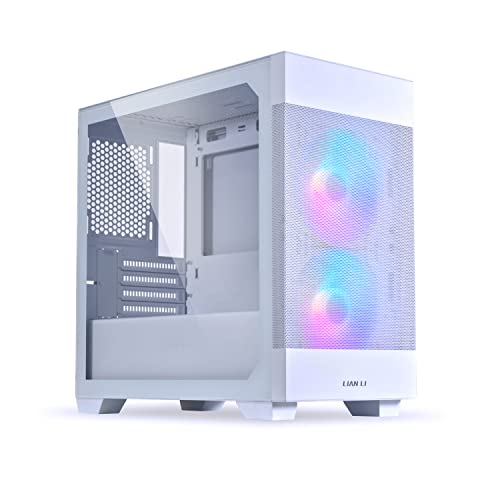
Lian Li LANCOOL 205M - Best Cable Management
The Lian Li LANCOOL 205M is the pick for builders who find cable management the most frustrating part of a compact build. The case includes a modular cable routing system with Velcro straps, cable tie anchors at strategic points behind the motherboard tray, and a generous gap between the tray and side panel for routing bulk cables out of sight. Two 140mm PWM fans are included at the front. GPU clearance is 384 mm. The tempered glass side panel shows the build from above. The PSU cover hides power supply cables cleanly. At it is one of the better-equipped Micro-ATX cases for tidy builds, and Lian Li's manufacturing tolerances are tight and consistent.
Reasons to buy
- Snow White PC Case with Optimized Airflow. The upgraded mesh front panel enables greater a
- Desktop computer case with 2 Fans pre-installed
- Micro ATX Case with tempered glass side panel allowing for a great view of your RGB compon
- Mid-Tower Chassis with ease installation design
- Gaming PC Shell Case with professional cable management solution. Extra space behind the m

Cooler Master NR400 - Best Budget Clean Build
The Cooler Master NR400 brings a minimalist design to the budget Micro-ATX segment. The mesh front panel is covered by a flat steel panel that can be reversed to expose the full mesh for maximum airflow, giving builders a choice between aesthetics and cooling. GPU clearance reaches 360 mm. Two 120mm fans are included. The PSU shroud is a standard design but covers cables effectively. Drive bays accommodate two 3.5-inch and two 2.5-inch drives. At it is one of the most affordable options for a clean-looking Micro-ATX build. The tempered glass side panel shows RGB lighting well. Build quality is appropriate for the price; tolerances are slightly looser than Lian Li or Fractal but well within acceptable for most users.
Reasons to buy
- MINIMALIST DESIGN, OPTIMIZED PERFORMANCE
- TEMPERED GLASS SIDE PANEL
- EXCELLENT FAN AND RADIATOR SUPPORT
- IMPRESSIVE CLEARANCES
- SMART INTERNALS

NZXT H510 Flow - Best for Clean Aesthetics
The NZXT H510 Flow is the compact case that has the most recognizable design language in the segment. The perforated front panel improves on the original H510's airflow, and the two-panel tempered glass design gives a premium look. One 120mm front intake and one 120mm rear exhaust fan are included. GPU clearance reaches 381 mm. Cable management routing is extensive, with multiple channels behind the tray and a built-in cable bar. The USB 3.2 Gen 2 front I/O panel is a step above competitors in this price range. NZXT CAM software is optional for fan control but not required. At it is the most expensive entry here but delivers the cleanest aesthetic for a showcase build.
Reasons to buy
- Wraparound glass panels with a seamless edge provides an unobstructed view of the inside t
- Compact dual-chamber design improves overall thermal performance and creates a clean, uncr
- Includes three pre-installed 120mm fans positioned at an ideal angle for superb out-of-the
- The top and side panels feature an airflow-optimized perforation pattern to enhance overal
- An intuitive cable management system simplifies the build process by using wide channels a

Silverstone FARA B1M - Best Micro-ATX Budget Value
The Silverstone FARA B1M targets the buyer who needs a functional Micro-ATX case without spending more than necessary. At it is the most affordable pick on this list and still supports GPUs up to 330 mm long, includes one pre-installed fan, and provides a tempered glass side panel. The steel construction is sturdy. Cable management options are more limited than the higher-priced options, but adequate for a clean build with some planning. Drive support covers two 3.5-inch and one 2.5-inch bay. For a secondary build, a children's learning computer, or a budget workstation, the FARA B1M delivers a complete case at the lowest entry price in this roundup.
Reasons to buy
- Steel honeycomb mesh design providing superior intake volume to cool internal components
- Precisely designed interior provides sufficient space for high end graphics card and multi
- Adjustable drive cage allows flexibility in PSU size and cable management space
- I/O ports includes USB 3.0 x 1, USB 2.0 x 2, Audio x 1 and MIC x 1
- Removable filters on top and bottom make cleaning out dust a breeze
What to look for
What to consider
Confirm motherboard compatibility before buying. Micro-ATX cases support Micro-ATX and Mini-ITX boards but not full ATX. Measure your GPU's exact length and compare it to the case's listed GPU clearance with safety margin. Check CPU cooler height clearance if you plan to use an aftermarket air cooler. Count the drive bays you need for your storage configuration. If you plan to add case fans beyond what is included, confirm the mounting positions. Budget for included fans: a case with two fans included saves to versus one that ships empty. Consider whether side panels are tempered glass or steel based on your preference for showing the build.
What to consider
For more PC building guides, see our articles on [best budget graphics cards](/articles/best-budget-graphics-cards) and [best Micro-ATX motherboards](/articles/best-micro-atx-motherboards). Our evaluation approach is detailed at our [methodology](/methodology).
FAQs
Micro-ATX motherboards support up to four RAM slots and typically three or four PCIe slots, offering more expansion than Mini-ITX while remaining significantly smaller than full ATX. Mini-ITX is smaller still but usually limited to two RAM slots and one PCIe slot. For a compact build that still supports a dedicated GPU, multiple drives, and standard cooling options, Micro-ATX is the more practical choice for most builders.
GPU clearance in compact cases typically ranges from 280 mm to 360 mm depending on the model. Most modern triple-fan GPUs measure 330 to 340 mm long. Before purchasing a case, confirm the listed GPU length limit and compare it to the exact dimensions of your graphics card, including any backplate protrusions, to avoid fitment issues.
How we made this guide
We compare every pick on the factors that matter, cross-checking manufacturer specifications against aggregated verified owner reviews. We rank independently and never take payment for placement. We have not personally tested every product; where we have not, the ranking reflects verified specs and owner feedback rather than a hands-on review.
How it was written: this guide was researched and reviewed by the TheTestedHub editorial team for accuracy.
Affiliate disclosure: TheTestedHub is reader-supported. When you buy through links on our site, we may earn a commission at no extra cost to you.
Related guides
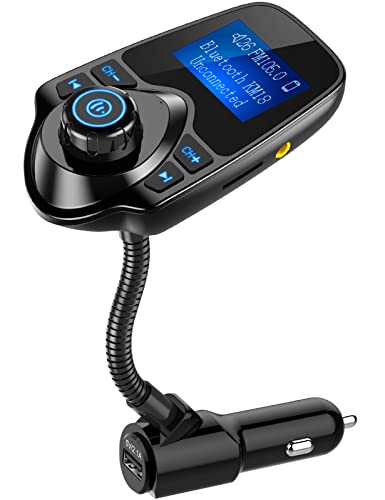
Expert Pick: Why the Nulaxy KM18 FM Transmitter Wins

The Right Scratch Remover for Any Depth, Any Budget

Ceramic Coating Kits Matching Your Skill Level

The Foam Cannons Worth Buying in 2026

Car Cleaning Kits for a Scratch Free Shine

The 2026 Guide to the Best Portable EV Chargers

Choose the Right Level 2 EV Charger: 2026 Guide
