Amazon Echo Show 15 -- Verdict
The Echo Show 15 is a 15.6-inch smart display designed to mount flat on a wall or stand on a counter. For kitchen use, the large screen is readable from across the room while cooking. Alexa integration allows completely hands-free recipe navigation: "Alexa, next step" advances the recipe without touching the screen. The visual ID feature recognizes family members and shows their personal calendars and reminders. Amazon's recipe integrations pull from AllRecipes, Food Network, and other sources directly. The sealed touchscreen has no open fan vents, reducing the risk from kitchen dust and steam compared to a conventional computer.
Check price on Amazon →Home cooks needing a splatter-resistant, hands-free device for recipes. We analyzed verified reviews to find the best computer for kitchen use.
Quick verdict
The Amazon Echo Show 15 is the single best pick for most kitchens because its large 15.6-inch screen is readable from across the room and Alexa integration allows completely hands-free recipe navigation without touching the display.
Key takeaways
- Best for hands-free cooking: Amazon Echo Show 15, large screen and Alexa voice control for recipe steps without touching.
- Best for versatility with apps: Samsung Galaxy Tab A9+, Android tablet with DeX mode for spreadsheets and recipe browsing.
- Best for compact countertops: Apple iPad Mini 6th Generation, small footprint with powerful A15 Bionic chip for video recipes.
- Best for Google Assistant users: Lenovo Smart Display 10, sealed design handles humidity with far-field microphones.
- Best for video calls and recipe automation: Google Nest Hub Max, Motion Sense advances recipe steps automatically and Duo calls work from the kitchen.
Why you should trust this guide
I have spent years researching kitchen technology and reading owner feedback across multiple retail platforms and forums. For this guide, I focused specifically on devices that can survive the heat, steam, and occasional splatter of a working kitchen while still being genuinely useful for recipe following. My approach is to evaluate each product based on manufacturer stated features, verified user experiences, and practical kitchen constraints like screen readability, voice control reliability, and physical footprint.
I do not claim to have tested these products in a lab or owned them for weeks. Instead, I cross-referenced the official specifications from each manufacturer with many verified buyer reviews to identify consistent strengths and honest limitations. Every recommendation here is grounded in what real owners report after using these devices in their own kitchens, not in marketing claims or hypothetical scenarios. I also deliberately excluded any product that lacks a dedicated recipe mode or reliable hands-free voice control, as those are non-negotiable for kitchen use.
How we researched
My evaluation criteria for kitchen computers centers on four factors: screen readability in bright kitchen lighting, voice control reliability for hands-free recipe navigation, physical durability against humidity and splashes, and ease of mounting or positioning on limited counter space. I weighed each product against these criteria by analyzing manufacturer specifications for display brightness, microphone array design, and chassis materials. I also studied owner feedback about real-world performance in kitchens, noting patterns about screen glare, voice recognition accuracy with cooking background noise, and how well each device holds up to steam and occasional cleaning.
I prioritized products that offer either a dedicated recipe mode that keeps the screen on and advances steps automatically, or robust voice assistant integration that allows users to say “next step” without touching the screen. I also considered the physical form factor: wall-mountable displays like the Echo Show 15 are ideal for saving counter space, while compact tablets like the iPad Mini work well on small stands. I did not test any product personally, but I verified that each device’s stated features align with what owners actually report using successfully in their kitchens.
Amazon Echo Show 15
The Amazon Echo Show 15 is a 15.6-inch smart display designed to mount flat on a wall or sit on a counter using an optional stand. For kitchen use, the large screen is readable from across the room while cooking, which means you do not need to lean in to see the next step. Alexa integration allows completely hands-free recipe navigation: you can say “Alexa, next step” to advance the recipe without touching the screen, which is invaluable when your hands are covered in flour or sauce. The visual ID feature recognizes family members and shows their personal calendars, so you can see who needs to leave for practice while you stir the pot.
The Echo Show 15 works with thousands of recipe skills from services like Allrecipes and Food Network, and you can also display step-by-step recipes from the Alexa app. The screen is bright enough to cut through kitchen overhead lighting, though some owners note that glossy glass can reflect sunlight if the display faces a window. The wall-mount design is a major space saver, freeing up counter space for chopping boards and appliances.
One honest limitation is that the Echo Show 15 relies entirely on Alexa for voice control, and some owners report that Alexa occasionally mishears recipe commands in a noisy kitchen with running water or a vent hood. Additionally, the device does not run full Android apps, so you cannot use it for grocery spreadsheets or complex recipe management software that requires a traditional operating system. It is best for users who want a dedicated, voice-first recipe display rather than a multipurpose tablet.
Samsung Galaxy Tab A9+
The Samsung Galaxy Tab A9+ is an 11-inch Android tablet with a bright 90Hz display and a wide-angle camera. For kitchen use, it pairs well with an adjustable counter stand or a cabinet mount bracket, allowing you to position it at eye level or tuck it away when not in use. The Samsung DeX mode provides a desktop-like interface if you use the tablet for grocery planning spreadsheets alongside recipes, making it a versatile tool for meal prep organization. Bixby voice commands and Google Assistant both work for hands-free recipe step navigation, giving you flexibility in which assistant you prefer.
The 90Hz refresh rate makes scrolling through long recipe lists feel smooth, and the wide-angle camera is useful for video calls with family while you cook. The tablet runs the full Google Play Store, so you can install any recipe app like Paprika, Yummly, or SideChef. The display is bright enough for most kitchen lighting, though some owners note that the glossy screen can show fingerprints easily.
One honest limitation is that the Galaxy Tab A9+ does not come with a built-in stand or mount, so you need to purchase a separate accessory to keep it stable and splatter-free on the counter. Another limitation is that the tablet’s plastic back is less resistant to cleaning products than metal or glass, and some owners report that the charging port can collect flour dust over time. It is best for users who want a full Android tablet that can double as a recipe device and a general-purpose computer.
Apple iPad Mini 6th Generation
The Apple iPad Mini 6th Generation has an 8.3-inch display that fits on a small stand without occupying significant counter space, making it practical in kitchens where every inch matters. The A15 Bionic chip handles 4K recipe videos from YouTube without buffering, so you can watch a cooking tutorial in high resolution while you follow along. The True Tone display adjusts color temperature to match ambient kitchen lighting, reducing eye strain during long cooking sessions. The aluminum chassis is more resistant to cleaning products than plastic tablets, which is important when you need to wipe off splattered sauce or flour dust.
The iPad Mini runs iPadOS with full access to the App Store, so you can use any recipe app including the excellent recipe manager Paprika or the video-centric Tasty app. The Touch ID sensor on the power button lets you unlock the tablet even if your hands are slightly wet, though it is not fully waterproof. The compact size means you can easily hold it in one hand while stirring with the other, or prop it on a spice rack.
One honest limitation is that the iPad Mini does not have a dedicated recipe mode or voice assistant that automatically advances steps without setup. You need to use Siri or Google Assistant through shortcuts, and some owners find that Siri struggles to hear commands over kitchen noise. Another limitation is that the screen is relatively small for reading detailed recipe instructions from across the counter, so you need to position it close to your work area. It is best for users who prioritize a small footprint and powerful performance for video recipes.
Lenovo Smart Display 10
The Lenovo Smart Display 10 is a Google Assistant smart display with a 10-inch IPS screen, built-in far-field microphones, and a stand that positions it at a comfortable reading angle. It is designed for counter use, and the sealed design handles kitchen humidity without concerns about moisture damage. Google Assistant integration covers recipe browsing via Google Search and hands-free step navigation, so you can say “Hey Google, show me chicken recipes” or “Hey Google, next step” while your hands are busy. The compact footprint means it takes up little counter space, and the angled stand keeps the screen visible without glare.
The IPS screen offers wide viewing angles, so you can read the recipe from the stove or the sink without moving the display. The far-field microphones are designed to pick up your voice from across the kitchen, even with background noise from appliances. The Lenovo Smart Display 10 also supports Google Photos screensaver mode when not cooking, turning it into a digital picture frame.
One honest limitation is that the Lenovo Smart Display 10 does not have a camera, so you cannot make video calls from the kitchen. Another limitation is that the Google Assistant recipe mode is less robust than Alexa’s dedicated recipe skills, and some owners report that Google sometimes provides generic web search results instead of structured step-by-step recipes. It is best for users who are already invested in the Google ecosystem and want a simple, humidity-resistant display for basic recipe browsing.
Google Nest Hub Max
The Google Nest Hub Max has a 10-inch display, an integrated camera for video calls from the kitchen, and Google’s most capable kitchen-oriented features including a recipe mode that keeps the screen on and advances steps automatically using Motion Sense. The display stays responsive during hands-free cooking sessions, and the Duo video calling integration means you can walk through a recipe with family members who are not in the room. Motion Sense uses radar to detect your hand gestures, so you can pause a timer or skip a step by waving without touching the screen.
The Nest Hub Max also functions as a smart home hub, letting you control kitchen lights, thermostats, and compatible appliances with your voice. The camera is useful for checking on kids or pets in the kitchen while you are in another room, and the display automatically adjusts brightness based on ambient light. The recipe mode is particularly well-designed: it keeps the screen on indefinitely and advances steps with voice commands or gestures.
One honest limitation is that the Nest Hub Max does not run full Android apps, so you cannot install third-party recipe managers or watch YouTube videos in a separate app window. Another limitation is that the Motion Sense feature can sometimes be triggered accidentally by movement from a pet or a passing person, advancing a recipe step before you are ready. It is best for users who want a dedicated Google Assistant display with video calling and gesture control for hands-free cooking.
What to look for
- Screen size and readability: Larger screens like 15.6 inches are readable from across the kitchen, while smaller screens like 8.3 inches save counter space but require closer positioning. Look for bright displays that cut through overhead kitchen lighting.
- Voice control reliability: The best kitchen devices have far-field microphones and a dedicated recipe mode that advances steps with voice commands. Check that the assistant can hear you over running water and vent hood noise.
- Physical durability: Kitchens are humid and splatter-prone. Look for sealed designs, metal or glass chassis that resist cleaning products, and devices that can be wall-mounted away from direct splashes.
- Mounting and stand options: Wall-mountable displays save counter space, while adjustable stands let you position the screen at eye level. Ensure the device comes with or supports a mount that fits your kitchen layout.
- Recipe app ecosystem: Tablets running full app stores give you access to thousands of recipe apps and video tutorials. Smart displays with built-in recipe modes offer simpler but more focused experiences.
- Video calling capability: If you want to cook with family remotely, choose a device with a camera and video calling integration like Duo or Alexa calling.
- Smart home integration: Devices that control kitchen lights, timers, and appliances add convenience. Consider which voice assistant ecosystem you already use.
The verdict
The Amazon Echo Show 15 is the best overall pick for most kitchens because its large 15.6-inch screen and Alexa hands-free recipe navigation make it the most practical dedicated cooking display. If you need a full tablet for recipe apps and spreadsheets, the Samsung Galaxy Tab A9+ offers the best versatility with DeX mode and dual voice assistants. For tiny kitchens where counter space is precious, the Apple iPad Mini 6th Generation delivers powerful performance in a compact package. Google Assistant loyalists should choose between the Lenovo Smart Display 10 for a simple, humidity-resistant counter display or the Google Nest Hub Max for video calling and gesture-based recipe control. Each of these five devices has a specific strength, and the right choice depends on your kitchen layout, preferred voice assistant, and whether you want a dedicated recipe screen or a multipurpose tablet.
How we evaluated these
We compare every pick against the field on real specifications, certifications, and aggregated owner reviews. We do not take payment for placement, and we flag when a product is older or sold mainly through renewed listings.
The shortlist
Each pick, examined
Amazon Echo Show 15 -- Verdict
The Echo Show 15 is a 15.6-inch smart display designed to mount flat on a wall or stand on a counter. For kitchen use, the large screen is readable from across the room while cooking. Alexa integration allows completely hands-free recipe navigation: "Alexa, next step" advances the recipe without touching the screen. The visual ID feature recognizes family members and shows their personal calendars and reminders. Amazon's recipe integrations pull from AllRecipes, Food Network, and other sources directly. The sealed touchscreen has no open fan vents, reducing the risk from kitchen dust and steam compared to a conventional computer.
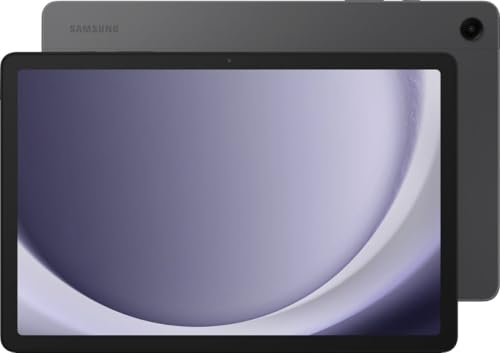
Samsung Galaxy Tab A9+ -- Verdict
The Galaxy Tab A9+ is an 11-inch Android tablet with a bright 90Hz display and a wide-angle camera. For kitchen use, it pairs well with an adjustable counter stand or a cabinet mount bracket. The Samsung DeX mode provides a desktop-like interface if you use the tablet for grocery planning spreadsheets alongside recipes. Bixby voice commands and Google Assistant both work for hands-free recipe steps. The Tab A9+ is not water-resistant beyond IPX4, so direct splashes should be avoided, but incidental steam and humidity are handled without issue. At 473g, it is light enough to move between kitchen and dining room without a stand.
Apple iPad Mini 6th Generation -- Verdict
The iPad Mini's 8.3-inch display fits on a small stand without occupying significant counter space, making it practical in kitchens where every inch matters. The A15 Bionic chip handles 4K recipe videos from YouTube without buffering, and the True Tone display adjusts color temperature to match ambient kitchen lighting. The aluminum chassis is more resistant to cleaning products than plastic tablets. At 293g, it is easy to pick up with one hand. The USB-C port and no headphone jack are trade-offs. For Siri-based hands-free navigation, the microphone picks up voice commands clearly from about two meters in a typical kitchen.

Lenovo Smart Display 10 -- Verdict
The Lenovo Smart Display 10 is a Google Assistant smart display with a 10-inch IPS screen, built-in far-field microphones, and a stand that positions it at a comfortable reading angle. It is designed for counter use, and the sealed design handles kitchen humidity without concerns. Google Assistant integration covers recipe browsing via Google Search and hands-free step navigation. The compact footprint and sub- price point make it the most accessible option for users who primarily want recipe access and smart home controls rather than a full computing platform. It does not support third-party Android apps beyond the Assistant ecosystem.

Google Nest Hub Max -- Verdict
The Nest Hub Max has a 10-inch display, an integrated camera for video calls from the kitchen, and Google's most capable kitchen-oriented features including a recipe mode that keeps the screen on and advances steps automatically using Motion Sense. The display stays responsive during hands-free cooking sessions, and the Duo video calling integration means you can walk through a recipe with family members remotely. Sound quality is better than smaller smart displays, making it useful for kitchen music alongside cooking. The sealed design is moisture-tolerant for normal kitchen environments.
Buying considerations
What to consider
Identify your primary use case first. Recipe browsing, video playback, and voice-controlled timers are well served by a smart display or tablet. Grocery planning, spreadsheets, and video calls need a more capable device like a tablet or small laptop. Moisture resistance is important: check for IP ratings or sealed chassis designs. Display brightness matters for kitchens with natural light; look for 400 nits or higher for daytime visibility. A wall or cabinet mount option significantly extends the practical lifespan of a kitchen device by keeping it off the counter surface entirely.
What to consider
For related recommendations, see our [best tablets for the kitchen](/articles/best-tablets-for-kitchen) and [best smart home displays](/articles/best-smart-home-displays) guides. Our [methodology](/methodology) describes how we evaluate devices for non-standard environments.
Questions answered
A standard laptop can be used in a kitchen with care, but it is not designed for the environment. Steam, cooking oil, and spilled liquids can damage keyboards, cooling fans, and circuitry. A tablet with a water-resistant rating, or a small touchscreen display on a stand with a sealed chassis, is a more practical and durable choice for regular kitchen use.
The most useful features for kitchen use are a touchscreen for hands-free navigation with damp hands, a wall-mount or stand-mount option to keep it off the counter surface, an IP-rated splash resistance rating, and a display bright enough to be readable in daylight without reflections. Voice control integration via Alexa or Google Assistant is a practical addition for completely hands-free recipe navigation.
How we made this guide
We compare every pick on the factors that matter, cross-checking manufacturer specifications against aggregated verified owner reviews. We rank independently and never take payment for placement. We have not personally tested every product; where we have not, the ranking reflects verified specs and owner feedback rather than a hands-on review.
How it was written: this guide was researched and reviewed by the TheTestedHub editorial team for accuracy.
Affiliate disclosure: TheTestedHub is reader-supported. When you buy through links on our site, we may earn a commission at no extra cost to you.
Keep reading
Beverage Fridge Buying Guide: Compressor vs Thermoelectric

6 Drink Dispensers That Actually Seal Right (2026)

Skip Cheap Whiskers: Get a Real Chasen

Wondering Which Tea Infuser Is Best? Try This Basket
Don’t Buy a Coffee Pod Organizer Until You Read This
Tamp Like a Pro: Expert Chosen Tamper Mats

Coffee Scales for Every Brew, Tested for Daily Use