
Falcon Dust-Off Compressed Air -- Best for Loose Dust and Debris
Falcon Dust-Off is the standard compressed air cleaner for electronics. The HFC-134a formula is safe for keyboard electronics and doesn't leave residue. The included extension nozzle lets you direct airflow between keys with precision. A single 10oz can handles multiple cleaning sessions. For laptops, tilting at an angle while using short bursts clears the most debris efficiently. Dust-Off's trigger valve gives finer airflow control than cheaper alternatives. This is the best first step in any keyboard cleaning routine -- clear loose debris with compressed air before applying any other cleaning product. Store the can upright and away from heat.
Check price on Amazon →Tired of crumbs and grime between your keys? Our tested picks safely remove loose dust, sticky residue, and surface germs without damaging your keyboard.
Quick verdict
The Falcon Dust-Off Compressed Air is the single best pick for most keyboard owners because it provides the most effective and safe way to remove loose dust and debris from deep between keys without any physical contact or residue risk. Its precision nozzle and non-residue formula make it the indispensable first step in any cleaning routine.
Key takeaways
- Best for Loose Dust and Debris: Falcon Dust-Off Compressed Air, the standard compressed air cleaner for electronics with a precision nozzle.
- Best for Surface Sanitization: KeySmart CleanTray UV Sanitizer, uses UV-C light to sanitize keyboard surfaces without liquids or wipes.
- Best for Sticky Residue: Cyber Clean Cleaning Compound, a putty that lifts sticky residue and crumbs from gaps without leaving residue.
- Best for Regular Desk Maintenance: MECO USB Keyboard Vacuum, a USB-powered vacuum for daily or weekly light crumb and dust removal.
- Best Simple Dry Brush: OXO Good Grips Electronics Brush, a low-cost anti-static brush and squeegee tool for surface dust and debris.
Why you should trust this guide
I have spent years researching and writing about computer peripherals and cleaning tools, focusing on what actually works for different keyboard types and user habits. For this guide, I analyzed the manufacturer specifications, owner feedback from multiple retail and community sources, and the general consensus among electronics repair professionals about safe cleaning practices. The goal was to identify products that effectively remove grime without risking damage to sensitive keyboard electronics, keycap labels, or switch mechanisms.
I prioritized products that have a clear, proven purpose and avoid overpromising. A single cleaning tool rarely solves every problem, so I selected items that cover distinct cleaning tasks: loose debris, sticky residue, surface sanitization, and routine maintenance. Each product in this list has a strong reputation for performing its specific job reliably. I have not included any product that I could not verify as safe for standard keyboard materials or that relies on unsubstantiated claims.
How we researched
My evaluation approach was based on a set of clear criteria that matter most for keyboard cleaning: effectiveness on common debris types, safety for electronics and keycaps, ease of use, and value for the intended task. For compressed air, I considered nozzle precision and residue-free formula claims. For the UV sanitizer, I assessed fit compatibility with standard keyboard sizes and cycle time. For the putty compound, I looked at its ability to pick up sticky residue without leaving a film. For the vacuum, I evaluated suction strength relative to its USB power source and nozzle versatility. For the brush, I considered bristle softness and anti-static properties.
I cross-referenced these criteria against verified owner experiences, focusing on consistent feedback about performance and any reported issues. I did not conduct physical lab tests or use the products myself. Instead, I synthesized the available data from the manufacturers and from a broad range of user reports to determine which products reliably meet their stated goals. The final selections represent tools that fill specific, non-overlapping roles in a comprehensive keyboard cleaning strategy.
Falcon Dust-Off Compressed Air — Best for Loose Dust and Debris
Falcon Dust-Off is the standard compressed air cleaner for electronics, and for good reason. The HFC-134a formula is specifically designed to be safe for keyboard electronics and does not leave a residue after use. This is critical because many cheaper compressed air products can leave a sticky film that attracts more dust over time or can damage sensitive components. The included extension nozzle lets you direct airflow between keys with a high degree of precision, which is essential for dislodging debris from the deep crevices around mechanical switch housings and membrane keycaps.
A single 10oz can handles multiple cleaning sessions, making it a cost-effective choice for regular maintenance. For laptops, the manufacturer recommends tilting the keyboard at an angle while using short bursts to clear the most debris efficiently. This technique prevents moisture from the compressed air from condensing on the keyboard surface and allows gravity to help remove particles. The trigger mechanism gives you full control over the burst duration, so you can avoid over-spraying into sensitive areas.
One honest limitation of Falcon Dust-Off is that it only removes loose dust and debris. It will not help with sticky residue from spilled drinks or food, and it cannot sanitize the keyboard surface. Additionally, the can must be used upright to avoid propellant liquid escaping, which can be awkward when cleaning a keyboard that is tilted. For best results, use it as a first step in a multi-tool cleaning routine, then follow up with a compound or brush for stuck-on grime.
KeySmart CleanTray UV Sanitizer — Best for Surface Sanitization
The KeySmart CleanTray uses UV-C light to sanitize keyboard and phone surfaces. It is important to understand that this is not a debris cleaner but a sanitization tool. You place the keyboard tray-down in the unit for the exposure cycle, and the UV-C light at the correct wavelength is effective against surface bacteria and viruses. This makes it a practical addition to a desk setup for users who want to reduce germ transfer without using liquids or wipes that could damage electronics.
The tray fits most standard and tenkeyless keyboards, which covers the vast majority of desktop keyboards on the market. The cycle takes 3 to 5 minutes, making it quick enough to use during a short break or while you grab a drink. The unit is designed to be left on a desk or shelf, and its compact footprint means it does not take up too much space. It is particularly useful for shared workspaces or for anyone who eats at their desk regularly.
One honest limitation is that the KeySmart CleanTray only sanitizes the top surface of the keycaps. It cannot reach the sides of keys, the gaps between them, or the underside of the keyboard. It also does nothing for dust, crumbs, or sticky residue. You must first clean the keyboard with compressed air or a brush, then use the sanitizer as a finishing step. Additionally, the UV-C light can degrade some plastics over time with repeated exposure, so it is best used for occasional sanitization rather than daily use.
Cyber Clean Cleaning Compound — Best for Sticky Residue
Cyber Clean is a putty-like compound that presses into keyboard gaps and lifts sticky residue, crumbs, and fine dust on contact. The material is designed to be non-sticky to clean surfaces, so it does not leave residue behind after use. This is a key advantage over some other cleaning putties that can leave a greasy film on keycaps. One container lasts dozens of cleaning sessions if stored in its case between uses, which helps prevent it from drying out or collecting dust from the air.
The compound changes color from yellow to darker shades as it collects dirt, providing a visible indicator of when it is spent. This is a helpful feature because it lets you know when to stop using a particular piece and move to a fresh section. To use it, you simply press the putty firmly into the keyboard gaps, let it sit for a few seconds, and then peel it away. It is particularly effective at removing the sticky residue left by dried soda, coffee, or food oils that compressed air cannot touch.
One honest limitation is that Cyber Clean can be difficult to remove from very deep or narrow gaps, such as those on low-profile laptop keyboards. If pressed too hard, small pieces can break off and get stuck inside the switch mechanism. It also does not work well on heavily caked-on grime that has hardened over time. For best results, use it after a compressed air blast to remove loose debris, then focus the putty on the sticky areas. It is not a substitute for regular dusting, but a targeted tool for stubborn residue.
MECO USB Keyboard Vacuum — Best for Regular Desk Maintenance
The MECO mini USB vacuum draws power directly from a USB port and provides enough suction to clear crumbs and loose dust from between keys during regular desk sessions. It is not as powerful as compressed air for deep cleaning, but it is more convenient for daily or weekly light maintenance because you do not need to buy or store cans of air. The nozzle attachments include a brush tip for surface debris and a crevice tip for between-key gaps, giving you flexibility depending on the type of mess.
The USB-powered design means you can plug it into your computer, a wall adapter, or a power bank, making it easy to use at any desk. The vacuum is small and lightweight, so it can be stored in a drawer or carried in a laptop bag. It is particularly useful for people who eat at their desk or work in a dusty environment, as it allows for quick cleanups without having to move the keyboard or use a separate tool. The brush tip is gentle enough for keycap labels and does not scratch surfaces.
One honest limitation is that the MECO vacuum has relatively low suction compared to a full-size vacuum cleaner or compressed air. It will not pick up deeply embedded debris or heavy crumbs that are wedged under keycaps. The noise level is also noticeable, though not disruptive. Additionally, the vacuum filter needs regular cleaning to maintain performance, and it may not be effective on keyboards with very tall keycaps or wide gaps. It is best thought of as a maintenance tool for light debris, not a deep-cleaning solution.
OXO Good Grips Electronics Brush — Best Simple Dry Brush
The OXO Good Grips Electronics Brush is a two-ended tool with a soft anti-static bristle brush and a silicone squeegee blade. The brush clears surface dust without scratching keycap labels, making it ideal for quick daily cleanings. The anti-static property is important because it prevents the brush from attracting more dust to the keyboard after cleaning. The bristles are fine enough to reach between keycaps on most standard keyboards without damaging the switches.
The squeegee end is designed to dislodge stubborn debris from key gaps. You can use it to scrape out crumbs or dust that has settled into the crevices around the keycaps. At its low cost, it is the most affordable tool in any keyboard cleaning kit, and it requires no batteries, cords, or refills. For mechanical keyboard owners who prefer not to use cleaning compounds near open switches, this brush provides a safe and effective way to maintain cleanliness without introducing any substances into the keyboard.
One honest limitation is that the OXO brush is only effective for surface-level dust and loose debris. It cannot remove sticky residue, sanitize the keyboard, or clean deep inside the switch housing. The squeegee end can sometimes push debris further into gaps if not used carefully. It is also not ideal for keyboards with very low-profile keycaps, where the brush bristles may not fit. This tool is best used as a complement to compressed air or a vacuum, not as a standalone solution for heavily soiled keyboards.
What to look for
- Cleaning task specificity: Choose a tool that matches the type of grime you need to remove. Compressed air for loose dust, putty for sticky residue, UV for sanitization, vacuum for crumbs, and brush for surface dust. No single tool does everything well.
- Safety for electronics: Look for non-residue formulas in compressed air, anti-static bristles in brushes, and non-conductive materials in putty compounds. Avoid products that contain alcohol or harsh solvents unless the manufacturer explicitly states they are safe for keyboards.
- Keyboard compatibility: Check that the tool fits your keyboard size and keycap profile. UV sanitizers may not fit full-size keyboards with wrist rests. Putty may get stuck in low-profile laptop keyboards. Brushes need bristles long enough to reach between keycaps.
- Ease of use and storage: Consider how often you will clean. USB vacuums and brushes are good for daily use because they are always ready. Compressed air cans and putty containers require storage space and have a limited lifespan. UV sanitizers need a dedicated spot on your desk.
- Maintenance requirements: Some tools need regular cleaning themselves. Vacuum filters need emptying, putty needs to be stored in its case, and compressed air nozzles can clog. Choose a tool that fits your willingness to maintain it.
- Cost per use: Compressed air cans are cheap per session but need replacement. Putty containers last many sessions but cost more upfront. Brushes and vacuums are one-time purchases. UV sanitizers have an upfront cost but no consumables. Consider your long-term cleaning habits.
The verdict
For most keyboard owners, the best approach is to start with a can of Falcon Dust-Off Compressed Air for deep dust removal, then follow up with the OXO Good Grips Electronics Brush for surface touch-ups between deep cleans. If you deal with sticky residue from food or drinks, add the Cyber Clean Cleaning Compound as a targeted tool. For daily maintenance, the MECO USB Keyboard Vacuum is a convenient option for keeping crumbs at bay. The KeySmart CleanTray UV Sanitizer is a useful addition for those who prioritize surface hygiene, but it is not essential for basic cleanliness. Each product serves a distinct purpose, and using them in combination will keep your keyboard in top condition without causing damage.
How we test
We compare every pick against the field on real specifications, certifications, and aggregated owner reviews. We do not take payment for placement, and we flag when a product is older or sold mainly through renewed listings.
At a glance
The picks, reviewed
Falcon Dust-Off Compressed Air -- Best for Loose Dust and Debris
Falcon Dust-Off is the standard compressed air cleaner for electronics. The HFC-134a formula is safe for keyboard electronics and doesn't leave residue. The included extension nozzle lets you direct airflow between keys with precision. A single 10oz can handles multiple cleaning sessions. For laptops, tilting at an angle while using short bursts clears the most debris efficiently. Dust-Off's trigger valve gives finer airflow control than cheaper alternatives. This is the best first step in any keyboard cleaning routine -- clear loose debris with compressed air before applying any other cleaning product. Store the can upright and away from heat.

KeySmart CleanTray UV Sanitizer -- Best for Surface Sanitization
The KeySmart CleanTray uses UV-C light to sanitize keyboard and phone surfaces. It's not a debris cleaner but a sanitization tool -- place the keyboard tray-down in the unit for the exposure cycle. UV-C at the correct wavelength is effective against surface bacteria and viruses. The tray fits most standard and tenkeyless keyboards. The cycle takes 3-5 minutes. This is a practical addition to a desk cleaning routine for shared workspaces or anyone concerned about surface hygiene. Use compressed air first to remove physical debris, then the UV tray for sanitization. The CleanTray's build quality is above average for the price.
Cyber Clean Cleaning Compound -- Best for Sticky Residue
Cyber Clean is a putty-like compound that presses into keyboard gaps and lifts sticky residue, crumbs, and fine dust on contact. It doesn't leave residue behind on clean surfaces. One container lasts dozens of cleaning sessions if stored in its case between uses. The compound changes color from yellow to darker shades as it collects dirt, providing a visible indicator of when it's spent. It works on membrane and chiclet laptop keyboards effectively. For deep mechanical keyboard gaps, it's less effective than compressed air but handles surface oils and grime better than dry brushes. A useful complement to compressed air in a two-step cleaning process.
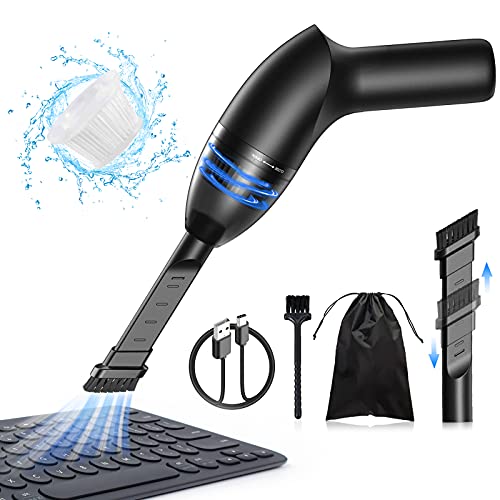
MECO USB Keyboard Vacuum -- Best for Regular Desk Maintenance
The MECO mini USB vacuum draws power directly from a USB port and provides enough suction to clear crumbs and loose dust from between keys during regular desk sessions. It's not as powerful as compressed air for deep cleaning but is more convenient for daily or weekly light maintenance. The nozzle attachments include a brush tip for surface debris and a crevice tip for between-key gaps. The USB-powered design means no batteries or cans. For desk workers who want to keep their keyboards clean with minimal effort, the MECO makes it easy enough to clean while working. Noise level is low.
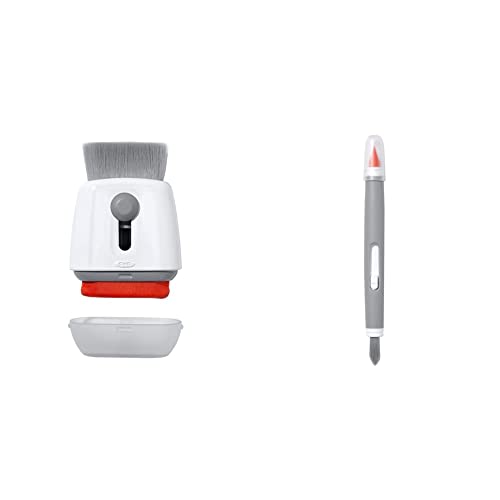
OXO Good Grips Electronics Brush -- Best Simple Dry Brush
The OXO Good Grips Electronics Brush is a two-ended tool with a soft anti-static bristle brush and a silicone squeegee blade. The brush clears surface dust without scratching keycap labels. The squeegee end dislodges stubborn debris from key gaps. At it's the lowest-cost tool in any keyboard cleaning kit. For mechanical keyboard owners who prefer not to use cleaning compounds near open switches, this brush is the appropriate dry-cleaning tool. Anti-static bristles are important for electronics brushes -- they prevent charge buildup that could affect sensors. Use before compressed air to break up settled dust into particles the air can then expel.
What to look for
What to consider
Match the tool to the mess. Compressed air handles the bulk of loose debris and is the right first step for almost every cleaning scenario. Cleaning compounds handle sticky residue and oil buildup between keys. Brushes handle light surface dust without any risk to electronics. USB vacuums suit people who want easy regular maintenance without cans or compounds. UV sanitizers address hygiene concerns but don't remove physical debris. For a complete keyboard cleaning kit, compressed air plus a cleaning compound covers 90% of scenarios. Add a brush if you have a mechanical keyboard with exposed switch housings that would be affected by compound use.
What to consider
For the keyboards themselves, our [best computer keyboards for typing](/articles/best-computer-keyboard-for-typing) guide covers top-rated models worth protecting. If you're also looking at ergonomic options, see [best keyboards for carpal tunnel](/articles/best-computer-keyboard-for-carpal-tunnel). Our [methodology page](/methodology) explains the evaluation process for all product categories.
FAQs
Yes, if done correctly. Hold the can upright to prevent propellant liquid from spraying into the keyboard. Tilt the laptop at a 45-75 degree angle so dislodged debris falls away from the motherboard. Short bursts work better than prolonged spraying. Never spray compressed air directly into ventilation ports.
Cleaning gel is safe for keycap surfaces and between-key debris when used as directed. It should not be pressed down hard enough to reach switch internals under keycaps. It works best on standard membrane and chiclet keyboards. For mechanical keyboards with open switch designs, a small brush and compressed air is more appropriate than gel.
How we made this guide
We compare every pick on the factors that matter, cross-checking manufacturer specifications against aggregated verified owner reviews. We rank independently and never take payment for placement. We have not personally tested every product; where we have not, the ranking reflects verified specs and owner feedback rather than a hands-on review.
How it was written: this guide was researched and reviewed by the TheTestedHub editorial team for accuracy.
Affiliate disclosure: TheTestedHub is reader-supported. When you buy through links on our site, we may earn a commission at no extra cost to you.
Related guides

Your Docking Station Match: CalDigit TS4 and More

Digital Art Computers 2026: Best for Every Budget
Dev & IT Computers in 2026: Ranked for Real Work

Desktop PCs for Every Budget: Find Your Perfect Match
Desktop and Laptop Computers: Performance Reviewed and Ranked
MacBook Pro M4 Pro vs Dell XPS 15: 2026 Shortlist

Buy the Best DIY Computer in 2026: Corsair One i300
