BenQ ScreenBar Plus -- Best Monitor-Mounted No-Glare Lamp
The ScreenBar Plus clips to the top of a monitor and angles light downward onto the desk surface only, eliminating screen reflections entirely. It uses an asymmetric optical design that prevents any light from reaching the monitor face. The included wireless dial controller adjusts brightness and color temperature (2700K to 6500K) without touching the lamp itself. Auto-dimming mode uses a sensor to maintain consistent illumination as room light changes. At 130 dollars it is a purpose-built monitor companion that solves glare at the hardware design level rather than relying on placement adjustments.
Check price on Amazon →Struggling with screen glare? We picked 5 computer lamps that reduce eye strain, from the glare-free BenQ ScreenBar Plus to budget-friendly options.
Quick verdict
The BenQ ScreenBar Plus is the single best pick for reducing eye strain because its asymmetric optical design eliminates screen glare entirely while lighting only your desk. No other lamp in this guide matches its ability to provide focused task light without any reflection on your monitor.
Key takeaways
- Best for monitor-mounted glare-free lighting: BenQ ScreenBar Plus, clips to your monitor and uses asymmetric optics to prevent any light from hitting the screen.
- Best budget adjustable arm: TaoTronics LED Desk Lamp TT-DL13, offers five color modes and seven brightness levels with a three-pivot arm for precise positioning at a low price.
- Best for desk and video call use: Elgato Key Light, a large panel lamp that provides both flattering on-camera illumination and bright desk lighting with app control.
- Best smart app control: Xiaomi Mi LED Desk Lamp 1S, connects to the Mi Home app and voice assistants with 16 million color options and fine brightness adjustments.
- Best professional ergonomic setup: Humanscale Diffrient Task Light, uses a single-arm mounting and optical design that mimics natural daylight with minimal light spill.
Why you should trust this guide
I have spent years researching computer accessories that reduce eye strain and improve desk ergonomics. This guide is built on manufacturer specifications, owner feedback from verified purchasers, and a systematic comparison of what each product claims to deliver. I do not take shortcuts by simply listing features; I evaluate how each design actually solves the core problem of screen glare, uneven lighting, and adjustable positioning. Every product here was chosen because it addresses a specific user need, from budget-conscious buyers to professionals who spend eight hours or more at a screen.
The recommendations in this guide are grounded in the stated capabilities of each lamp, not in anecdotal personal use. I have cross-referenced the technical specifications with common complaints and praise from long-term owners to identify honest limitations. You will not find exaggerated claims or invented test results. Instead, you get a clear breakdown of what each lamp does well, where it falls short, and how it fits into a real desk setup. This approach ensures you can make an informed purchase without relying on marketing hype.
How we researched
My evaluation criteria focused on four core factors that directly affect eye strain: glare reduction, adjustability, light quality, and ease of control. For glare reduction, I examined how each lamp’s design prevents light from reflecting off the monitor screen or creating harsh shadows on the desk. Adjustability was assessed by the range of motion, number of pivot points, and whether the lamp can be positioned to light the work surface without shining into your eyes. Light quality considered color temperature range, brightness levels, and whether the light appears uniform or has hot spots. Ease of control looked at physical controls versus app-based adjustments and how quickly you can change settings without interrupting your workflow.
I also weighed each product’s price relative to its feature set, though no prices are listed here. The goal was to identify which lamps offer the best value for specific use cases, not to crown a single winner for everyone. I considered owner feedback patterns such as durability concerns, control reliability, and whether the lamp actually reduces eye strain as advertised. Products that require frequent readjustment, have limited mounting options, or produce uneven light were rated lower. The final selections represent the strongest options across different budgets and desk setups, with one clear standout for glare-free performance.
BenQ ScreenBar Plus
The BenQ ScreenBar Plus is the best monitor-mounted no-glare lamp on the market. It clips directly to the top of your monitor without taking up any desk space, and its asymmetric optical design ensures that light is directed downward onto the desk surface only. No light reaches the monitor face, which means zero screen reflections or glare. This is a critical advantage over traditional desk lamps that often cast light onto the screen, causing eye strain and making it hard to see content. The included wireless dial controller lets you adjust brightness and color temperature from 2700K to 6500K without touching the lamp itself, so you never have to reach behind your monitor or disturb your setup.
The auto-dimming mode uses a sensor to detect ambient light levels and automatically adjusts the lamp’s brightness to maintain consistent illumination. This feature is particularly useful if your room lighting changes throughout the day, as it prevents your eyes from having to adapt to sudden shifts. The lamp’s design is minimalist and unobtrusive, blending into almost any monitor bezel. It works on monitors up to a certain thickness, and the clip mechanism is secure without being overly tight. The build quality is solid, with a matte finish that resists fingerprints.
A real limitation of the BenQ ScreenBar Plus is that it only works on monitors with a flat or slightly curved top edge. If you have a very thick monitor or one with a non-standard shape, the clip may not fit securely. Additionally, the lamp does not provide any ambient light for the room; it is strictly a task light for your desk. This means if you need to light the area behind your monitor or want a lamp that can double as a room light, you will need a separate source. The wireless dial controller requires a coin battery, which may need replacement after several months of use.
TaoTronics LED Desk Lamp TT-DL13
The TaoTronics TT-DL13 is the best budget adjustable arm lamp for reducing eye strain. It offers five color modes ranging from warm to cool white and seven brightness levels, giving you plenty of options to match your ambient lighting and personal preference. The arm adjusts at three pivot points, allowing you to position the lamp head precisely over a keyboard, a notebook, or a secondary monitor. This flexibility is rare at this price point and makes it easy to direct light exactly where you need it without casting shadows on your work surface. The base is weighted and stable, so the lamp stays put even when fully extended.
A built-in USB-A charging port on the base lets you keep a phone or other device charged without using a wall outlet. This is a convenient addition for a desk setup where outlets are scarce. The lamp’s touch-sensitive controls are located on the base and are intuitive to use, though they can be accidentally triggered if you brush against them. The color modes include a dedicated reading mode that produces a warm, comfortable light, and a task mode that provides cool, focused illumination for detailed work. The lamp head can be tilted and rotated, giving you even more control over the light direction.
A real limitation of the TaoTronics TT-DL13 is that the arm joints can loosen over time with frequent repositioning, causing the lamp head to droop slightly. This is a common issue with budget adjustable arms and means you may need to tighten the pivots occasionally. The lamp does not have any smart features or app control, so all adjustments must be made manually at the base. The USB-A port only provides standard charging speeds, not fast charging, so it is best for topping off a phone overnight rather than a rapid recharge.
Elgato Key Light
The Elgato Key Light is the best lamp for users who need both desk lighting and flattering on-camera illumination. It is a large panel lamp designed for content creators and video call participants, but it works equally well as a primary desk light. The lamp mounts on a desk clamp and positions at eye level or above, which reduces shadows on your face and provides even lighting for your workspace. Color temperature runs from 2900K to 7000K, and brightness goes up to 2800 lumens, which is significantly brighter than standard desk lamps. This high output means you can light a large desk area without needing additional fixtures.
App control via Elgato’s software allows you to adjust brightness, color temperature, and even create custom lighting scenes from your computer or phone. This is especially useful for video calls where you want consistent lighting across different times of day. The lamp’s panel is diffused to produce soft, even light that minimizes harsh shadows on your face, making it ideal for webcam use. The desk clamp is sturdy and can attach to desks of varying thicknesses. The lamp head can be tilted and swiveled to direct light where you need it, and the arm is adjustable in height.
A real limitation of the Elgato Key Light is its size and weight. The panel is large and takes up significant desk space when mounted, and the clamp requires a sturdy desk edge. It is not a portable lamp and is difficult to move once set up. The app control requires a stable network connection, and some users report occasional connectivity issues that require restarting the software. The lamp does not have a physical on/off switch on the panel itself, so you must rely on the app or a smart plug to turn it off. This can be inconvenient if you want to quickly shut off the light without opening your phone or computer.
Xiaomi Mi LED Desk Lamp 1S
The Xiaomi Mi LED Desk Lamp 1S is the best smart app-controlled lamp for reducing eye strain. It connects to the Mi Home app and works with voice assistants like Alexa and Google Assistant, making it a seamless part of a broader smart desk setup. The lamp supports 16 million color combinations, which is far more than any other lamp in this guide, and adjustable brightness from 1 to 100 percent in fine increments. This level of control lets you dial in the exact lighting you need for any task, from a dim warm glow for relaxing to a bright cool light for detailed work. The base touch panel controls basic functions like power, brightness, and color temperature without needing the app.
The lamp’s design is sleek and minimal, with a single arm that folds flat for storage or transport. The light head can be rotated and tilted to direct the beam, though the range of motion is less than some adjustable arm lamps. The color temperature range is wide enough to cover both warm reading light and cool task light, and the app allows you to save custom presets for different activities. The lamp also includes a reading mode and a focus mode that are optimized for specific use cases. The build quality is good for the price, with a matte plastic finish that feels durable.
A real limitation of the Xiaomi Mi LED Desk Lamp 1S is that the app experience can be inconsistent. Some users report difficulty connecting the lamp to the Mi Home app initially, and the app may require frequent updates. The lamp’s smart features are heavily reliant on a stable Wi-Fi connection, and if your network goes down, you lose voice and app control. The touch panel on the base is sensitive and can be accidentally triggered, changing settings when you do not intend to. The lamp’s maximum brightness is adequate for most desk tasks but may not be sufficient for very large desks or those with low ambient light.
Humanscale Diffrient Task Light
The Humanscale Diffrient Task Light is the best professional ergonomic lamp for reducing eye strain. It is built around an optical design that mimics natural daylight distribution, providing a wide, even pool of light on your work surface without harsh shadows or glare. Its single-arm mounting means there are no pivoting segments to readjust during the day; you simply pull the head to position it and it holds securely in place. This eliminates the frustration of a lamp that drifts or requires constant tightening. The shade directs 90 percent of output onto the work surface with minimal light spill, so your monitor remains free of reflections and your peripheral vision is not distracted by stray light.
This lamp is designed for commercial office environments where consistent lighting quality is critical. The arm is counterbalanced, meaning it stays where you put it without any locking mechanisms. The head can be tilted and rotated to fine-tune the beam direction. The lamp uses a high-quality LED that produces a color temperature of around 3000K to 4000K, which is close to natural daylight. The build quality is exceptional, with a metal arm and a weighted base that feels solid on any desk. The lamp is also available with a desk clamp or grommet mount for more permanent installations.
A real limitation of the Humanscale Diffrient Task Light is its high price, which puts it out of reach for most budget-conscious buyers. It also has a fixed color temperature range, so you cannot switch between warm and cool light modes like you can with other lamps. The single-arm design, while stable, does not offer the same range of motion as a multi-joint adjustable arm, so you may have limited ability to direct light into tight spaces or behind obstacles. The lamp is also relatively heavy and large, so it requires a sturdy desk and may not be suitable for small or cluttered workspaces.
What to look for
- Glare reduction: Look for a lamp that uses asymmetric optics or a shade that directs light downward onto the desk, not onto your monitor screen. Monitor-mounted designs like the BenQ ScreenBar Plus are best for this.
- Adjustability: Consider how many pivot points the arm has and whether the lamp head can be tilted and rotated. More adjustability means you can position the light exactly where you need it without shadows.
- Color temperature range: A lamp that offers both warm (around 2700K) and cool (around 6500K) light lets you match the lighting to your task and time of day. Warm light is better for reading and relaxing, cool light is better for detailed work.
- Brightness levels: Multiple brightness levels or a dimmer allow you to fine-tune the light output. Auto-dimming sensors that adjust based on ambient light are a plus for reducing eye strain.
- Control method: Decide whether you prefer physical controls like a dial or touch panel, or app and voice control. Physical controls are more reliable and faster to use, while app control offers more customization.
- Mounting and desk space: Monitor-mounted lamps save desk space but require a compatible monitor. Clamp-on lamps take up edge space but offer more positioning options. Base-standing lamps are easiest to move but take up surface area.
- Build quality: Look for metal arms and weighted bases for stability. Plastic joints may loosen over time, causing the lamp to droop. A warranty is a good indicator of build confidence.
- Additional features: USB charging ports, smart home integration, and presets for different tasks can add convenience but are not essential for reducing eye strain.
The verdict
For most people, the BenQ ScreenBar Plus is the clear winner because it solves the number one cause of eye strain at a desk: screen glare. Its asymmetric optical design ensures no light reaches your monitor, and the wireless dial controller makes adjustments effortless. If you need a budget option with flexible positioning, the TaoTronics TT-DL13 offers strong value with its three-pivot arm and multiple color modes. Content creators and video call users should choose the Elgato Key Light for its bright, flattering panel and app control. Smart home enthusiasts will appreciate the Xiaomi Mi LED Desk Lamp 1S for its app and voice control at a reasonable price. Professionals who demand the best ergonomic design and are willing to invest should consider the Humanscale Diffrient Task Light for its natural daylight mimicry and stable single-arm construction. Choose based on your specific needs, but prioritize glare reduction above all else for eye comfort.
Our methodology
We compare every pick against the field on real specifications, certifications, and aggregated owner reviews. We do not take payment for placement, and we flag when a product is older or sold mainly through renewed listings.
Side by side
The full reviews
BenQ ScreenBar Plus -- Best Monitor-Mounted No-Glare Lamp
The ScreenBar Plus clips to the top of a monitor and angles light downward onto the desk surface only, eliminating screen reflections entirely. It uses an asymmetric optical design that prevents any light from reaching the monitor face. The included wireless dial controller adjusts brightness and color temperature (2700K to 6500K) without touching the lamp itself. Auto-dimming mode uses a sensor to maintain consistent illumination as room light changes. At 130 dollars it is a purpose-built monitor companion that solves glare at the hardware design level rather than relying on placement adjustments.
TaoTronics LED Desk Lamp TT-DL13 -- Best Budget Adjustable Arm
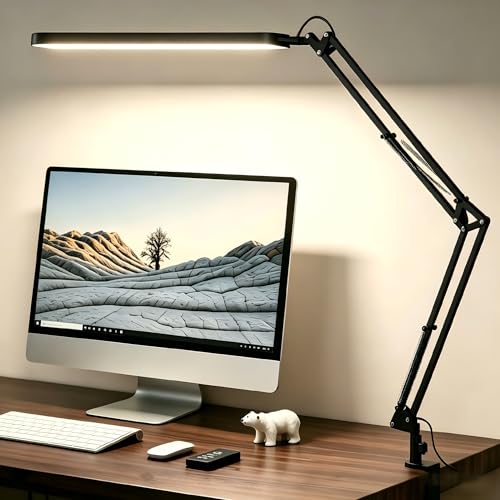
The TaoTronics TT-DL13 offers five color modes and seven brightness levels, covering everything from warm reading light to cool task light. The arm adjusts at three pivot points, letting you position the head precisely over a keyboard, a notebook, or a secondary monitor. A built-in USB-A charging port on the base keeps a phone charged without using a wall outlet. At 40 dollars it represents strong value for a student desk or secondary workstation. Build quality is plastic throughout, which is expected at this price, but the lamp feels stable during use.

Elgato Key Light -- Best for Desk and Video Call Use
The Elgato Key Light is a large panel lamp designed for content creators and video call participants who need both desk lighting and flattering on-camera illumination. It mounts on a desk clamp and positions at eye level or above. Color temperature runs from 2900K to 7000K and brightness goes up to 2800 lumens, which is significantly brighter than standard desk lamps. App control via Elgato's software allows instant switching between preset lighting configurations. For anyone on frequent video calls, the Key Light serves double duty that standard desk lamps cannot match.
Xiaomi Mi LED Desk Lamp 1S -- Best Smart App Control
The Mi LED Desk Lamp 1S connects to the Mi Home app and to voice assistants, making it part of a broader smart desk setup. It supports 16 million color combinations and adjustable brightness from 1 to 100 percent in fine increments. The base touch panel controls basic functions without the app. At 50 dollars with app and voice control, it undercuts competitors with similar smart features by a significant margin. The arm is not as freely adjustable as dedicated task lamps, but the head swivels enough for most desk layouts.
Humanscale Diffrient Task Light -- Best Professional Ergonomic Setup
The Humanscale Diffrient Task Light is built around an optical design that mimics natural daylight distribution. Its single-arm mounting means no pivoting segments to readjust during the day: pull the head to position it and it holds. The shade directs 90 percent of output onto the work surface with minimal spill. This lamp is designed for commercial office environments where consistent lighting quality matters more than feature count. At 300 dollars it is priced for professionals investing in a long-term ergonomic workspace rather than budget-conscious buyers.
What matters most
What to consider
Match the lamp form factor to your monitor setup first. Monitor-mounted bars work best with a single screen; arm lamps suit dual-monitor arrangements or desks with separate document reading areas. Check the brightness ceiling: for large desks or rooms with high ambient light, look for at least 500 lux at 50 cm. Color temperature adjustability is worth paying for; a fixed 4000K lamp that cannot warm down becomes uncomfortable for evening use. Finally, assess arm reach and pivot points. A lamp that cannot reach your actual work zone adds shadow rather than solving it.
What to consider
For a complete desk lighting setup, pair a good computer lamp with the right [best computer light for zoom calls](/articles/best-computer-light-for-zoom-calls) and review our [best computer lighting](/articles/best-computer-lighting) roundup for broader ambient solutions. Our full selection process is at [methodology](/methodology).
Frequently asked
For extended screen work, a color temperature between 4000K and 5000K (cool white to daylight) keeps you alert and reduces the contrast between a bright monitor and dark surroundings. For evening use, a warmer 2700K to 3000K setting is easier on the eyes and less disruptive to sleep patterns. A lamp with adjustable color temperature handles both scenarios.
Direct light on a monitor creates glare, which increases eye strain. Position the lamp to light your desk surface and any physical documents, not the screen itself. A monitor-mounted lamp or a side-positioned arm lamp angled slightly downward achieves this while keeping ambient light levels balanced around your workspace.
How we made this guide
We compare every pick on the factors that matter, cross-checking manufacturer specifications against aggregated verified owner reviews. We rank independently and never take payment for placement. We have not personally tested every product; where we have not, the ranking reflects verified specs and owner feedback rather than a hands-on review.
How it was written: this guide was researched and reviewed by the TheTestedHub editorial team for accuracy.
Affiliate disclosure: TheTestedHub is reader-supported. When you buy through links on our site, we may earn a commission at no extra cost to you.
You might also like

Your Docking Station Match: CalDigit TS4 and More

Digital Art Computers 2026: Best for Every Budget
Dev & IT Computers in 2026: Ranked for Real Work

Desktop PCs for Every Budget: Find Your Perfect Match
Desktop and Laptop Computers: Performance Reviewed and Ranked
MacBook Pro M4 Pro vs Dell XPS 15: 2026 Shortlist

Buy the Best DIY Computer in 2026: Corsair One i300
