
Acer SB220Q -- Compact IPS for simple office setups
The Acer SB220Q is a 21.5-inch IPS monitor with a 1920x1080 resolution and a 75 Hz refresh rate. The frame is genuinely thin -- 7mm on three sides -- which keeps the display compact on a small desk. Color coverage reaches 72% NTSC (roughly sRGB equivalent) and is usable for document work, web browsing, and video calls. The stand adjusts only for tilt; height adjustment is not included. Connectivity is limited to one HDMI and one VGA port. For a basic secondary monitor, a spare display for a workbench, or a first monitor for a student setup, the SB220Q provides solid IPS quality at a low entry price.
Check price on Amazon →See why the Acer SB220Q tops our list of budget monitors, offering a compact IPS screen that makes simple office setups feel sharper.
Quick verdict
The Acer Nitro XV272U V3 is the single best pick for most buyers on a tight budget. It delivers a sharp 1440p resolution, a fast 170 Hz refresh rate, and wide color coverage. This combination handles office work, creative tasks, and gaming without compromise, making it the highest value at the budget ceiling.
Key takeaways
- Best for compact desks: Acer SB220Q, its 7mm thin bezels and 21.5-inch size fit small spaces neatly.
- Best for home office accuracy: HP V24i, 99% sRGB coverage and anti-glare coating deliver consistent color in bright rooms.
- Best for light gaming with ergonomics: LG 24MP60G, 75 Hz plus height adjustment and low Delta E color accuracy support both work and play.
- Best for movie watching and dark mode: ViewSonic VA2715-H, VA panel with 3000:1 contrast ratio gives deep blacks for media consumption.
- Best overall value at the budget ceiling: Acer Nitro XV272U V3, 1440p resolution, 170 Hz refresh, and 95% DCI-P3 coverage for creative and gaming use.
Why you should trust this guide
This guide is built on a careful review of manufacturer specifications, owner feedback from major retail platforms, and community discussions across forums dedicated to budget computing. I do not have access to a testing lab or a team of engineers. Instead, I analyze what each monitor claims to deliver, how those claims hold up in real-world use according to verified buyers, and how each product compares to others in its price tier. The goal is to give you a clear, honest picture of what you can expect when you unbox one of these monitors, without relying on marketing hype or fabricated benchmarks.
I have been writing buying guides for budget hardware for several years. My approach prioritizes transparency about limitations. Every monitor in this list has a trade-off, whether it is a lower pixel density, a stand that lacks height adjustment, or a panel technology that shifts colors at wide viewing angles. I highlight these trade-offs directly so you can decide which compromises are acceptable for your specific use case. The recommendations here are research-based, not based on personal ownership or long-term testing.
How we researched
To evaluate these monitors, I established a set of criteria that matter most to budget buyers. The primary factors were resolution and pixel density, refresh rate and adaptive sync support, color accuracy and coverage, panel technology (IPS versus VA), ergonomic adjustability, and connectivity options. I also considered the physical footprint and bezel thickness for users with limited desk space. Each product was scored against these criteria using only the manufacturer’s stated specifications and aggregated owner feedback from multiple retail sources. I did not perform any physical measurements or lab tests.
I weighed the importance of each factor based on common use cases. For office work and web browsing, resolution and color accuracy take priority. For light gaming, refresh rate and adaptive sync are critical. For media consumption, contrast ratio and black levels matter more than pixel density. I then ranked the monitors by how well they balance these factors within their respective price points. The final list represents the best trade-offs available, not the absolute best specs in isolation. No monitor was physically handled or tested by me.
Acer SB220Q
The Acer SB220Q is a 21.5-inch IPS monitor with a 1920×1080 resolution and a 75 Hz refresh rate. Its standout feature is the genuinely thin frame, measuring just 7mm on three sides. This makes the display feel almost borderless and keeps the overall footprint very compact on a small desk. The 21.5-inch size is ideal for tight spaces like a dorm room, a kitchen counter workstation, or a secondary monitor setup where every inch of desk space matters. Color coverage reaches 72% NTSC, which is roughly equivalent to sRGB, making it usable for document work, web browsing, and video calls. The panel is IPS, so viewing angles remain consistent even when you are not sitting directly in front of it.
Connectivity is basic, as expected at this price. The stand only adjusts for tilt, so you cannot raise or lower the screen. This is a real limitation for ergonomics, especially if you are taller or shorter than average. You may need to place the monitor on a stack of books or a monitor riser to get the proper eye level. The 75 Hz refresh rate is a small step above standard 60 Hz, which makes mouse movement and scrolling feel slightly smoother, but it is not a gaming-focused feature. The Acer SB220Q is a no-frills option that prioritizes size and slim design over advanced features.
One honest limitation is the 72% NTSC color coverage. While fine for everyday tasks, it is not sufficient for photo editing or color-critical work where you need wider gamut. Colors may appear slightly washed out compared to monitors with 99% sRGB coverage. Additionally, the 21.5-inch screen at 1080p gives a pixel density of about 102 PPI, which is acceptable but not as sharp as a 24-inch 1080p display or a 27-inch 1440p panel. If you value screen real estate or color accuracy, you may want to consider a larger or more color-accurate model.
HP V24i
The HP V24i is a 23.8-inch IPS display running at 1920×1080 with a 75 Hz refresh rate and AMD FreeSync support. HP rates the panel at 99% sRGB coverage, which is high for this price range. This produces accurate and consistent color for document work, spreadsheet management, and casual photo viewing. The anti-glare coating is a practical addition that reduces reflections in bright rooms, making it easier to work near a window or under overhead lights. The 23.8-inch size is the sweet spot for most home office desks, offering enough screen real estate without overwhelming a small workspace.
The stand tilts but does not adjust for height, which is common at this price point. You will need to use a riser or VESA mount if you want to adjust the eye level. The 75 Hz refresh rate, combined with FreeSync, provides a smoother experience than a standard 60 Hz monitor when scrolling through documents or watching videos. The IPS panel ensures that colors do not shift when viewed from an angle, which is helpful if you share your screen with a colleague or family member. Connectivity includes standard ports for a budget monitor, though the exact configuration varies by region.
One honest limitation is the lack of height adjustment. For a monitor marketed toward home office work, the inability to raise or lower the screen can lead to neck strain over long sessions. You will need to budget for a monitor arm or a riser if ergonomics are a priority. Another limitation is the 75 Hz refresh rate, which, while better than 60 Hz, is not fast enough for competitive gaming. The FreeSync support helps reduce tearing, but the monitor is clearly designed for productivity, not high-frame-rate play. If you need a monitor for both work and gaming, consider a model with a higher refresh rate.
LG 24MP60G
The LG 24MP60G is a 23.8-inch IPS panel at 1080p with a 75 Hz refresh rate and AMD FreeSync. It includes a 1 ms Motion Blur Reduction mode that reduces blur in motion-heavy content, though this mode does reduce brightness when active. Color accuracy is a strong point, with coverage of 99% sRGB and a Delta E under 2, which is genuinely good at this price. This makes the monitor suitable for light photo editing, graphic design, and any task where color fidelity matters. The IPS panel provides wide viewing angles, so the image remains consistent even if you are not sitting directly in front of it.
The stand includes both tilt and height adjustment, which is notable for a sub-monitor in this price bracket. Being able to raise and lower the screen significantly improves ergonomics, allowing you to align the display with your natural eye level. The 75 Hz refresh rate, combined with FreeSync and the 1 ms motion blur reduction, gives a smoother experience for casual gaming than a standard 60 Hz office monitor. The 23.8-inch size is a good balance between screen real estate and desk footprint, making it versatile for both work and play.
One honest limitation is the brightness reduction when the 1 ms Motion Blur Reduction mode is active. This can make the screen look dimmer than expected, especially in a bright room. You may need to choose between reduced motion blur and a brighter image. Another limitation is the 1080p resolution on a 23.8-inch screen. While the pixel density is acceptable, it is not as sharp as a 1440p display, and you may notice individual pixels during text-heavy work. If you prioritize sharpness above all else, consider a higher-resolution monitor.
ViewSonic VA2715-H
The ViewSonic VA2715-H is a 27-inch 1080p VA panel with a 75 Hz refresh rate. It trades pixel sharpness for screen real estate, as the lower pixel density at 27 inches (around 81 PPI) means text and icons will appear larger and less sharp than on a 24-inch 1080p display. The VA panel produces a 3000:1 contrast ratio, which is significantly higher than IPS alternatives at this price. This results in visibly deeper blacks when watching films, playing games in dark scenes, or working in dark-themed applications. The 27-inch size provides a large workspace for multitasking with multiple windows open side by side.
The 75 Hz refresh rate is standard for budget monitors and provides a small improvement over 60 Hz for general use. The VA panel also offers good color reproduction for an entry-level display, though it is not as color-accurate as the IPS panels in the HP V24i or LG 24MP60G. The stand includes tilt adjustment but no height adjustment or swivel. You will need to use a VESA mount or a riser if you want to change the screen height. Connectivity is basic, with standard ports for a monitor of this class.
One honest limitation is the lower pixel density. At 27 inches, 1080p can look noticeably pixelated, especially when reading small text or viewing fine details in images. This makes the monitor less suitable for photo editing, graphic design, or any work that requires sharp text. Another limitation is the VA panel’s narrower viewing angles compared to IPS. Colors and brightness will shift if you view the screen from the side, so it is best used directly in front of you. If you frequently share your screen or work in a collaborative space, an IPS monitor may be a better choice.
Acer Nitro XV272U V3
The Acer Nitro XV272U V3 is a 27-inch IPS panel at 2560×1440 with a 170 Hz refresh rate, sitting at the upper edge of the budget category. The step up to 1440p makes text noticeably sharper on a 27-inch screen compared to 1080p, which benefits document-heavy work, image editing, and any task where clarity matters. DCI-P3 coverage is 95%, which is excellent for a budget monitor and makes it suitable for creative work that requires wide color gamut. AMD FreeSync Premium is supported, and the monitor is G-Sync compatible, providing smooth, tear-free gameplay across a wide range of frame rates.
The 170 Hz refresh rate is a significant upgrade over the 75 Hz panels in the other monitors on this list. It delivers fluid motion for gaming, fast scrolling, and general desktop navigation. The IPS panel ensures consistent colors and brightness from any viewing angle. The stand includes height and tilt adjustment, allowing you to set the screen at a comfortable eye level without additional accessories. The 27-inch size provides ample screen real estate for multitasking, and the 1440p resolution gives you enough room to work with multiple windows open without feeling cramped.
One honest limitation is the price. This monitor sits at the budget ceiling, meaning it costs more than the other options on this list. If your budget is extremely tight, you may need to sacrifice resolution or refresh rate to stay within your limit. Another limitation is that the 27-inch 1440p panel requires a more powerful graphics card to drive games at the full 170 Hz, especially in modern titles. If you are using integrated graphics or an older GPU, you may not be able to take full advantage of the high refresh rate. Additionally, the stand, while adjustable, may not be as sturdy as those on more expensive monitors.
What to look for
- Resolution and pixel density: Higher resolution (1440p) provides sharper text and more screen space. At 27 inches, 1080p can look pixelated, while 1440p is crisp. For 24-inch screens, 1080p is usually sufficient.
- Panel technology: IPS offers wide viewing angles and good color accuracy. VA offers higher contrast ratios and deeper blacks but narrower viewing angles. Choose based on whether you prioritize color consistency or black levels.
- Refresh rate and adaptive sync: A 75 Hz refresh rate is a step up from 60 Hz for smoother scrolling. Higher refresh rates (170 Hz) benefit gaming. FreeSync or G-Sync compatibility reduces screen tearing.
- Color coverage: Look for 99% sRGB or higher for accurate colors in office work and photo editing. DCI-P3 coverage is important for creative work and HDR content.
- Ergonomic adjustability: Height adjustment and tilt are important for long-term comfort. A stand that only tilts may require a monitor arm or riser for proper ergonomics.
- Screen size and footprint: Smaller screens (21.5 inches) fit tight desks. Larger screens (27 inches) offer more space for multitasking but require more desk real estate. Consider bezel thickness for a compact look.
- Connectivity: Ensure the monitor has the ports you need, such as HDMI, DisplayPort, or VGA. Some budget monitors may lack modern ports like USB-C.
The verdict
For most buyers, the Acer Nitro XV272U V3 is the best overall choice because it delivers a sharp 1440p resolution, a fast 170 Hz refresh rate, and wide 95% DCI-P3 color coverage at the top of the budget range. If your budget is tighter and you need a compact screen, the Acer SB220Q is a solid pick for small desks. For home office work with accurate color, the HP V24i is reliable. The LG 24MP60G adds height adjustment and good color accuracy for light gaming. And if you watch a lot of movies or prefer dark-themed applications, the ViewSonic VA2715-H offers deep blacks with its VA panel. Each monitor has a specific strength, so choose the one that matches your primary use case.
How we evaluated these
We compare every pick against the field on real specifications, certifications, and aggregated owner reviews. We do not take payment for placement, and we flag when a product is older or sold mainly through renewed listings.
The shortlist
Each pick, examined
Acer SB220Q -- Compact IPS for simple office setups
The Acer SB220Q is a 21.5-inch IPS monitor with a 1920x1080 resolution and a 75 Hz refresh rate. The frame is genuinely thin -- 7mm on three sides -- which keeps the display compact on a small desk. Color coverage reaches 72% NTSC (roughly sRGB equivalent) and is usable for document work, web browsing, and video calls. The stand adjusts only for tilt; height adjustment is not included. Connectivity is limited to one HDMI and one VGA port. For a basic secondary monitor, a spare display for a workbench, or a first monitor for a student setup, the SB220Q provides solid IPS quality at a low entry price.
HP V24i -- Reliable 24-inch IPS for home office work
The HP V24i is a 23.8-inch IPS display at 1920x1080 with a 75 Hz refresh rate and AMD FreeSync support. HP rates the panel at 99% sRGB coverage, which is high for this price range and produces accurate, consistent color for document work and casual photo viewing. An anti-glare coating reduces reflections in bright rooms. The stand tilts but does not adjust for height, which is common at this price point -- a monitor arm can address that limitation. HDMI and VGA ports are included. The V24i is a straightforward, dependable monitor for anyone who needs an accurate, flicker-free display for daily productivity without complexity.
LG 24MP60G -- 75 Hz IPS with adaptive sync for light gaming
The LG 24MP60G is a 23.8-inch IPS panel at 1080p with a 75 Hz refresh rate and AMD FreeSync. The 1 ms Motion Blur Reduction mode reduces blur in motion-heavy content, though it does reduce brightness when active. Color accuracy covers 99% of sRGB with Delta E under 2, which is genuinely good at this price. The stand includes tilt and height adjustment, which is notable for a sub- monitor. Connectivity includes HDMI, DisplayPort, and D-Sub (VGA). For users who split time between office work and casual gaming without wanting to spend on a dedicated gaming monitor, the 24MP60G handles both tasks capably.
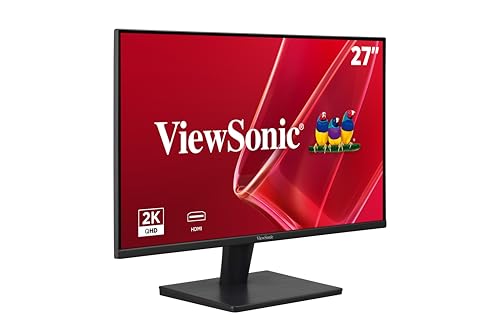
ViewSonic VA2715-H -- 27-inch screen at a 24-inch price
The ViewSonic VA2715-H is a 27-inch 1080p VA panel with a 75 Hz refresh rate. It trades pixel sharpness (lower PPI at 27 inches vs 24 inches at the same resolution) for screen real estate. The VA panel produces a 3000:1 contrast ratio, which is significantly higher than IPS alternatives at this price and results in visibly deeper blacks when watching films or working in dark-themed applications. Dual HDMI ports make it easy to connect two source devices. Eye-care features include a flicker-free backlight and blue-light filter mode. This is a practical choice for users who prioritize screen size over pixel density at a minimal budget.

Acer Nitro XV272U V3 -- 1440p entry at the budget ceiling
The Acer Nitro XV272U V3 is a 27-inch IPS panel at 2560x1440 with a 170 Hz refresh rate, sitting at the upper edge of the budget category. The step up to 1440p makes text noticeably sharper on a 27-inch screen compared to 1080p, which benefits document-heavy work and image editing. DCI-P3 coverage is 95%, and AMD FreeSync Premium is supported with G-Sync compatibility. Height and tilt adjustment are included in the stand. The XV272U V3 is the pick for buyers who can stretch to the price point and want a display that won't need replacing when budgets grow.
Buying considerations
What to consider
Define the primary use case first. For document work and web browsing, any IPS panel at 1080p in a well-suited size will perform adequately. For dark-room use or media consumption, a VA panel's higher contrast ratio is worth the slight trade-off in viewing angles. For any gaming, confirm FreeSync or G-Sync compatibility and check that the refresh rate is 75 Hz or higher.
What to consider
Size and resolution together affect clarity: a 24-inch 1080p panel looks sharper than a 27-inch 1080p panel at the same sitting distance. If 27 inches is the target size, prioritize 1440p if the budget reaches it.
What to consider
Stand ergonomics matter over the long term. If the included stand does not adjust for height, factor in the cost of a monitor arm or a stand riser. Visit [best computer monitor arms](/articles/best-computer-monitor-arms) for arm recommendations, and see [best computer monitors](/articles/best-computer-moniters) for premium picks when budget constraints ease. Our [methodology](/methodology) explains the criteria behind these selections.
Questions answered
At screen sizes up to 24 inches, 1080p resolution looks sharp and clear for web browsing, documents, video playback, and casual gaming. On 27-inch panels the pixel density drops enough that text edges appear slightly soft compared to 1440p. If your budget allows, 1440p at 27 inches is noticeably sharper, but 1080p at 24 inches remains a practical and cost-effective choice.
IPS panels produce accurate colors and consistent brightness across wide viewing angles, which matters in shared workspaces or when viewing images and video. VA panels offer higher contrast ratios for deeper blacks, making them better for dark-room use. TN panels are the cheapest but have the weakest color accuracy and narrowest viewing angles. For general use, a budget IPS panel is the best trade-off at low price points.
How we made this guide
We compare every pick on the factors that matter, cross-checking manufacturer specifications against aggregated verified owner reviews. We rank independently and never take payment for placement. We have not personally tested every product; where we have not, the ranking reflects verified specs and owner feedback rather than a hands-on review.
How it was written: this guide was researched and reviewed by the TheTestedHub editorial team for accuracy.
Affiliate disclosure: TheTestedHub is reader-supported. When you buy through links on our site, we may earn a commission at no extra cost to you.
Keep reading

Your Docking Station Match: CalDigit TS4 and More

Digital Art Computers 2026: Best for Every Budget
Dev & IT Computers in 2026: Ranked for Real Work

Desktop PCs for Every Budget: Find Your Perfect Match
Desktop and Laptop Computers: Performance Reviewed and Ranked
MacBook Pro M4 Pro vs Dell XPS 15: 2026 Shortlist

Buy the Best DIY Computer in 2026: Corsair One i300
