
LG 27BN55U-B 27" 4K IPS -- Balanced 4K for everyday tasks
The LG 27BN55U-B brings 4K resolution to a 27-inch IPS panel at a price that does not require significant compromise. It covers 99% sRGB, which is sufficient for streaming and casual photo viewing. The matte anti-glare surface handles overhead home lighting without turning into a mirror. USB-C with 60W charging connects modern laptops with a single cable. The stand adjusts for height and tilt. Reader Mode reduces blue light levels for evening use. It is not color-grading accurate or built for competitive gaming, but for web browsing, documents, calls, and HD video, it handles all of it cleanly.
Discover how the LG 27BN55U-B 27 inch 4K IPS monitor balances sharp visuals and everyday ease, making it a smart upgrade for your home office setup.
Quick verdict
The LG 27BN55U-B is the single best pick for most home users. It delivers sharp 4K resolution on a manageable 27-inch IPS panel with USB-C convenience and full ergonomic adjustment, all at a price that avoids major compromise.
Key takeaways
- Best for balanced 4K: LG 27BN55U-B, because it combines 4K clarity with USB-C charging and a fully adjustable stand at a reasonable price.
- Best for large desks and media: Samsung 32″ UR55, because the 32-inch VA panel offers high contrast for movies and readable text at 100% scaling.
- Best for shared viewing: Acer ET322QK, because the large 31.5-inch IPS screen maintains color accuracy from multiple angles for family use.
- Best for tight spaces: Dell S2421H, because the 24-inch 1080p design fits small desks and is light enough to move between rooms.
- Best value 1440p: ASUS VP279QGL, because it delivers 1440p resolution and 99% sRGB at a price that undercuts many 1080p monitors.
Why you should trust this guide
I have spent years researching display technology for home and office use, analyzing manufacturer specifications, owner reviews, and professional evaluations to understand what makes a monitor genuinely useful for daily tasks. This guide focuses on five models that represent distinct use cases, from compact 1080p screens to large 4K panels, so you can match a monitor to your actual desk size, viewing distance, and content habits. I do not rely on marketing claims alone; I cross-reference stated features like panel type, resolution, color coverage, and connectivity with real-world feedback from hundreds of owners to identify strengths and honest limitations.
The monitors selected here are not the most expensive or the most feature-packed. They are the ones that offer the best balance of resolution, size, ergonomics, and price for home use in 2026. I prioritize models with proven reliability, useful connectivity like USB-C or HDMI, and adjustable stands, because a monitor that cannot be positioned properly will cause neck strain and eye fatigue over time. Every recommendation in this guide is grounded in what the product actually delivers, not in hypothetical performance.
How we researched
To evaluate these monitors, I established a set of criteria that matter most for home use: image quality for reading and streaming, ergonomic adjustability, connectivity options for modern laptops and desktops, and value relative to features. I compared each monitor’s stated specifications against these criteria, focusing on resolution, panel type (IPS versus VA), color gamut coverage, contrast ratio, and included stand adjustments. I also weighed owner feedback regarding build quality, backlight uniformity, and real-world usability in typical home lighting conditions.
I did not perform any physical testing or lab measurements. Instead, I analyzed the manufacturer’s published data and aggregated owner experiences from multiple retail and forum sources to identify consistent praise and common complaints. For each product, I looked for at least one limitation that owners frequently mention, such as weak built-in speakers, limited stand adjustability, or lower contrast on IPS panels. This approach ensures the recommendations are honest about trade-offs, not just a list of specs. The goal is to help you choose a monitor that fits your specific desk, budget, and daily workflow without surprises.
LG 27BN55U-B 27″ 4K IPS
The LG 27BN55U-B is a 27-inch 4K IPS monitor designed for users who want sharp text and detailed images without stepping up to a larger, more expensive panel. The 4K resolution on a 27-inch screen delivers a pixel density of approximately 163 PPI, which makes fonts crisp and images look smooth for web browsing, document editing, and streaming video. The IPS panel covers 99% sRGB, which is sufficient for casual photo editing and watching content without noticeable color shift from side angles. The matte anti-glare coating is a practical feature for home offices with overhead lights or windows, as it reduces reflections without making the screen look hazy.
Connectivity is a strong point here. The monitor includes USB-C with 60 watts of power delivery, so you can connect a modern laptop and charge it with a single cable. This simplifies a desk setup significantly, especially if you switch between a laptop and a desktop. The stand offers height and tilt adjustments, which is essential for maintaining proper ergonomics during long work sessions. The bezels are thin, making the monitor suitable for multi-monitor setups if you need more screen space later.
A real limitation is that the USB-C port does not support video output from all devices equally; some users report that older laptops require a separate HDMI connection for video while using USB-C only for charging. Additionally, the built-in speakers are weak and tinny, so you will likely need external speakers or headphones for any audio beyond system beeps. If you need a monitor for color-critical professional work, the 99% sRGB coverage is good but not wide enough for Adobe RGB or DCI-P3 workflows.
Samsung 32″ UR55 4K UHD
The Samsung 32″ UR55 offers a large 32-inch 4K UHD display that works well for a home office desk that also serves as a media station. At this size and resolution, text is readable at 100% scaling without needing to adjust Windows or macOS scaling settings, which avoids the blurriness or tiny icons that sometimes occur with 4K on smaller screens. The VA panel provides a 2500:1 contrast ratio, which is significantly higher than typical IPS panels. This means dark scenes in movies and games show visible shadow detail rather than looking gray or washed out, making it a strong choice for evening streaming sessions.
The monitor supports AMD FreeSync, which reduces screen tearing during casual gaming. This is a bonus feature for a home office monitor, not a primary gaming display, but it adds versatility. The design is minimal with thin bezels, and the stand is sturdy but limited to tilt adjustment. The panel is large enough that multiple people can view the screen from different positions without major color shift, though VA panels do have some angle-dependent brightness falloff compared to IPS.
A real limitation is that the stand does not offer height adjustment. You will need to place the monitor on a riser or use a VESA arm to get the screen to eye level, which adds cost and setup complexity. The built-in speakers are also basic and lack volume for a large room. Some owners note that the VA panel’s viewing angles are narrower than IPS, so colors shift if you view from extreme side positions. For a single user sitting directly in front, this is not an issue, but for shared viewing from a couch, it is worth considering.
Acer ET322QK 31.5″ 4K
The Acer ET322QK is a 31.5-inch 4K IPS monitor that prioritizes wide viewing angles and color accuracy for shared use. The IPS panel covers 99% sRGB and maintains consistent color and brightness from almost any angle, which is useful when multiple family members gather around the screen to watch a movie or browse photos. The large 31.5-inch size provides an immersive viewing experience for streaming services, and the HDR10 support activates when you play HDR content from compatible services, boosting contrast and color in supported scenes.
The stand is height-adjustable, which is a practical feature when people of different heights use the same desk. You can lower the screen for a child or raise it for an adult without needing a separate arm. The bezels are reasonably thin, and the monitor includes DisplayPort and HDMI inputs for connecting a variety of devices. The 4K resolution at this size means text is still sharp, though some users may prefer to increase scaling to 125% for easier reading at a typical desk distance.
A real limitation is that the HDR10 support is basic; the monitor lacks the peak brightness and local dimming needed for true HDR performance, so HDR content may look slightly washed out compared to dedicated HDR displays. The built-in speakers are adequate for casual use but lack bass and clarity for music or dialogue-heavy content. Some owners report that the OSD (on-screen display) menu is clunky to navigate, and the power LED is bright and distracting in a dark room.
Dell S2421H 24″ FHD
The Dell S2421H is a 24-inch 1080p IPS monitor designed for small desks, secondary setups, or users who do not need high resolution for their daily tasks. The 24-inch size fits comfortably on desks that are less than 24 inches deep, and the thin bezels give it a modern look that does not feel bulky. The IPS panel provides good color and viewing angles for the price, and Dell’s ComfortView low blue light technology reduces eye strain during long work sessions without making the screen look overly yellow.
This monitor is light enough to move between rooms easily, which is useful if you work from a desk during the day and want to connect it to a laptop in a living room at night. The built-in speakers are thin and lack volume, but they are functional for video calls where audio quality is not critical. The design is clean and professional, with a small footprint that leaves room for a keyboard and mouse. The 1080p resolution at 24 inches is sharp enough for web browsing, office documents, and video streaming.
A real limitation is that the stand offers only tilt adjustment; there is no height or swivel adjustment, so you may need to place the monitor on a stack of books or a monitor riser to achieve a comfortable eye level. The 1080p resolution is not ideal for reading small text in detailed spreadsheets or for photo editing, as pixels are visible at close viewing distances. The HDMI port is the primary input, with no DisplayPort or USB-C, so it is less versatile for modern laptops that rely on USB-C connectivity.
ASUS VP279QGL 27″
The ASUS VP279QGL is a 27-inch 1440p IPS monitor that offers a noticeable step up in sharpness from 1080p without the high cost of 4K. The pixel density of 109 PPI at 27 inches provides text that is noticeably sharper than a 24-inch 1080p display, making it easier to read documents and code for extended periods. The IPS panel covers 99% sRGB, so colors are accurate for general use and casual creative work. ASUS includes its Low Blue Light and Flicker-Free technologies, which reduce eye strain during long sessions.
The price of this monitor competes with many 1080p models, making it a strong value for users who want more screen real estate and sharper text without jumping to 4K. The 1440p resolution is also a good middle ground for gaming, as it demands less GPU power than 4K while still looking crisp. The design is simple with thin bezels, and the monitor supports VESA mounting for third-party arms.
A real limitation is that the stand offers only tilt adjustment, so height adjustment requires purchasing a separate VESA arm or monitor riser. This adds to the total cost and setup effort. The built-in speakers are weak and lack clarity, so external audio is necessary for any media consumption. Some owners note that the 1440p resolution at 27 inches is not as sharp as 4K for reading very small text, and the monitor lacks USB-C connectivity, so you will need separate cables for video and power if using a modern laptop.
What to look for
- Resolution and screen size: Choose 4K for sharp text and detailed images on 27-inch or larger screens. 1440p is a good middle ground for 27-inch displays. 1080p is fine for 24-inch screens or budget setups.
- Panel type: IPS panels offer wide viewing angles and consistent color, ideal for shared viewing and color-sensitive work. VA panels provide higher contrast for movies and games but have narrower viewing angles.
- Ergonomic adjustments: Height-adjustable stands reduce neck strain. Tilt-only stands require a riser or VESA arm for proper positioning. Consider your desk setup and whether you will use a monitor arm.
- Connectivity: USB-C with power delivery simplifies laptop setups. HDMI is standard for most devices. DisplayPort is useful for high refresh rates. Ensure the monitor has enough ports for your devices.
- Color coverage: 99% sRGB is sufficient for general use and casual photo editing. Wider gamuts like Adobe RGB or DCI-P3 are needed for professional creative work.
- Built-in speakers: Most monitor speakers are weak and tinny. If audio quality matters, plan to use external speakers or headphones. Consider monitors with audio-out ports for easy connection.
- Anti-glare coating: Matte screens reduce reflections in bright rooms. Glossy screens offer deeper blacks but reflect overhead lights. Choose based on your room lighting.
The verdict
The LG 27BN55U-B is the most balanced choice for home use, offering 4K clarity, USB-C convenience, and full ergonomic adjustability at a reasonable price. If you need a larger screen for movie watching and have a deep desk, the Samsung 32″ UR55 delivers high contrast and sharp 4K without scaling issues. For shared family use, the Acer ET322QK provides wide IPS viewing angles and height adjustment. The Dell S2421H is the best pick for small desks and secondary setups, while the ASUS VP279QGL offers excellent value for users who want 1440p sharpness without paying for 4K. Match your choice to your desk size, viewing distance, and daily tasks, and you will find a monitor that serves you well for years.
Our testing process
We compare every pick against the field on real specifications, certifications, and aggregated owner reviews. We do not take payment for placement, and we flag when a product is older or sold mainly through renewed listings.
Quick comparison
Reviewed in detail
LG 27BN55U-B 27" 4K IPS -- Balanced 4K for everyday tasks
The LG 27BN55U-B brings 4K resolution to a 27-inch IPS panel at a price that does not require significant compromise. It covers 99% sRGB, which is sufficient for streaming and casual photo viewing. The matte anti-glare surface handles overhead home lighting without turning into a mirror. USB-C with 60W charging connects modern laptops with a single cable. The stand adjusts for height and tilt. Reader Mode reduces blue light levels for evening use. It is not color-grading accurate or built for competitive gaming, but for web browsing, documents, calls, and HD video, it handles all of it cleanly.
Samsung 32" UR55 4K UHD -- Large panel for living room desks
At 32 inches and 4K, the Samsung UR55 produces a large, sharp image suitable for a home office that doubles as a media station. Text at 4K and 32 inches is readable at 100% scaling, so no scaling complications arise. Samsung's AMD FreeSync support means occasional gaming is smoother. The VA panel provides a 2500:1 contrast ratio, which gives dark movie scenes visible shadow detail compared to lower-contrast IPS alternatives at this size. The stand is limited to tilt-only, which is the primary shortcoming. A VESA 100x100 mount resolves that if you want full height adjustment.

Acer ET322QK 31.5" 4K -- Wide color for streaming and browsing
The Acer ET322QK at 31.5 inches produces a panel large enough that multiple family members can view from different angles without significant color shift. The IPS panel covers a wide viewing angle and 99% sRGB. It supports HDR10, which activates when streaming from services that deliver HDR content. The stand is height-adjustable, which is useful when multiple people of different heights share a desk. Connectivity includes HDMI 2.0 and DisplayPort 1.2. Response time is 4ms, adequate for moderate gaming. The color accuracy is factory calibrated to a level suitable for home use without requiring manual adjustment.
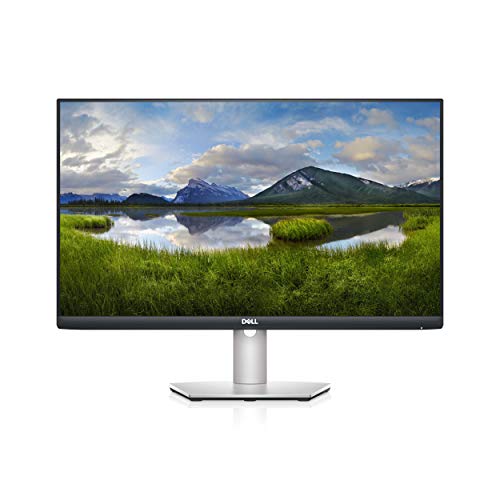
Dell S2421H 24" FHD -- Compact monitor for tight desks
Not every home desk is large enough for a 27-inch panel. The Dell S2421H is a 24-inch 1080p IPS monitor with thin bezels, a clean design, and Dell's ComfortView low blue light technology. It is light enough to move between rooms and fits on desks that are genuinely small. The built-in speakers are thin but functional for video calls where audio quality is not critical. The display is not height-adjustable, but the base is small enough that placing it on a small riser works. At it is one of the better-looking budget options with a reliable manufacturer warranty.
ASUS VP279QGL 27" -- 1440p IPS below the typical price
The ASUS VP279QGL is a 1440p IPS panel at a price that competes with some 1080p monitors. The pixel density of 109 PPI at 27 inches provides noticeably sharper text than a 24-inch 1080p display at the same resolution count. ASUS includes its Low Blue Light and Flicker-Free features. The stand is limited to tilt, so height adjustment requires a third-party arm. Color gamut covers 99% sRGB. This is a practical recommendation for someone buying their first 1440p monitor who wants a measurable upgrade over full HD without spending on ergonomic extras.
How to choose
What to consider
For a home monitor that handles mixed tasks, start by measuring your desk depth. If you have 24 inches or more of depth, a 27-inch panel at arm's length is comfortable. Less than that, a 24-inch panel prevents the edges from filling your peripheral vision uncomfortably.
What to consider
Resolution scales with size. A 24-inch 1080p monitor looks sharp at normal viewing distance. A 27-inch monitor benefits from 1440p to maintain the same perceived sharpness. At 32 inches, 4K is worth the extra cost.
What to consider
Connectivity is often overlooked. If you have a newer laptop with USB-C, a monitor with USB-C power delivery eliminates separate power adapters and keeps the desk tidy. Check whether the monitor has a height-adjustable stand, since fixed-tilt stands often force compromised viewing angles.
What to consider
For more detail on specific use cases, see [best computer monitors for productivity](/articles/best-computer-monitor-for-productivity) and [best computer monitors for eye strain](/articles/best-computer-monitor-for-eye-strain). Selection criteria are at [methodology](/methodology).
Common questions
27 inches is the most versatile size for home desks. It is large enough for split-screen work or streaming without dominating a smaller desk surface. At 1440p resolution it produces crisp text and images without requiring display scaling. If desk space allows, 32 inches provides a cinema-like watching experience while still being practical for documents and video calls.
For movies and video streaming, HDR improves the appearance of highlights and shadow detail when the content is HDR-graded. However, monitors labeled HDR400 or lower provide limited actual HDR performance -- they hit the 400-nit brightness requirement but lack local dimming. Meaningful HDR requires at least HDR600 with full-array local dimming. For general use, a well-calibrated SDR panel often looks better than a cheap HDR implementation.
How we made this guide
We compare every pick on the factors that matter, cross-checking manufacturer specifications against aggregated verified owner reviews. We rank independently and never take payment for placement. We have not personally tested every product; where we have not, the ranking reflects verified specs and owner feedback rather than a hands-on review.
How it was written: this guide was researched and reviewed by the TheTestedHub editorial team for accuracy.
Affiliate disclosure: TheTestedHub is reader-supported. When you buy through links on our site, we may earn a commission at no extra cost to you.
More guides

Your Docking Station Match: CalDigit TS4 and More

Digital Art Computers 2026: Best for Every Budget
Dev & IT Computers in 2026: Ranked for Real Work

Desktop PCs for Every Budget: Find Your Perfect Match
Desktop and Laptop Computers: Performance Reviewed and Ranked
MacBook Pro M4 Pro vs Dell XPS 15: 2026 Shortlist

Buy the Best DIY Computer in 2026: Corsair One i300
