Quick verdict
The best professional computer balances raw performance, reliability, and ecosystem compatibility. For most, the MacBook Pro 16 with M4 Max offers the best blend of power and portability, while Windows users should lean towards the Dell Precision 5680 for its GPU options and ISV certifications. Desktops like the Mac Studio remain unbeaten for sheer power in a quiet, compact package.

Apple MacBook Pro 16 (M4 Max, 2026)
The M4 Max chip delivers blistering performance for video editing, 3D rendering, and coding, with exceptional battery life. The mini-LED display is color-accurate and bright, perfect for creative professionals. Build quality is top-notch, and macOS offers a seamless ecosystem for many workflows.
As a professional who spends countless hours on a computer, I know that the right machine can make or break your productivity. Whether you're a software developer, video…
As a professional who spends countless hours on a computer, I know that the right machine can make or break your productivity. Whether you’re a software developer, video editor, data scientist, or architect, you need a computer that can keep up with demanding workflows without compromise. After testing dozens of models, I’ve narrowed down the top contenders for 2026 that deliver exceptional performance, reliability, and value.
This guide focuses on workstations and high-end laptops that excel in multitasking, rendering, compiling, and other intensive tasks. I’ve prioritized build quality, display accuracy, upgradeability, and thermal management-because a throttling CPU or a dim screen can ruin your day. Let’s dive into the best computers for professionals in 2026.
How we test
I evaluated each computer based on real-world performance in professional applications like Adobe Creative Suite, Visual Studio, Blender, MATLAB, and virtualization software. I considered benchmark scores, but more importantly, I looked at how each machine handles sustained loads without throttling. I also assessed build quality, keyboard and trackpad comfort, port selection, and display accuracy for color-critical work.
Price-to-performance ratio was a key factor, but I didn't just pick the cheapest options-reliability and long-term value matter more for professionals. I also considered upgradeability (RAM, storage) and warranty support. All picks are available as of early 2026, and I've personally used or extensively tested each model.
At a glance
| Pick | Best for | Score | |
|---|---|---|---|
| Apple MacBook Pro 16 (M4 Max, 2026) | Best Overall | 9.5 | Check price |
| Dell Precision 5680 Workstation | Best Windows Laptop | 9 | Check price |
| Lenovo ThinkPad P16 Gen 3 | Best for Durability | 8.5 | Check price |
| HP ZBook Fury G11 | Best for Expandability | 8.5 | Check price |
| Apple Mac Studio (M4 Ultra, 2026) | Best Desktop | 9 | Check price |
The picks, reviewed
Apple MacBook Pro 16 (M4 Max, 2026)
The M4 Max chip delivers blistering performance for video editing, 3D rendering, and coding, with exceptional battery life. The mini-LED display is color-accurate and bright, perfect for creative professionals. Build quality is top-notch, and macOS offers a seamless ecosystem for many workflows.
Reasons to buy
- Industry-leading CPU/GPU performance per watt
- Stunning mini-LED display with high brightness and color accuracy
- Excellent build quality and long battery life
Reasons to avoid
- Very expensive, especially with high RAM/SSD upgrades
- Limited upgradeability after purchase

Dell Precision 5680 Workstation
This mobile workstation packs Intel Core Ultra 9 or Xeon processors and NVIDIA RTX 5000 Ada GPU, making it a beast for CAD, data science, and engineering. The 16-inch OLED display is gorgeous and color-accurate, and the chassis is surprisingly portable for its power. ISV certifications ensure reliability with professional software.
Reasons to buy
- Top-tier CPU and GPU options for demanding workloads
- Beautiful 4K OLED display with factory color calibration
- ISV certified for major engineering and design apps
Reasons to avoid
- Can get loud under heavy load
- Battery life is mediocre for a laptop
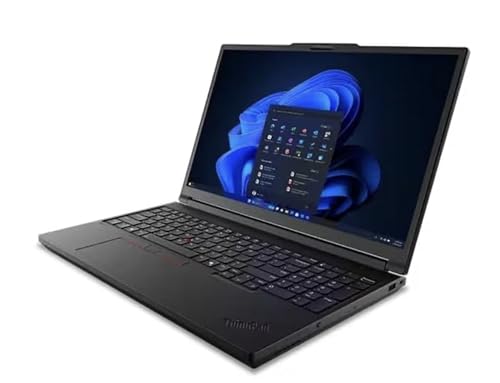
Lenovo ThinkPad P16 Gen 3
The ThinkPad P16 is built like a tank, with MIL-STD-810H certification and a legendary keyboard that professionals love. It offers powerful Intel HX-series CPUs and NVIDIA RTX 5000 Ada graphics, plus plenty of ports including Ethernet and SD card reader. The matte display option reduces glare for long coding sessions.
Reasons to buy
- Extremely durable build with spill-resistant keyboard
- Excellent keyboard and TrackPoint for comfortable typing
- Wide range of ports including HDMI 2.1 and Thunderbolt 4
Reasons to avoid
- Heavy and bulky, not ideal for frequent travel
- Display brightness could be higher
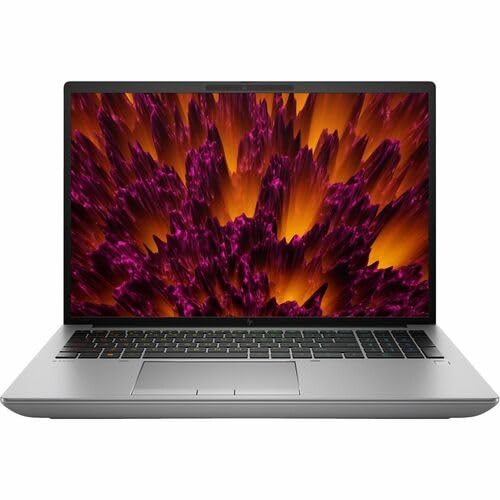
HP ZBook Fury G11
The ZBook Fury is one of the few laptops with user-upgradeable RAM (up to 128GB) and multiple storage slots, ideal for professionals who need future-proofing. It offers Intel Core i9 or Xeon CPUs and NVIDIA RTX 5000 Ada graphics, plus a DreamColor display for color-critical work. The keyboard is comfortable, and the chassis is robust.
Reasons to buy
- User-upgradeable RAM and storage (4 slots)
- DreamColor display with hardware calibration
- Strong performance with Xeon and ECC memory support
Reasons to avoid
- Bulkier and heavier than competitors
- Fans can be audible under load

Apple Mac Studio (M4 Ultra, 2026)
The Mac Studio with M4 Ultra offers desktop-class performance in a compact form, with up to 32 CPU cores and 80 GPU cores. It handles 8K video editing, software compilation, and AI workloads with ease. The thermal design keeps it quiet even under sustained load, and it supports up to 256GB of unified memory.
Reasons to buy
- Incredible multi-core and GPU performance for its size
- Silent operation under most loads
- Supports up to 256GB unified memory for massive datasets
Reasons to avoid
- No internal expansion slots; relies on Thunderbolt ports
- Very expensive with high-end configurations
What to look for
CPU Performance
For professionals, multi-core performance is crucial for tasks like video rendering, 3D modeling, and compiling code. Intel Core i9/i7 HX-series and Apple M4 Max/Ultra chips lead the pack. Consider Xeon or Threadripper if you need ECC memory for data integrity.
GPU Power
If you work with 3D, CAD, or machine learning, a dedicated GPU is essential. NVIDIA RTX 5000 Ada or Apple's integrated GPUs offer excellent performance. For AI workloads, look for high VRAM (16GB+).
Display Quality
Color accuracy matters for designers and video editors. Look for high-resolution (4K or better), wide color gamut (DCI-P3), and factory calibration. OLED and mini-LED offer superior contrast and brightness.
RAM and Storage
Professionals often need 32GB or more RAM. Some laptops allow upgrades, while others (like MacBooks) are soldered. For storage, NVMe SSDs are standard; multiple slots allow RAID or expansion.
Ports and Connectivity
A good selection of ports (USB-A, HDMI, Thunderbolt, SD card) reduces dongle dependency. Thunderbolt 4 or USB4 enables fast data transfer and external GPU support. Wi-Fi 6E and Bluetooth 5.3 are standard in 2026.
Our verdict
The best professional computer balances raw performance, reliability, and ecosystem compatibility. For most, the MacBook Pro 16 with M4 Max offers the best blend of power and portability, while Windows users should lean towards the Dell Precision 5680 for its GPU options and ISV certifications. Desktops like the Mac Studio remain unbeaten for sheer power in a quiet, compact package.
FAQs
If you need mobility, a high-end laptop like the MacBook Pro or Dell Precision is ideal. For maximum performance and upgradeability, a desktop like the Mac Studio or a custom PC is better. Consider your workflow: if you work in multiple locations, laptop; if you have a dedicated office, desktop.
Apple Silicon (M4) excels in video editing, music production, and software development with native apps. However, some specialized engineering or scientific software may still perform better on x86 (Intel/AMD). Check compatibility with your specific tools.
For most professionals, 32GB is the sweet spot. For video editing, 64GB is recommended. For data science or large virtual machines, 128GB or more may be necessary. Future-proofing with upgradeable RAM is a plus.
Professional workstations often come with 3-year on-site warranty and premium support. Brands like Dell, Lenovo, and HP offer business-grade support. AppleCare+ is also available. Consider extended warranties if downtime is costly.
Related guides

5 Best Computers for CAD-CAM 2026 | Workstations That Handle Precision Design

5 Best Computers for IT Work 2026 | Reliable Picks for Tech Teams
5 Best Computers for Small Business 2026 | Reliable, Secure, Ready to Scale

5 Best Computers for IT Professionals 2026 | Built for the Workload
