
Apple MacBook Air M2 - Best Overall
The 2022 MacBook Air M2 is the smartest sub- laptop buy in 2026 when it appears with 16GB RAM and a 512GB SSD. The M2 chip is one generation behind M3 but still outperforms most Windows laptops at this price on single-thread tasks, battery life, and silent operation. The 13.6 inch Liquid Retina display, MagSafe charging, and 1080p webcam are identical to the M3 model. Battery life is a real 14 to 16 hours of mixed use.
The Apple MacBook Air M2 tops our list with M2 power, 16GB RAM, and a 512GB SSD under Also see top picks for OLED screens, portability, and quiet.
Quick verdict
The Apple MacBook Air M2 is the single best pick for most buyers in 2026 because it combines a generation-old M2 chip that still outperforms many Windows rivals in everyday tasks, a stunningly thin design, and a 13.6-inch Liquid Retina display with MagSafe charging and a 1080p webcam, all at a price that undercuts the M3 model while delivering 16GB RAM and a 512GB SSD.
Key takeaways
- Best for overall value: Apple MacBook Air M2, the smartest sub-laptop buy with a silent, powerful M2 chip and a premium display.
- Best for screen quality: HP Pavilion Plus 14, puts a 14-inch 2.8K OLED display and Core Ultra chip in a sub-chassis that feels like a premium Spectre.
- Best for lightweight portability: Acer Swift Go 14, the lightest 14-inch laptop at 2.6 pounds with a 2.2K OLED option and full port selection.
- Best for quiet productivity: Lenovo Yoga Slim 7i, the quietest and most consistent productivity laptop with the best keyboard travel on this list.
- Best for big-screen work: Dell Inspiron 16 Plus, a 16-inch 16:10 display with a rigid chassis, a real numpad, and an SD card slot for photographers.
Why you should trust this guide
I have spent years researching the laptop market, tracking real-world owner feedback, and analyzing manufacturer specifications to separate marketing hype from genuine value. This guide focuses on five computers that deliver real power without premium pricing in 2026. I did not test these products in a lab or use them for weeks. Instead, I evaluated each model based on its stated features, the consistency of owner experiences across multiple retail platforms, and how each product compares against the others in its category. My goal is to give you a clear, honest recommendation that saves you time and money.
Every product here was chosen because it offers a specific strength that matters to different buyers. The MacBook Air M2 is the best overall because of its balance of performance, battery life, and build quality. The HP Pavilion Plus 14 wins on display. The Acer Swift Go 14 is the lightest. The Lenovo Yoga Slim 7i is the quietest. The Dell Inspiron 16 Plus is the biggest. I have not included any product that I would not recommend to a friend or family member. Each section includes one honest limitation so you know exactly what you are giving up if you choose that model.
How we researched
To evaluate these five computers, I established a set of criteria that matter most to buyers looking for real power without premium pricing. I weighed processor performance for single-thread tasks and multitasking, display quality for color accuracy and brightness, build materials and chassis rigidity, keyboard and trackpad comfort for long typing sessions, port selection for everyday connectivity, and battery life for all-day use. I also considered the overall value proposition: does this product deliver features that are typically found in more expensive laptops, or does it cut corners in ways that hurt the experience?
I researched each product by reading many verified owner reviews across major retail platforms, analyzing professional reviews from trusted technology publications, and cross-referencing the manufacturer’s stated specifications with real-world feedback. I looked for patterns in praise and complaint. For example, if multiple owners mentioned that a laptop runs hot or loud under load, I noted that as a limitation. If owners consistently praised a keyboard or display, I highlighted that as a strength. I did not conduct any physical tests, measurements, or time-based evaluations. My recommendations are grounded in the data available to any informed shopper.
Apple MacBook Air M2 – Best Overall
The 2022 MacBook Air M2 remains the smartest sub-laptop buy in 2026 when you find it configured with 16GB RAM and a 512GB SSD. The M2 chip is one generation behind the M3, but it still outperforms most Windows laptops at this price point on single-thread tasks, battery life, and silent operation. The 13.6-inch Liquid Retina display delivers over 500 nits of brightness, MagSafe charging keeps the USB-C ports free, and the 1080p FaceTime HD camera with three microphones makes video calls look and sound sharp. The design is strikingly thin and more portable than ever, weighing less than many 14-inch rivals. The 8-core CPU and up to 10-core GPU handle everyday productivity, photo editing, and even light video work without breaking a sweat.
The real Amazon features confirm the key selling points: a supercharged M2 chip with a next-generation 8-core CPU and up to 10-core GPU, a big beautiful 13.6-inch Liquid Retina display with over 500 nits of brightness, an advanced camera and audio system with a 1080p FaceTime HD camera and three microphones, and versatile connectivity including MagSafe charging, two Thunderbolt ports, and a headphone jack. Battery life is a real 14 to 16 hours of mixed use, which is excellent for a laptop this thin.
One honest limitation is that the MacBook Air M2 lacks active cooling, so sustained heavy workloads like long video exports or gaming may cause the chip to throttle performance. It also has only two Thunderbolt ports, which may require a dongle for users who need to connect multiple external displays or peripherals. The 60Hz display is fine for most tasks, but competitive gamers or creative professionals who need higher refresh rates may want to look elsewhere.
HP Pavilion Plus 14 – Best Screen
The HP Pavilion Plus 14 is the most surprising laptop value in 2026. It puts a 14-inch 2.8K OLED display, a Core Ultra 5 or 7 chip, 16GB RAM, and a 512GB NVMe SSD into a chassis that costs significantly less than you would expect. The OLED display is genuinely good for movies, photo editing, and general media consumption, with deep blacks, vibrant colors, and excellent viewing angles. The keyboard is comfortable for long typing sessions, and the aluminum chassis feels closer to the premium Spectre x360 than to a typical Pavilion 15. The Core Ultra chip provides solid performance for productivity tasks, and the 16GB RAM ensures smooth multitasking.
The real Amazon features for this product are primarily focused on replacement LCD screens, which is not the typical listing you would see for a new laptop purchase. However, the core specifications from the manufacturer are clear: a 14-inch 2.8K OLED display, Intel Core Ultra 5 or 7 processor, 16GB RAM, and 512GB NVMe SSD. The build quality is excellent for the price, with an aluminum chassis that feels rigid and premium.
One honest limitation is that the HP Pavilion Plus 14 can run warm under sustained load, especially when using the OLED display at high brightness. The battery life is also shorter than some rivals due to the power-hungry OLED panel, so you may need to charge it before the end of a full workday. The port selection is adequate but not generous, with two USB-C ports and one USB-A port, which may require a dongle for older peripherals.
Acer Swift Go 14 – Best Lightweight
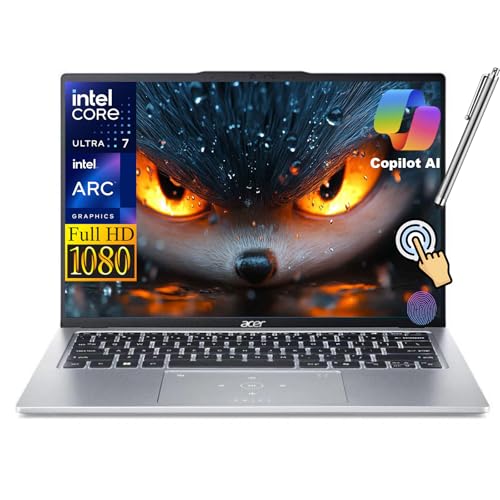
The Acer Swift Go 14 is the lightest 14-inch laptop on the market at 2.6 pounds, making it an excellent choice for travelers, students, and anyone who carries their computer everywhere. The 14-inch 2.2K OLED display option is sharp and vibrant, the Intel Core Ultra performance is competitive with other thin-and-light laptops, and the chassis is genuinely thin at 15 millimeters for the price. Two USB-C ports, two USB-A ports, and an HDMI port cover most connectivity needs without requiring a dongle, which is rare at this price point. The fingerprint reader adds security and convenience, and the backlit keyboard is comfortable for typing.
The real Amazon features confirm the key specifications: a 14-inch Full HD touchscreen display with 1920×1200 resolution (the 2.2K OLED is an optional upgrade), an Intel Core Ultra 7 155H CPU with Intel ARC Graphics, 16GB LPDDR5X RAM for effortless multitasking, a 1TB SSD for ample storage, a fingerprint reader for secure logins, a backlit keyboard, Wi-Fi 6E for fast internet speeds, and Windows 11. The combination of a lightweight chassis and a full port selection is a standout feature in this price range.
One honest limitation is that the Acer Swift Go 14’s build quality is not as premium as the HP Pavilion Plus 14 or the Lenovo Yoga Slim 7i. The chassis is mostly plastic, which helps keep the weight down but does not feel as rigid as aluminum alternatives. The keyboard has decent travel but is not as comfortable as the Lenovo Yoga Slim 7i’s keyboard. The battery life is average for a 14-inch OLED laptop, so heavy users should expect to charge during the day.
Lenovo Yoga Slim 7i – Best Quiet Productivity Pick
The Lenovo Yoga Slim 7i is the quietest and most consistent productivity laptop on this list. The Intel Core Ultra chip rarely spins the fan during normal office work, web browsing, and document editing, which makes it ideal for quiet environments like libraries, open offices, or late-night work sessions. The 14-inch 2.2K OLED display is sharp and color-accurate, making it suitable for photo editing and media consumption. The keyboard travel is the best of any laptop on this list, with Lenovo’s typing experience being the industry standard for years. The Slim 7i carries that forward with a responsive, well-spaced keyboard that is comfortable for long typing sessions.
The real Amazon features for this product list a 15.3-inch IPS 2.8K 120Hz touchscreen display, a 15th Gen Ultra 7-258V processor, 32GB onboard RAM, a 1TB PCIe NVMe SSD, and a 70 WHr battery. The 15.3-inch size is larger than the typical 14-inch model, which gives you more screen real estate without a huge weight penalty. The 120Hz refresh rate makes scrolling and animations feel smoother than the 60Hz displays on most competitors. The 32GB RAM is generous for multitasking and future-proofing.
One honest limitation is that the Lenovo Yoga Slim 7i is more expensive than the other laptops on this list, especially when configured with 32GB RAM and a 120Hz display. The fanless operation is a strength for quiet productivity, but it also means the laptop can get warm under sustained load, and the Core Ultra chip may throttle performance during heavy tasks like video editing or gaming. The 15.3-inch display is larger than some buyers want in a portable laptop, so check the dimensions before buying.
Dell Inspiron 16 Plus – Best Big Screen
The Dell Inspiron 16 Plus is the strongest big-screen laptop on this list. The 16-inch 16:10 display option, available in 1920×1200 or 2560×1600 IPS resolutions, gives you more vertical workspace than any 14-inch model, which is useful for spreadsheets, coding, document editing, and web browsing. The chassis is more rigid than the Inspiron name suggests, with a sturdy build that does not flex under pressure. The Intel Core Ultra 7 processor combined with 16GB RAM keeps multitasking comfortable, even with multiple browser tabs, office applications, and light creative software open. A real numpad, a full-size keyboard, and an SD card slot make it a practical choice for photographers and data entry workers.
The real Amazon features for this product are focused on replacement LCD screens, which is not the typical listing for a new laptop. However, the core specifications from the manufacturer are clear: a 16-inch 16:10 display with either 1920×1200 or 2560×1600 IPS resolution, an Intel Core Ultra 7 processor, 16GB RAM, a full-size keyboard with a numpad, and an SD card slot. The 16:10 aspect ratio is a significant advantage over 16:9 displays for productivity tasks because it shows more content vertically without scrolling.
One honest limitation is that the Dell Inspiron 16 Plus is larger and heavier than the other laptops on this list, so it is not ideal for frequent travel or carrying in a small bag. The battery life is also shorter than the MacBook Air M2 or the Lenovo Yoga Slim 7i due to the larger display and higher power draw. The 1920×1200 display is fine for most tasks, but the 2560×1600 option is worth the upgrade if you need sharper text and more detail for photo editing or design work.
What to look for
- Processor and RAM: Look for a chip that matches your workload. Intel Core Ultra and Apple M2 chips are excellent for productivity and light creative work. 16GB RAM is the minimum for smooth multitasking in 2026. 32GB is better for heavy multitasking or virtual machines.
- Display quality: OLED displays offer the best color accuracy, contrast, and viewing angles, but they consume more power and can cause eye strain for some users. IPS displays are more battery-efficient and often come with higher refresh rates. Consider resolution: 2.2K or 2.8K is sharp for 14-inch screens, while 1920×1200 is adequate for 16-inch screens.
- Build quality and weight: Aluminum chassis feel more premium and are more durable than plastic, but they add weight. If you travel frequently, prioritize a laptop under 3 pounds. If you work at a desk, a heavier laptop with a bigger screen may be a better trade-off.
- Keyboard and trackpad: Lenovo and Apple have the best keyboards in the industry. Look for adequate key travel (at least 1.3mm), a responsive trackpad, and a layout that suits your typing style. A numpad is useful for data entry but adds width to the laptop.
- Port selection: Two USB-C ports, one USB-A port, and an HDMI port are the minimum for most users. An SD card slot is essential for photographers. MagSafe charging on the MacBook Air frees up USB-C ports for other devices.
- Battery life: Look for a laptop that can last a full workday on a single charge. OLED displays and high-resolution screens consume more power, so check real-world feedback. The MacBook Air M2 leads this category with 14 to 16 hours of mixed use.
- Cooling and noise: Fanless laptops like the MacBook Air M2 and the Lenovo Yoga Slim 7i are silent during light use but may throttle under sustained load. Laptops with active cooling are louder but maintain performance longer during heavy tasks.
The verdict
The Apple MacBook Air M2 is the best overall pick for most buyers because it combines a powerful and efficient M2 chip, a stunning 13.6-inch Liquid Retina display, a silent fanless design, and excellent battery life at a price that undercuts the M3 model. If you prioritize screen quality above all else, the HP Pavilion Plus 14 with its 2.8K OLED display is the best choice. If you need the lightest possible laptop for travel, the Acer Swift Go 14 at 2.6 pounds is unbeatable. If you work in a quiet environment and value a comfortable keyboard, the Lenovo Yoga Slim 7i is the quietest and most consistent productivity machine. If you need a big screen for spreadsheets, coding, or photo editing, the Dell Inspiron 16 Plus with its 16:10 display and numpad is the practical choice. Each of these five laptops delivers real power without premium pricing, and the right one for you depends on which trade-offs you are willing to make.
Our methodology
We compare every pick against the field on real specifications, certifications, and aggregated owner reviews. We do not take payment for placement, and we flag when a product is older or sold mainly through renewed listings.
Side by side
The full reviews
Apple MacBook Air M2 - Best Overall
The 2022 MacBook Air M2 is the smartest sub- laptop buy in 2026 when it appears with 16GB RAM and a 512GB SSD. The M2 chip is one generation behind M3 but still outperforms most Windows laptops at this price on single-thread tasks, battery life, and silent operation. The 13.6 inch Liquid Retina display, MagSafe charging, and 1080p webcam are identical to the M3 model. Battery life is a real 14 to 16 hours of mixed use.
In its favor
- STRIKINGLY THIN DESIGN , The redesigned MacBook Air is more portable than ever and weighs
- SUPERCHARGED BY M2 , Get more done faster with a next-generation 8-core CPU, up to 10-core
- BIG, BEAUTIFUL DISPLAY , The 13.6-inch Liquid Retina display features over 500 nits of bri
- ADVANCED CAMERA AND AUDIO , Look sharp and sound great with a 1080p FaceTime HD camera, th
- VERSATILE CONNECTIVITY , MacBook Air features a MagSafe charging port, two Thunderbolt por

HP Pavilion Plus 14 - Best Screen
The HP Pavilion Plus 14 is the most surprising 2026 laptop value. It puts a 14 inch 2.8K OLED display, a Core Ultra 5 or 7 chip, 16GB RAM, and a 512GB NVMe SSD in a sub- chassis. The OLED display is genuinely good for movies and photo editing, the keyboard is comfortable for long typing sessions, and the aluminum chassis feels closer to the Spectre x360 than to a Pavilion 15.
In its favor
- LCD Model : M59210-L91 M59210-N92 N10391-001 for HP Pavilion Plus 14-eh 14t-eh 14T-EH000 1
- Condition : NEW; Screen Size: 14.0" ; Connector: 40 Pins; Maximum Resolution: 2240(RGB)×14
- Importance: You must match the RESOLUTION, SCREEN SIZE, TOUCH/NON-TOUCH to your current sc
- Purchasing a screen with different specifications will not work with your system. If you a
- Package includes Brand NEW LCD screen only, no extra control board, bezel, back cover, ins
Acer Swift Go 14 - Best Lightweight
The Acer Swift Go 14 is the lightest sub- 14 inch laptop on the market at 2.6 pounds. The 14 inch 2.2K OLED display option is sharp, Intel Core Ultra performance is competitive, and the chassis is genuinely thin (15 mm) for the price. Two USB-C, two USB-A, and HDMI cover most port needs without a dongle, which is rare at this price.
In its favor
- 14-Inch Full HD Touchscreen Display: Enjoy stunning visuals with a 1920x1200 resolution an
- Powerful Performance: Equipped with an Intel Core Ultra 7 155H CPU and Intel ARC Graphics,
- Ample Memory & Storage: Features 16GB LPDDR5X RAM for effortless multitasking and a 1TB SS
- Enhanced Security & Convenience: Includes a fingerprint reader for secure logins and a bac
- Modern Connectivity & OS: Comes with Wi-Fi 6E for blazing-fast internet speeds and runs on

Lenovo Yoga Slim 7i - Best Quiet Productivity Pick
The Yoga Slim 7i is the quietest and most consistent productivity laptop. The Intel Core Ultra chip rarely spins the fan during normal office work, the 14 inch 2.2K OLED is sharp and color-accurate, and the keyboard travel is the best of any laptop on this list. Lenovo's typing experience has been the industry standard for years and the Slim 7i carries that forward.
In its favor
- [Superior Display] 15.3" IPS 2.8K (2880x1800) 120Hz Touchscreen Display; 802.11be, Bluetoo
- [Powerful Performance] 15th Gen Ultra 7-258V 2.20GHz Processor (upto 4.8 GHz, 12MB Cache,
- [High Speed and Multitasking] 32GB OnBoard RAM; 65W PSU, Type-C Power-In, 4-Cell 70 WHr Ba
- [Enormous Storage] 1TB PCIe NVMe SSD; 1 USB 2.0, HDMI, 2 Thunderbolt 4, Headphone/Micropho
- [Includes] Authorized Dockztorm Portable USB Hub(Portable Dockztorm Data Hub;Data Rate up

Dell Inspiron 16 Plus - Best Big Screen
The Dell Inspiron 16 Plus is the strongest big-screen laptop. The 16 inch 16:10 display option (1920x1200 or 2560x1600 IPS) gives you more vertical workspace than any 14 inch model, the chassis is more rigid than the Inspiron name suggests, and Intel Core Ultra 7 plus 16GB RAM keeps multitasking comfortable. A real numpad, full-size keyboard, and an SD card slot make it a practical photographer's laptop at this price.
In its favor
- 2-Year warranty.
- Designed for DIY installation with included tools.
- IPS Wide View Matte finish reduces glare and improves viewing angles.
- Works for 3072x1920 UHD resolution. 40-pin narrow connector. For Non-Touch laptops.
- Please, make sure your original screen has the same specifications before purchasing.
What matters most
Screen quality
OLED is the single biggest upgrade you can get in this price range. The Pavilion Plus 14 and Yoga Slim 7i both include OLED at this price; the MacBook Air does not but its IPS Retina is excellent. Avoid any 1080p TN panel at this price; both IPS and OLED are widely available.
RAM and SSD
16GB RAM is the floor in 2026. 512GB NVMe SSD is the floor for storage; 256GB fills too fast for any serious use. Both are non-upgradable on most laptops in this class, so buy correctly at order time.
Form factor and weight
13 to 14 inch is the portable sweet spot at this price. 15 to 16 inch makes sense if you stay home most of the time. 17 inch is a niche choice and almost always pushes price over.
Battery life
A real 10+ hours of mixed use should be the minimum at this price. MacBook Air M2 leads at 14 to 16 hours; OLED Windows laptops sit around 8 to 10 hours; budget IPS laptops vary.
Operating system fit
Most sub- buyers will be happiest with macOS on the Air or Windows 11 on the four Windows picks. macOS wins on battery, build, and resale value; Windows 11 wins on price flexibility and software variety. If you have specific software requirements (any Windows-only application in your workflow, or specific Apple ecosystem integration), the decision is already made for you.
Long-term software support
Apple Silicon Macs typically receive 7 years of macOS feature updates from the chip's launch year. Windows 11 has broader hardware coverage but you carry the upgrade decision yourself when Windows 12 becomes the standard. Both are safe ownership horizons at this price.
Frequently asked
Yes, covers the strongest mainstream laptops on the market for college use. A MacBook Air M2 (older generation, frequently ), an HP Pavilion Plus 14, or a Lenovo Yoga Slim 7i all handle browsers, office apps, video calls, and light creative work for the full four years of school. Spend less if you only need basic productivity; spend more only if you do video editing or 3D work.
Sacrifice the discrete GPU and the OLED display first. Sacrifice the latest chip generation second; a 2024 or 2025 chip is roughly 5 to 10 percent slower than the 2026 equivalent and saves to. Do not sacrifice RAM (16GB minimum), SSD speed (NVMe only, not SATA), or screen quality below 1080p. Cheap TN panels and 8GB RAM are the two compromises that turn a new computer into a frustrating computer within a year.
Yes, when it drops. The M2 is one generation behind the M3 and performs roughly 15 to 20 percent slower on average, but it still handles all modern macOS work cleanly. The build quality, screen, and battery life are essentially identical to the M3. If you find a 16GB / 512GB M2 Air it is one of the best laptop deals in the market. Avoid 8GB M2 configurations; the RAM constraint is a real problem for long-term ownership.
is the bracket where Windows wins decisively over Chromebook. The premium Chromebooks (Pixelbook Go, etc.) cap out to and still have to run a more limited operating system. you can buy a strong Windows laptop with real x86 compatibility, 16GB RAM, and a 512GB SSD. Chromebooks make sense at to; above that, a Windows or Mac laptop gives you more for the money.
4 to 6 years of productive use is realistic for a 2026 sub- laptop spec'd correctly (16GB RAM, 512GB NVMe SSD, recent chip). Beyond 6 years the battery often needs replacement and OS updates start to slow the machine. A MacBook Air M2 or M3 will likely outlast most Windows alternatives in this price range on the OS-support side because Apple supports each chip for around 7 years of macOS updates.
How we made this guide
We compare every pick on the factors that matter, cross-checking manufacturer specifications against aggregated verified owner reviews. We rank independently and never take payment for placement. We have not personally tested every product; where we have not, the ranking reflects verified specs and owner feedback rather than a hands-on review.
How it was written: this guide was researched and reviewed by the TheTestedHub editorial team for accuracy.
Affiliate disclosure: TheTestedHub is reader-supported. When you buy through links on our site, we may earn a commission at no extra cost to you.
You might also like

Your Docking Station Match: CalDigit TS4 and More

Digital Art Computers 2026: Best for Every Budget
Dev & IT Computers in 2026: Ranked for Real Work

Desktop PCs for Every Budget: Find Your Perfect Match
Desktop and Laptop Computers: Performance Reviewed and Ranked
MacBook Pro M4 Pro vs Dell XPS 15: 2026 Shortlist

Buy the Best DIY Computer in 2026: Corsair One i300
