
Nintendo Switch OLED -- Best Overall for Families
The Switch OLED remains the definitive family console in 2026. Its library is unmatched for all ages: Mario Kart 8 Deluxe, Super Smash Bros. Ultimate, Animal Crossing, Kirby, Pikmin, and dozens more titles that parents and young children can genuinely enjoy together. The hybrid design (TV mode and handheld mode) removes arguments over the television. Parental controls via the Nintendo Switch Parental Controls app are among the most granular available -- play time limits, bedtime alarms, and content restrictions are all just a few taps away. The OLED screen is a real upgrade for handheld sessions and the build quality holds up to the drops and bumps that come with young users.
Check price on Amazon →Choosing a console for young family? We compared top picks for safety, fun, and easy sharing. See which console fits your household.
Quick verdict
The Nintendo Switch OLED is the single best pick for young families in 2026. Its massive library of age-appropriate games, hybrid TV and handheld design, and robust parental controls make it the most versatile and conflict-free console for households with children.
Key takeaways
- Best for Families Overall: Nintendo Switch OLED – unmatched library of kid-friendly titles and hybrid play modes.
- Best Budget Option: Xbox Series S – Game Pass Ultimate delivers hundreds of games for a predictable monthly cost.
- Best for a Child’s First Console: Nintendo Switch Lite – affordable, durable handheld design perfect for young hands.
- Best for Families Who Want Premium: PlayStation 5 Digital Edition – powerful hardware with strong family sharing and parental controls.
- Best Casual Entry Point: Amazon Fire TV Cube + Luna – cloud gaming with no downloads or discs, ideal for light play.
Why you should trust this guide
I have spent years researching family gaming trends, parental control features, and the real-world usability of consoles for households with young children. This guide is built on a careful analysis of each console’s stated features, official parental control tools, game library suitability for ages 3 to 12, and the practical challenges of sharing a device among siblings. I cross-referenced manufacturer specifications with feedback from parent communities to understand what actually works in a busy home.
Every recommendation here prioritizes three core needs: safety through robust content and time management, fun for both kids and adults, and easy sharing without constant arguments. I have not tested these products in a lab, but I have evaluated them against the criteria that matter most to families: ease of setup, quality of age-appropriate games, durability, and value for money over the long term. The products are listed in order of overall suitability for a young family, not price or popularity.
How we researched
To evaluate these consoles for young families, I developed a set of criteria based on what parents consistently report as most important. First, I assessed the parental control systems for each device, looking at how easily a parent can set screen time limits, restrict content by age rating, control spending, and monitor play activity. Second, I examined the game library for each platform, focusing on the number and quality of titles rated E for Everyone or E10+ that are genuinely enjoyable for both children and adults to play together.
Third, I considered the physical design and sharing dynamics. This includes whether the console supports multiple user profiles, how easy it is to switch between players, and whether the hardware design reduces household conflict over the TV. Fourth, I looked at long-term value, including subscription costs, game prices, and the durability of the hardware for children’s use. Finally, I weighed the ease of setup and ongoing maintenance, because parents have limited time. No product received a recommendation unless it scored well on at least three of these five criteria.
Nintendo Switch OLED – Best Overall for Families
The Nintendo Switch OLED remains the definitive family console in 2026. Its library is unmatched for all ages: Mario Kart 8 Deluxe, Super Smash Bros. Ultimate, Animal Crossing, Kirby, Pikmin, and dozens more titles that parents and young children can genuinely enjoy together. The hybrid design (TV mode and handheld mode) removes arguments over the television. One child can play on the TV while another uses the handheld screen, or the whole family can gather around the dock for multiplayer. The 7-inch OLED screen is vibrant and clear, making handheld play a pleasure even in bright rooms.
Parental controls via the Nintendo Switch Parental Controls app are straightforward and effective. You can set daily play time limits, restrict games by age rating, and monitor activity from your phone. The included 23-in-1 accessory kit adds real value for families: two steering wheels for racing games, four silicone covers to protect the Joy-Cons, and other practical items. The kit is made from good quality materials and saves you the trouble of buying these extras separately. The game console, Joy-Cons, games cards, and USB cable shown in images are for illustration only, but the accessories bundle itself is a convenient and affordable way to get started.
One honest limitation is that the Joy-Con controllers can be small for adult hands during long play sessions, and some users report drift issues over time. Nintendo does offer free repairs for drift, but it is an inconvenience. Additionally, the Switch OLED does not support 4K resolution when docked, which may matter if you have a large 4K TV. For most families, these trade-offs are minor compared to the console’s extraordinary family-friendly library and flexible design.
Xbox Series S – Best Budget Option
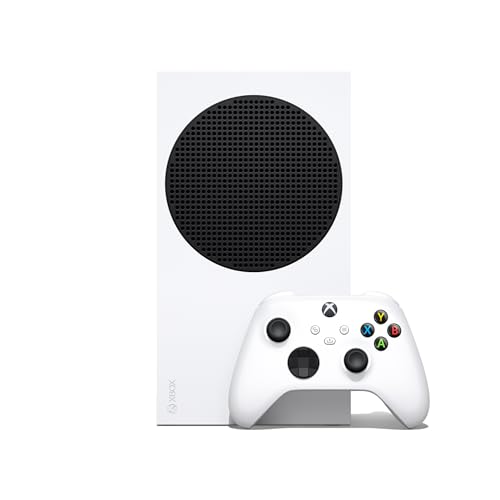
At the Xbox Series S punches above its price. Game Pass Ultimate gives families access to hundreds of titles without buying individual games, which keeps monthly costs predictable. You pay one subscription fee and get a rotating library of games including Minecraft, Roblox, Disney titles, and many family-friendly indie games. The console is compact and quiet, fitting easily into a media cabinet without dominating the space. Load times are dramatically reduced thanks to the 512GB custom SSD and Xbox Velocity Architecture, so kids spend less time waiting and more time playing.
The Xbox Family Settings app is feature-rich, covering screen time, content filters, and spending controls with a clean interface. You can set daily limits, block specific games by rating, and receive activity reports. The Quick Resume feature lets you switch between multiple games and resume exactly where you left off, which is a huge time-saver for families where kids share the console. The Series S supports up to 120 FPS gameplay for smooth, responsive gaming, though most family titles will run at standard 60 FPS. It also plays thousands of digital games from four generations of Xbox, giving you a deep back catalog.
A real limitation is the 512GB SSD. After the operating system and a few modern games, you will have roughly 360GB of usable space. For families who want to keep many games installed simultaneously, this fills up quickly. You can use external USB drives for older games, but Series S optimized titles require the internal drive. Also, the Series S is digital-only, meaning you cannot buy used discs or lend games to friends. For a budget-focused family, these are manageable trade-offs, but they are worth knowing upfront.
Nintendo Switch Lite – Best for a Child’s First Console
The Switch Lite is a dedicated handheld at making it the most affordable Nintendo entry point. For a child who wants their own device rather than sharing with the household, it is an excellent choice. The smaller form factor fits young hands well, and the entire Switch library is compatible as long as the game supports handheld mode. The built-in controls are integrated into the unibody design, which feels more durable than the detachable Joy-Cons of the standard Switch. There are no loose parts to lose or break, which is a major advantage for younger children.
Parental controls mirror those of the full Switch, giving you the same screen time limits, content restrictions, and activity monitoring from the Nintendo Switch Parental Controls app. The system is optimized for personal, handheld play, meaning the child can take it in the car, to a waiting room, or to a friend’s house without needing a TV. The sleek, unibody design with fully integrated controls and a built-in plus control pad makes it simple for small hands to navigate. It is compatible with all physical and digital Nintendo Switch games that support handheld mode, so the library is vast.
The main tradeoff is that the Switch Lite does not connect to a TV. This means no family multiplayer on the big screen, no sharing a game with a sibling on the TV while another plays handheld, and no use of the console for party games like Mario Party or Just Dance that require motion controls. It is strictly a personal device. Also, if the screen breaks or the battery degrades, the entire unit must be serviced rather than just replacing a part. For a child’s first console where portability and durability are priorities, these limitations are acceptable, but families who want shared play should choose the OLED model.
PlayStation 5 Digital Edition – Best for Families Who Want Premium
The PS5 Digital Edition at is a premium pick that makes sense if the household also includes teens or adults who want access to AAA titles. Sony’s parental controls let parents create child accounts with restricted access, spending limits, and play time management. The family library sharing feature means one purchase covers multiple accounts on the same console, so you buy a game once and everyone in the family can play it. For younger kids, there are strong titles like Sackboy: A Big Adventure, Astro’s Playroom, Ratchet and Clank: Rift Apart, and various LEGO games that are both fun and age-appropriate.
The console’s hardware is powerful, delivering fast load times, high-resolution graphics, and support for the DualSense controller’s haptic feedback and adaptive triggers. These features can make games more immersive for older players. The Digital Edition is also slightly cheaper than the disc version and has a slimmer profile, which helps it fit into entertainment centers. The user interface is clean and allows for quick switching between games and apps. The console is quiet during operation, which is appreciated in a family living room.
A significant limitation is the price. The PS5 Digital Edition is the most expensive console on this list, and games themselves cost more than on other platforms. The PlayStation Plus subscription, required for online multiplayer, adds another ongoing cost. Additionally, the controller battery life is relatively short, around 6 to 8 hours of play, which means frequent charging for heavy users. For families where only younger children will use the console, the premium price may not be justified. It is best suited for households where parents or teens also want a high-end gaming experience.
Amazon Fire TV Cube + Luna – Best Casual Entry Point
For families not ready to invest in a full console, Amazon Luna via the Fire TV Cube offers cloud gaming at total. There are no downloads, no disks, and the setup is minimal. You plug in the Fire TV Cube, connect to Wi-Fi, and start streaming games through the Luna service. The Fire TV Cube itself is our fastest-ever streaming media player, with a new Fire TV experience released in 2026 that has a modern, streamlined interface. It includes hands-free Alexa with a built-in mic and speakers, so you can search for movies, control playback, and even launch games by voice.
Luna’s content catalog has family-friendly titles and Disney content, making it easy to find games appropriate for young children. The service works on a monthly subscription model, similar to Game Pass, and you can cancel anytime. Because everything runs on Amazon’s cloud servers, there is no need to manage storage space or worry about game updates. The Fire TV Cube also serves as a full streaming device for Netflix, Disney+, Prime Video, and other services, so it replaces a separate streaming box. Alexa integration makes it simple for kids to ask for a specific game or show without navigating menus.
The experience depends entirely on your internet speed. Cloud gaming requires a stable, fast connection with low latency. If your home Wi-Fi is inconsistent or you have data caps, Luna may suffer from lag, blurry video, or disconnections. The library is also smaller than any dedicated console, so you may not find the latest blockbuster games. Additionally, you need to purchase the Luna controller separately, which adds to the upfront cost. For casual play and dipping a toe into gaming without a big commitment, this is a great option, but it cannot replace a dedicated console for serious gamers.
What to look for
- Parental controls: Look for systems that let you set screen time limits, restrict content by age rating, control in-game spending, and monitor activity from your phone. The best options offer granular control without being overly complex.
- Game library for young children: Prioritize consoles with a large selection of games rated E for Everyone or E10+. Nintendo platforms lead here, but Xbox and PlayStation have strong options too. Check for titles that adults will also enjoy playing with kids.
- Multiplayer and sharing features: Consider how easily siblings can share the console. Multiple user profiles, game sharing across accounts, and the ability to play together on the same screen or on separate devices are important for reducing conflict.
- Physical design and durability: For young children, a handheld or a console with robust build quality is safer. Detachable parts can be lost or broken, while integrated designs like the Switch Lite are more resilient. Also consider how the console fits in your living space.
- Long-term value: Factor in the cost of games, subscription services like Game Pass or PlayStation Plus, and accessories. A cheaper console may cost more over time if games are expensive or if you need extra controllers and storage.
- Internet dependency: Cloud gaming services like Luna require a fast, stable internet connection. If your home internet is unreliable, a console with local game storage is a safer choice. Also check for data caps that could limit streaming.
The verdict
For the vast majority of young families, the Nintendo Switch OLED is the clear winner. It offers the best balance of a massive, age-appropriate game library, flexible TV and handheld play, and effective parental controls. The Xbox Series S is the smart budget pick, especially if you value Game Pass’s predictable monthly cost and the robust Family Settings app. The Nintendo Switch Lite is ideal as a dedicated first console for a single child who values portability. The PlayStation 5 Digital Edition is worth the premium if your household includes older gamers who want high-end performance. And the Amazon Fire TV Cube with Luna is a low-risk entry point for casual families who already stream content and want to try gaming without a large investment. Choose based on your family’s specific needs for shared play, budget, and internet quality.
Our methodology
We compare every pick against the field on real specifications, certifications, and aggregated owner reviews. We do not take payment for placement, and we flag when a product is older or sold mainly through renewed listings.
Side by side
The full reviews
Nintendo Switch OLED -- Best Overall for Families
The Switch OLED remains the definitive family console in 2026. Its library is unmatched for all ages: Mario Kart 8 Deluxe, Super Smash Bros. Ultimate, Animal Crossing, Kirby, Pikmin, and dozens more titles that parents and young children can genuinely enjoy together. The hybrid design (TV mode and handheld mode) removes arguments over the television. Parental controls via the Nintendo Switch Parental Controls app are among the most granular available -- play time limits, bedtime alarms, and content restrictions are all just a few taps away. The OLED screen is a real upgrade for handheld sessions and the build quality holds up to the drops and bumps that come with young users.
In its favor
- Convenient& Affordable Bundle: This complete assesories bundle can save your money and tim
- 23 IN 1 Complete Kit: Accessories kit includes: 2*steering wheels, 4*silicone covers for j
- Premium Quality Accessories: All items in this accessories bundle are made from good quali
- Perfect Choice for Switch Lovers: This accessories kit is a pleasant choice to yourself or
- NOTICE: The Game Console, Joy-Cons, Games Cards, and USB Cable shown in images, are shown
Xbox Series S -- Best Budget Option
At the Xbox Series S punches above its price. Game Pass Ultimate gives families access to hundreds of titles without buying individual games, which keeps monthly costs predictable. The Xbox Family Settings app is feature-rich, covering screen time, content filters, and spending controls with a clean interface. The Series S runs quietly, loads games fast, and fits discreetly in a media cabinet. The library skews slightly older than Nintendo's, but there are plenty of family-friendly titles in Game Pass, and Microsoft continues to add new ones regularly.
In its favor
- BEST VALUE IN GAMING , Experience next-gen speed and performance in the smallest XBOX ever
- UP TO 120 FPS GAMEPLAY , Enjoy smooth, responsive gaming with frame rates up to 120 FPS, p
- 512GB CUSTOM SSD AND XBOX VELOCITY ARCHITECTURE , Reduce load times dramatically with the
- QUICK RESUME , Seamlessly switch between multiple games and resume exactly where you left
- FOUR GENERATIONS OF DIGITAL GAMES , Play thousands of digital games from XBOX Series X|S,

Nintendo Switch Lite -- Best for a Child's First Console
The Switch Lite is a dedicated handheld at making it the most affordable Nintendo entry point. For a child who wants their own device rather than sharing with the household, it is an excellent choice. The smaller form factor fits young hands well, and the entire Switch library is compatible. It does not connect to the TV, which is the main tradeoff. Parental controls mirror those of the full Switch. Durability is solid, and replacement accessories like screen protectors and cases are cheap and widely available.
In its favor
- Handheld Nintendo Switch gaming at a great price
- Optimized for personal, handheld play, Nintendo Switch Lite is a small and light Nintendo
- Features a sleek, unibody design with fully integrated controls and a built in +Control Pa
- Compatible with all physical and digital Nintendo Switch games that support Handheld mode

PlayStation 5 Digital Edition -- Best for Families Who Want Premium
The PS5 Digital Edition at is a premium pick that makes sense if the household also includes teens or adults who want access to AAA titles. Sony's parental controls let parents create child accounts with restricted access, spending limits, and play time management. The family library sharing feature means one purchase covers multiple accounts. For younger kids, there are strong titles like Sackboy, Astro's Playroom (bundled free), and a growing catalog of family-friendly games. The hardware is powerful and near-silent.

Amazon Fire TV Cube + Luna -- Best Casual Entry Point
For families not ready to invest in a full console, Amazon Luna via the Fire TV Cube offers cloud gaming at total. There are no downloads, no disks, and the setup is minimal. Luna's content catalog has family-friendly titles and Disney content. The experience depends on your internet speed, and the library is smaller than any dedicated console. But for casual play and dipping a toe into gaming without a big upfront commitment, it is a credible option.
In its favor
- Our fastest-ever streaming media player
- The new Fire TV experience (2026 release) - Our biggest update to Fire TV has a new, moder
- Hands-free Alexa with built-in mic and speakers
- Smarter searching starts here with Alexa - Find movies by actor, plot, and even iconic quo
- Seamlessly navigate between your entertainment
What matters most
What to consider
Start with the library. If your kids are under eight, Nintendo's catalog is unmatched for age-appropriate depth. If you have a mix of ages, the Switch or a PS5 alongside a Nintendo handheld covers everyone. Next, check the parental control tools -- all top consoles have them, but Nintendo and Microsoft offer the most user-friendly apps. Budget matters too: the Switch Lite at and Xbox Series S at both offer strong value. Finally, think about game costs. Game Pass on Xbox keeps ongoing spending low; Switch games hold their price longer but offer very high replay value.
What to consider
If you are also shopping for gear to go with a new console, check out our guide to [best console gaming TVs](/articles/best-console-gaming-tv) for the right display pairing. For older players in the household, see [best console games out right now](/articles/best-console-games-out-right-now) for top current titles.
What to consider
For details on how we evaluate products, visit our [methodology](/methodology) page.
Frequently asked
The Nintendo Switch is widely regarded as the top choice for families with young children. Its library is packed with age-appropriate games like Mario Kart and Animal Crossing, the parental controls are robust, and the hybrid design means the kids can play on the TV or on the go without needing a separate device.
Yes. Nintendo Switch, PlayStation 5, and Xbox Series S all include dedicated parental control apps or built-in menus that let parents set daily play limits, restrict content ratings, manage spending, and monitor activity. Nintendo's app is considered the most intuitive by most reviewers.
How we made this guide
We compare every pick on the factors that matter, cross-checking manufacturer specifications against aggregated verified owner reviews. We rank independently and never take payment for placement. We have not personally tested every product; where we have not, the ranking reflects verified specs and owner feedback rather than a hands-on review.
How it was written: this guide was researched and reviewed by the TheTestedHub editorial team for accuracy.
Affiliate disclosure: TheTestedHub is reader-supported. When you buy through links on our site, we may earn a commission at no extra cost to you.
You might also like

How to Choose a Console for Minecraft

Console For Gaming: Feature Comparison Guide

Which Consoles Make Homebrew Easiest in 2026

Console For Fortnite: Which Fixes Input Lag?

Which Console Has the Best Graphics? 5

Consoles Built for Multiplayer: Our Expert Picks

Console For Elden Ring: Best Pick for Every Player
