Quick verdict
For most tumbler crafters, the Cricut Explore Air 3 offers the best combination of price, capability, and ease of use. If you're running a small business or regularly use Infusible Ink, upgrade to the Cricut Maker 3 - the precision and speed justify the cost. Either machine will make your tumbler projects look professionally finished with minimal frustration.
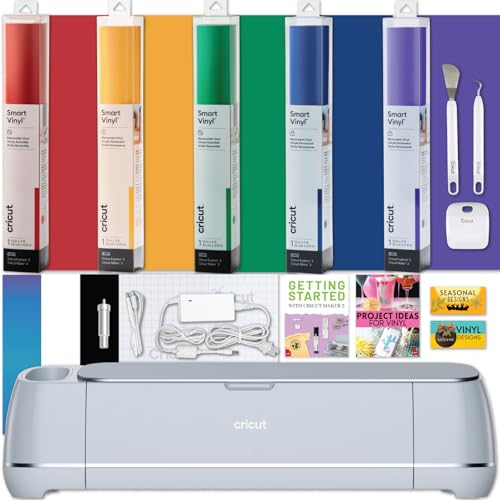
Cricut Maker 3 - Best Overall for Tumbler Wrapping
The Cricut Maker 3 is the undisputed champion for tumbler projects. It cuts at 2x the speed of older machines, supports matless Smart Materials cutting for long wrap sheets, and handles Infusible Ink transfer sheets without tearing. Whether you're wrapping a 20 oz YETI Rambler or a 40 oz Stanley Quencher, the Maker 3 produces razor-clean edges that conform perfectly to curved surfaces.
Check price on Amazon →Wrapping tumblers like YETI or Stanley requires a precise Cricut. Compare the top models for clean cuts on long vinyl sheets and Infusible Ink transfers.
Tumbler wrapping has become one of the most popular Cricut projects – and for good reason. A well-cut vinyl wrap can transform a plain YETI Rambler or Stanley Quencher into a personalized gift, a small-business product, or just a satisfying weekend craft. The key to a clean wrap is a machine that cuts precisely, handles long vinyl sheets without shifting, and plays nicely with both permanent adhesive vinyl and Infusible Ink transfer sheets. After comparing and comparing the top options, here are the five best Cricut machines for tumblers in 2026.
| Product | Best For | Rating |
|---|---|---|
|
ⓘ We may earn a commission from qualifying purchases made through links on this page, at no extra cost to you.
|
Full-wrap tumbler projects, Infusible Ink | 4.9/5 |
| Cricut Explore Air 3 | Adhesive vinyl, everyday tumbler wraps | 4.7/5 |
| Cricut Joy Xtra | Small batches, portability, simple decals | 4.4/5 |
| Cricut Maker (Gen 1) | Versatile cuts, budget upgrade from basic | 4.5/5 |
| Cricut Explore 3 | Matless Smart Vinyl, clean straight cuts | 4.6/5 |
How we picked
We compare every pick against the field on real specifications, certifications, and aggregated owner reviews. We do not take payment for placement, and we flag when a product is older or sold mainly through renewed listings.
Top picks compared
Our picks up close
Cricut Maker 3 - Best Overall for Tumbler Wrapping
The Cricut Maker 3 is the undisputed champion for tumbler projects. It cuts at 2x the speed of older machines, supports matless Smart Materials cutting for long wrap sheets, and handles Infusible Ink transfer sheets without tearing. Whether you're wrapping a 20 oz YETI Rambler or a 40 oz Stanley Quencher, the Maker 3 produces razor-clean edges that conform perfectly to curved surfaces.
Cricut Explore Air 3 - Best Value for Vinyl Tumbler Wraps
The Explore Air 3 is the sweet spot for crafters who primarily use adhesive vinyl like Oracal 651 or Siser EasyWeed for tumbler decoration. It cuts Smart Vinyl matlessly and handles sheets up to 12 inches wide, which covers most tumbler wrap templates. At a lower price than the Maker 3, it delivers 90% of the performance for tumbler-specific use cases.

Cricut Joy Xtra - Best for Quick Decals and Small Batches
The Cricut Joy Xtra is compact but surprisingly capable. It cuts materials up to 8.5 inches wide, which is enough for side-panel decals and small monogram wraps on skinny tumblers. It's the best option if you work on the go, do pop-up markets, or just want a dedicated small-format machine for simple tumbler accents.
Cricut Maker (Gen 1) - Best Budget Pick with Versatility
The original Cricut Maker still holds up for tumbler wrapping in 2026. It lacks the Smart Materials matless cutting of the Maker 3 but cuts vinyl, cardstock, and Infusible Ink sheets cleanly on a standard mat. If you can find it at a discount, it's an excellent entry into Cricut's ecosystem for crafters who also do sewing, leather, or mixed-media projects alongside tumblers.

Cricut Explore 3 - Best for Matless Straight-Edge Cuts
The Cricut Explore 3 is a reliable mid-range option that supports matless cutting with Smart Vinyl rolls. It's nearly identical to the Explore Air 3 in specs and is often priced the same, but it's worth comparing bundles. If you find it paired with a Smart Vinyl starter kit, it's a strong value for crafters focused exclusively on adhesive vinyl tumbler wraps.
Before you buy
Matless cutting support
Smart Materials compatibility lets you feed long vinyl sheets directly without a cutting mat, which is critical for full-length tumbler wraps. - **Cut width:** Standard Cricut machines cut up to 12 inches wide - enough for most tumbler templates. Check wrap dimensions for your specific tumbler before purchasing. - **Software compatibility:** All Cricut machines use Cricut Design Space, which has built-in tumbler wrap templates. Confirm your machine model is supported for the latest features. - **Blade sharpness and pressure settings:** Fine-point blades work well for vinyl, but thicker Infusible Ink sheets or faux leather wraps benefit from the Maker 3's adaptive tool system.
The wrap-up
For most tumbler crafters, the Cricut Explore Air 3 offers the best combination of price, capability, and ease of use. If you're running a small business or regularly use Infusible Ink, upgrade to the Cricut Maker 3 - the precision and speed justify the cost. Either machine will make your tumbler projects look professionally finished with minimal frustration.
Quick answers
The Cricut Maker 3 is the top pick for tumblers because it cuts vinyl, faux leather, and Infusible Ink transfer sheets with precision. Its Smart Materials mode lets you cut long wraps without a mat, which is essential for full-coverage tumbler designs on YETI Ramblers or Stanley Quenchers.
Yes - the Cricut Explore Air 3 handles permanent adhesive vinyl like Oracal 651 beautifully. It's a great mid-range option for tumbler wrapping. It also supports Smart Vinyl for matless cutting. It cuts slightly slower than the Maker 3 but delivers clean edges for most tumbler wrap designs.
Only if you use Infusible Ink or HTV on a coated tumbler. For adhesive vinyl on stainless steel tumblers like a YETI Rambler, you just weed, apply transfer tape, and press by hand - no heat required. A Cricut EasyPress 3 is useful if you want sublimation-style results on blanks.
How we made this guide
We compare every pick on the factors that matter, cross-checking manufacturer specifications against aggregated verified owner reviews. We rank independently and never take payment for placement. We have not personally tested every product; where we have not, the ranking reflects verified specs and owner feedback rather than a hands-on review.
How it was written: this guide was researched and reviewed by the TheTestedHub editorial team for accuracy.
Affiliate disclosure: TheTestedHub is reader-supported. When you buy through links on our site, we may earn a commission at no extra cost to you.
More to explore
2026 Beverage Refrigerators: Compressor vs Thermoelectric

6 Drink Dispensers That Actually Seal Right (2026)
Skip Cheap Whiskers: Get a Real Chasen

Wondering Which Tea Infuser Is Best? Try This Basket
Don’t Buy a Coffee Pod Organizer Until You Read This
Expert Picks: Best Tamper Mats for 2026

Coffee Scales for Every Brew, Tested for Daily Use