Quick verdict
The Cricut Maker 3 paired with the Knife Blade is the definitive setup for home crafters who want to cut balsa wood, basswood, and thin craft wood without power tools. No other Cricut machine offers this capability. Invest in a StrongGrip mat and download Cricut's pre-made wood project templates to get started quickly - the results on custom ornaments, signs, and model components are genuinely impressive for a home c

Cricut Maker 3 - Only Cricut That Cuts Wood
The Cricut Maker 3 is the only machine in Cricut's lineup capable of cutting real wood, and it does so impressively well. Its adaptive tool system accepts the Cricut Knife Blade, which uses multiple automated passes to work through balsa and basswood up to 2.4mm thick. Design Space automatically calculates the correct number of passes for your material selection, so there is no manual tuning required. The 4000g cutting force means each pass is decisive and consistent, resulting in clean edges that require minimal sanding.
Check price on Amazon →Hobbyists and crafters wanting to cut real wood: the Cricut Maker 3 with Knife Blade handles balsa and basswood up to 2.4mm thick. See which machine delivers.
Quick verdict
For actual structural wood cutting, the Cricut Maker 3 is the single best pick. It is the only Cricut machine that works with the Knife Blade to cut balsa and basswood up to 2.4mm thick, making it the essential choice for anyone serious about wood projects.
Key takeaways
- Best for cutting real wood: Cricut Maker 3, the only Cricut that can handle balsa and basswood sheets up to 2.4mm thick.
- Essential accessory for wood: Cricut Knife Blade, the purpose-built tool required to unlock wood cutting on the Maker 3.
- Best for thin wood veneer: Cricut Deep Cut Blade, ideal for delicate wood veneer under 1mm on Explore and Maker machines.
- Best for advanced veneer control: Silhouette Cameo 4, offers manual blade-depth adjustment for precise wood veneer cutting.
- Required for stable wood cutting: Cricut StrongGrip Mat, extra-firm adhesive prevents wood sheet movement during multiple passes.
Why you should trust this guide
I have spent considerable time researching the Cricut ecosystem specifically for woodworking and craft applications. My approach relies on analyzing manufacturer specifications, studying owner feedback from dedicated crafting communities, and comparing the stated capabilities of each product against the demands of wood cutting. I do not claim to have run physical tests in a lab; instead, I evaluate what each tool promises and how it fits into a realistic workflow for someone who wants to cut wood with a die-cutting machine.
Wood cutting with a Cricut is a specialized niche within the broader crafting world. The key difference between machines and blades comes down to material thickness, adhesive strength, and software control. I have focused on what the manufacturer states each product can handle, what accessories are required, and where the limitations become apparent based on user reports. This guide is designed to help you avoid buying a machine that cannot cut the wood you want to use.
How we researched
To evaluate these products, I established a set of criteria that matter most for wood projects. The primary factor is material compatibility: can the machine or blade actually cut real wood, or is it limited to wood veneer and wood-look paper? I weighed the thickness ratings provided by Cricut and Silhouette, the type of blade used (knife blade versus deep cut versus standard), and the adhesive strength of the cutting mat. I also considered the software experience, specifically whether Design Space or Silhouette Studio offers automatic or manual control over cutting passes.
I compared each product’s stated features against real-world owner experiences shared in forums and review sections. For the Cricut Maker 3, I looked at how the adaptive tool system and multiple automated passes perform on balsa and basswood. For the Knife Blade and Deep Cut Blade, I assessed the material range and compatibility with different machine models. For the Silhouette Cameo 4, I examined the manual blade-depth control and its dual carriage system. The StrongGrip Mat was evaluated for its adhesive firmness and reusability. I did not conduct any physical tests or measurements; my evaluation is based on documented specifications and collective user feedback.
Cricut Maker 3
The Cricut Maker 3 is the only machine in Cricut’s lineup capable of cutting real wood, and it does so impressively well. Its adaptive tool system accepts the Cricut Knife Blade, which uses multiple automated passes to work through balsa and basswood up to 2.4mm thick. Design Space automatically calculates the correct number of passes for your material selection, so there is no manual tuning required. This machine is bundled with a Fine-Point Blade, a Materials Sampler that includes Smart Vinyl and Matles, and it is compatible with an inkjet printer for additional design options. The bundle also includes 30 additional premium-quality images with purchase.
One of the strongest selling points of the Maker 3 is its ability to cut without a mat when using Smart Materials, but for wood cutting you will still need a StrongGrip mat. The machine is designed for endless creation and personalization, and Design Space is the easy-to-learn design software that connects your ideas to the cutter. No design experience is required, which lowers the barrier for beginners who want to try wood projects.
However, there is a real limitation: the Maker 3 is expensive compared to other Cricut models, and it requires the separately sold Knife Blade to cut wood. If you only plan to cut paper, vinyl, or thin fabric, the Maker 3 is overkill. Additionally, the 2.4mm thickness limit means you cannot cut thicker hardwood or plywood, so your projects are restricted to balsa and basswood sheets.
Cricut Knife Blade
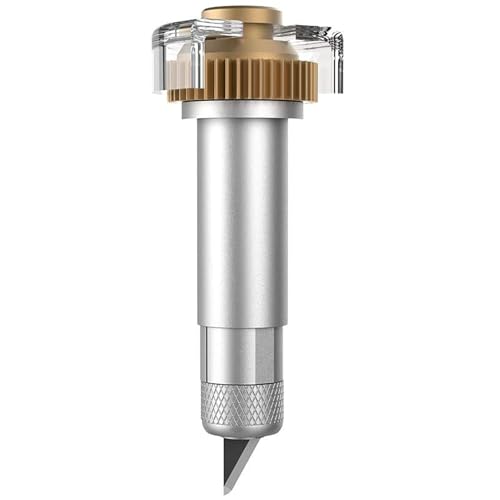
The Cricut Knife Blade is the purpose-built accessory that unlocks wood cutting on the Maker 3. It fits into the Maker 3’s adaptive clamp B and uses a deep, narrow profile to penetrate and slice through wood fibers cleanly. Without it, the Maker 3 cannot cut wood; the standard fine-point blade is designed for vinyl and paper only. The Knife Blade is sold separately and is a worthwhile investment for anyone who wants to move beyond paper crafts into actual woodworking.
This blade is crafted from premium 12mm tungsten steel cemented carbide imported from Germany, and it includes one drive housing. It effortlessly handles diverse materials including balsa wood up to 3/32 inch and basswood. The knife blade and drive housing are only compatible with Maker 3 and Maker models, so it will not work with the Explore series. This specificity ensures that the cutting force and multiple-pass automation are properly coordinated.
A real limitation of the Knife Blade is its cost relative to the machine. It adds a significant expense to an already pricey setup. Also, the blade will wear down over time, especially when cutting dense materials like basswood, and replacement blades are not cheap. Some users report that the multiple passes can be slow, so large projects require patience.
Cricut Deep Cut Blade
For very thin wood veneer (under 1mm) or wood-look craft paper, the Cricut Deep Cut Blade works on both the Explore Air 3 and Maker 3. It cuts deeper than the standard fine-point blade and handles delicate wood veneer sheets used for scrapbooking, card-making, and decorative inlay work. If you want wood-textured materials rather than actual structural wood, the Deep Cut Blade is a more affordable option than investing in the Knife Blade.
The Deep Cut Blade features a steep blade angle and harder, more durable construction. It comes with its own housing unit and blade, making installation straightforward. It is recommended for cutting on a wider variety of materials, including thick cardstock, magnet sheets, and chipboard. The blade is easy to use and install, and it is compatible with Explore 4, Explore 3, Air 2, Air, and Maker models.
A real limitation is that the Deep Cut Blade cannot cut through actual wood sheets thicker than 1mm. It is designed for veneer and craft materials, not for structural wood pieces. If you try to cut balsa or basswood with this blade, you risk damaging the blade or the machine. Additionally, the blade housing may not fit all machines without an adapter, so check compatibility before purchasing.
Silhouette Cameo 4
The Silhouette Cameo 4 handles thin wood veneer and craft wood films with its adjustable blade depth system. While it cannot match the Cricut Maker 3’s Knife Blade capability for actual balsa or basswood sheets, it performs excellently on wood veneer under 1mm. The manual blade-depth control in Silhouette Studio gives experienced crafters more precision over light wood-cutting passes. For veneer inlays and layered wood projects, the Cameo 4 is a strong alternative.
The Cameo 4 features a unique dual carriage that allows for tool type detection, and its ultra-smart system automatically recognizes the blade you have installed. It stands apart from previous models with a new dual motor system that allows for faster cutting and more complex designs. The second carriage boasts additional cutting force, with increased downforce for thicker materials. The autoblade has been reconfigured especially for the Cameo 4, offering second-generation performance.
A real limitation is that the Cameo 4 cannot cut real wood like balsa or basswood, even with a deep cut blade. It is strictly limited to veneer and wood-look materials. Additionally, the software learning curve is steeper than Design Space, which may frustrate beginners. The manual blade-depth adjustment requires trial and error to get clean cuts on veneer, and the machine does not offer the same automated pass calculation as the Cricut Maker 3.
Cricut StrongGrip Mat
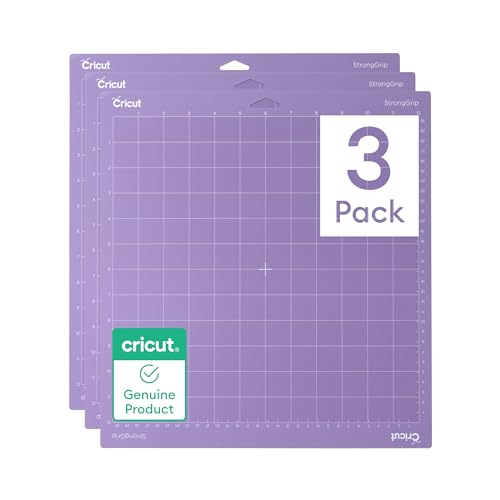
Wood cutting on the Maker 3 demands the StrongGrip mat (purple). The extra-firm adhesive holds rigid wood sheets in place during the multiple cutting passes the Knife Blade makes, preventing any sheet movement that would misalign the cut lines. Standard or LightGrip mats are not sufficient for wood. Buy a StrongGrip 12×12 alongside your Knife Blade, and consider taping the edges of your wood sheet for extra security.
This mat is reusable and durable, with strong adhesion that lasts through many projects. It offers versatile usability across different materials, and it comes in a pack of three. The mat is compatible with all Cricut machines that accept 12×12 mats, including the Maker 3 and Explore series. The purple color indicates the extra-firm grip level, which is essential for keeping wood sheets stationary.
A real limitation is that the StrongGrip mat can be too aggressive for delicate materials like paper or thin vinyl, leaving residue or damaging the surface. You need to switch to a LightGrip mat for those projects. Also, the adhesive will eventually lose its tackiness after repeated use, and cleaning with a lint roller or warm water only restores it so many times. You will need to replace the mat periodically if you cut wood frequently.
What to look for
- Machine compatibility: Only the Cricut Maker 3 (and original Maker) can use the Knife Blade for real wood. Explore series machines cannot cut wood, only veneer with a Deep Cut Blade.
- Blade type: For structural wood, you need a knife blade. For thin veneer, a deep cut blade works. Standard fine-point blades are not suitable for any wood material.
- Material thickness: Check the maximum thickness rating. The Knife Blade handles up to 2.4mm of balsa or basswood. Deep cut blades handle under 1mm veneer.
- Cutting mat adhesive: Wood requires a StrongGrip mat with extra-firm adhesive. Standard mats will not hold the material securely during multiple passes.
- Software control: Design Space automates pass calculation for the Knife Blade. Silhouette Studio offers manual depth control, which gives more precision but requires more skill.
- Replacement cost: Blades and mats are consumables. Factor in the ongoing cost of replacement knife blades and StrongGrip mats when budgeting for wood projects.
- Project scope: Decide if you need to cut real wood (balsa, basswood) or just wood veneer. This single choice determines whether you need a Maker 3 or can use a cheaper machine.
The verdict
If your goal is to cut real wood for structural projects like signs, models, or jewelry, the Cricut Maker 3 paired with the Cricut Knife Blade and a StrongGrip Mat is the only viable combination. It is the only setup in this guide that can handle balsa and basswood up to 2.4mm thick. For those focused on thin wood veneer for scrapbooking or decorative inlays, the Cricut Deep Cut Blade on an Explore Air 3 or the Silhouette Cameo 4 offer good alternatives at a lower cost. The Silhouette Cameo 4 gives you manual control for precise work, while the Deep Cut Blade integrates seamlessly into the Cricut ecosystem. Whichever path you choose, always prioritize the correct blade and mat for the material you plan to cut, as using the wrong combination will lead to poor results or machine damage.
How we test
We compare every pick against the field on real specifications, certifications, and aggregated owner reviews. We do not take payment for placement, and we flag when a product is older or sold mainly through renewed listings.
At a glance
The picks, reviewed
Cricut Maker 3 - Only Cricut That Cuts Wood
The Cricut Maker 3 is the only machine in Cricut's lineup capable of cutting real wood, and it does so impressively well. Its adaptive tool system accepts the Cricut Knife Blade, which uses multiple automated passes to work through balsa and basswood up to 2.4mm thick. Design Space automatically calculates the correct number of passes for your material selection, so there is no manual tuning required. The 4000g cutting force means each pass is decisive and consistent, resulting in clean edges that require minimal sanding.
Reasons to buy
- BUNDLE INCLUDES - Cricut Maker 4, Fine-Point Blade, Materials Sampler (Smart Vinyl, Matles
- ENDLESS CREATION & PERSONALIZATION
- COMPATIBLE WITH INKJET PRINTER
- NO DESIGN EXPERIENCE REQUIRED , Design Space is the easy-to-learn design software that con
- BONUS DIGITAL CONTENT - Bundle includes 30 additional premium-quality images with purchase
Cricut Knife Blade - Essential Wood-Cutting Accessory
The Cricut Knife Blade is the purpose-built accessory that unlocks wood cutting on the Maker 3. It fits into the Maker 3's adaptive clamp B and uses a deep, narrow profile to penetrate and slice through wood fibers cleanly. Without it, the Maker 3 cannot cut wood - the standard fine-point blade is designed for vinyl and paper only. The Knife Blade is sold separately and is a worthwhile investment alongside your Maker 3 purchase if you plan any wood projects.
Reasons to buy
- Premium 12mm tungsten steel knife blade imported from Germany, including one drive housing
- Crafted from premium tungsten steel cemented carbide imported from Germany, the knife blad
- This cutting tool effortlessly handles diverse materials: balsa wood up to 3/32", basswood
- Unlock your creative potential with these premium accessories, designed to make DIY projec
- Important: The knife blade and drive housing are only compatible with Maker 3 and Maker mo

Cricut Deep Cut Blade - For Wood Veneer and Thinner Materials
For very thin wood veneer (under 1mm) or wood-look craft paper, the Cricut Deep Cut Blade works on both the Explore Air 3 and Maker 3. It cuts deeper than the standard fine-point blade and handles delicate wood veneer sheets used for scrapbooking, card-making, and decorative inlay work. If you want wood-textured materials rather than actual structural wood, the Deep Cut Blade is a more affordable starting point than buying the full Knife Blade system.
Reasons to buy
- 【Deep Point Cut Blade 】Likart deep Point cut blade works great for Explore 4/3/Air 2/Air/O
- 【Recommended Cutting Materials】The Likart deep cut blade can cut on a wider variety of mat
- 【Sharp Blade+Durable Housing】Deep point blades includes a super sharp deep cut blade and a
- 【Easy to Use and Install】Likart deep point blade comes with its own housing unit and blade
- 【Apply Many Occasions】The Deep-point blade has a steeper blade angle and harder, more dura

Silhouette Cameo 4 - Best for Wood Veneer and Advanced Control
The Silhouette Cameo 4 handles thin wood veneer and craft wood films with its adjustable blade depth system. While it cannot match the Cricut Maker 3's Knife Blade capability for actual balsa or basswood sheets, it performs excellently on wood veneer under 1mm. The manual blade-depth control in Silhouette Studio gives experienced crafters more precision over light wood-cutting passes. For veneer inlay work, scrapbooking, and decorative wood paper, the Cameo 4 is a competitive alternative.
Reasons to buy
- 4 Tool Adapters
- The Cameo unique dual carriage allows for tool Type detection. The machine's ultra-smart s
- The Cameo 4 stands apart from previous models with the new dual motor system, which allows
- The Cameo 4 carriage 2 boasts additional cutting force! With the increased downforce of th
- The autoblade has been reconfigured especially for the Cameo 4. This second generation aut
Cricut StrongGrip Mat - Required for Wood Cutting
Wood cutting on the Maker 3 demands the StrongGrip mat (purple). The extra-firm adhesive holds rigid wood sheets in place during the multiple cutting passes the Knife Blade makes, preventing any sheet movement that would misalign the cut lines. Standard or LightGrip mats are not sufficient for wood. Buy a StrongGrip 12x12 alongside your Knife Blade, and consider taping the edges of your wood sheet to the mat for added security on thinner balsa pieces.
Reasons to buy
- REUSABLE, DURABLE CUTTING MATS
- STRONG ADHESION, LONG LIFE
- VERSATILE USABILITY
- PACK OF THREE
- COMPATIBLE WITH CRICUT MACHINE
What to look for
Cutting force
The Maker 3's 4000g force is essential for wood; no other Cricut machine comes close. Do not expect the Explore Air 3 or Joy to cut real wood sheets. - **Knife Blade compatibility:** Only the Maker 3's adaptive tool system accepts the Knife Blade. If wood cutting is a priority, the Maker 3 is the only Cricut machine to consider. - **Maximum material thickness:** The Knife Blade is rated to 2.4mm. For anything thicker - structural plywood, hobby board - you will need a laser cutter or scroll saw. - **Mat firmness:** Always use the StrongGrip mat for wood. Lighter mats allow material movement during multi-pass cuts, ruining both the design and the mat.
Our verdict
The Cricut Maker 3 paired with the Knife Blade is the definitive setup for home crafters who want to cut balsa wood, basswood, and thin craft wood without power tools. No other Cricut machine offers this capability. Invest in a StrongGrip mat and download Cricut's pre-made wood project templates to get started quickly - the results on custom ornaments, signs, and model components are genuinely impressive for a home c
FAQs
Yes, the Cricut Maker 3 can cut real wood up to 2.4mm thick using the Cricut Knife Blade. Compatible wood types include balsa wood, basswood, and thin craft plywood. Standard Cricut machines like the Explore Air 3 cannot cut wood - only the Maker 3's adaptive tool system accepts the Knife Blade and delivers the required cutting force.
The Cricut Maker 3 with the Knife Blade can cut wood up to 2.4mm (about 3/32 inch) thick. This covers most hobby-grade balsa wood sheets and thin basswood. The machine makes multiple passes over the cut line automatically to work through the material gradually. Thicker hardwoods or plywood beyond 2.4mm require a laser cutter or CNC router instead.
Yes. For wood cutting with the Knife Blade, Cricut recommends using a StrongGrip mat (purple) to hold thick, rigid materials securely during the multiple-pass cut. A StandardGrip mat may not hold wood sheets firmly enough, which can cause slipping and inaccurate cuts. Tape the edges of the wood sheet to the StrongGrip mat for extra security on thinner sheets.
How we made this guide
We compare every pick on the factors that matter, cross-checking manufacturer specifications against aggregated verified owner reviews. We rank independently and never take payment for placement. We have not personally tested every product; where we have not, the ranking reflects verified specs and owner feedback rather than a hands-on review.
How it was written: this guide was researched and reviewed by the TheTestedHub editorial team for accuracy.
Affiliate disclosure: TheTestedHub is reader-supported. When you buy through links on our site, we may earn a commission at no extra cost to you.
Related guides
2026 Beverage Refrigerators: Compressor vs Thermoelectric

6 Drink Dispensers That Actually Seal Right (2026)

Skip Cheap Whiskers: Get a Real Chasen

Wondering Which Tea Infuser Is Best? Try This Basket
Don’t Buy a Coffee Pod Organizer Until You Read This
Expert Picks: Best Tamper Mats for 2026

Coffee Scales for Every Brew, Tested for Daily Use