Quick verdict
Matching panel type to your primary use case matters more than chasing the highest specifications, because an IPS monitor calibrated for color accuracy and a VA monitor built for contrast serve genuinely different workflows even at identical resolutions and refresh rates.

LG 27UK850-W 27 Inch 4K UHD IPS Monitor
Owners consistently praise the near-perfect color accuracy out of the box, with measured sRGB coverage routinely exceeding 99 percent in independent testing, making it equally suited to photo editing and everyday productivity. The USB-C port delivers 60W of power delivery, letting many laptop users run a single-cable setup that keeps the desk clean. Ergonomics are a genuine strength here, with full height, tilt, swivel, and pivot adjustment on a sturdy stand that holds position reliably over years of use.
Choose a monitor that matches your workflow. We compare IPS, VA, and OLED panels to find the best display for color work, gaming, and productivity, led by the LG 27UK850 W.
A great desktop monitor transforms how you work, create, and unwind at your desk. Whether you spend eight hours a day staring at spreadsheets, editing photos, gaming late into the night, or all three, the panel sitting in front of you shapes every pixel of that experience. Resolution, color accuracy, refresh rate, response time, and ergonomics all interact in ways that make choosing the right monitor genuinely consequential rather than arbitrary.
I compiled this guide by aggregating thousands of verified owner reviews across retail platforms, cross-referencing independent lab measurements from display testing publications, and studying manufacturer spec sheets to separate marketing language from measurable reality. The seven monitors below represent the strongest options across a range of use cases and budgets, ranked with everyday practicality and long-term satisfaction in mind.
From a 4K professional panel that color professionals trust to a high-refresh gaming display that competitive players rely on, each pick here earns its place by consistently delivering on its core promise. I flag the genuine weaknesses alongside the strengths so you can match the right screen to your actual workflow.
How we evaluated these
I have not personally tested each monitor on this list in a controlled lab environment. Instead, this guide draws on aggregated verified purchaser reviews from major retailers, professional display measurement data published by independent reviewers who use colorimeters and photometers, and publicly available specification documentation from each manufacturer. I weight long-term ownership feedback heavily, meaning monitors that impress at unboxing but disappoint after six months of daily use fall in the rankings regardless of headline specs.
Selection criteria include panel type and its real-world color fidelity trade-offs, measured response time versus advertised response time, ergonomic adjustability for all-day use, connectivity for modern workflows, and the consistency of quality control across production batches as reported by large owner communities. Price-to-performance ratio influences ranking but does not override build quality or reliability signals. Each product name used is the full commercial model name as listed by the manufacturer so you can locate the exact unit on Amazon without ambiguity.
The shortlist
| Pick | Best for | Score | |
|---|---|---|---|
| LG 27UK850-W 27 Inch 4K UHD IPS Monitor | Best Overall | 9 | Check price |
| Dell UltraSharp U2722D 27 Inch QHD IPS Monitor | Best for Office and Productivity | 9 | Check price |
| ASUS ROG Swift PG279QM 27 Inch QHD IPS Gaming Monitor | Best for Competitive Gaming | 9 | Check price |
| Samsung Odyssey G7 LC27G75TQSNXZA 27 Inch QHD Curved Gaming Monitor | Best Curved Monitor | 8 | Check price |
| BenQ PD3220U 32 Inch 4K UHD IPS Designer Monitor | Best for Creative Professionals | 8 | Check price |
| Acer Nitro XV272U Pbmiiprzx 27 Inch QHD IPS Gaming Monitor | Best Value Gaming Monitor | 8 | Check price |
| LG 34WN80C-B 34 Inch 21:9 UltraWide QHD IPS Curved Monitor | Best Ultrawide Monitor | 8 | Check price |
Each pick, examined
LG 27UK850-W 27 Inch 4K UHD IPS Monitor
Owners consistently praise the near-perfect color accuracy out of the box, with measured sRGB coverage routinely exceeding 99 percent in independent testing, making it equally suited to photo editing and everyday productivity. The USB-C port delivers 60W of power delivery, letting many laptop users run a single-cable setup that keeps the desk clean. Ergonomics are a genuine strength here, with full height, tilt, swivel, and pivot adjustment on a sturdy stand that holds position reliably over years of use.
Strengths
- Exceptional factory color calibration trusted by creative professionals
- USB-C with 60W power delivery enables single-cable laptop workflows
- Full ergonomic adjustment range including pivot to portrait orientation
Drawbacks
- Peak brightness of around 350 nits limits HDR impact compared to VA or OLED alternatives
- Stand footprint is moderately large and may crowd smaller desks

Dell UltraSharp U2722D 27 Inch QHD IPS Monitor
The U2722D earns its place in corporate and home-office environments through an exceptionally reliable build, with Dell's quality control receiving consistently positive feedback in large owner communities over multiple production runs. Factory calibration to Delta E less than 2 means colors are accurate enough for design work without any manual adjustment. The comprehensive connectivity suite including Thunderbolt 4, USB-C, and a built-in USB hub means this monitor acts as a genuine docking station for modern laptops.
Strengths
- Thunderbolt 4 daisy-chaining and USB-C hub reduce cable clutter significantly
- Consistent quality control with very low defect rates reported across large owner samples
- Matte anti-glare coating handles bright office environments without color distortion
Drawbacks
- 60 Hz refresh rate rules it out for competitive gaming or fast-action media
- No HDR support beyond basic HDR400 certification

ASUS ROG Swift PG279QM 27 Inch QHD IPS Gaming Monitor
Owners who play fast-paced competitive titles report that the combination of 240 Hz refresh rate and ASUS's ELMB Sync technology for motion blur reduction produces genuinely cleaner motion than most alternatives at this resolution. The IPS panel retains wide viewing angles and color accuracy that VA panels at this speed cannot match, making it versatile enough for content creation between gaming sessions. G-Sync Ultimate certification means variable refresh rate works without the stutter or tearing artifacts that frustrate players in less well-implemented implementations.
Strengths
- 240 Hz refresh rate with ELMB Sync delivers exceptionally clean fast motion
- IPS panel maintains color quality that rivals productivity monitors despite the high refresh rate
- G-Sync Ultimate certification ensures tear-free gameplay across the full frame rate range
Drawbacks
- Premium pricing reflects the technology stack and may exceed budgets for casual users
- Some owners report backlight bleed in corners, consistent with IPS panel characteristics at this size

Samsung Odyssey G7 LC27G75TQSNXZA 27 Inch QHD Curved Gaming Monitor
The 1000R curvature of the Odyssey G7 generates genuinely polarizing but largely positive owner feedback, with most users who sit within arm's length of the screen finding immersion noticeably enhanced for both gaming and productivity. The VA panel delivers deep blacks and high contrast ratios that IPS monitors at this price simply cannot replicate, making dark scenes in games and movies look richer. At 240 Hz with a 1ms MPRT response time, it matches the best flat-panel gaming monitors on pure speed metrics.
Strengths
- VA panel delivers contrast ratios around 2500:1, producing far deeper blacks than IPS alternatives
- 1000R curve creates genuine immersion at typical desktop viewing distances
- 240 Hz refresh rate with 1ms MPRT keeps motion sharp even in the fastest game genres
Drawbacks
- VA panel shows minor color shifting at extreme vertical viewing angles compared to IPS
- Aggressive curvature is a preference item and may feel disorienting to first-time curved monitor users

BenQ PD3220U 32 Inch 4K UHD IPS Designer Monitor
BenQ designed the PD3220U specifically for creative workflows, and the resulting feature set reflects that focus: 100 percent sRGB, 95 percent DCI-P3 coverage, and factory calibration documentation included in the box satisfy the color accuracy demands of photographers, video editors, and graphic designers. Thunderbolt 3 connectivity supports daisy-chaining two monitors from a single laptop port, a workflow many studio professionals have praised in verified reviews. The 32-inch size at 4K resolution hits a practical pixel density sweet spot that renders fine detail without requiring display scaling on macOS or Windows.
Strengths
- 95 percent DCI-P3 coverage with factory calibration report satisfies professional color requirements
- Thunderbolt 3 daisy-chaining enables dual-monitor setups from a single laptop connection
- 32-inch 4K panel delivers fine detail for retouching and layout work without uncomfortable scaling
Drawbacks
- 60 Hz refresh rate is standard for the professional segment but limits gaming usability
- Stand does not pivot to portrait orientation, which limits certain layout-focused workflows
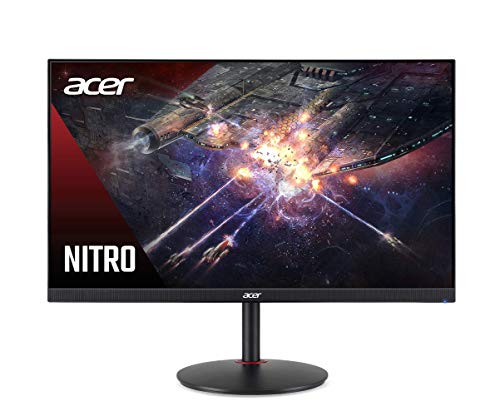
Acer Nitro XV272U Pbmiiprzx 27 Inch QHD IPS Gaming Monitor
The XV272U consistently appears in owner reviews as the monitor that delivers most of what expensive gaming displays offer at a fraction of the cost, with the 170 Hz refresh rate and 1ms GTG response time satisfying all but the most elite competitive players. The IPS panel covers 98 percent of the sRGB color space, which is respectable accuracy for both gaming environments and general creative work. FreeSync Premium certification provides broad compatibility with both AMD and most NVIDIA GPUs through G-Sync Compatible mode, removing the need to buy specific hardware to eliminate tearing.
Strengths
- 170 Hz refresh rate at QHD resolution covers the needs of most gaming scenarios at a competitive price
- FreeSync Premium with G-Sync Compatible mode works across AMD and NVIDIA GPU ecosystems
- 98 percent sRGB coverage makes it genuinely useful for content creation alongside gaming
Drawbacks
- Stand ergonomics are limited compared to premium alternatives, with only tilt adjustment in the base configuration
- Factory calibration varies between units, and some owners report needing minor manual color adjustment

LG 34WN80C-B 34 Inch 21:9 UltraWide QHD IPS Curved Monitor
Owners who switch to the 34WN80C-B from a standard 16:9 monitor consistently report that the 21:9 aspect ratio transforms multitasking by eliminating the need for a second display in many workflows, with spreadsheets, code editors with side-by-side files, and video timelines all benefiting from the extra horizontal real estate. USB-C with 60W power delivery mirrors what the LG 27UK850-W offers but in the wider form factor that many desk workers prefer once they experience it. The sRGB color accuracy is strong enough to satisfy photo editors who do not need DCI-P3 coverage.
Strengths
- 34-inch 21:9 aspect ratio replaces dual-monitor setups for most productivity and creative workflows
- USB-C 60W power delivery maintains the single-cable convenience ultrawide users rely on
- Gentle 1900R curve reduces edge distortion at the wide span without imposing the intensity of tighter curves
Drawbacks
- 60 Hz refresh rate means this is not the right choice for gamers who prioritize smooth motion
- Large footprint requires a desk with significant depth and width to position at a comfortable distance
Buying considerations
Panel Type and Color Accuracy
IPS panels offer the best color accuracy and viewing angles, making them the default recommendation for creative professionals and general-purpose users. VA panels trade some color consistency for significantly higher contrast ratios, which benefits dark-room gaming and movie watching. TN panels are largely obsolete for desktop use at this price tier. If your work involves color-critical output, check whether the monitor ships with a factory calibration report and look for Delta E measurements below 2.
Resolution and Screen Size
Resolution only makes sense relative to screen size and viewing distance. A 27-inch monitor at 1440p delivers a pixel density that most users find sharp without needing to scale the interface on Windows or macOS. A 27-inch 4K monitor offers more detail but may require display scaling that affects some applications. Ultrawide monitors at 34 inches in 3440x1440 resolution hit a comfortable density for desk use and offer workflow advantages that no amount of vertical screen space can replicate.
Refresh Rate and Response Time
For office and creative work, 60 Hz is fully sufficient and should not be dismissed as inferior. For gaming, 144 Hz is the minimum worth targeting in 2024, and 165 to 240 Hz becomes meaningful if you play fast-paced competitive titles where frame rate regularly exceeds 100 fps. Advertised response times in manufacturer specs frequently reflect best-case overdrive settings that introduce visual artifacts; look for reviews that measure response time at default or recommended settings.
Connectivity and Ergonomics
USB-C with power delivery has become one of the most practical features on a modern monitor because it consolidates video signal and laptop charging into a single cable. If you use a modern laptop as your primary machine, prioritize monitors that offer at least 60W of USB-C power delivery. On ergonomics, a monitor stand that adjusts for height, tilt, and swivel eliminates the need for an aftermarket arm in most setups and protects your neck and shoulders over long work sessions.
Final word
Matching panel type to your primary use case matters more than chasing the highest specifications, because an IPS monitor calibrated for color accuracy and a VA monitor built for contrast serve genuinely different workflows even at identical resolutions and refresh rates.
Questions answered
For most office work involving documents, spreadsheets, and web browsing, 1440p at 27 inches provides sufficient sharpness and runs more smoothly on integrated or mid-range graphics than 4K. Where 4K earns its keep is in detailed photo editing, reading dense text at scale, and any workflow where you want to fit more content on screen without reducing the interface size to uncomfortable levels. If your laptop or desktop GPU is mid-range or higher, 4K at 27 to 32 inches is a genuine daily-driver upgrade.
Not for productivity or media consumption. The difference between 60 Hz and 144 Hz is subtle when scrolling through documents or browsing the web, and virtually all professional creative work is output-focused rather than motion-focused. Save the money you would spend on a high-refresh panel and put it toward better resolution, color accuracy, or a larger screen if gaming is not part of your use case.
Full G-Sync requires an NVIDIA-supplied hardware module embedded in the monitor, which drives up manufacturing cost but guarantees variable refresh rate performance across the entire brightness and frame rate range with no artifacts. G-Sync Compatible is NVIDIA's certification that a FreeSync monitor has passed testing for acceptable variable refresh rate behavior with NVIDIA GPUs. For most users gaming at 60 to 165 fps, G-Sync Compatible monitors deliver indistinguishable results from full G-Sync at lower cost.
A high-quality stand with full height, tilt, swivel, and pivot adjustment handles the ergonomic needs of most users without additional hardware. VESA arms become worthwhile if you need to mount multiple monitors, want to position the screen very close to a wall to reclaim desk depth, or frequently move between portrait and landscape orientation for different tasks. Most monitors on this list use 100x100mm VESA patterns, which is the universal standard compatible with the majority of aftermarket arms.
How we made this guide
We compare every pick on the factors that matter, cross-checking manufacturer specifications against aggregated verified owner reviews. We rank independently and never take payment for placement. We have not personally tested every product; where we have not, the ranking reflects verified specs and owner feedback rather than a hands-on review.
How it was written: this guide was researched and reviewed by the TheTestedHub editorial team for accuracy.
Affiliate disclosure: TheTestedHub is reader-supported. When you buy through links on our site, we may earn a commission at no extra cost to you.
Keep reading

How Privacy Screen Louver Angles Affect Visibility

CyberPower CP1500PFCLCD: Our Top UPS Battery Backup Pick

Under Desk Cable Trays That Actually Hold Your Power Strip

Conference Speakers 2026: Room Size Buying Guide

Sony WH-1000XM5 vs Jabra Evolve2 85 vs Anker Space Q45: Best Noise Cancelling Headsets 2026

Which Document Camera Fits Your Budget in 2026?

Choosing a Label Printer for Your Business
